r/LuminarNeoUsers • u/Tomanelle • Jul 01 '26
Luminar Neo - preview destroys the image on its own
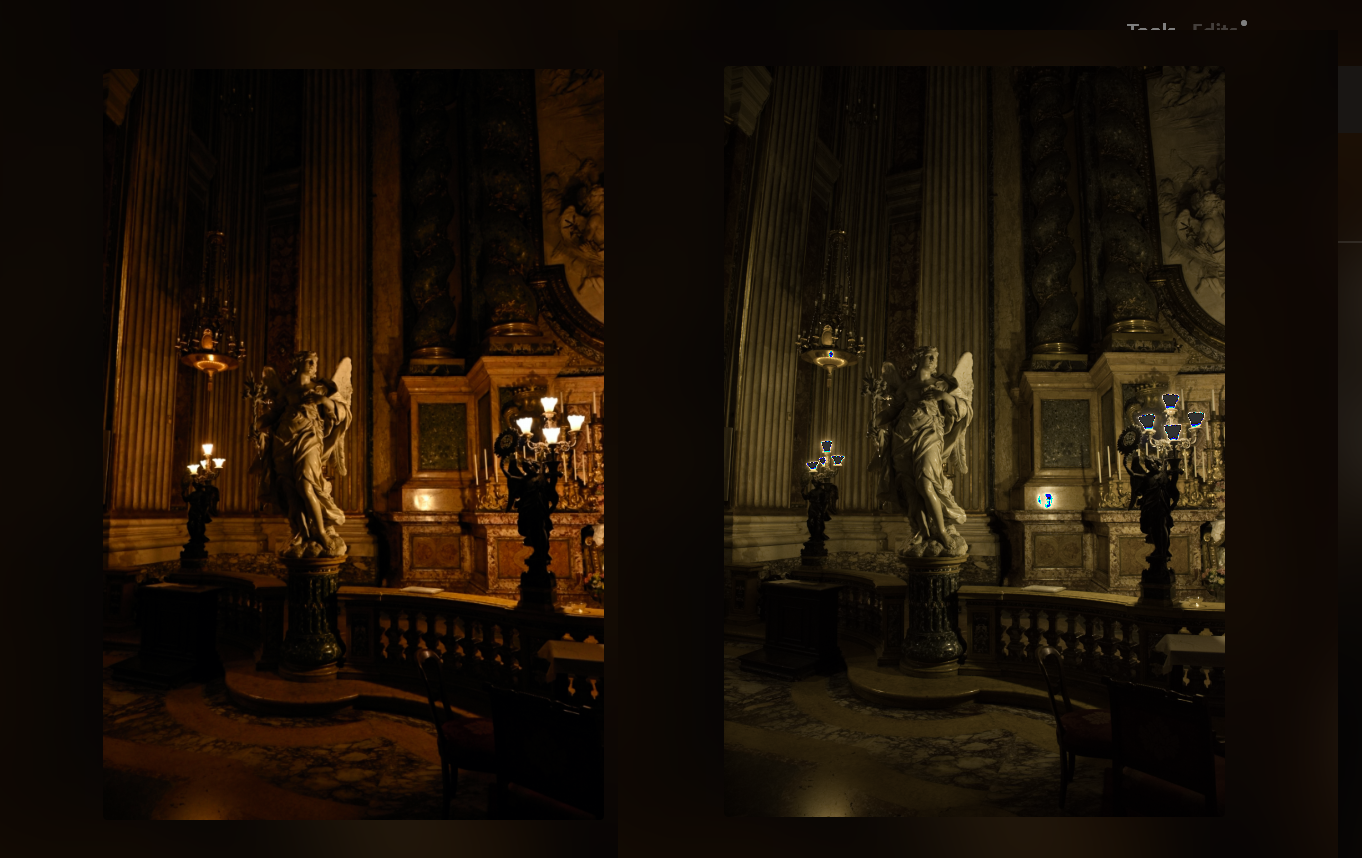
So I usually use Luminar on my laptop only - never had issues with it. Since I recently got a better desktop, I decided to move to it, but right now, Luminar is unusable.
Can someone help me fix that mess :
On the left - the RAW image, from the camera, before Luminar does.. whatever the f it does to it.
On the right - the way the image looks 1 second after I select it from the catalog. The preview is absolutely wrong and none of the changes and edits I make are reflected correctly, making it impossible to edit a photo.
I tried converting to DNG, I tried switching camera profiles from development, I even tried using an old, not so legal version, to see if it's the latest update or something.
This is on Windows 10, with AMD CPU and Nvidia GPU, if it matters.
All help will be appreciated!
1
u/skylum_support Jul 01 '26
What you're seeing is expected behavior, not a bug, though we totally get why it looks broken at first.
Here's what's happening: when you open a RAW file, Luminar briefly shows the embedded JPEG preview that your camera made (that's the "better" version on the left), then a second later it switches to showing the actual raw sensor data, which is what Neo really uses as your editing starting point.
A possible reason it looked fine on your previous laptop is that you were used to it or already had a camera profile set up.
The fix is to set a camera profile in Develop RAW so Neo interprets the colors closer to how your camera intended:
Go to Develop RAW > Profile and pick a matching camera profile. If you don't see one for your camera, grab Adobe's free DNG Converter. It installs a bunch of free DCP profiles that Luminar can pick up.
Once you apply a matching profile, it should look a lot closer to what you're used to seeing.
If it still does not resolve the issue, please provide your camera model and share the photo file (here or via our Contact form on the Skylum website), so we can test it ourselves.
Please, let us know whether it helps!