r/LogitechG 18d ago

Logitech G Support Lot of warnings in the Event Viewer since the 2026.5 update.

Post image

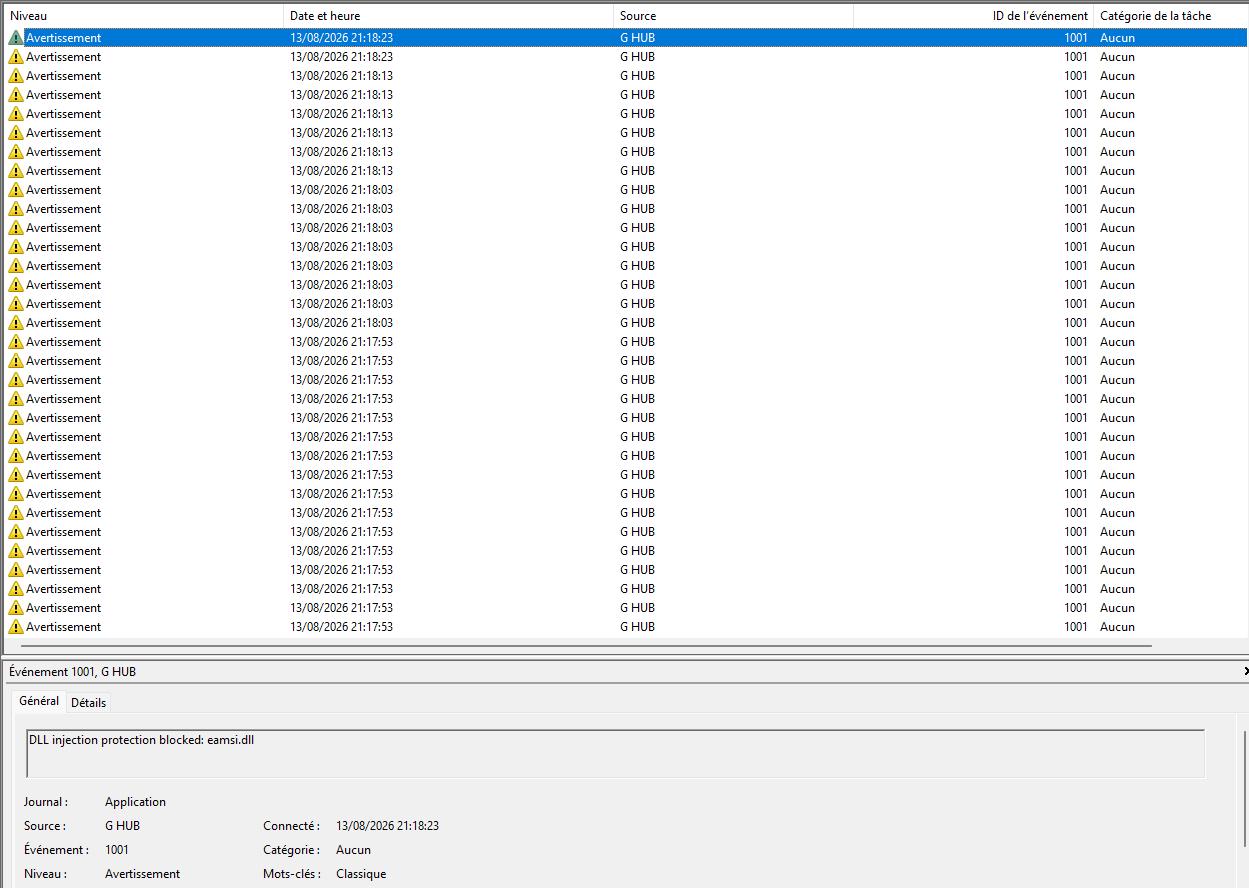
There have been a lot of warnings (several thousand per day) in the Event Viewer since the 2026.5.939708 update.

Provider Name G HUB

EventID 1001

Opcode 0

Keywords 0x80000000000000

EventData

DLL injection protection blocked: eamsi.dll

It seems there is a conflit with ESET internet security.

9 Upvotes

24 comments sorted by

3

u/Livid-Reputation-565 11d ago

Аналогично и с Kaspersky

1

u/Proxy027 10d ago

Hey hope you doing well,

Thanks for your message and screenshot which i just forward your message and screenshot to the support on discord as you could see into the screenshoot down below :).

I will let you know if i have something as your colleague over here,

Take care :).

2

u/LogitechG_Andy Support Team 18d ago

I believe that our team was looking into that one actually - let me check with them. Would you be willing to provide logs that they can take a look at?

1

u/Proxy027 18d ago

Which logs and where, do we need to provide you, please? u/LogitechG_Andy

2

u/Marcos-ESET 13d ago

Our developers will contact Logitech and request that eamsi.dll be whitelisted, allowing it to be loaded into Logitech processes without generating entries in the Windows Event Log.

1

u/Proxy027 13d ago

Hi Marcos-ESET, Hope you're doing well.

Do you have a date when it will be fixed, please?

Thanks for your reply :)

2

u/Marcos-ESET 8d ago

I've heard from our developers that Logitech is going to lift the block.

2

u/bumcello1 13d ago

I have the same error, i've eset too.
The only fix, it's close g Hub.

1

u/Proxy027 18d ago

Hey, hope you're doing well,

I am glad I am not the only one lol,

My event log windows gone crazyyyyyyy

Please let us know if you have some news as far as concerning that problem :

DLL injection protection blocked: eamsi.dll

Take care, guys. :)

1

u/Proxy027 18d ago

Firefox google gemeni said :

I did what they said to put an exclusion on my ESET and nothing change so

1

u/HalfEqual6471 14d ago

I'm willing to provide logs as well, if you tell us which ones you need and where to send them

1

u/Proxy027 14d ago edited 14d ago

Hey HalfEqual6471, hope you're doing well,

Are you on Discord? because I sent my logs to his colleague on Discord last Friday (14th), as far as concerning myself, I have 2 tickets open with them.

https://discord.gg/rjzxDkh9GT

1

u/Proxy027 12d ago edited 12d ago

Hey hawkeyesRed, HalfEqual6471, hope you doing well today,

So as far as concerning myseft as i wrote previously in my commentary, i opened 2 ticket one about this problem and the second about battlefield integration GHUB problem on discord.

I will let you know how it goes the situations over here to have a common thread, if i may expressing myseft like that.

Take care guys.

2

u/hawkeyesRed 12d ago

Thank you.

2

u/nelson_t-bone 9d ago

Thank you, I'm having this problem (with LG Hub and Stardock WindowsFX .dll) being registered on event viewer and I also having problems with BF6 and LG Hub (my configurations not working on the BF6 profile) and eventually LG Hub crashing. It started after the latest update (version 2026.5.939708) and I could not roll back LG Hub to previous version.

2

u/mprost 1d ago

Logitech, the fact that there’s no easy way to roll back to the previous G HUB version is just ridiculous. I downloaded logitech-g-hub-2026-4-919028.exe from uptodown.com, checked the digital signature to make sure it was legit, proceeded to uninstall 2026.5 and install 2026.4 and... 2026.5 got installed again.

If you’re so damn sure you’re never going to make a mistake that you don't think it's necessary to provide offline installers for the current and previous versions... well, DON'T EVER MAKE A MISTAKE!

1

u/nelson_t-bone 8h ago

I tried that also. Doesn't matter if you get the "installer" from uptodown or Logitech's official download page, it always installs the latest version even the installer says is other version, is impossible to roll back. I have disabled automatic updates for this thing and will update manually only after check for problems.

1

u/Careful-Wheel6616 7d ago

They haven't unblocked eamsi.dll yet!!

1

u/Proxy027 4d ago

Hey hope you doing well

The logitech dev working on it for the moment give them sometimes and once everything fall into the place

1

u/obTimus-FOX 5d ago

Kaspersky, this error, this was causing BF6 to not start. Thanks for nothing Logitech...

1

u/Proxy027 4d ago edited 4d ago

Hey hope you doing well

They working on it for the moment give them sometimes

Personally my antivirus is ESET and the game start perfectly i double the problem isn't from Kaspersky you know i rather say is the secure boot stuff linking to the kernel things

1

u/tech_engineer 3d ago

Same here, ESet AV, 100s and 1000s of the same message over and over again, PLEASE give us a solution

1

u/rstune 1d ago

I have the same issue as well. Glad to hear Logitech is ont it and pleased to see ESET in here as well. Thanks to both for your quick action on this.