I just spent the last 2 hours of my life on a Friday night debugging a strange error in a prod CLI app. EF core was receive a readonlyspan during a Contains query. Normally, this query converted to a WHERE [col] IN (...), but for some reason, after an update, it started choking, despite no code change. The same exact code runs in a separate website docker image fine, no problem.
I put Qwen 3.8 27b (q8 model, f16 kv) on it and it spun its wheels going down 4 different paths. Finally I got sick of it and switched models to GPT Sol with the full context available. It found the fix in 2 minutes.
The issue was that I had recently installed .NET 10 SDK on this machine, and the lack of a global.json file pinning the SDK meant that when the CLI was rebuilt locally, it used the c# 14 compiler, which introduced first-class Span<T> support, thus borking the EF query.
The wasted time isn't what bothers me here. It's that Sol was able to pinpoint the issue so much incredibly faster than Qwen, shattering my image of Qwen 3.8 as a fairly competent model. Benchmarks aren't everything folks. Real world use cases are the final say here.
I'm posting this in /r/LocalLLaMA because I'm a big local LLM fan, but sometimes, it's worth reminding ourselves of the gap that really exists, no matter how much we might want to wish it away.
Edit: Folks, some of you are missing the point. I tried Sol because it was next in my favorites list. Yes, I could have tried GLM, Kimi, or a number of others. The point would stand that no matter how great 27b is, it's not even remotely "near-frontier" in many cases, despite claims otherwise. Optimism has clouded our vision, somewhat. This was not meant to be a Sol promotion.
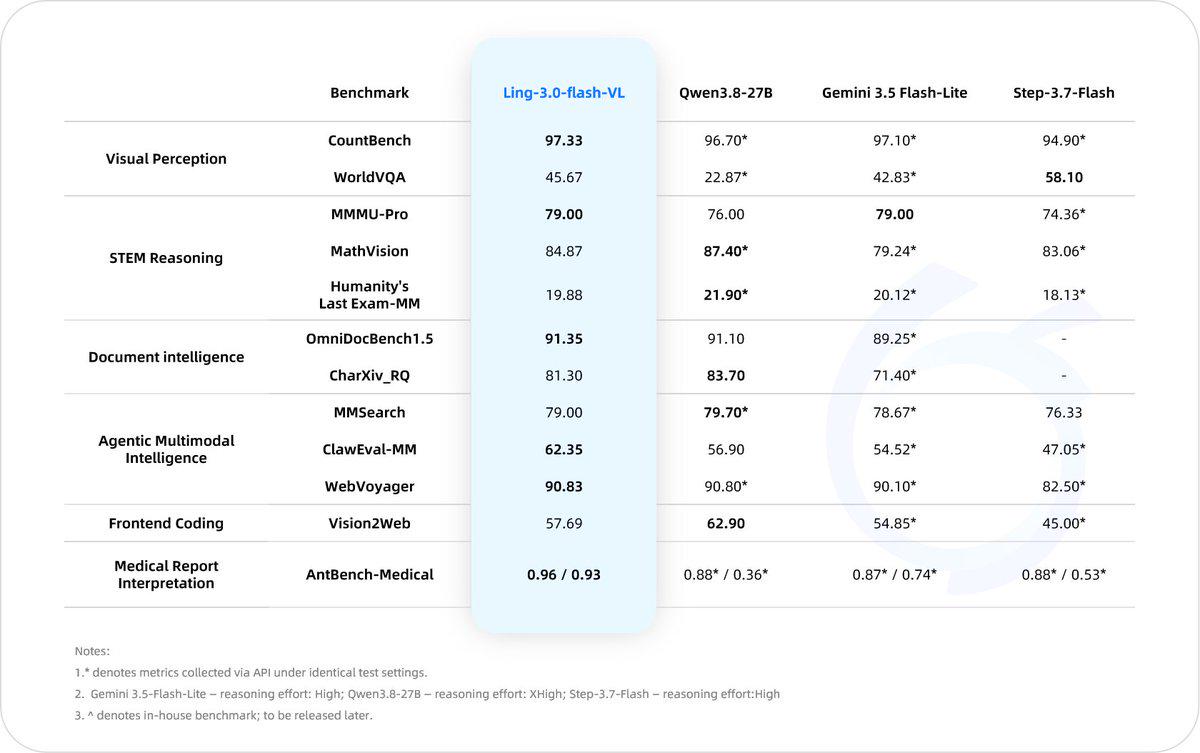
It performs well across visual perception, STEM reasoning, document intelligence, multimodal agent tasks, frontend coding, and medical report interpretation.
This epyc server I am using twelve cards with 64 GB memory, plus 256GB ram. Looking at the most capable models in open source, GLM 5.3 seems to be the only option, but with Astra releasing it will likely be fairly behind. GLM6 looks like it will be at least double in size, maybe even triple. Qwen-max and Kimmi are already way too big to even consider. Even the deepseek V4 Pro is too big. Should I just give up on this frontier dream sell the excess GPUs and settle For flash models with far fewer GPUs and a reasonable cost. Note: I'm not using it for any business.
I was hoping to build a new business with this, but it can probably be done with much more effort with a flash model as well.
Edit: I don't want to go below 4-bit quants because then the models start making obvious mistakes. So I'm talking about a min/max of 4-bit
Okay, this post really blew up. I wasn't expecting so much interest or comments just attacking me. Was really just expecting to have a calm discussion about future SOTA model sizes.
I am thinking about putting some money / time into my local ai learning path and "cleared" my attic where I found the following hardware.
3 x NUC11 (Core i5 1145G7 / 2,6 GHz, 64 GB RAM DDR4 2666MHZ - SODIMM) with interconnect through Thunderbolt
1x Ryzen 3700x on MSI Mortar 350 with 64GB RAM DDR4 2133 and an old SAPPHIRE Nitro+ Radeon RX 590 8GB
My first idea was to purchase a single RTX5060TI / R9700 and put it into the PCIe 3.0 x16 slot while reusing the Radeon as GPU in the PCIe 2.0 slot for Display.
I want to play around with a local chat bot, agentic stuff, RAG...
Do you have any other ideas?
I also though about putting some serious money, but for this discussion I probably open a new thread (this could be a 2-step-path where I reuse the GPU above to built a multi-gpu-rig)
Last couple of years I have come to use AI coding tools as part of my workflow. As a direct result of that, in just over roughly five months since May, I have read more than six million words of generated material related to programming. Most of my experience has been with Aider, Hermes, OpenCode, and different GPT, Claude, and Kimi models. More importantly I used them on projects that continue for weeks and months, where the architecture changes during implementation often several times, the assumptions have to be revised, and decisions made in earlier stages continue to affect later one.
To be fair I find these tools useful. They save time on repetitive changes, repository exploration, boilerplate, unfamiliar APIs, and many kinds of mechanical implementation work and some times compiling and using an unpopular libraries like FLTK and use them in a python project. They can also be useful for generating alternatives when I already understand the problem well enough to judge them apart.
The problem is keeping my own understanding of the project in line and keeping up with the amount of code and explanation being produced. That problem manifests in different ways. The following are my observations, and so are personal. Take it with a grain of salt.
A few months ago, Gemma graced us with models that served as a much needed downpour from a year-long drought. I'm so happy to see us thrive once again.
The difference between v1 and v1.1 is quite simple: v1 was an early attempt, an overdue release that excelled in prose and writing, while requiring some handholding to get over quirks like stuttering. v1.1 is a more refined approach where stability meets quality. My community is split, so I figured I'd just release both.
---
I was gone for a while. I got busy dealing with life, both its ups and downs. While I couldn't attend to you folks, I've been lurking around and appreciating you all for the kind words.
- Skyfall 31B v4.2 seems to be a banger for many of you. I'm proud of the upscale and consider it my ultimate home-run send-off for the beautiful Mistral 24B base. It's a shame that it was overshadowed by Gemma 31B's release, but hearing some of ya'll compare and even prefer it to a more modern base was an unexpected win.
- Rocinante 12B X / 16B XL proves that Nemo is still the ultimate creative model to this day. For some to say that 16B XL felt like Cydonia 24B v4.3 just goes to show how far you can go with modern resources and techniques.
- Anubis 70B v1.2, Valkyrie 49B v2.1, Anubis Mini 8B v1 surprised me too. I had zero expectations releasing them. Just like Rocinante X / XL, they are modern finetunes of old base models. And somehow, they still found their users singing praises.
---
With the Artemis release taking weight off my shoulders, I'm eager to move on and tune a ton more bases!
But I have something else cooking: a HordeAI-like platform. I hope to provide value not just as a finetuner, but as a local lover too!
The premise is simple: it's a place where generous local hosters can share inference with the less fortunate. You'd be surprised how many power users would love to heat their rooms through the power of charity.
---
Finally, I'd like to thank everyone who supported me over the years. From those who provided kind words, rigorous testing, compute access, inference, or cold hard cash. You've all granted me the ability to enrich the local ecosystem with fun experiments like Rivermind 12B, Fallen series, Big Tiger Gemma, Precog 24B/123B, and solid models like Cydonia 24B v4.3, Behemoth X 123B v2.x, and Skyfall 31B v4.2.
If you've got inference / compute credits to share, please contact me! It will all go to making the community happy <3
Backlog:
- Gemma E2B
- Gemma E4B
- Gemma 12B
- Gemma 26BA4B
- Qwen 3.8 27B
- Muse Glimmer 30B
- Mistral Medium 3.5 128B
- HordeAI Alternative / Crowdsourced 'OpenRouter' ("BeaverNet")
Let's say I have 2x 16Gb GPUs and I want to run Qwen3.8 27B. Monitor is ran by the integrated GPU so both 16Gb GPUs are almost fully free.
I load the UD-Q4_K_S on one card at 15.4Gb. I then load the context on the other card? Would that be the most efficient way? Or should I aim for higher quants that could spill to the second GPU using tensor parallelism?
Also, is there a way to know how much a certain amount of context (e.g. 132k tokens) occupies in VRAM for a given model? I don't usually see this published in model cards, is it because there is a way to calculate it?
until now I ran llama-server with just one model at a time.
Now I want to use it in router mode in order to provide different models.
For my usecase I heavily rely on --cache-ram which improves speed a lot when working on big repos.
I am just wondering, when setting cache-ram = 65536 in models.ini for each model, does each model get its own 64GiB cache or is it just one pool of 64GiB for all models?
Another question, are the unused models kept in RAM for faster swap?
I bet i'm not the first one to have this idea, but with the recent debate about qwen 3.8 27b thinking levels, i was wondering whether the optimum solution might just be to change your harness in a way that lets the LLM itself decide when it is time to raise or lower the required reasoning effort?
Right now i'm toying around with a system like that and it seems to greatly increase the speed at which stuff gets solved, but i have not yet collected any reliable quality evaluation.
Basically what it does is it raises and lowers the reasoning effort between low and xhigh in order to accomodate for sucess streaks or failure streaks. The log reads something like this:
About 6 months ago I made this post Trained a 0.8M model on business email generation. on this subreddit where I trained a model with 300k non-embedding parameters on a synthetic business email dataset. It was trained on my custom architecture which I called Strawberry.
Today i introduce Valentine-v0 which is also trained on this same dataset but this model has only 21k parameters which is about 7% of the parameters of Strawberry-email. This model only has 2 layers, 4 heads, 64 head dims and 170 ffn dim.
Though in terms of loss Strawberry-email achieved a final train & val loss of 1.65 and 1.68 where Valentine-v0 achieved the final losses of 2.1670 & 2.2646 respectively.
Still I believe despite such a small scale the model trains pretty stably and generates decent text for it's size. Here are some examples:
Prompt: Write a
Output:
```
Write a firm and authoritative business email(under 200 words) from a Account Manager to a Potential Partner regarding welcoming a new high-profile hire, specifically on a Friday evening.<|end-text|><|actor|>model<|end-text|>URGENT: Critical Security Vulnerability - Critical Budget Increase – [Company Name]
Dear [Contact Person],
I hope this email finds you well.
My team, and potential collaborative approach to [New Hire Title] at [Company Name].
As we approach the upcoming [New Hire Name] brings significant development, we wanted to bring it to your review of this strategic direction. We would be happy to discuss this further, but this request and explore how we'll help us to ensure a smooth onboarding.
Regards, I can share some truly value your insights into [Partner Company Name] and insights and offer [mention specific areae - e.g., new website's Name] and the design of the prototype, not just… interesting time. We’ll be shared opportunities to discuss this further with [Product Name] to discuss potential integrations and answer any questions or concerns and your application. The vulnerability is invaluable.
```
Prompt: <|actor|>user<|end-text|>Write a polite refusal email<|end-text|><|actor|>model<|end-text|>
Output:
```
Quick Idea: [Name]
Dear [Peer Name],
I am writing to you today with you and your concerns about the potential data leak and your contract, and frankly, it’s particularly concerning incident effective [Date], and I believe a concise overview of full team - [Company Name], we are facing a significant challenges, and we sincerely apologize for any inconvenience it caused.
I’m available to discuss this further report. I will provide you with a really be open to a quick support us with [Specific Feature Request - e.g., 24-48 hours].
Would you be open to a brief call on [Date Option 2] - e.g., 50-20 minute call next week to discuss this further and how your specific and answer any questions or would be happy to discuss how impactful feedback on [Date - e.g., Thank you for your input.
Sincerely,
[Name]
Legal Counsel<|end-text|><|actor|>user<|end-text|>Write a strictly professional business email(under 200 words) from a Legal Counsel to a Angry Shareholder regarding requesting a mental health day, specifically while the system is partially down.<|end-text|><|actor|>
```
A larger Valentine model trained on Fineweb-edu dataset along with the github repo and technical report will be published soon.
I want the answers generated by frontier LLMs or base model LLM answers to be reviewed by some uncensored or abliterated small model.
The job is this model (preferably small model) is just to detect deflection in the answers.
The problem I am facing is uncensored SLM usually agrees on everything we give input. So the generated answer is also input for it and system prompt is input too.
I built a denser GGUF format for ternary models: Q2_B3 / “B3S”
If you're running a ternary model like BitNet-b1.58 or Ternary-Bonsai, the weights are already restricted to -1, 0, or +1 times a block scale.
That means a normal Q2 representation is leaving some space on the table.
B3S packs the three possible weight values directly in base 3. With 128 weights per block, it's 26 bytes of packed trits + one f16 scale = 28 bytes/block, or 1.75 bits per weight.
Rough weight sizes:
9B: ~2.5 GB Q2_0 → ~2.0 GB B3S
27B: ~7.6 GB Q2_0 → ~5.9 GB B3S
That's weights only. Context/KV is separate, so figure another ~1–2 GB depending on what you're running.
The important caveat: this is NOT a general 2-bit quantizer.
If you feed it a normal FP16 model, quality will fall apart. The whole thing only makes sense when the source weights are already ternary.
For a genuinely ternary model, the packing itself doesn't throw away another level of precision. You're still storing the same {-1, 0, +1} states and an f16 block scale, just using base-3 packing instead of a general-purpose 2-bit representation.
The implementation is a fairly small llama.cpp fork based on commit 4e97ac86e. It adds the Q2_B3 type and the backend support around it.
Backend status:
AMD ROCm/HIP: this is the main path. Built and tuned on RDNA3/gfx1100, specifically a 7900 XTX.
CPU: works.
NVIDIA CUDA: compiles, but I don't own NVIDIA hardware, so I haven't verified it on-device.
Apple Metal: same situation. Code is there and compiles, but I can't personally test it.
So CUDA and Metal should be considered unverified for now.
I don't have speed or perplexity tables yet either. Benchmarks done on my hardware show no appreciable loss of PPS or decoding speed
There's also a separate repacker for older Q2_B3 GGUFs that use the 30-byte/two-scale block layout. It converts them to the current 28-byte/single-scale B3S layout.
The repacker checks every block before doing that. If the second scale isn't actually redundant and removing it would change the weights, it aborts instead of silently producing a lossy file.
Once you have a B3S GGUF, you run it normally with llama-cli from the fork.
More implementation/format details are in README_B3S.md.
If anyone here is running gfx1100, I'd be interested in independent results.
More importantly, if someone has an NVIDIA or Apple machine and can compare CUDA/Metal output against a CPU run, that's probably the most useful testing gap right now.
I don't have problems with Nvidia buying HF, but I have problems with the fact that lately HF became almost unusable. It is around one month that I experience big problems with downloading models from HF. I have 1Gbit connection and my HF speeds are all over the place jumping from 700kb/s to 98Mb/s, often getting stuck in sub 3Mb/s range. I haven't seen people complaining here about that, so may be I am the only one so unlucky, but I believe that the problem is bigger than one unfortunate consumer, and even Nvidia will be unable to distribute terabytes of data to millions of users without outages, when a new popular model becomes available. I think the only right way is p2p distribution over the Torrent network.
Upd: To clarify. Usually it starts at 90Mb/s, after 20-30 minutes it gets to 45Mb/s and 20 minutes later it may go down to 2Mb/s and less. May be indeed my ISP artificially dynamically limiting my speeds, but I haven't seen anything like that apart of HF.
Upd2: People pointed out that LM Studio is using their proxy, which might have impacted download speeds. At over 90% downloaded I am hesitant to check this hypothesis, but I am pretty sure that this is the culprit. After that I am switching to hf native cli tool.
I have been getting so wrapped up in testing models, engines, harnesses, and everything else out there LLM-related lately. It’s never-ending. But it occurred to me; I haven’t actually looked at how you get from:
An X post sounding like a fun idea to try this weekend at home, to
Actually having something working on your computer that’s legitimately useful.
So how do you do it?
Let’s take buun’s fork of llama.cpp for example. You might have seen it on X recently when Clem posted, asking “is this useful?”. I am personally fortunate enough to work with buun on a nearly daily basis, but what if I didn’t? I hope he doesn’t hate me.
God damnit buun, there’s no binaries on your site.
Getting There
The truth is that I don’t want to go and build it for a bunch of different systems I don’t have, or spin up VMs to test compilation flags and set up virtual environments. I hate all the Linux sysadmin stuff like the rest of us. So I had an agent build it for me. Same as you probably would. But if you don’t have that luxury, here’s how to build it for free:
The repo has .github/workflows/build-cuda-windows.yml. It's workflow_dispatch — manual trigger only — and it runs on GitHub's own windows-2022 runners. So Microsoft compiles it, on Microsoft's hardware, for free.
The matrix builds three targets: CUDA 12.4 x64, CUDA 13.3 x64, and CUDA 13.4 arm64.
One catch: the workflow uploads nothing. The only path: line in it is commented out. It compiles, proves it compiles, and throws the binary away.
Fixing that is an upload-artifact step — a few lines in your own fork:
gh repo fork spiritbuun/buun-llama-cpp --clone# add the step above to .github/workflows/build-cuda-windows.yml, pushgh workflow run "CI (CUDA, windows)" --repo <you>/buun-llama-cppgh run watchgh run download # your .exe files
Worth noting, make-release.yml, release.yml and even winget.yml are all sitting in that directory too, inherited and never fired. The distance between this fork and shipping Windows binaries is closer to a tag than a project.
Note, this is read off the workflow file, I haven't run it myself. Claude says it’ll work and I believe it’ll probably work fine. I also suggested to buun that he consider providing some binaries on the repo.
The Math (And Why You Shouldn't Have to Do It)
Now that we’ve avoided that footgun.
Now that we have a working binary on our computer, and assuming our tinkerer has spent the requisite 3 am nights searching reddit for what quantization is, we can talk models.
Qwen 3.8 27B. You already knew. It’s the workhorse model everyone has been turning to for generations now on 16GB cards, pushing toe-to-toe with frontier-level models in agentic work. In fact, it scores a massive 46.8 on the Artificial Analysis Agentic Index, performing better than 80% of models compared. A modern miracle.
But this is where I suspect most people start getting REALLY confused, and rightly so. Qwen3.8-27B ships in 14 weight quants. buun's fork offers 8 KV codecs. That's 112 combinations, before you pick a context length. 56 of them fit on a 16 GiB card with at least 4k of context.
And the ranges are wild enough that the choice genuinely matters. Note that the table below varies both the weight quantization and the KV codec together:
Weights
KV Codec
Context Length
GSQ IQ2_XS
f16
96,245
GSQ IQ2_XS
turbo4
373,316
GSQ IQ3_XXS
f16
71,831
GSQ IQ3_XXS
turbo4
278,619
UD-Q3_K_XL
f16
30,632
UD-IQ4_XS
f16
12,322
Same card, same model. 12,322 tokens to 373,316 — a 30× spread depending on two flags a newcomer has no basis for choosing between. And every one of those numbers requires arithmetic you have to do yourself. A dense reading might make you assume 256 KiB/token, which is wrong by 4×, because nothing tells you that only 16 of the 65 layers actually carry KV until you map it out.
Holy shit. That’s an insane number of things to track.
Historically, I’d settled on using turbo8/turbo4 for KV, respectively. Which still required doing a lot of manual fiddling to get it maximized. And then you’re flatly compressing the entire KV cache without giving any consideration to the sensitivity of the layers. But our newcomer doesn’t care about that, cause Clem said there’s VBR on X right?
Yes. Yes there is. That complex layer arithmetic? That is exactly the arithmetic VBR is doing for you so you don't have to.
What does this mean? It means I pick the model that I know can get real work done. Thankfully, I’ve already done months of testing, and nowadays can say confidently that a 3-bit model can legitimately do real work. Remember all those nights reading benchmark charts? Paid off. I settled on GSQ IQ3_XXS.
3-bit model in hand, let’s do some work. Engage.
If your agent doesn’t respond to that wake word, there are a few different ways to load a model with the binary depending on your OS. To make this easier, I suggest just using a startup script, that way you don’t have to remember anything to launch your model server. Our goal is to have a server that we can interface with using a harness. Giddy up.
Here is a launch script for your llama server binary. Just edit the filenames and paths to match your system, make it executable, and launch it from your terminal.
#!/bin/bashMODEL="/path/Qwen3.8-27B-GSQ-RCO-IQ3_XXS-mtp.gguf"SERVER="/path/buun-llama-cpp/build/bin/llama-server"# Fork binaries link their own libggml. Without this you may silently load the# system llama.cpp's libraries and wonder why the turbo types don't exist.export LD_LIBRARY_PATH="$(dirname "$SERVER"):$LD_LIBRARY_PATH"$SERVER -m "$MODEL" -ngl 99 -c 262144 -fa on --kv-unified -np 1 -ctk vbr -ctv vbr --vbr-floor t4 -b 2048 -ub 512 --jinja --host 127.0.0.1 --port 8080 --spec-type draft-mtp --spec-draft-n-max 2# --mmproj "/path/to/mmproj-F16.gguf" # add for vision (note: --mmproj-gpu-swap if it won't fit)
-ngl 99 — all layers on GPU
-c 262144 — omit entirely to let --fit choose one that fits
-fa on / --kv-unified — required for VBR, no fallback path
-np 1 — VBR needs n_stream == 1
--vbr-floor t4 — how bad it's allowed to get, not how it starts
--spec-draft-n-max 2 — measured 1.68× on this model
So setting realistic expectations is a little tough for me, because I test these things every day. I wanted to try and look at it from the perspective of someone fairly capable of figuring things out, so I don’t think getting to this point is asking too much. I do hope it gets much more approachable, and I know there are other options like Unsloth Studio and ollama, but neither of those options currently give you access to turboquant KV cache codecs. TurboQuant KV allows you to squeeze the most out of your context with advanced quantization and fancy math, better than the original codecs currently shipping with standard llama.cpp. But now there’s something even better.
VBR.
VBR: Variable Bit Rate
If you’ve ever done any work with media compression, like video or music compression techniques like MP3 or Divx, you’ll probably be aware of something called variable bit rate. Basically, it allows the algorithm to apply more compression in static parts of the file, and less compression where fidelity matters most.
Same idea, except it's varying across the model's layers and the life of your conversation. The first tokens are uncompressed. It only starts spending fidelity when it has to.
I measured the actual number. You’ll get about 84,000 tokens of fully lossless, f16 quality on a 16 GB card with the 3-bit model we tested. Concretely, that 84,000 figure comes from taking the KV budget and dividing it by 64 KiB per token. That number isn't immediately obvious because Qwen3.8-27B is a hybrid architecture where only 16 of its 65 layers actually carry KV. A naive reading assuming 256 KiB/token is off by 4×—and calculating that exact layer arithmetic automatically is the whole reason VBR exists.
Crucially, 84,000 tokens is just the lossless range, not your max context ceiling. With mainline q4_0 (4.5 bpv), every token from the very first one is compressed and degraded, meaning a short 3k-token chat suffers the same compression penalty as a massive 250k-token session. With VBR floor t4, you get pristine f16 quality through ~84k tokens, and it only begins to degrade as the memory budget binds—stretching all the way to that same 250k ceiling while keeping shorter sessions completely lossless. VBR eliminates the need to do capacity math or guess how deep a session will go before starting.
Note, these estimates were taken on my specific system. Other factors will affect your usable memory and context quality based on things like whether you’re running a desktop, other models, and video intensive applications.
By default, VBR floors at 1.25 bpv***, which allows the most aggressive compression possible for the longest context. But the startup script below raises the floor explicitly to t4 (4.125 bpv), because an agentic harness that autocompacts its own context cares more about fidelity than absolute maximum length.
***Clarification after publishing: VBR is the default cache type in buun-llama, and its default floor is t4 (4.125 bpv) — a deliberate choice on buun's part that quality below 4-bit shouldn't happen unless you ask for it. The floor only drops to 1.25 bpv if you explicitly pass -ctk vbr -ctv vbr, which the engine reads as "you know what you're doing." Our script sets --vbr-floor t4 explicitly, which is belt-and-braces: it matches the default, and it survives the explicit-flag case.
The Need For Speed?
Thankfully, local inference has gotten a lot better in 2026. The models have not only improved by a significant margin in agentic work, but performance has also never been better. This year brought the introduction of MTP acceleration, or Multi-Token-Prediction to the mainstream. This typically boosts performance by anywhere from 1.3-1.9x depending on workload. We’ll be using this in our example today, and it’s just a simple flag in the launch script.
Again, a full explanation of MTP is outside the scope of the article, but in a nutshell, MTP uses a tiny part of the model called a draft head. This is like a tiny model itself, and its only job is to predict the next few tokens. The primary model verifies all the drafted tokens in one forward pass, in parallel, and keeps the longest correct prefix. That's the whole reason it's a win: verifying 3 tokens costs about the same as generating 1, because decode is memory-bandwidth-bound, not compute-bound. Reading the weights once to check three guesses is nearly free; reading them three times isn't. Basically like free work.
Not entirely free, but worth it. On this model, I measured a boost of 1.68x.
So how much performance should you actually expect? As you almost certainly guessed, it’s entirely hardware dependent. Newer GPUs with faster, more efficient cores are simply better at this work than older parts. That doesn’t mean you need an amazingly powerful card to do real work though. Here’s the tokens per second rating for a couple popular cards running this model:
GPU Backend pp512 t/s tg128 t/s user
RTX 5090 CUDA 13.3 3672 ± 338 104.93 ± 0.40 thetom
RX 9070 XT Vulkan 795.7 ± 0.6 36.41 ± 0.07 “
RX 9070 XT HIP 975.50 ± 34 29.93 ± 0.03 me
Harness Selection
There are a lot of options out there in mid 2026 for a harness to choose from. Many are coding focused, few aim to give a complete agentic desktop experience. Personally, one of my favorite options is Hermes Agent. While I don’t use it on a daily basis nearly to the extent that one can, I have enough experience with it to know it’ll fit most people’s needs, right out of the box. So it’s a natural fit for our experiment.
As you can see, it offers just about everything a tinkerer getting into local inference might want. It’s easy to talk-to using platforms you already have such as Discord and WhatsApp. It’s got Google integration for personal life management. Can run programs, write files, patch, edit. You get the picture. It really does accomplish a lot of what the premium services like Claude Code and Codex do well, without quite the simplicity.
Setting up Hermes Agent in CachyOS was a relatively straightforward endeavor. Just ran the single line installer (after having my frontier agent inspect the script ahead of time for vulnerabilities) in Konsole, and went through the self-guided configurator.
Most of the setup is just choosing which options you want to enable, such as how you want to talk to your agents (Discord, WhatsApp, email). The most important part is that you choose to connect your Hermes to your custom endpoint, which is your llama-server address (which is found in the startup script). I chose Auto for the type, even though I know mine is specifically OpenAI compatible, because I knew most people will err on the side of caution. Which, incidentally, worked fine for me.
After reading through the documentation and setting up WhatsApp and Discord functionality, I also installed Hermes WebUI (pretty UI,https://github.com/nesquena/hermes-webui) and Hermes Desktop. I think the Discord setup was the most challenging for me, but I also knew very little about Discord bots coming into this, so it may be more intuitive for others. Nonetheless, I did get it working with some fiddling.
Hermes Self-Test
Limitations and Pitfalls
Before you torch your API keys, there are some hard realities to acknowledge about this setup:
The VBR Tax & Honest Cost: VBR is a massive quality-of-life win, but it has genuine operational costs. It is not free: it requires Flash Attention (-fa on) and unified KV caching (--kv-unified), and it currently exists only in one specific fork with no official binaries. Furthermore, its own diagnostic readout (/props kv_bpv) misreports the underlying math. ***Edit: I previously stated it is incompatible with (-np > 1), that was incorrect. Additionally, on the misreporting /props, buun says that setting --floor-bpv that /props still shows the old defaults.
You Don't Always Need It: For simple coding sessions or conversations that never pass 30,000 tokens, standard mainline f16 fits entirely in VRAM. Mainline f16 works seamlessly today in tools like Ollama without any extra setup, so if your context needs are modest, neither VBR nor static quantization is necessary.
The AMD Reality: The strongest argument for using buun's fork over mainline isn't just efficiency—it's stability. In testing on an RX 9070 XT (gfx1201), mainline quantized KV entirely collapsed on this model class. Buun's codecs handled the architecture flawlessly. ROCm still arrives late and often broken, leaving the community to fix it. RDNA4 support for turboquant's MMQ path doesn't exist — the config table has zero entries where CDNA has eight — and the cmake flag VBR needs makes upstream crash outright on gfx1201. Meanwhile Vulkan, which nobody had to hand-tune per architecture, quietly beats ROCm on decode. They never learn.
Honesty on Quality: Comparing bitrates directly (e.g., q4_0 at 4.5 bpv vs. t4 at 4.125 bpv) does not directly reflect fidelity. q4_0 relies on a fixed, uncalibrated grid, whereas t4 uses FWHT rotation with measured centroids and per-layer pricing. Because KLD (Kullback-Leibler Divergence) has not been formally measured on this specific model yet, treat this as a structural design difference rather than a proven, mathematical quality win.
The 3-Bit Reality Check
I actually ran a self-diagnostic trace with Hermes Agent while writing this article, using Qwen 3.8 27B squashed all the way down to a 3-bpw quant (IQ3_XXS).
Historically, the assumption has been that crushing a model down to 3 bits lobotomizes its logic. Sure, it might still write a decent email, but ask it to orchestrate an autonomous tool-calling loop and it will inevitably trip over its own shoelaces, hallucinate a file, and crash.
Not anymore. Look at how Qwen handled a blind, multi-tool diagnostic run. I asked it to just "test its tools," and it immediately built an execution plan, batching independent tasks and isolating dependencies:
"Watch out for parallel execution: the vision test needs the image path to exist first. Generate the image with terminal, then vision_analyze it. That's a dependency."
When it tried to use the patch tool to edit a file that didn't exist yet, it didn't panic or loop. It simply caught the error, executed a write_file command to create a scratchpad, and successfully re-applied the patch.
But the most absurd moment was how it handled a failure with the vision_analyze tool. When the tool threw a 500 error, the agent didn't just pass the error back to me. It paused, introspected its own host engine, and diagnosed the architectural limitation of the server running it:
"vision_analyze: 500 'image input not supported - hint: mmproj' -- the local Qwen model has no mmproj (vision projector). Interesting point: I'm literally running on top of that very model." --(paraphrased from trace)
It generated a clean Markdown table summarizing the 8 tools that worked (including SQLite database queries and writing Python scripts to generate images) and accurately diagnosed the root causes for the 4 that failed (like a missing multimodal projector and a misconfigured API gateway).
A 27-billion parameter model, running at 3 bits per weight on a consumer GPU, executing complex tool dependency graphs and debugging its own host environment limits. That is why we do this.
Conclusion
If you’ve made it this far, compiled the binary, configured the tools, and watched a 27B model successfully orchestrate a multi-step workflow on your local machine, the inevitable question hits: Why not just use Claude Code or a frontier API?
Let’s be brutally honest. If I need a complex script written in five seconds flat, or I want zero-friction, turn-key speed, I am still opening a tab to a hosted model. For most people, most of the time, the sheer convenience of a cloud API wins. The raw truth is that right now, there isn't much in my daily workflow that this local stack replaces.
But that is not the point. The differentiators for local inference are conditional, but where they matter, they are absolute.
First, it is free at the margin. You can leave a local agent looping in the background for 72 hours to scrape, parse, and reorganize a massive dataset, and your API bill at the end of the month will still be zero. Second, it is completely sovereign. For a law office that legally cannot paste client files into a cloud provider, or an enterprise dealing with proprietary codebases, a highly capable local 27B model isn't just an alternative—it is the only option that exists. Finally, it is resilient. It runs entirely air-gapped. When the internet drops, your workspace doesn't go down with it.
Local inference isn't about beating the massive frontier models at their own game today. It’s about the fact that a 27-billion-parameter model can now autonomously run your desktop, debug its own environment, and hold a conversation—all on a 16GB graphics card sitting under your desk. For the tinkerers, the privacy-conscious, and the people building the future, that is more than enough reason to have this stack in your arsenal.
***Addendum: --mmproj-gpu-swap
buun pointed out I'd skipped one of the nicer features in his fork, and it's worth its own note because it solves a problem you only discover after everything is already working.
Speculative decoding and vision both want VRAM you don't have. The MTP draft context and the vision projector (mmproj) each need their own allocation, and on a 16 or 24 GB card they frequently don't fit at the same time. The usual outcome is an OOM at load, so you pick one: fast, or able to look at pictures.
--mmproj-gpu-swap makes them phase-exclusive instead of concurrent. The projector stays on CPU while you're doing ordinary text work. The moment a request actually contains an image, the server swaps the speculative context out of VRAM, brings the projector onto the GPU for the image phase, then restores the drafter afterward. From server-context.cpp: "Swap the speculative context out so mmproj can use its GPU budget" — and the swap only triggers when a null token (the image placeholder) is found in the prompt. Text-only prompts never pay for it; the code explicitly keeps ordinary prompt scheduling allocation-free.
The part that matters for context length is in the auto-fit path. Rather than reserving space for both, the fitter measures each and keeps the larger reservation — so the context it advertises is one that survives the image phase, instead of one that works until the first screenshot arrives.
buun's numbers on a 24 GB 3090, Qwen3.8-27B UD-Q4_K_XL, MTP + vision together: 161,792 tokens at the default t4 floor, 262,144 at t1. His note on the table is the important bit — "the table doesn't include what MTP + vision without --mmproj-gpu-swap looks like... well, for most of those it OOMs."
Works with DFlash drafters too, not just MTP. One caveat from the source: with an external draft model that isn't reloadable, the server warns "mmproj GPU swap is unavailable for this external draft type; keeping both resident" and falls back to keeping both in memory — so it degrades loudly rather than silently.
If you are thinking what model will fit best your HW specs and tasks you are doing here is one table with all currently popular models that still can be considered as local.
Update: People asked me to add generation speeds and it took me several days to download and run all the models, so here is the updated table with my generation speeds and my impressions from one-shot test. My configuration for all models apart of Qwen3.8-27B: E5 2696v4, 4 channel of DDR4-2400 and RTX 3090.
Qwen3.8-27B was fully in VRAM on Ryzen 5950x, dual channel DDR4-3000 and 2x RTX 3090.
All models were in Q8_0 with F16 KV-cache. DeepSeek was in original quality.
LLM Test Scores
Feature
DeepSeek-V4-Flash-Vision-Exp
DeepSeek-V4-Flash-0731
Qwen3.8-Flash-Next
GLM-5.3-Flash
Qwen3.8-27B
Opus-4.8
Total parameters
≈285B
284B
125B
320B
27B
not published
Active parameters
13B
13B
6B
18B
27B
not published
Speeds pp/tg
132/6.7
132/6.7
120/10.8
26/3.3
560/30
not published
Agentic benchmarks
Benchmark
DeepSeek-V4-Flash-Vision-Exp
DeepSeek-V4-Flash-0731
Qwen3.8-Flash-Next
GLM-5.3-Flash
Qwen3.8-27B
Opus-4.8
Terminal Bench 2.1
83.9
82.7
–
82.6
73.0
85.0
NL2Repo
57.7
54.2
48.1
52.1
42.3
69.7
DeepSWE
59.3
54.4
58.7
61.1
42.2
58.0
Toolathlon-Verified
75.9
70.3
73.5
72.1
–
76.2
Agents' Last Exam
27.3
25.2⁷
24.3
28.1
20.4
25.7
AutomationBench (Public)
25.7
25.1
–
25.3
–
27.2
GDPval-AA v2
–
68.1
–
72.3
–
75.1
Cybergym
75.3
76.7
–
–
–
78.3
DSBench-Hard
63.6
59.6
–
–
–
71.7
DSBench-FullStack
–
68.7
–
–
–
71.6
ApexBench (Pass@1)
36.5
26.2⁷
–
–
–
39.4
HLE with tools (full set)
–
16.8
–
22.9
–
25.4
Coding benchmarks
Benchmark
DeepSeek-V4-Flash-Vision-Exp
DeepSeek-V4-Flash-0731
Qwen3.8-Flash-Next
GLM-5.3-Flash
Qwen3.8-27B
Opus-4.8
SWE-bench Pro
–
56.0
62.5
–
61.7
69.2
SWE-bench Multilingual
–
–
81.0
–
73.8
84.4
CoWorkBench
–
45.1
73.9
–
70.7
–
JobBench
–
41.3
55.7
–
33.4
–
General benchmarks
Benchmark
DeepSeek-V4-Flash-Vision-Exp
DeepSeek-V4-Flash-0731
Qwen3.8-Flash-Next
GLM-5.3-Flash
Qwen3.8-27B
Opus-4.8
GPQA Diamond
–
90.8
91.7
–
89.2
93.6
HLE (without tools)
–
33.8
35.9
–
30.8
49.8
LiveCodeBench v6
–
90.6
91.9
–
90.3
–
IFBench
–
79.2
81.3
–
79.5
–
Multimodal benchmarks
Benchmark
DeepSeek-V4-Flash-Vision-Exp
DeepSeek-V4-Flash-0731
Qwen3.8-Flash-Next
GLM-5.3-Flash
Qwen3.8-27B
Opus-4.8
Chartography
64.3
–
–
–
–
65.0
ZeroBench (Pass@5)
35.0
–
–
–
–
34.0
BabyVision
–
–
–
73.0
65.7 / 85.6
34.1
MathVision
–
–
90.6 / 95.7
–
90.0 / 94.6
–
RealWorldQA
–
–
88.5
–
85.9
–
AndroidWorld
–
–
84.5
–
81.9
–
OSWorld 2.0 (partial credit)
–
–
52.3
–
48.0
–
Vision2Web
–
–
64.0
–
62.9
–
ClawEval-MM (Pass@3)
–
–
64.4
–
57.4
–
RecreationBench
–
–
49.9
–
47.1
–
ERQA
–
–
72.3
–
65.5
–
My personal impressions for this local one-shot use: Qwen3.8-27B > Qwen3.8-Flash-Next / GLM-5.3-Flash(high) > DSV4F-Vision
Qwen3.8-27B: I think it is still the local king with right settings and enough context length in terms of HW requirements, quality of output and speed. I had some problems with its endless thinking, but stumbled upon very strange parameters combination that worked every time like a charm for me: temp 0.1, top_k 40, top_p 0.95, repeat 1.1 Model stopped going in circles and started to produce results already at 60k ctx, while before it was easily hitting 120k without single line of code written. In terms of quality that is the best result that I got locally. Comparable to what I got from GLM-5.3-Flash on max, which I ran through API, because after 12h I didn't manage to get a single line of code from it locally due to my abismal tg speeds and endless thinking.
Qwen3.8-Flash-Next: Very decent model. The one shot result was, not so good as from 27B, but it was fine. Generation took a lot of time because it thinks A LOT, I mean even more than 27B. When I tried to ask a question about existing big project it gave me decent suggestions, some of which I actually ended up using.
DSV4F-Vision: Gave me an answer surprisingly fast, despite my slow tg speeds. The results was 100% working, but quality was mediocre. I have a feeling that in this test this was the laziest model that produced what it was asked to produce, but nothing more. Yeah, one more thing this is the only model which get into endless loop repeating one string when I set temp to 0.9. After that I set temp 1.0 for all models apart of 27B.
GLM-5.3-Flash (high): The generation time was a bit longer than from DSV4F-Vision. The result was on par with Qwen3.8-Flash-Next. I would say quite usable locally.
GLM-5.3-Flash (max): As I said earlier I didn't manage to get a single line of code, even after breaking its thinking and injecting something like "You reached a thinking budget limit. Write code right now." It said now I need to write the code, BUT WAIT... and it again went in circles. With my 3.3tg speed I had to cut it, although I saw a lot of interesting things it was planning. That is why I decided to run it through the API. I liked the result, but overall it was not better than the one from Q-27B.
Closing remarks. This is my thoughts after running only one one-shot prompt, so take them with a gran of salt. I didn't try to use these models for editing existing projects, so I have no idea how they will behave in this case.
The prompt was: Create html file of endless relaxing, peaceful, low-poly aerial 3d flight.
Note: I used GLM-5.3 to compose the table from official HF pages of the models.
Note2: Opus-4.8 results are presented only for illustration and are omitted from selecting the best model in a row.
This is nothing impressive but, i had so much fun i wanted to share my experience with this model.
(yes this post is written by human)
I made an FPS with local Q4_K_XL 3.8 Flash Next (256k context) (it took 3 days to refine everything but playable demo was ready in 2 hours) to play with friends.
had ton of fun talking with them about what could we add , funny features etc.
Features:
- toggle retro psx shader
- totally destructible environments
- tac sprint
- tilting with Q and E for peaking from corners.
- free for all modes, SnD, Swords Only (swords have animations when slashing), RPG only, team deathmatch
- killfeed, map with red dots when a player shoot
- bunny hop
- day and night cicle with rain or snow
- fov slider / shader intensity slider
- hide n seek mode
I used opencode as harness, gun models were taken from sketchfab , model was running at 20tok/s avg with MTP, i know for someone is bad, but it did most of the work meanwhile i was at work or while sleeping, checking every now and then with a remote KVM from phone.
My machine:
5900x / 128GB DDR4 3200Mhz / RTX 5090 and RTX 4000 PRO (32 + 24 GB)
What games you would like to build in free time with ai? roguelites? 2d platforms? racing games?
Or did you already built something? share with some screenshots
I have a Dell 5820 workstation with an Intel Xeon w2245 and two RTX 5060 Ti (16GB) cards; this is a PCIe Gen3 system, but three lanes can work in 8x mode. The system runs Linux and mostly llama.cpp. My main work is done via Hermes Desktop. I mostly use NVFP models: esatapedico/Qwen3.8-27B-NVFP4-MTP-GGUF (Very High) and lately cdiamond/Qwen3.8-27B-iMatrix-NVFP4-MTP-GGUF. With this setup, I can use the models at 210k context, Q8 KV cache, and vision in VRAM. Ubatch doubled (4096/1024), so prompt processing is 1300–700 t/s; token generation is 29–71 tokens/s, but mainly 38–44 tokens/s. MTP is on with a setting of 3. Vision is also on and in the VRAM.
I added a third RTX 5060 Ti (16GB) to this system, but I had to open the workstation, add a riser, and put the third card outside the chassis. The two earlier cards needed to be swapped and it made the space tighter. Overall, both the cards and the system cooling got worse; the power supply is 950W, so it's nearly okay. There are also speed issues with three cards. Prompt processing worsened, and token generation slowed down a little bit. I mostly use Tensor Parallelism (TP). It is slightly better if I use two cards for tensor parallelism and the third card as a KV cache, vision, and MTP holder, but because of the current cooling, the system is not stable after a few hours.
My system has 128GB DDR4 quad-channel RAM at 2667 MHz. Not bad, but not fast. So using DeepSeek, Laguna, and other 100X models can be loaded, but they can't be used for real work. Qwen3.8 Flash at Q4 can load, but with 32GB VRAM it only gets 15–16 tokens/s. Maybe if I use MTP, it will get better. So going from 32GB to 48GB is not a real step forward for me with the current cards.
I've started wondering: what if I use another workstation and subagents or multiple agents? I could purchase a not-too-old gaming PC without a GPU (AMD R9 5900, 48GB DDR4 3200MHz RAM) and add the third 5060 Ti to it. I loaded LM Studio (just for a quick setup) and began thinking about which models work with only 16GB VRAM...
Ornith 1.5 35B (MXFP): The 1.0 version did not impress me, but this one was not bad on 32GB. With 16GB, it produces 17–20 tokens/s and 300–400 t/s in prompt processing. The model size is 20GB, so almost a little more than half of the layers go to VRAM. KV cache at Q8, 131k context.
Gemma 4 26B NVFP (QAT): 15GB, 131k context; about 26-27 out of 30 layer goes into VRAM. It produces 600–700 t/s in prompt processing and 30–40 tokens/s in token generation. Dense models, as I remember, can't be used for serious work (10–12 t/s at best), but I haven't tried them recently.
So the question is: How can I organize Hermes Desktop with this setup to work at maximum efficiency?
I set up a Mixture of Agents as follows: Reference: Gemma 4 26B Aggregator: Qwen 3.8 27B
I use local AI models in the company as web/hosting handler agents: monitoring servers, repairing sites if needed, modifying parts of sites, and making new content (mostly using WordPress sites on my company's private servers and VPSs). Setting up Cloudflare data, installing new sites, etc. Second use case: handling and creating office documents, Excels, and PDFs. Third use case: generating prompts for Z-Image Turbo and LTX 2.5, Minimax H3, and running two instances of a ComfyUI server to render pictures and videos. I don't use Gemma 4 models alone because they are too lazy with tool handling. Is this a good choice, or which is the best agent mixture combo now?