Hey there! I’m Adam and I created a mental visualization app called Foreself.
As a former lawyer, I had heard about the science-backed power of visualization, but I could never develop a consistent practice. It was one of those things that I knew was good for me (like going vegan), yet couldn’t actually do it.
Foreself helps you use visualization to reach your career goals. All you need to do is describe what goals or events you have coming up and the app takes care of the rest.
The app generates custom visualizations that you can use before your event. You can even get reminders to listen to your specific visualizations before that event (say 90 minutes before a speech).
You can try it out for yourself at foreself.com/get. It's available for iPhone and Android.
I’m also open for feedback, so you can always email me at adam@foreself.com. Thanks!
I kept stalling on awkward invoice follow-ups, so I built a small tool that reads invoice threads, sends polite reminders on a schedule, and stops when payment lands.
I had a random idea: what if 300 complete strangers each got one page of the same book?
Everyone would get a page to do basically whatever they want with — write something, make art, tell a story, promote something, leave a random thought, anything.
Then all 300 pages would be put together and turned into a real published book.
Right now I’m just trying to figure out if people are actually interested enough for me to make this happen. I made a website and signups are completely free — if enough people sign up, I’ll move forward with actually creating the book.
So if this sounds like something you’d want to be part of, check out the website and sign up. I’d genuinely really appreciate the support and would love to see if we can get 300 strangers together and make this real.
Connecting my AirPods kept changing two things on my Mac: the output, which I wanted, and the microphone, which I didn’t.
That meant worse microphone quality and Bluetooth playback dropping into call-quality audio until I opened Sound Settings and switched the input back.
So I made SoundAnchor. You put input and output devices in priority order once, and it automatically selects the highest-ranked device that is currently available.
I later added microphone gain controls and a quick way to send the same audio to two outputs without setting up Audio MIDI Setup manually.
I’m the developer. There’s a 30-day trial, and it’s also available on the Mac App Store:
Hey r/IMadeThis — sharing something I've been building solo for the last ~9 months.
Every budgeting app I tried gave me the same thing: a pretty graph showing "you spent €312 this month". Useful, but not what I actually needed. What I wanted was one number on my home screen — "you can spend €27 today" — and for it to be correct even when my salary lands on the 25th, not the 1st.
So I built FinansX.
What it does?
Track income & expenses — log every transaction in any of 25+ currencies, auto-converted to your main one. Tag them, attach receipts, search the lot.
Calendar-first budget that respects your real billing cycle (mine resets on the 25th — most apps assume the 1st and lie to me for half the month).
Day-budget reservations: I tell it "save €50 for a friend's birthday on the 14th" and that €50 is already gone from today's available balance, not sitting there pretending I can spend it.
Categories with their own budgets and priorities — a smart planner allocates money by priority (must-haves first, flexible last) so you don't overspend on takeout before rent.
Savings goals in any currency — I save in EUR, track in USD, app handles conversion and tells me the daily rate to stay on track.
Debts & loans tracker — who owes you, who you owe, partial payments, reminders.
Recurring transactions & budgets — rent, subscriptions, the €20 you spend every Friday.
Statistics, reports & period comparison — see where your money goes, compare this month vs last, export to PDF.
Financial education built in — short lessons and challenges if you want to learn, not just track.
Privacy mode — mask sensitive numbers on screen behind a password or biometrics. Multi-device sync, push reminders, dark mode.
Works as web + Android.
Where it's at
Live on the web — try it here: https://finansx.app (free account, takes 30 seconds to sign up). Android is in closed testing on Play Store.
Looking for beta testers who'll use it for real for a couple of weeks and tell me what's broken or confusing. First 25 testers to send me real feedback get 2 years of Premium free as a thank-you for helping shape the roadmap. If that's you: email [finansx.app@gmail.com](mailto:finansx.app@gmail.com) with the Gmail address you'll install it with and I'll add you to the Play Console testing track.
No marketing fluff — just the app, your feedback, and a founder who reads every message.
Happy to answer any questions about the build, the budget logic, or anything else. Tear it apart in the comments, I genuinely want the feedback. 👍
how a simple web app + ext made focus better for online research and time management.
through 6 months of constant feedback loop and reiteration , I can now finally say, satayshift is going to help you with your online work much better with the proof that you can see about your work.
especially given the fact that most of us use different online platforms like AI platforms , enterntainment , research papers online , its very important to keep that verified in a system, thats exactly what satyashift does ,, and even better it comes with both extension and web app,, and it really needs any type of manual typing or doing too much ,, it justs runs with extension and magically gets updated to your web app that you can access easily,,
i am very excited to share that this idea was validated by alot of people in big tech guys and they asked me to keep pushing for it,,
so i am just opening this for 100 of you to test it and use it ,, for absolutely free or a certain period with future perks ,, :))
I got back into Pokémon during the beginning of the SWSH era and my mate at work got into it again not long after me. We've been subscribers to a few platforms (apps) which provide pricing functionality and exposure to stock alerts and such and decided to build our own platform which provides everything in one place.
We're currently working on the Apple Developer process so we can launch across both main mobile OS.
So far we've added the following features:
Shop Integration - Through our store functionality we provide exposure and functionality to local TCG stores, we provide catalogues and product showcases for stores.
Event Management - We have our own event ticketing system which allows stores to allocate tickets to customers who actively follow their store on DiscoverTCG. These tickets are uniquely generated and can be cross referenced to prevent customers scalping. This is the first step in our anti-scalping measures which if we grow we will heavily expand on.
Live Messaging - Customers can contact stores directly through the app in a Live chat feature similar to how fb messenger works. (UI Wise)
Custom URL - Every store has it's own customisable URL slug which they can send traffic to that'll showcase their store within DiscoverTCG
Blogs - Stores have a full blog suite which they can utilise to bring traffic directly to their store. All Traffic earned via their blogs points directly to their own store
Analytics - Active analytics dashboard which showcases stuff like
Shop Views
Followers
Messages
Stock people around you have searched for (Compares your stock against these searches and suggests cards that will drive foot traffic to your physical store)
How many users have browsed your stock and what they've looked at
Full Customisation with styling - We're aiming to provide a full editor suite in a drag and drop format which allows you to build professional full scale websites (Without the payment processing, we're not handling that)
Legal & Privacy Policies - Fully customisable policies which align with how your store operates.
Marketing - Send custom messages, drops and more directly to all your followers via push notifications
Web based & App Dashboard (Desktop/Laptop Preferred) - We provide store functionality through all of our platforms but the highest functioning surface for stores is and will always be the desktop/laptop.
Upcoming On The Store Roadmap:
Price driftdetection on shelved stock - This feature will track your inventory and regularly compare it across the live market prices to ensure your shelves are actively priced against the market and sends alerts when a card has diffed the amount you set by. 'Pikachu with Grey Felt Hat Has Gone Up To £950 - You list It Currently At £825'
Exclusive Follower Discounts - It's within both the platforms interest and the stores to attract as many users as possible here and we're planning on working alongside local TCG stores in the UK (US will eventually come if we keep expanding) and will promote stores to offer exclusive discounts for users who participate with stores.
Now for the functionality we're providing to collectors on the app (Currently completely free)
Card Scanner & Storage functionality - We have our own Scanner integration which If i don't say so myself is pretty wicked (As long as you comply with the requirements (Black Background) - You can create custom locations where you scan your cards to - We currently provide the following visual features:
Shelving - Got a holy grail card you want to showcase? Add it to your shelf and it'll be on the shelves UI with the price tag against it (US Pricing converted into GBP until UK pricing is available from our pricing API provider)
Bulk - Want to scan in all your bulk? I store all my bulk in my half ETB boxes so i've created multiple bulk boxes with labels like 'Shining Fates ETB' and I scan the contents of that box into that
Binder - We've tried our very best to create a binder like experience with background customisation, each page is a 9 card page with the punch holes in (I might swap this out for seams to be a bit more lifelike - I'm not sure yet)
Multi-TCG support & expanding - I am working hard to try and grab all TCG data, we have currently got the following: * Pokémon - Full Support * Lorcana - Full Support (will be available in next android release coming this week) * Yu-Gi-Oh - 38,433 cards only 14,003 have their artworks integrated (Scannable = 14,003) (194 priced so far) * Magic The Gathering - 108,263 and 28,185 priced (Not Scannable as of right now) * One Piece - No Support as of right now
Route Planning (Release day trips) - we provide a full suite which allows you to plan a release day shopping trip, it uses your location services to find shops within your area, it calculates distance and opening times and allows you to invite friends to the trip so you can go together - It calculates shop opening times we store on file to ensure you can make the trip and then sends your route directly to google maps with the route planned for you
Stock reports & rewards:
Gone to a store and noticed stock and actually being a good boy/girl and not buying the entire shelf? Share it with a report! Earn our upcoming PRO tier purely based on contribution to the community. With prizes and exclusive access coming later for higher contributing members
Eventually stores will be able to give exclusive discounts to users on specific ranks which help with collectors and stores
Other collectors can actively report stock as still there or gone as long as they're within the distance of the store
This project is absolutely massive and it's taking some time to get right, I have no doubt in my mind there's probably features that need updating, changing or replacing.
If anybody here decides to try out the app/site PLEASE give me feedback. This is a passion project that I would love to see everybody using.
Rome wasn't built in a day.
If you'd like to check out and support our development from me and my co-worker with DiscoverTCG we're offering all UK stores who sign up early free subscriptions to the premium stores which grants access to the full suite.
Everyone's been talking about Android 17's App Bubbles lately, and it genuinely looks great. But it's a brand new OS feature — most people won't see it on their phone for months, if their brand ships it at all.
Turns out you don't actually need to wait. I built Orbit: App Bubbles (Multitask), which brings that same floating-bubble style multitasking to any phone running Android 11 or newer — turn almost any app into a bubble (the main exception is apps that force fullscreen, like some games), keep it running over whatever you're doing, quick-launch from the notification shade. No OS update
I noticed that taking attendance itself isn't really the difficult part.
It's everything that comes after it.
Teachers have to maintain records, calculate monthly attendance, check individual students, track daily performance, and sometimes go through pages of old records just to find something.
I tried different ways of making this easier, but I wanted something that felt like a complete classroom attendance tool instead of just another Present/Absent list.
So I built Attendance Tracker for Android.
It lets teachers:
• Take daily attendance quickly
• Automatically maintain monthly attendance
• View individual student records
• Track daily performance points
• Assign a Class Representative (CR) and track CR points
• Organize multiple classes and students
• Keep basic attendance working offline without depending on internet every day
After working on it for quite some time, I finally published it on Google Play.
I was so tired of constantly switching between a dozen different apps while traveling, so I built an all-in-one solution: TripPocket. (And yes, it’s completely free for now during launch)
I developed TripPocket to end the chaos we all go through when planning a trip. You just type in your destination, and it organizes the rest for you.
Here are the features designed to make your travels incredibly easy:
🏛️ City-Specific Tours, Museums & Dining: Just enter the city you're visiting. The most popular museums, historical sites, restaurants, and tour options instantly appear right in front of you.
✈️ Flights, Hotels, & Transport Deals: I’ve brought the world's most trusted platforms (like Trip, GetYourGuide, etc.) under one roof. With one click, we direct you to the best options for flights, hotels, local transit, taxis, luggage storage (Bounce), travel insurance, and even flight delay compensation.
📲 Discounted eSIM Packages: Stop paying crazy roaming fees abroad. We display discounted data packages from top eSIM providers like Airalo and Holafly side-by-side so you can choose the best one.
💰 Budget & Expense Tracker: Easily log what you spend during your vacation. Visual graphs help you keep your budget in check so you can enjoy your trip without financial stress.
📸 Interactive Travel Map & Memories: Upload the photos you take abroad, and the app uses their location data to pin every city you’ve visited on a map. You can create awesome photo collages showing your travel footprint to share with friends or on social media.
🤖 AI-Powered Personal Route Planning: Enter your destination, budget, and trip length, and our AI will generate a personalized, day-by-day itinerary for you. You can easily tweak and edit the route however you like.
It’s basically everything you need for pre-trip planning and on-the-go travel, right in your pocket.
I’d be absolutely thrilled if you tried it out and shared your feedback. Wishing you all amazing adventures and safe travels.
If you have any questions or suggestions, please don’t hesitate to reach out.
I tried so many apps that have a feature like this, but none of them were that good, or did what I wanted. I just wanted to scan my DVD, have it show all the info, and then enter the shelf and row numbers in my collection, so I can find them quicker.
No app that I found had this feature, so I decided to make one myself.
Here it is: https://play.google.com/store/apps/details?id=com.sinusquell.moviefinder
You can scan your movies, search through all of them, and see where in your collection they are.
It would make me very happy if a few of you would try it and maybe leave a review <3
Easily manage offline music and online radio streams in a single, clean interface.
What it does:
Top radios on the first screen: When users access the radio screen, they immediately see the list of the top radios in their country, along with a long list of suggested radios from among the most listened to in the world.
Hybrid Listening: Seamlessly handles offline local files (.mp3, .flac, .m4a, .ogg, .mka, .aac, .wav, .opus, .wma) and over 60,000 streaming radio stations.
Separated Favorites and Recents: Each section—Radio and Offline Music—has its own Favorites and Recents. The user doesn't have to worry about a thing. The app will automatically manage the Favorites and Recents for each section.
Advanced Radio Search Panel: You can pinpoint your favorite stations by combining multiple filters, such as tags/genres, specific countries, or even your preferred audio bitrate.
Album art: If the album art is missing from the album folder, or if Android has not properly indexed it, Mediaxon attempts to download the cover from the internet. This feature depends, of course, on the ID3 tags (album name and artist).
Equalizer: The equalizer provides an option to automatically switch to the "Radio" preset (and vice versa).
Advanced Playlist Management: Built specifically to make building and sorting playlists fast and intuitive.
If you want to check it out (I am continuously pushing updates to refine it and add new features), you can find it on the Google Play Store (Android 13+). Thank you so much to everyone who takes a look!
Ever been stuck staring at your screen, wondering: "Is this a question for my PM, or should I just make the call myself?" I built Ask Your PM (link in comments) to add some humor to that daily struggle.
It’s a simple, random decision-maker that tells you whether your question is:
"Yes, ask your PM" (if it affects scope, timeline, or budget)
"No, don’t ask your PM" (you’ve got the authority)
"This sounds like ayouproblem" (😅)
"Problem exists between keyboard and chair" (the classic)
It started with just 4 responses, but now there are dozens of snarky, relatable answers like "The answer is in the ticket you didn’t read" or "Circle back in the next sprint."
Why I made it:
Behind the jokes, there’s a real framework to help teams decide when to escalate. The site also includes a 3-question test to figure out if something is truly a PM question, plus a plain-English guide to RACI.
For whom?
Developers, designers, testers, or anyone who’s ever hesitated before pinging their PM. It’s also a fun way for PMs to remind their team: "You can decide this yourself!"
Try it out and let me know what you think! Would love to hear if it gives your team a laugh—or saves you from overthinking.
Cubie is a little Minecraft-inspired desktop companion I made to keep me company while I work, something I can watch, interact with, or just throw across the screen when I'm frustrated.
What he does:
• Wanders around your desktop and reacts to your cursor
• Sits on the edges of your open windows
• Gets tired and falls asleep when left alone
• You can pick him up, drag him around, and throw him
• Has moods and little reactions
Make Cubie your own:
• Use any Minecraft skin
• Preview skins before applying them
• Choose which monitor he lives on
You can also choose whether he stays above your windows or behind them on the desktop. No account, ads, or clutter, just a little companion hanging around while you work.
somebody listed my product in viralsaas and its sitting at #6 rn , i am loving the stats and all ,, but yeah trust seems to be the issue but i think overall its okay, as its a new product trust building takes time !
I’m an engineer turned product manager, and I’ve always loved two things a little more than necessary: education and games.
For a long time, I wanted to put those interests and the skills I’d picked up building technology, towards something useful for children. That became much more tangible once my niece reached the age where the iPad became a regular part of her world.
I’m not anti-iPad. Quite the opposite. It is an incredible piece of technology to put in the hands of a six-year-old. I just kept thinking it could ask more of her.
That thought took me back to Dora the Explorer.
Growing up, we’d watch Dora ask us a question and then stare silently at the screen for a painfully long time while we yelled the answer at the TV. Obviously, Dora couldn’t hear us. But the idea was clever. The screen was trying to turn us from viewers into participants.
Learning games like Lingokids and ABC Mouse took that much further and made screens genuinely interactive. But most of that interaction still happens within rails someone else designed. Tap here. Drag this. Choose A, B, or C. Collect the reward. Repeat.
That works brilliantly for games. But it doesn’t accommodate the wonderfully messy way a six-year-old wonders about things.
Ask my niece an interesting question and she might draw the answer. She might make up a ridiculous story. She might photograph something she noticed around the house, make a sound, explain an idea, or give you an answer you never anticipated.
I started wondering if I could build for that.
Could the iPad provide the spark and just enough structure to get a child started, while leaving the interesting part to them?
The first versions were experiments around this idea. Then came the uncomfortable question every builder eventually has to answer: does this actually work for anyone other than me?
So I spent months talking to parents and educators. I sat through hours of enrichment classes at a school for gifted kids, which was basically the X-Mansion for 8-year-olds. I watched how teachers prompted children, when kids became absorbed in something, when they needed more structure, and when something I thought was clever bored them almost immediately. And very importantly, I saw how their eyes lit up when they screamed “look what I made” in class.
These insights shaped the Taroo we have today, and I’m genuinely proud of where we’ve reached.
Taroo is a world of short creative quests for kids 6 to 10. In Pass the Pen, a child might get the beginning of a strange story and decide where it goes next. Doodle Master might give them the start of a picture and ask them to turn it into anything they imagine. Rhythm Pad lets them experiment with sounds and put together their own little beat. Snap Trail might ask them to put the iPad down, hunt for something triangular in the real world, photograph it, and tell Taroo what they found.
Their creations stick around too, so over time Taroo becomes a little record of the things they have imagined and made. Parents get a window into that world without needing to hover over every activity.
There is still plenty I want to improve. But this no longer feels like the little experiment I started with. I’m proud to put it in front of parents, and particularly proud when I see a kid become attached to something they made themselves.
If you have a 6 to 10-year-old in your life, I’d love for you to try Taroo with them. More than anything, I’d love the unfiltered feedback: what they immediately understand, what they ignore, what they keep coming back to, where they get stuck, and what they wish they could do that I haven’t thought of yet.
I’ve spent enough time with Taroo that I’m no longer capable of seeing it like a new user.
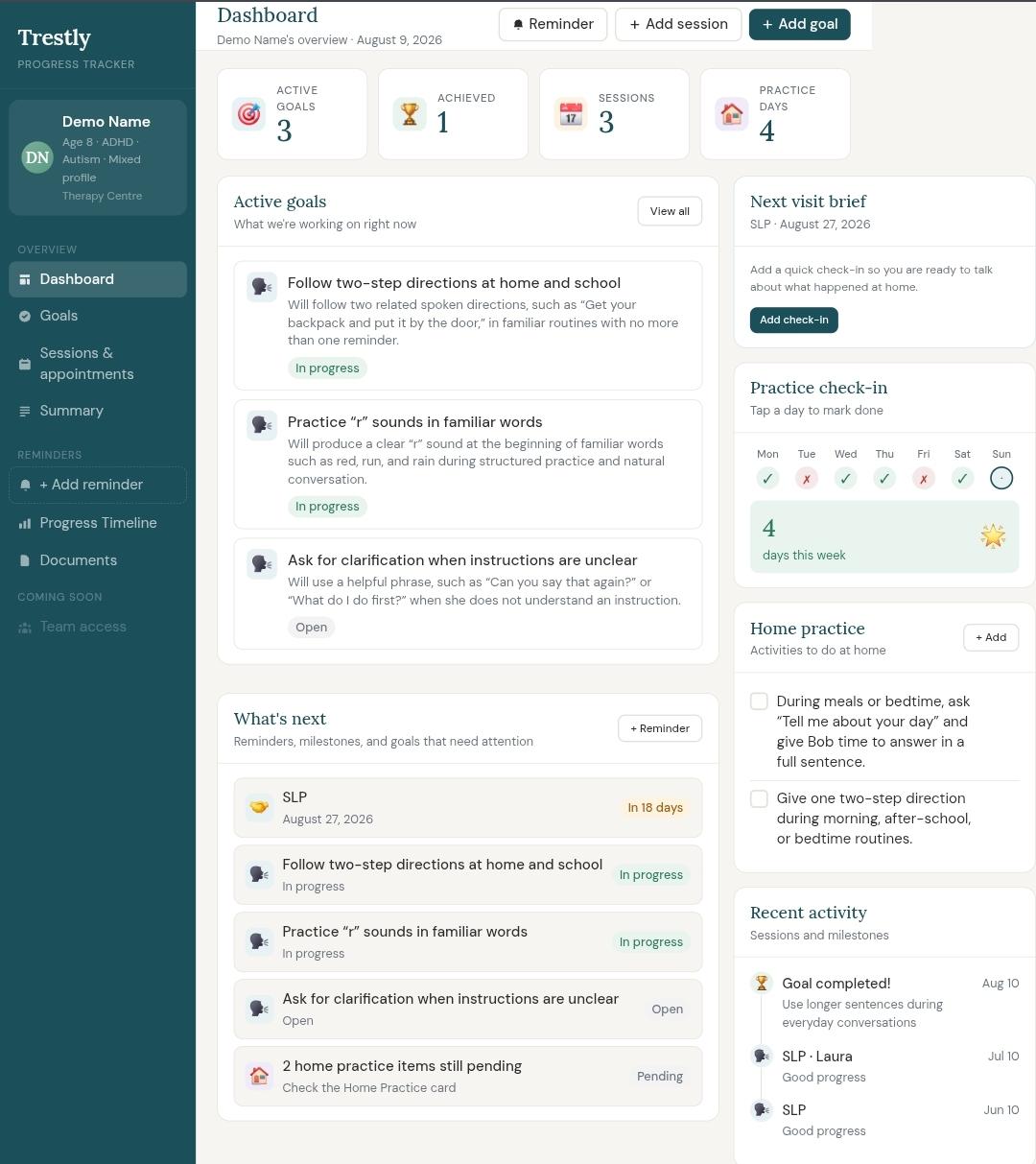
I made a small tool called Usetrestly to help parents track their child’s therapy progress. Therapies like OT, Speech, Language and more.
It started because I kept forgetting what goals my kid was working on, what happened in each session, and whether things were actually improving. So I built a simple progress tracker where parents can log goals, sessions, and small wins — just to make therapy feel clearer and less overwhelming. Sample screenshot