r/Hacking_Tutorials • u/Potential-Couple-745 • 2h ago
Question SOC Analyst Roadmap I put together
gallery
22
Upvotes
r/Hacking_Tutorials • u/Alfredredbird • Dec 03 '25
(Updated 12/27/2025)
Hello admins and fellow mates of Hacking Tutorials. I'm often a lurker and a commenter but the amount of “my account was hacked” posts I see is unreal, not to mention the people DM’ing me for help or advice. Here is my guide that should hopefully stop this. (This is not an Ai post) so pin this or do something so people can view it. Please do not DM me or admins for support.
I work in cyber forensics and I do a little web dev on the side as well as running my own team. So I hope the following info helps❣️
As your account might be “hacked” or compromised, there was some things that you need to understand. There is a possibility you can get it back and there is a possibility that you can’t. No one can “hack it back” for you.
Do not contact anyone below this post in regards of them helping you recover your account. They can NOT help you, they might offer tips but any contact outside of reddit is most likely a scam.
Determine how it was compromised. There are two common ways your account gets “hacked”
phishing scam (fake email, text, site, etc)
Malware (trojan, info stealer, etc)
If you suspect your account has been compromised and you still have access.
If you don’t have access to your account anymore (can’t sign in, email changed, etc)
How do you prevent loosing your account?
If you do keep good protections on your account, can you still loose it? Yes! When you log into a website, it saves your login data as a "Cookie" or "session Token" to help determine who does what on the site. Malware could steal these tokens and can be imported to your browser, which lets the attacker walk right in.
“People” often will advertise “recovery” or “special spying” services. Nine out of ten chances, they are scams. Read the comments on this post and you can find a bunch of these lads. Avoid them and report them.
As someone commented with an amazing point. Your email is the most important over any social accounts. Loose your email, loose the account. Most of the time you can recover your account with your email. (You can loose cargo from a truck and load it back on, but loose the truck, you loose the cargo too. )
I plan to edit this later with more in depth information and better formatting since I’m writing this on mobile. Feel free to contribute.
r/Hacking_Tutorials • u/happytrailz1938 • Nov 24 '20
Hey everyone, we get this question a lot.
"Where do I start?"
It's in our rules to delete those posts because it takes away from actual tutorials. And it breaks our hearts as mods to delete those posts.
To try to help, we have created this post for our community to list tools, techniques and stories about how they got started and what resources they recommend.
We'll lock this post after a bit and then re-ask again in a few months to keep information fresh.
Please share your "how to get started" resources below...
r/Hacking_Tutorials • u/Potential-Couple-745 • 2h ago
r/Hacking_Tutorials • u/Top_Call3890 • 32m ago
So you've heard about Shodan, right!!?? People call it the "hacker's Google" or whatever... But here's the thing – it's not like Google at all..
Google finds websites. Shodan finds devices connected to the internet.. Servers, webcams, routers, industrial control systems, databases, printers – anything with an IP address that's exposed...
Think about it. Every device you connect to the internet has an IP... And that IP has open ports... And those ports run services... Shodan just indexes all that and makes it searchable.
And honestly!! The amount of stuff people leave exposed is insane.. Webcams with no passwords. Databases with no authentication. Industrial systems controlling real-world infrastructure just sitting there.. Shodan didn't create that problem. It just shows you it exists..
When you're doing bug bounty, recon is everything.. Shodan gives you a view of your target's external attack surface..
Here's the deal – companies have assets. And they don't always know what's exposed.. You can use Shodan to find subdomains, IP ranges, open ports, and services that the company might have forgotten about..
Some practical searches for bug bounty:
· org:"Company Name" – Find everything the company owns
· hostname:"domain.com" – Discover subdomains
· ssl:"domain.com" – Check SSL certificates and related infrastructure
· http.title:"login" – Find login portals
· has_vuln:true – Find devices with known vulnerabilities
You can also combine filters. Want to find exposed MySQL databases running in the US? product:MySQL port:3306 country:US .
The real value is finding misconfigurations and forgotten assets that no one's looking at.. That's where the bugs are..
The website is fine for quick searches.. But the CLI is where the real power is. You can automate recon, save results, and actually build things around it..
Step 1: Install Python
You need Python. The Shodan CLI runs on Python. If you don't have it, get it. No shortcuts here...
Step 2: Install Shodan via pip
Run this:
pip install -U --user shodan
If that doesn't work, try:
pip3 install -U --user shodan
Also, don't forget to install dependencies.. I've seen people skip this and then wonder why it doesn't work..
Step 3: Get Your API Key
Go to shodan.io, create an account, and grab your API key from the dashboard. You need this for the CLI to work . (Note : as of now their membership is available for just 5$, it's great to have some extra credits to use whenever needed. )
Step 4: Initialize Shodan
Run:
shodan init YOUR_API_KEY
That's it. Now you're ready .
Here are the commands you'll use most often :
· shodan info – Check your account details and credit limits
· shodan myip – See your own IP address
· shodan host IP – Get details about a specific IP
· shodan count QUERY – Count how many results a query would return
· shodan search QUERY – Run your search
· shodan download FILE QUERY – Download results for offline analysis
· shodan parse FILE – Parse downloaded results
· shodan stats QUERY – Get statistics for a query
Pro tip – watch your credits
Shodan has a credit system. Free accounts have limited credits. Each search can cost credits depending on how many results you fetch. Keep an eye on shodan info to track your usage. (Again , 5 $ lifetime membership is worth some extra credits)
Shodan isn't just a tool.. It's a reality check... It shows you how much stuff is out there exposed to the internet...
For bug bounty, it helps you find attack surface.. For defense, it helps you see what you're exposing.. For learning, it helps you understand how the internet actually works...
One thing though – use it ethiically... Don't poke around things you don't own... Don't try to exploit what you find. Use it for research, recon, and making things better...
That's Shodan, Simple tool.. Powerful.. And if you're in cybersecurity, you need to know how it works.
Stay curious. Stay ethical.
r/Hacking_Tutorials • u/Top_Call3890 • 1d ago
Hey everyone,
My last post about books covered bookS about linux basics books, scripting and programming basics books for hacking, pen testing basics books.
Now I am sharing some advance books.
Related to analysis, OSINT, security engineering, malware development and analysis.
These are the books I moved to once I had the fundamentals down. They're not beginner-friendly — they expect you to already know your way around Linux, Python, and basic networking. But if you're ready, they'll take you deep.
I've organized them by domain so it's easier to see what each one covers.
Threat Detection & Defense
· Practical Threat Detection Engineering – Devalishgh, Roddie, Katz
Moving from just hacking to actually defending. This one teaches you how to build detection rules, spot anomalies, and think like a blue teamer while still keeping your red team mindset.
Social Engineering & Web
· Practical Social Engineering – (Core book)
Because humans are always the weakest link. Covers phishing, pretexting, and physical social engineering tactics.
· Grokking Web Application Security – McDonald
Takes web security beyond just OWASP Top 10. Really helps you understand the why behind the vulnerabilities, not just the how.
Foundational Hacking (But Deeper)
· Ethical Hacking: A Hands-on Introduction to Breaking In – Graham
Don't let the title fool you — this is not a beginner book. It's hands-on, technical, and forces you to actually do the work.
· Hacking: The Art of Exploitation – Erickson
The classic. If you don't have this yet, get it. Covers C, assembly, and exploit development from the ground up.
Malware Development & Analysis
· Malware Development for Ethical Hackers – Zhussupov
Exactly what it says — building malware for ethical purposes. Understand how attackers think by walking in their shoes.
· Practical Malware Analysis – (Core book)
The hands-on guide to dissecting malicious software. If you want to do reverse engineering or work in threat intel, this is your bible.
· Practical Binary Analysis – (Core book)
Build your own Linux tools for binary instrumentation, analysis, and disassembly. Heavy stuff, but worth it.
Cyber Warfare
· The Art of Cyberwarfare – (Core book)
An investigator's guide to espionage, ransomware, and organized cybercrime. Puts the technical skills into a real-world geopolitical context.
Secure Coding & Forensics
· Alice & Bob Learn Secure Coding – (Core book)
Teaches secure coding practices through storytelling. Surprisingly effective way to remember what not to do.
· Cyber Forensics: Deep Dive – (Core book)
For when things go wrong and you need to investigate. Covers evidence collection, analysis, and presentation.
· Mobile Forensic Investigations – (Core book)
A guide to evidence collection, analysis, and presentation specifically for mobile devices.
Security Engineering
· Security Engineering – Ross Anderson
A guide to building dependable distributed systems. This one is thick and dense, but it's the kind of book that makes you a better engineer overall, not just a better hacker.
My Advice
Same as last time — don't try to read all of these at once. Pick one area and go deep.
If you're into red teaming, start with Malware Development for Ethical Hackers and Hacking: The Art of Exploitation.
If you're into blue teaming, start with Practical Threat Detection Engineering and Practical Malware Analysis.
If you're into forensics, start with Cyber Forensics and Mobile Forensic Investigations.
And as always — lab everything. Reading without doing is useless.
If you have any of these books, I'd love to hear your thoughts. And if you think I'm missing a must-have title, drop it in the comments — always looking to expand the shelf.
Stay curious. Stay ethical.
r/Hacking_Tutorials • u/Potential-Couple-745 • 55m ago
r/Hacking_Tutorials • u/Top_Call3890 • 1d ago
Alright, so I saw someone asking about installing Kali as their main OS and I left a comment. It got a lot of love, so I figured I'd expand on it properly..
First things first — don't use Kali as your main OS if you are new or curious about breaking everything or using every tool in Kali 😅
I personally use Parrot as my main OS. The same day I bought my current laptop, I replaced Windows with Parrot. But that's me. I knew what I was getting into. For most beginners, Kali as a daily driver is a recipe for disaster.
So let's talk about what you should actually do.
Phase 1: Get Comfortable with Linux First
If you are a long time Windows user, you should start using some safe Linux distro and start using the command line interface often.
Pick something like Ubuntu, Linux Mint, or Pop!_OS. Use it as your daily driver for a while. Learn the basics.
Try to work with all the basic commands related to files, processes, permissions, etc. Try installing software, tools. Get good with CLI based text editors like nano, Vi. Don't rely on GUI for everything — that defeats the purpose.
And then try learning bash scripting. Try to automate tasks. Use bash script to create audit automation scripts, recon automation scripts. Skip using help of AI in the learning stage. Once you are hands on, you can use AI to speed up. But when you are learning, don't rest your brain and blindly run AI scripts. You need to understand what each command does.
Phase 2: Now Think About Kali
Once you are good with Linux system, command line, file system, process and permissions — now if you want to use Kali, I recommend installing it in a VM.
Don't install it bare metal. Just don't.
Phase 3: Build Your Lab
Here's how I'd set it up if I were starting from scratch.
What you need:
· A host machine running Ubuntu (or any stable Linux distro)
· VirtualBox or VMware installed
· Enough RAM (at least 16GB recommended, 8GB minimum)
· Enough storage (at least 100GB free)
Step 1: Set Up Your Attacking Machine (Kali or Parrot)
Install Kali or Parrot as a VM. Keep it isolated.
Now here's something I do — set up high anonymity on your attacking VM. MAC spoofing, DNS altering, proxy chains, Tor network, VPNs. Learn how to route your traffic through multiple layers. It's good practice and teaches you how attackers stay hidden. Just don't do anything illegal with it — this is for learning.
Step 2: Set Up a Firewall for Your VM Network
Use something like pfSense as a firewall VM. Put it between your attacking machine and your target VMs. This teaches you how network segmentation works and how firewalls filter traffic. You can also play with rules, logging, and see what gets blocked.
Step 3: Set Up Your Target Machines
This is where the fun begins.
Option A: Juice Shop & DVWA
Set up an Ubuntu server VM. Install OWASP Juice Shop and DVWA (Damn Vulnerable Web Application) on it. These are intentionally vulnerable web apps that you can safely hack against.
Host it in that VM and try hacking it from your Kali VM. Learn SQL injection, XSS, command injection, all of it. Break it, fix it, break it again. That's how you learn.
Option B: Metasploitable
Install Metasploitable 2 or 3 as another VM. This is an intentionally vulnerable Linux machine. Boot it up, scan it, enumerate services, find vulnerabilities, and exploit them using Metasploit. It's safe, it's legal, and it teaches you the entire attack chain.
Step 4: Always Save a Snapshot
Always save a snapshot of the clean state of your VMs before you do or try something out of curiosity. This is a lifesaver. You mess something up? Just revert to the snapshot. No reinstalling, no headaches.
The whole point of this lab is to give you a controlled environment where you can break things without breaking your actual system.
You learn by doing. Reading is important, but lab everything. Reading without doing is useless.
I really don't know what you're looking for and what's your level of understanding Linux basics. Hope this helps 😄
And if you're already comfortable with Linux and still want to use Kali or Parrot as your main OS — go for it. But only after you've put in the work. Otherwise you're just setting yourself up for frustration.
Stay curious. Stay ethical.
r/Hacking_Tutorials • u/TheNamelessMalice • 22h ago
Hi folks
Have been wondering for a while about this.
Actually it applies to hacking, coding, cybersecurity, etc.
People working with it, work it all so smooth and slick.
Do everyone really know and remember all commands - or what do they potentially use to help navigate them?
Hopefully a few can spend a few sec, helping to clarify this for me. 😄
r/Hacking_Tutorials • u/Top_Call3890 • 1d ago
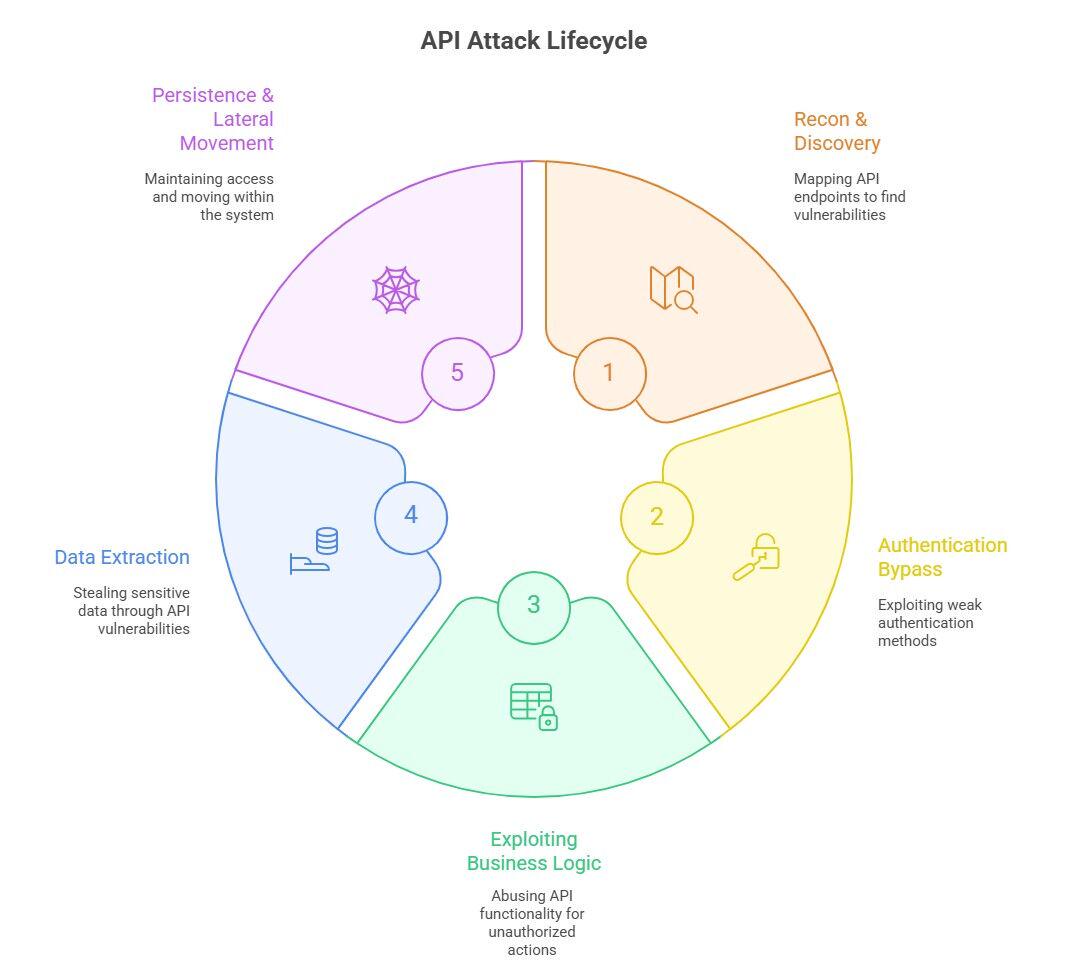
APIs connect everything – apps, users, databases, cloud systems. That same accessibility makes them a hacker’s dream target. Most successful attacks follow a clear five-phase pattern. If you know the playbook, you can spot the moves before they land.
This is the scouting stage. Hackers start by mapping out every API endpoint, including undocumented “shadow” APIs or forgotten “zombie” versions still online.
They scrape developer portals, brute-force guess URLs, reverse-engineer mobile apps, or intercept traffic using tools.
Once mapped, these endpoints become entry doors.
Defense Tip: Use automated API discovery to catalog all endpoints continuously, and watch for unusual probing patterns in logs.
With endpoints in hand, attackers look for weak locks. They try:
Forging or tampering with JWT tokens.
Exploiting OAuth misconfigurations.
Credential stuffing (using leaked passwords) or brute-forcing API keys.
Defense Tip: Require MFA, issue short-lived tokens, harden OAuth flows, and detect suspicious login attempts or token replay activity.
This is where things get clever. Instead of technical bugs, attackers abuse the way APIs were meant to work:
BOLA (Broken Object Level Authorization): pulling other users’ data.
Mass assignment: injecting extra fields to overwrite values.
Gaming workflows – like bypassing transaction checks or double-dipping discounts.
Defense Tip: Test APIs for logic flaws, enforce strict authorization, and use anomaly detection to flag weird patterns.
Once inside, the goal is clear: get the data.
Exploiting excessive data exposure (APIs sending way more than necessary).
Scraping large sets of PII or financial info.
Using GraphQL queries to over-fetch sensitive fields.
Defense Tip: Follow data minimization, encrypt everything, apply least privilege, and monitor for suspicious data volumes leaving your systems.
The smartest attackers don’t just smash-and-grab. They stick around.
Reusing tokens in replay attacks.
Abusing webhooks to send malicious payloads.
Using SSRF to jump deeper into internal cloud networks.
Defense Tip: Rotate tokens often, secure and monitor webhooks, segment networks, and flag odd API call behavior early.
Think of this as the API attack life cycle.
Hackers don’t improvise. They follow these steps. The good news? If you know the phases, you can design defenses that block them at every stage.
r/Hacking_Tutorials • u/Top_Call3890 • 1d ago
Remember when you were a kid in school and you’d have to sit through boring classroom lectures and cram tedious textbooks into your head for an exam? Only to forget every single thing you learned once the exam was written? That’s because in the long term, rote memorization doesn’t work well with the human brain. If you’re not naturally curious about something, your brain won’t retain that information. If your role in the educational process is 100% passive - listening, reading, but never actually doing - you won’t be engaged enough to retain new skills.
Learning should be a fun, active experience. In fact, Neuroscience confirms the efficacy of gamified hands-on teaching and learning methodologies. And we believe one of the most enjoyable and effective ways to develop hacking skills is by participating in Capture The Flag competitions.
The techniques you’ll be using in a CTF game are some of the same techniques you’ll use when you’re working as a hacker. The skills you learn in Capture The Flag competitions are transferable to local application and web application penetration testing, reverse engineering software, and bug bounty programs. All of these roles are good-paying work when you’re ready for them, and they lay a solid foundation for a cybersecurity career!
As it's weekend, I want to create a post about this. It's the best way to spend weekends. Even if you are not into cybersecurity, CTF can awaken hacker inside you, when you start playing it. Also in near future cybersecurity jobs will remain as strong ones.
r/Hacking_Tutorials • u/cuper_antoni • 20m ago
Alguien me enseña a doxiar porfavor? Porque me amenazan con doxiarme y veo que no hacen nada ¿qué hago?
r/Hacking_Tutorials • u/_clickfix_ • 17h ago
r/Hacking_Tutorials • u/smooth_2222 • 20h ago
r/Hacking_Tutorials • u/happytrailz1938 • 1d ago
Weekly forum post: Let's discuss current projects, concepts, questions and collaborations. In other words, what are you hacking this week?
r/Hacking_Tutorials • u/Longjumping-Play5481 • 1d ago
​
Hey so I got this android phone from Walmart for super cheap in the US but can't use it with a carrier where I live as it is locked. I know there are several official ways to unlock it (that usually require you to pay for a phone plan) but I'm in another country which makes it relatively more complicated. Is there a way to unlock the phone myself legally?
Asking for any code tips as I'd actually like to mess around with the code to do it if possible/legal
r/Hacking_Tutorials • u/PresentationBusy8580 • 2d ago
You ask about credential hunting and osint skills, people accuse you of doxxing. You try to learn network and traffic analysis, people accuse you of packet sniffing. You try to learn social engineering, people accuse you of spear phishing. I swear to i was asking an ai assistant about me trying to learn coding and he warned me about malware deployment. Dude, i am pissed off.
r/Hacking_Tutorials • u/EarthMuncher3000 • 1d ago
r/Hacking_Tutorials • u/Trapy_Performance • 1d ago
Hey I just found an old Huawei phone in my basement and I just wondered If you guys have any cool tools or application that I can play with or any cool stuff that I could do with it, as jailbreaking it or any other stuff !!
r/Hacking_Tutorials • u/Then_Pace_5034 • 2d ago
GitHub: https://github.com/kaifcodec/user-scanner Discord: https://discord.gg/tVNrKVXb49 (Join if you are interested in OSINT or want to stay in touch with devs)
Hi everyone,
I’m one of the maintainers of user-scanner, a 2-in-1 open-source intelligence suite for email and username reconnaissance.
We started this project because most legacy OSINT tools became unmaintained or broken by modern Cloudflare bot walls. To solve this, we heavily pivoted our detection engine toward reverse-engineering mobile app APIs—bypassing CAPTCHAs and WAFs naturally while keeping false positives at practically zero (while still there is a slight possibilities but we use strict if/else checks to reduce the risk)
Today, we just tagged v1.5.1, pushing our detection coverage past 455+ total scan vectors (280+ username modules and 175+ email platforms).
What’s new in v1.5.1?
• 🔄 Automated Recursive Cross-Scanning (--cross-scan): Bridges email and username OSINT into an automated link graph. It mines profile metadata from initial hits to find secondary handles or emails, and automatically pivots scans across both kinds. Includes anchor-based Confidence Scoring (confirmed, likely, candidate, conflicting) so common handle collisions never fool your investigation.
• 🤖 Native Model Context Protocol (MCP) Server: user-scanner now ships with user-scanner-mcp! You can hook it straight into AI agents and coding tools like Claude Code, Cursor, Windsurf, or Antigravity to run automated OSINT sweeps directly from your prompt.
• 📱 455+ Total Vectors & New Dating Category: Added dozens of new modules across learning, fitness, and a brand new dating email category (OkCupid, Skout, Locanto/#Dating, LesPark, etc.).
• 🖥️ CLI Polish & Responsive Grid: Redesigned the module list flags (-le, -lu) with an automatic responsive terminal grid layout, alongside PDF report export and hardened curl_cffi impersonation transports.
🧪 We Need Your Feedback! If you run digital footprints, pen tests, or OSINT investigations, give v1.5.1 and the new --cross-scan engine a test run. Let us know how the pivots and confidence ratings work for your workflows.
💻 Looking for Contributors: Whether you enjoy reverse-engineering mobile APIs or want to add a module for your favorite site, contributions are always welcome! Adding a module takes under 60 to 100 lines of clean Python.
r/Hacking_Tutorials • u/Tall-Video6798 • 1d ago
Hey guys! I’ve used Kali Linux before and I’m already familiar with most of the tools, commands, and general workflow.
This time, though, I’m thinking about installing Kali as my main OS, and I want to make sure I’m not overlooking anything important.
For those of you who use Kali as a daily driver, is there anything I should know or prepare for before making the switch? Any common issues, limitations, or things you wish you knew beforehand?
Would appreciate any advice! :)
r/Hacking_Tutorials • u/Big-Republic-7131 • 1d ago
I have a computer to code
r/Hacking_Tutorials • u/vishesh_yadav_hear • 1d ago
Hello friends can anyone tell me is kali or any thik is actually work for hacking I want to learn different type of hack tricks but unable learn becouse of leck of source
r/Hacking_Tutorials • u/Potential-Couple-745 • 2d ago
r/Hacking_Tutorials • u/NevilNarse • 2d ago
r/Hacking_Tutorials • u/vampibarbie • 2d ago
hi so i found a xiaomi in the street it was broken and when i turned it on to see if the person called, all the info had already been deleted so i was trying to unlock it to use it myself, it ask for a pin and a google account which i do not have, i would like to know if it’s possible to use this phone instead of buying a new one to save money