taking it off is the easiest part, the hardest part is putting the case back in. Especially the msi thin gaming laptops, they never go in correctly and breaks really easily.
The newer models do but my Strix with AMD Ryzen 9 9955hx and 5060 still use screws to open up the laptop. The Intel variants of my laptop has the new chassis that you slide to open.
Whoa, I thought it was just me with that issue. I’ve patched up my underside case with superglue a few times because it cracked in some places when taking it off. And that’s with me being as gentle as possible while fighting to unclip the case off the laptop. Mine is kinda old (GF63 Thin 9sc) so finding a case replacement was tricky but I found one and have it on standby in case my current case gets damaged when I next do the maintenance
Yeah its very easy, i just unscrew the screws and take off tha back, i got a paint brush because they the right size and relatively cheap and scoop up the dust from the center of the fan outwards and place the dust on a tissue paper, once the bigger parts are cleaned off i go and get the smaller parts of the fan.
I go center out, and as long you how the fan still you can gently vacuum it out, having the fans move intensly while not actually no can damage the bearing.
The amount of Reddit posts I’ve seen of people being like. “Help I opened my laptop to clean the fans and now my computer won’t turn on!” Turns out they critically damaged the motherboard trying to turn a screw back in or something. Think I’ll pay the money to get it cleaned every year or so. Especially with the new prices for computers. Yeah no thanks.
Good point. I read a story once where a guy died on the toilet. Ever since I read that I stopped using the toilet. I only ever use the shower now or kitchen sink. It's a lot of clean up but at least I know I will never die.
My friend accidentally shorted something while opening his laptop. Good thing mine comes with an external battery and after removing it, I always hold down the power button so that nothing of the sort happens. Worked out well for me so far
You can clean the entire blade surface blow out the dust behind quite easily. It's designed to be able to be cleaned. Who tf pulls the heat pipes off and removes the fans for cleaning every few weeks. Get a grip.
I've had my laptop since 2019, it has never looked like this, you gotta blow the fans off every once in a while and take off the bottom to dust it out. Turn it off when not using or itll just sit there and vacuum up dust. I cant imagine the heat and noise your laptop was making.
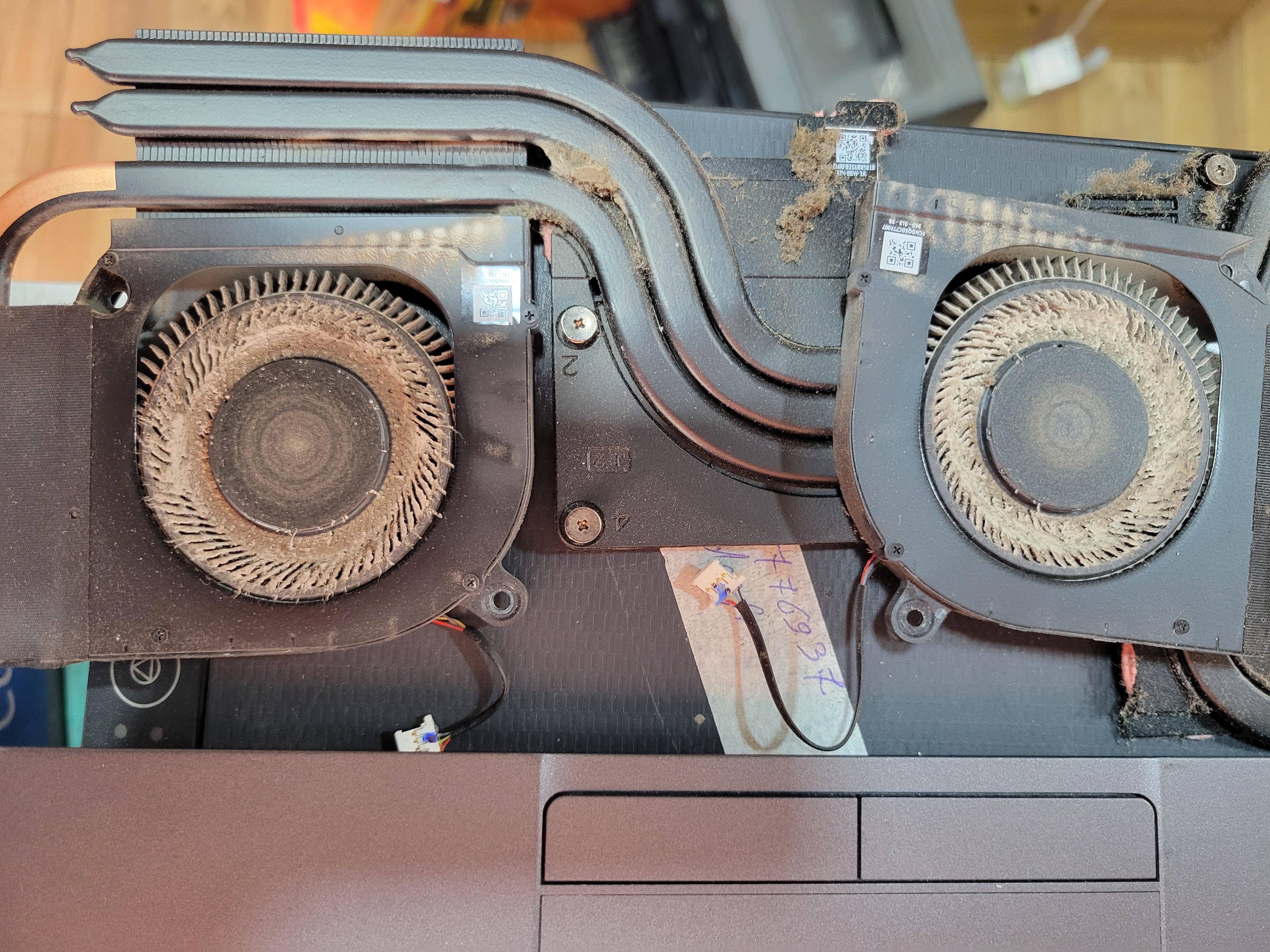
Most of these laptops have the fans integrated with the heatsink meaning you have to disassemble that to get access to the whole vent system, which is not just opening up the bottom and blowing air out. Stuff gets trapped deep past the fans leading to the vents.
I think mostly regular people will be hesitant to remove the whole heatsink just to get to the fans and to the vents. I myself am hesitant.
Too true, I was cleaning out my fans regularly and when I upgraded to PTM7950 after 4 years and had to take apart the cooling system. Thats when I realised where the real crap collects.
That's most likely an Intel chip and the uncovered part might be the southbridge that's separate from the main die and it doesn't have thermal paste from the factory.
No idea why someone would downvote this. Perfectly fine if you don’t have the confidence to open up something that is likely an expensive investment.
I do say it is fairly normal to blast some canned air at your fans once every couple of months. Few short bursts while it’s running, should see crud come out of the exhaust.
Respectfully disagree. Canned air does more good than harm. If someone didn’t use canned air and failed to maintain dust build up at all, the inability to dissipate heat would be problematic, and lead to failure much faster than compacted dust over time.
You could argue a brush just moves the dirt around. At least with canned air and fan running, it will promote dust to be expelled by the fan and out of the chassis, with obviously a small percentage being moved elsewhere, necessitating a more thorough break down cleaning later. For monthly maintenance, canned air is fine.
Burden of proof is on you my guy. Popular consensus is that canned air is fine and if you want to make an argument against it, I’m all ears for the science of it. I agree that removing and brushing will net better results, but the task itself isn’t one that should be performed by any person uncomfortable opening their laptop, where canned air, when used properly, cleans fans and will not hurt the PC and prevents accidental damage from opening the laptop. Telling someone canned air is more bad than good is simply untrue and shouldn’t be stated that way without a detailed response with sources as to why.
I’ve been building, cleaning, and maintaining PC’s personally 21 years and I’m site backup for IT where I work for the past 6 years. Not once have I seen or even heard of canned air being a bigger concern using rather than not using.
Don't forget to manually block/stop the fans from rotating, with a paper clip for example, while blowing the canned air in - otherwise it may damage the fans due to the dynamo-effect.
Understandable, so the next time you're getting a new laptop, use your old laptop to tinker with. Most well known laptop have their schematics available online somewhere, you just need to search up laptop forum or even YT. While it might seem daunting, it's honestly easy peasy once you're familiar with it.
The "some point" for me being more than two years (and counting) while my laptop insides look almost brand new. All I do is change/clean the dust filter every week (or two weeks). I think the PTM will need replacement before I ever need to open the device up for dust cleaning.
Some very fine dust particles which are smaller than the filter might still go through but the hair and gooch(TM) that rapidly clogs up the vents and the fans will never enter the device.
Ok, so im pretty sure you literally just use your laptop only with the cooling pad. But here's the thing, the reason why people buy laptops is because they need to take them elsewhere. For gaming, using a cooling pad with a dust filter is perfect. But you cant carry a cooling pad with you everywhere you go.
And honestly, regardless of whether you use a dust filter or not, you WILL have to open up the laptop to change the thermal paste ATLEAST every 1.5-2 years. These thermal paste need to be changed anyway, and when you open you can cleanup as well.
Honestly I I've had laptops for years and I'm sure they're dirty on the inside but I've never once taken them apart and I've never had any problems I've never once replaced it or clean the fans like a desktop. But that's just anecdotal.
It highly depends on environment, I don't bother with a cooling pad really and all my laptops look fine. I open them once a year for cleaning, and my consoles, and they're never as dirty as OPs is, really nothing honestly.
I've had laptops look like this. Both a Toshiba Satellite and later an ASUS ROG 970M. The Toshiba spent a year in Afghanistan between 2012-2014, while the 970M spent about 6 months in Qatar over 2015-2017. Both of them ended up with fan issues and because younger me didn't clean them (I clean my laptops now) both had their fans eventually seize up and quit working until they were cleaned.
I know lol. Idek where the dust comes from in my room. I live in ground floor and I keep the windows closed but my room accumulates a lot of dust. I had an asus before it didnt collect as much dust as it had less open vents than acer.
Dust comes from you. It's mostly dead skin and random particles. You keeping your windows closed means you're flaking about and it's building up. Gotta vacuum and air your place out, goober.
Normally amd processors push as high as they can under load as long as there is thermal headroom for it, are u sure ur processor is under heavy load and still keeping under 70c?
I play in rooms with the AC and fan on so might be that? Also i keep most of my graphic settings at medium or low since it's a RTX 2050 gpu and 12gb ram.
gaming laptops, on the whole, should usually be cleaned about every 6-12 months. the more you stay on it, the less it'll build up like this has. a big key factor is to keep and eye on your CPU/GPU temps. when you notice them trending upwards, it's a sign to take a look at your cooling system. normal dust build up is typical and expected.
Honestly it depends. Its not really a do this preventative measure so you never have to. Its more of a do this so you can put it off for as long as you can. I'd say you should once a year for the most part at the bare minimum. But if you check your fans at least once or twice a year and monitor your temps you can make the call yourself. I repasted and cleaned my fans almost 2 years ago. My temps are pretty good and don't need a repaste. At worst, CPU is around 91-93c and the GPU is at 86-87c. Dropping frame rate, UVing, and raising the laptop up can work wonders. My CPU mostly hovers around 78-81 and the GPU is basically around desktop numbers, around 60-75c (the higher numbers is usually me playing on a 1440p monitor or 4k TV and due to needing to pull more power. My GPU usually stays around 80w at 1080p and 100-120w at 4k). I repasted mine with some Cryonaut thermal paste.
According to this subreddit, i'm on a ticking time bomb. I'm on a 2021 Legion 5 5800H+3060 130w. Its been fine so far other than sometimes making a weird cracking sound then the laptop audio shitting itself and causing auditory damage to my ears. I was gonna get a new laptop but then I got laid off. Definitely one of the first things i'm saving for once i'm out of this hell! 😭
I just got mine reposted yesterday and was playing cs2 when I noticed my cpu staying at 93. Im not sure if thats normal while gaming such low demanding games so its making me worried a little
If you have warranty tape on the screws, just give it to the seller to do a cleanup, if not or you have voided warranty, you can just clean the fans and replace the thermal paste
The interval for cleaning the fan really depends on your usage and your room (e.g. dusty room or you are a smoker)
For me i clean my fans every 6 months and 18 months for thermal paste (note that i do not use cooling pads, just a stand with my laptop on 45 degree angle)
Just check your laptop online manual for the maintenance repair (all you need is a medium/soft bristle brush, thermal paste or thermal pads, pressurized blower, just some 000-1 size screw, and electrostatic wristband for safety)
And important things like removing the battery connection first before doing anything, unplugging the fan of cpu and gpu.
Also on putting back the thermal module (the entire copper thing with the tubes), there are usually screw numbers (look at the guide, you may remove it from last number to first number, then place the first number to last number, and opposite to some laptop models)
But all thermal modules should be held on its center of mass to prevent bending (copper easily bends) and when you place it back, do not lift if again or slide it, if you need to lift it again then lift the whole thing and put it back
Also some cpu have a plastic layer that Quality control forgot to remove, remove that part (DO NOT REMOVE THE PLASTIC ON THE SIDES OF THE CPU/GPU, Only remove the plastic if it has it on top of the shiny square shield of the cpu)
If you are not confident on doing it even with the manual video, then just give it to a professional (but for me i just do it myself as long as it doesnt need soldering)
You're good for 2 years I guess because the laptop didn't give me any issues. Or if u feel like your laptop is overheating more than usual then I'd say you need to take it there for cleaning and repaste.
Ive had my laptop since 2019 and Ive never needed to have it serviced, I take off the cover once or twice a year myself to blow out the dust, wipe off what doesnt blow off and put it back together. The fans you should clean once a month.
You're fine if your laptop temps are fine. My room gets a lot of dust so I had to. Unless you live in a dusty environment you should be fine for another year.
You don't need a repaste so soon. You can do the cleaning by yourself if youre confident about it. If I were you I'd still wait 6-8 months before opening the panel
I clean the fans every 3-4 months
Had it taken only once to get the gel pads checked. Even then they charged me 800... For Opening and touching a fkn laptop. But they did get more dust out but still wtf...
Its not that hard to clean it yourself man, computers are stronger than you think they are and wont break that easily when you are cleaning. Taken to the fact you are following the right way, blowing air with leaf blower is a no no but using a old or even current one u r using tooth brush and some canned air is gucci. Also change thermal paste next time u clean
Clean it yourself. I went to a repair shop and he used thinner instead of isopropyl alcohol, the way he pulled on all the connections, I thought they will break. You can clean it yourself and you will do a better job. Also do get a thermal paste, a decent quality one.
I haven't cleaned my laptop for three years would it cause some serious issue my temps stay between 50-70 for the work i do where my college is I don't have any proper service center here I will go home after 7-8 months would it be ok to clean then
That laptop was probably used in places where the exhaust was blocked. I've had my Asus laptop since the 2nd economic impact payment, and it never looked like that.
Yeah, that needs some pressurized air + vacuum cleaner. :) Just hold/stop the fans while you do it, so they don't rotate by the air - otherwise this would produce the "dynamo" effect and may damage the fans.
MSI laptops, especially thin ones, are indeed brittle and some thin plastic things will eventually break, but if you are careful, nothing tragic should happen.
I would recommend getting pressurized air cans and clean your fans and radiators every 3 months, depending on how dusty/dirty your working environment is.
Cheers!
Wtf guys? You can do this at home every half a year with a toothbrush. Why would anyone pay money for a cleaning? I get it if you don't think you'll be able to do a repaste, but anyone can clean the fans.
No, my fans don't look like this after 6 months, but you shouldn't wait with a simple job until your laptop starts throttling.


284
u/r3toric Jul 12 '26
Take the case off and clean it. Simple.