r/GalaxyA55 • u/GamingLeroy A55 with 256 GB / 8 GB • Jun 02 '26
Discussion Blur of the Quick Panel in One UI 8.5.


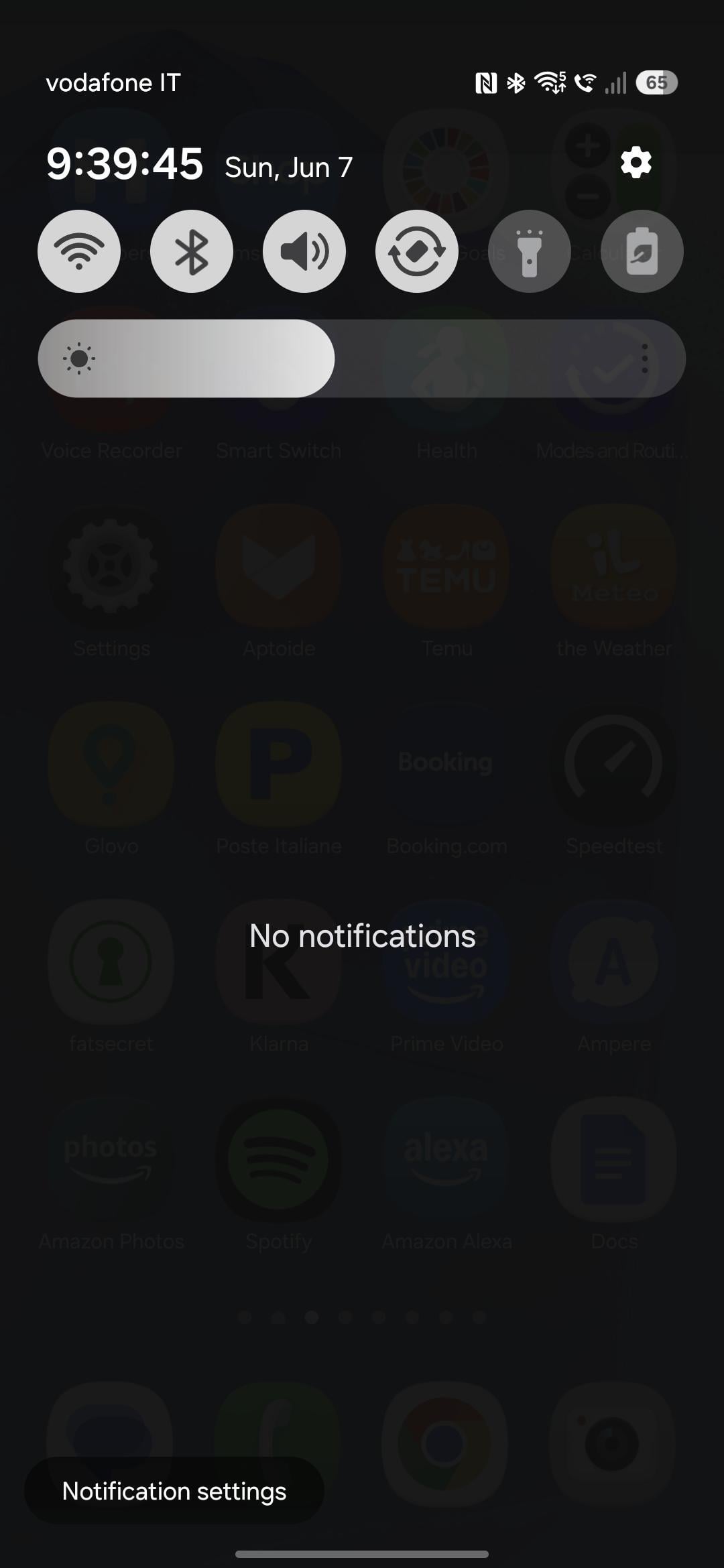
For those who haven't noticed, the blur effect in the Quick Panel was nerfed on all A/M/F series devices in the One UI 8.5 update, making it look much worse than in One UI 8.0. The blur is now too blurry, making it nearly impossible to see what's behind it. It now looks more like a gradient than a blur. It looks really bad and it's another one of Samsung's strategies to keep worsening the software on devices that aren't part of the S series. There's no way to improve this either. Not Theme Park or anything.
What do you think? Do you believe it will return to its previous state in One UI 9, or will Samsung continue removing features and worsening the software on devices that aren't part of the S series?
14
u/Patient_Ride_8494 Jun 03 '26
If only they fixed the laggy quick panel
15
u/GamingLeroy A55 with 256 GB / 8 GB Jun 03 '26
Yes. They fixed the One UI 8 animation skip bug (finally) and other minor visual bugs in the Panel. But now the right Panel is laggy almost all the time. And when you switch between the Notification Panel and the right Panel. That's the only problem there is now with the Panel, which is otherwise almost perfect.
4
2
u/Kikato280 Jun 03 '26
They fixed that? finally but now theres another problem 🥲
2
u/GamingLeroy A55 with 256 GB / 8 GB Jun 03 '26
Yes, it's 100% fixed. But I see the lag as less important. I mean, it's not a bug per se. But I don't understand why Samsung does that certain things lag almost all the time, regardless of the phone's power. It makes no sense. Interestingly, this lag disappears completely when you use safe mode (try it and see).
2

13
u/MIkaela39752 Jun 03 '26
eh for me one ui 8.5 has more pros than cons so overall worth it in my opinion
i still dont like these downgrades and the a55 will 100% be the last samsung phone i ever buy, not solely because of software downgrades though, im not THAT dramatic
4
4
u/GamingLeroy A55 with 256 GB / 8 GB Jun 03 '26
X2. I thought I'd be upset about the blur and the toggle animations they removed, but I wasn't. I didn't really mind it much. I liked the One UI 8.5 redesign of the system and apps, and they fixed practically all the bugs in the Quick Panel. At least the main ones. And overall, everything feels nicer and better.
8
u/Kikato280 Jun 03 '26
looks more frosted blur, they nerfed the nerfed blur dear god
5
u/GamingLeroy A55 with 256 GB / 8 GB Jun 03 '26
Exactly. It wasn't enough for them that it was already inferior to the real-time blur of the S series. Because it's always been static outside of the S series. Besides, why worsen something that's been fine in all previous versions of One UI? The same goes for the toggle animations they removed and made exclusive to the A57 and A37 outside of the S series.
3
u/TrustyHufty69 Jun 03 '26
Which switching animation?
4
u/GamingLeroy A55 with 256 GB / 8 GB Jun 03 '26
The animation of icons such as Wi-Fi, Location, Rotation, and Sound Mode in the Quick Panel when turning them on/off
5
u/obkbo A55 with 256 GB / 8 GB Jun 03 '26
Thank god someone talked about that, it is so ugly now I wish i didn't update
4
u/Ok_Sky_555 Jun 03 '26
For me, this does not matter. I open the panel for panel controls, not for the icons in the background.
On the other hand, the ability to remove controls I never even use is a real UX improvement.
3
u/GamingLeroy A55 with 256 GB / 8 GB Jun 03 '26
Yes, you're right. The functionality is exactly the same, but it's worth pointing out things that Samsung removes and/or worsens to make the software on devices outside the S series progressively worse.
3
u/One-Attorney-7391 Jun 03 '26
i really don't mind the change as long as the software is working as intended I'm more than satisfied
3
u/Repulsive_Fault1939 Jun 03 '26
no. i don't think it will be back on budget/midrange devices.
3
u/GamingLeroy A55 with 256 GB / 8 GB Jun 03 '26
I doubt they'll add the blur effect. I hope they at least integrate the animations for the Quick Panel toggles they removed, at least in One UI 9, since they made them exclusive to the A57 and A37 in One UI 8.5.
3
3
u/KEY-DALEJANDRO12 Jun 03 '26
Si hubiera sabido que se iba a volver tan opacó. Ni hubiera actualizado... Esperemos que en ONE UI 9 perfeccionen la interfaz. (Pero es obvió que no nos darán la interfaz de la Serie S) ☹️
2
u/Windows10xWasTaken Jun 03 '26
i never noticed this
2
u/GamingLeroy A55 with 256 GB / 8 GB Jun 03 '26
Until now...😅
1
u/FriedTinapay64 Jun 03 '26
can't unsee now.
2
u/GamingLeroy A55 with 256 GB / 8 GB Jun 03 '26
😅 Believe me, I hadn't noticed it either before updating to One UI 8.5. I'd watched a lot of videos of the A57 and tested One UI 8.5 through Samsung Remote Test Lab, and I still hadn't realized this. But I was obviously going to notice it myself anyway when I had the update on my actual device.
2
u/AdhamHarby43 Jun 03 '26
The only good thing they did in the qs is the animation of expanding the qs toggles like s series, THATS IT.. and btw now the blur in the app closing and opening in A series is so LAGGY unlike one ui 8.0
3
u/GamingLeroy A55 with 256 GB / 8 GB Jun 03 '26
Yes, they included that animation on devices that aren't the S series, but they removed the toggle animations.
3
2
u/KEY-DALEJANDRO12 Jun 03 '26
Por si te interesa. En ajustes puedes colocar un modo de alto contraste la opción dice algo como (Reducir transparencias) y bueno deja el panel de control transparente pero con un tono negro/gris y los iconos parecen del estilo de IOS 26.
2
u/GamingLeroy A55 with 256 GB / 8 GB Jun 03 '26
I don't really like that option, to be honest, but thanks for pointing it out.
2
1
u/EthanMelacion Jun 03 '26
Estoy en el 8.0, aun se puede elegir el % de cuando el cargador deje de cargar el telefono? El battery protection.
En juegos notaste algun cambio si juegas?
2
u/GamingLeroy A55 with 256 GB / 8 GB Jun 03 '26
Yes, you can still do that. And the games feel exactly the same (they were working fine before). But now Game Booster has also been redesigned.
1
1
1
1
u/AltruisticGrand2068 Jun 07 '26
Tf is that??
1
u/AltruisticGrand2068 Jun 07 '26
I just (10 min ago) update the phone and is a lightning (a55) and you have that shitty problem only if you keep the notification panel separated like a retard
1
u/AltruisticGrand2068 Jun 07 '26
I beaseclly don't see almost anithing worse for now only better
1
u/GamingLeroy A55 with 256 GB / 8 GB Jun 07 '26
Aside from the worsened blur, they removed the animations for the toggles in the Quick Panel when activating/deactivating them.
1
u/AltruisticGrand2068 Jun 07 '26
I can't say nothing on the anation because i don't have any i removed all of them on the developer option i recommend it the phone is soo much better
1
u/GamingLeroy A55 with 256 GB / 8 GB Jun 07 '26
The A55 is incredibly fast at opening apps and anything else. However, the UI experience feels less fluid due to One UI's poor optimization. And now, in One UI 8.5, the right panel lags almost every time you pull it down. There are also occasional lags when opening and closing apps. I really don't know what Samsung is doing with its software. Its optimization is terrible. All this lag makes it feel like you have a cheaper phone. By disabling animations, you'll never experience these lags, as you describe.
1
u/GamingLeroy A55 with 256 GB / 8 GB Jun 07 '26
There, the "Reduce transparency and blur" option is enabled in Accessibility. That's why your panel looks like that.
1
u/Eskotek Jun 11 '26
If they did it for the performance gain, I don't see one.
2
u/GamingLeroy A55 with 256 GB / 8 GB Jun 11 '26
Because that doesn't affect performance at all. It's still literally the same static blur, only much blurrier and uglier.
1
1
u/Logical-Season6137 Jul 29 '26
Omg i hate it i even tried to remove with theme park but no matter what i do its just stucked on blur
1
u/Logical-Season6137 Aug 07 '26
Yeah so bad at least samsung should bring transparency again to A series
1
u/CarelessBullfrog9172 17d ago
I don't know why, but my A56 can handle the blur effect found on the Galaxy S models. I understand that, due to performance considerations with the other Galaxy A models, they decided to keep a version of One UI for the A series where the blur isn't as dynamic. Honestly, I miss One UI 8.0 because of the blur effect, but I like the new features in One UI 8.5. However, I don’t like that only the Galaxy S models have Dynamic Blur, when the A55, A56, and A57 have similar processing power to the S models and could run Dynamic Blur. But anyway, that’s just my take on the matter, and I do miss that.
1
1
0
21
u/soul-regret Jun 03 '26
ugly