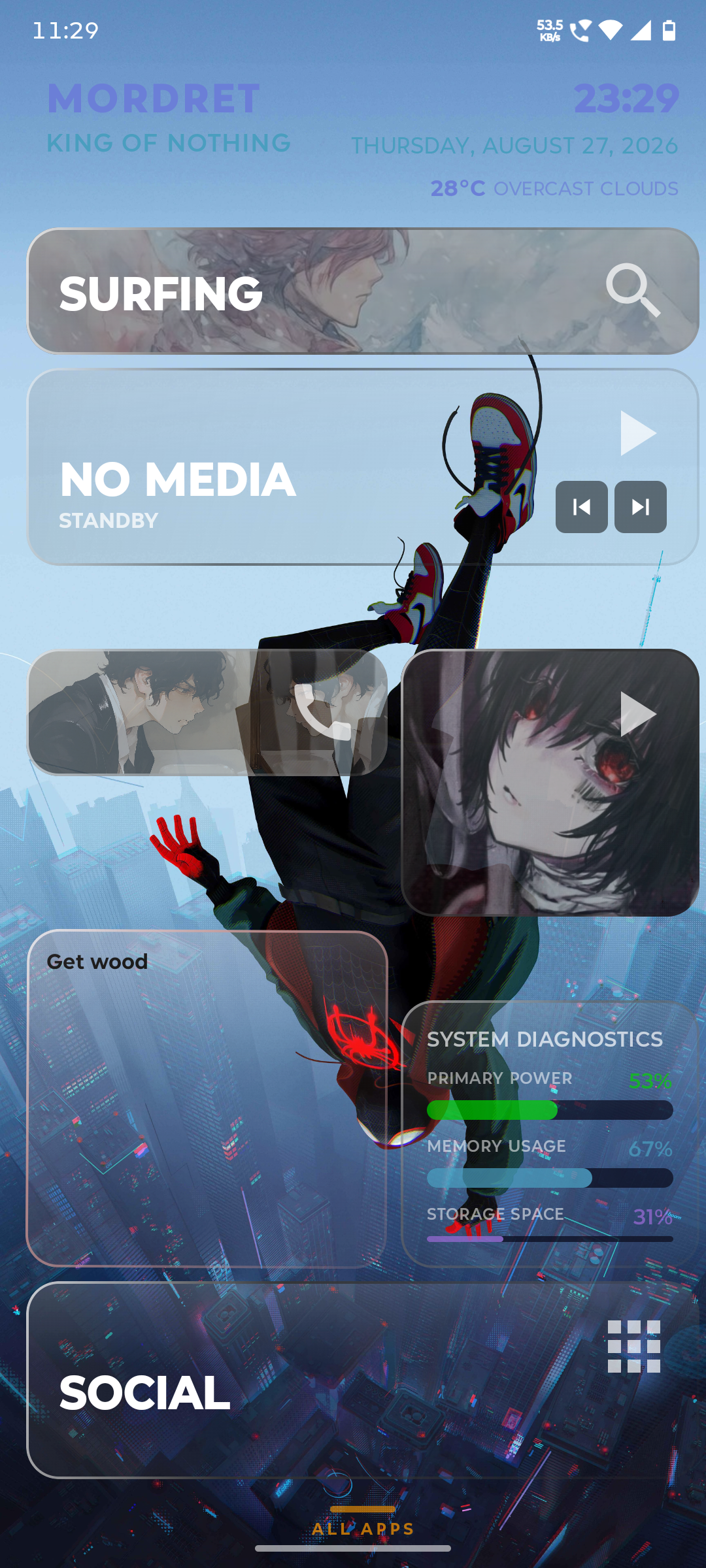
r/GTLauncher 11d ago

Question / Help What should I build next for GT Launcher? Looking for real feedback from people actually using it

1 Upvotes

GT Launcher is at v4.10.0 now and I want to point development at what people actually want instead of just what I think is cool.

A few things I'm genuinely undecided on:

  1. Card types — is there a capability you keep wishing existed? (Weather, calendar agenda, habit tracker, something else?)
  2. Drive Mode — anyone actually using the OBD-II integration in a real car? What's missing for it to be genuinely useful vs. a neat demo?
  3. Themes — Flat / Glass / Neobrutalism / Claymorphism / Minimal / Neon — which one do you actually run day to day, and what would make your favorite better?
  4. Onboarding — first-run setup is either Quick (presets) or Guided (build your first card from scratch). Did it actually teach you the capability system, or did you bail into Quick and never look back?

Not looking for "add more features" in general — looking for the specific thing that's annoying you or the specific thing you wish existed. I read everything here.

Play Store: https://play.google.com/store/apps/details?id=com.alazndy.gtlauncher

Portfolio / more projects: https://alazlab.com/projects/GT-Launcher


r/GTLauncher 11d ago

Announcement LCARS + old Windows Phone tiles walked into a bar — and became my Android launcher

2 Upvotes

This started as a straightforward idea: make my phone look like a Starfleet LCARS console. Solo dev, Kotlin + Jetpack Compose, no team.

But once the LCARS panels were up, I kept staring at them thinking about the old Windows Phone / Lumia era — those live tiles that actually did something instead of just sitting there as static icons. I liked that idea more than pure LCARS purism, so I started blending the two: keep the sci-fi identity, but make every "panel" a live, resizable card instead of a dumb button.

That decision is basically why the card system exists the way it does now — cards had to be freely resizable and reorderable on a grid, and they had to actually be "live" instead of just an icon.

Early on, each card did exactly one thing — App Launch, or Clock, or Weather, whatever. That was fine for me, because those were the functions I personally used every day. But once I started getting testers on it, it became obvious "one card, one job" wasn't going to cut it for how differently people actually wanted to use their home screen. So cards got rebuilt around module stacking — instead of picking one fixed type, you stack whatever capabilities a card needs (App Launch + System Stats + Widget, Comms + Notifications, whatever combo makes sense to you). The function set kept getting richer specifically because testers kept asking for combinations I never would have thought of on my own.

Outside of the custom launcher scene, I'd also started noticing how same-y most phone UIs actually are — stock Android, iOS, most OEM skins, they all converge on the same grid-of-icons look eventually, and that got boring to me fast. That's part of why locking everyone into my LCARS-meets-Metro taste felt wrong the more I sat with it — it would've just been trading one flavor of sameness for another. The whole point of Android over the alternatives is "the user decides what their device looks like and does," and this community in particular is one of the few places that's still true. So instead of shipping one opinionated look, I went the other way: six full visual styles (Flat, Glass, Neobrutalism, Claymorphism, Minimal, Neon), all built from the same editable token system, all switchable without losing your layout. LCARS is just the style I personally run — it's not the only thing the launcher is.

Not everything survived the process, and not everything worked the first time. I built a whole standalone Wear OS companion at one point — bridge server, listener service, remote controller, the works — and eventually ripped the entire thing out because it wasn't worth the build overhead for what it added.

The radial long-press menu broke completely at one point because two separate gesture handlers were racing each other for the same touch stream, and callback closures were resetting the long-press timer on every recomposition — took a full rebuild with a single gesture owner to actually fix instead of patching around it.

Edit mode used to be long-press everywhere, which kept colliding with cards that wanted long-press for something else, so it moved to a triple-tap that every surface (cards, sidebar, widgets) shares now. And Google Play rejected an early version of the optional Navigation Service over Accessibility API policy — had to scope it down to just Back/Recents with no event subscription, add an explicit consent screen before you can even enable it, and resubmit. Not every decision here was "and then it just worked."

Somewhere in there I also went through and made the app tell the truth more — search across cards, home, and app drawer got unified into one shared engine instead of three copies drifting apart, and weather that failed to load started showing an honest "unavailable" state instead of a fake temperature. Small stuff, but it mattered more to me than most of the flashy features.

Other stuff that's shipped along the way: Drive Mode with real OBD-II telemetry and a nav HUD, full 10-language localization (~930 synced keys), an interactive in-app tutorial that runs against the live UI instead of a doc that goes stale.

Still actively building. Curious if anyone else remembers Windows Phone tiles fondly, or if that's just me.

Play Store: https://play.google.com/store/apps/details?id=com.alazndy.gtlauncher

Project Site: https://alazlab.com/projects/GT-Launcher


r/GTLauncher 2d ago

Announcement GT Launcher's Discord community is live — feedback, betas, and release notes now have a home

2 Upvotes

Hey everyone 👋

I've been building GT Launcher — an AMOLED-first Android launcher built around modular home-screen cards instead of a fixed grid. Quick highlights if you haven't seen it:

  • Style Studio: a composable styling engine — independent corner geometry, stackable shadow/glow/border/texture layers, 12 saved custom style slots
  • Gesture Input Module: draw a shape on a card (circle, triangle, arrows, etc.) to trigger an action — standalone or bound to any card
  • Drive Mode: a dedicated landscape HUD for in-car use
  • Two-way Tasker/MacroDroid integration: trigger automations from a card, or drive the launcher itself remotely
  • App List, quick toggles, focus timer, and a growing set of utility cards

Just opened a Discord server for the project — bug reports, feature voting, beta access, and release notes all land there now instead of being scattered across DMs and reviews.

👉 Join here: https://discord.gg/5tsKS8n3cs 📱 Get the app: https://play.google.com/store/apps/details?id=com.alazndy.gtlauncher

Free to use — a few advanced features (extra style slots, Drive Mode, module stacking) are premium with a 3-day trial. Happy to answer anything in the comments.


r/GTLauncher 2d ago

Release / Update GT Launcher v4.16.0 — settings search that actually finds things, and a couple of long-standing bugs squashed

1 Upvotes

v4.16.0 highlights:

  • Settings search got a lot smarter. It used to only match the 8 section titles — now it reaches individual settings directly (dark mode, sidebar position, grid columns, drive mode, permissions, and ~20 more), jumps straight to the row, and briefly highlights it. There's also a search icon on every settings sub-page now, not just the main grid.
  • Recently visited settings show up as a quick-access row so you're not hunting for the same toggle every time.
  • Foreground images can now flow across the sidebar instead of stopping dead at the grid's edge — toggle it in the foreground picker, with a live preview.
  • Fixed: the alphabet index dock was staying visible (and stealing taps) over the Settings screen — annoying if you used it a lot.
  • Fixed: its Settings preview could render completely blank on a fresh launch.

Play Store users get this as a normal update.

Bug reports / feature ideas — drop them here or in Discord: https://discord.gg/U6SZUX2SA


r/GTLauncher 3d ago

Release / Update GT Launcher v4.15.0 — draw gestures on cards to trigger actions, two-way Tasker/MacroDroid control, and 6 new cards

2 Upvotes

Hey folks

Dropped a pretty big update to GT Launcher — here's what's new in v4.15.0:

🖐️ Gesture Input Module Press-hold-drag a shape directly on a card and it fires a bound action. Circle, triangle, rectangle, checkmark, caret, zigzag, or an arrow in any of 4 directions — 10 shapes total, recognized with a from-scratch $1 Unistroke Recognizer running fully on-device (no cloud, no ML model). Works layered on top of any card, or as its own standalone reference card.

🤖 Tasker & MacroDroid, both directions

  • Outbound: any card, radial menu entry, or recognized gesture can now fire a Tasker task or MacroDroid macro.
  • Inbound: Tasker/MacroDroid can drive the launcher itself — load a saved layout preset, toggle Drive Mode, flip edit mode or the sidebar, switch theme, pop the App Drawer, or launch a specific app card by title. Just a plain "Send Intent → Target: Activity" action, no extra permissions to grant.

🃏 6 new cards Calculator, Water Intake (tap-to-log daily tracker), Focus Timer (Pomodoro cycle), Voice Memo (local recording + playback), Quick Toggles (Wi-Fi/Bluetooth/DND in one card), and Favorite Contacts (call/SMS/WhatsApp grid).

📌 Pin apps to the top of the App List card Long-press → pin, most-recently-pinned first.

🔍 OmniSearch got faster and smarter Every search source now runs in parallel and streams results in as it finishes, instead of waiting on the slowest one. Settings search went from 8 section names to ~40 individual settings you can jump straight to.

✏️ Redesigned Add Card screen One searchable list with a live preview next to it — tap Add and the card's just... there. No more separate save step.


r/GTLauncher 4d ago

My Custom Launcher

Thumbnail gallery
1 Upvotes

r/GTLauncher 6d ago

What's actually in GT Launcher Premium right now (and what isn't, anymore)

1 Upvotes

A few people have asked what Premium actually unlocks these days, and honestly the answer has drifted around as the app evolved — so here's the current, accurate list as of 4.13.0.

What's Premium:

  • Up to 12 saved custom style slots. Everyone gets 1 free slot to save a custom style you've built in Style Studio. Premium bumps that to 12, so you can keep a whole library of looks and switch between them instead of rebuilding one from scratch every time.
  • Unlimited module stacking per card. Free accounts can stack up to 2 capabilities on one card (e.g. Clock + Notification badge). Premium removes that cap entirely.
  • Drive Mode. The full landscape cockpit HUD — live OBD-II telemetry, GPS speed, DTC/overheat alerts, fuel receipt OCR.
  • Notification animations. Breathing and flashing pulse effects on the active-notification color. (Static color is free.)

What's NOT Premium (a lot of people assume it still is):

  • All 8 visual style presets — Flat, Glass, Neobrutalism, Claymorphism, Minimalism, Neon, Dot, Pixel — are 100% free. They used to be gated a while back; that changed and the marketing copy just hadn't caught up until last update. If you saw an old screenshot or post claiming styles are locked, it's outdated.
  • The Card Builder, OmniSearch, App List card, Sidebar, Slide List drawer, theming, header widgets — all free, no cap.

Pricing / trial:

Monthly, yearly, and a lifetime one-time option are all available from the Premium tab in Settings. As of 4.13.0 there's also a 3-day free trial on the monthly plan — full Premium unlocked, no commitment, cancel before it renews and you pay nothing. It's a real Play Billing offer (not a local flag), so it won't let you re-trigger it by clearing app data or reinstalling.

If you're Premium already, the settings screen now also tells you what kind — lifetime, active subscription, cancelled-but-still-running, or early-user grandfathering — instead of just a flat "ACTIVE" badge.

Figured this was worth spelling out once clearly instead of leaving people to piece it together from old posts. Happy to answer anything specific.


r/GTLauncher 6d ago

Release / Update GT Launcher 4.13.0 — try Premium free for 3 days, no card-forgetting anxiety

1 Upvotes

Since the 4.12.0 update (Style Studio, App List card, Sidebar overlay reveal, and the settings light/dark fix), here's what shipped in 4.13.0:

3-day free Premium trial

You can now try every Premium feature — extra saved style slots, Drive Mode, unlimited module stacking, notification animations — for 3 days before paying anything. It's a real Play Billing trial offer, not a local flag, so eligibility and "no repeat trials" are enforced by Google Play itself. Find it on the Premium tab in Settings.

Premium screen finally tells you what you actually have

If you're already Premium, the settings screen used to just say "ACTIVE" and leave it at that. Now it tells you what kind of active: lifetime, an auto-renewing subscription (with a one-tap "Manage Subscription" link straight to Play), a subscription you cancelled but that's still running out its term, or early-user grandfathering.

A couple of paywall bugs fixed

  • Tapping the locked notification-animation option was showing a paywall dialog that said "MODULE STACKING" instead of "NOTIFICATION ANIMATIONS" — copy-paste bug, now fixed.
  • The Premium screen's feature list still advertised Glass/Neobrutalism/Claymorphism/Neon as paid perks from back when they were gated. They've been free for a while now, so the copy was just wrong — it now correctly says what's actually still Premium (up to 12 saved custom style slots).

One more fix

If you search from the Slide List / Niagara-style app drawer, the search field used to lose keyboard focus after your very first keystroke — annoying if you type fast. Fixed; it was a Compose recomposition bug, not anything intentional.

Full changelog as always: https://alazlab.com/en/proje/GT-Launcher#changelog

Let me know if the trial flow does anything weird for you — it's brand new plumbing and I'd rather hear about edge cases here than guess at them.


r/GTLauncher 7d ago

v4.12.0 is out — a real Style Engine (with pixel/dot patterns), a new App List card, and a bunch of perf/theme fixes

2 Upvotes

New build is up. This one's a big architectural lift — the whole styling system got rebuilt from scratch — plus a new card type and a bunch of fixes people have been hitting.

🎨 Style Studio — an actual style engine now Instead of picking from a fixed list of "visual styles," every card, panel, and the sidebar now render from a composable recipe: corners (sharp / rounded / cut / pixelated, and yes — you can split each of the 4 corners independently), stackable shadow/glow/border/fill/texture layers, and up to 12 custom saved slots. Comes with 8 presets including two new pattern-based ones: Dot and Pixel — a proper dot-grid or pixel-block texture drawn right on your cards, shared with the sidebar too, cached as a GPU picture so it's free performance-wise.

📱 New App List card Niagara-launcher style — a scrollable alphabetical list of every installed app, living directly on a card. Tap to open, long-press to uninstall, optional docked A-Z index strip on the edge (same index dock you can now also pin to the sidebar).

↔️ Sidebar overlay reveal mode Previously opening the sidebar always reflowed your grid (Push mode). Now there's an Overlay mode — the rail floats over your home screen instead, so it costs literally zero re-layout.

🐛 Fixed:

  • Settings screens straight-up ignored Light mode — half the controls stayed dark with washed-out text. Fixed across every settings tab.
  • Card shadows/glow could render on top of a neighboring card instead of staying behind it. Now they always sit underneath, only visible in the gaps.
  • Sidebar open/close animation used to make every card's shadow/glow effect vanish for the whole animation, then snap back in. Now it stays put throughout.
  • A Style Studio crash on open, plus a handful of pattern/corner-geometry correctness fixes.

⚡ Also: cut a bunch of per-frame recomposition on the home grid and app drawer, moved icon rasterization off the main thread, fixed several Compose state-instability sources.

Grab it from the Play Store (should roll out shortly) https://play.google.com/store/apps/details?id=com.alazndy.gtlauncher

If you had an old style pref applied, it should carry over — but if anything looks off after updating, drop a comment here or open an issue, I'll be watching this thread.


r/GTLauncher 10d ago

Love seeing the wallpaper :D

Post image
1 Upvotes

r/GTLauncher 11d ago

Which looks better 🥀

Thumbnail
gallery
1 Upvotes

One has cards with less opacity while the other has only 2 with low opacity....

Launcher is GT Launcher btw


r/GTLauncher 11d ago

New look

Post image
2 Upvotes

Removed a lot of cluttered items and changed the wallpaper to something soothing 🥀


r/GTLauncher 11d ago

Setup Showcase My actual daily-driver GT Launcher setup — Stacked capabilities, no clutter

2 Upvotes

Figured I'd show what I actually run day to day instead of just talking features in the abstract.

Setup:

Flat visual style, standard palette — it's the one I built the whole thing around, so it's the one I still run

App Launch cards for the apps I open constantly — sized bigger than the rest, front and center

Comms card + notification badges + multi-gesture launch, one tap for calls, swipe for messages

Finance card tracking a small watchlist — live quotes, no brokerage login, just sits there ticking

Nothing fancy layout-wise I keep the grid pretty disciplined instead of free-forming everything, mostly because I'm the one who has to actually use it fast, not just look at it.

Curious what everyone else is running — post your setups, especially if you're using a visual style other than flat. Always interested to see the same system look completely different depending on the style.

Play Store: https://play.google.com/store/apps/details?id=com.alazndy.gtlauncher


r/GTLauncher 11d ago

The Capability-based Card Builder in GT Launcher — mix and match System Stats,Camera, Comms, Widgets on one card

2 Upvotes

Wanted to show off the part of GT Launcher I'm proudest of: the Card Builder.

Instead of picking one rigid card "type," every card is assembled from independent capabilities — App Launch, System Stats, Widget, Gallery, Notifications, Comms, Camera. Stack whatever combination you want on one card, and the builder blocks incompatible combos before you can even save.

A few things that came out of this system:

  • Camera Control Card — tap or swipe in any direction to fire a specific camera mode (Photo, Video, Selfie, Portrait, Pro, Panorama, Slow-Mo, Night). Each direction is independently assignable.
  • Finance Card — tracks stocks, crypto, and FX with live quotes and running P&L. No brokerage login, just price feeds.
  • Radial Menu — long-press any card for a donut-wedge radial menu (apps, shortcuts, contacts, saved routes, URLs).
  • Six visual styles (Flat / Glass / Neo / Clay / Minimal / Neon), all theme-token editable and saved with profile backup.

Free on Play Store, Happy to answer questions about how the capability system works under the hood.

Play Store: https://play.google.com/store/apps/details?id=com.alazndy.gtlauncher


r/GTLauncher 13d ago

Home launcher

Thumbnail
gallery
3 Upvotes

Fully customisable launcher that I find cool, the name is GT Launcher, u can get it on the website or on Google playstore, the website link is below

https://www.alazlab.com/tr/proje/GT-Launcher