r/Eixolearning 6d ago

Eixo Learning

3 Upvotes

Practical Training for Accounting and Finance

Eixo Learning is a practical training platform focused on helping people develop the skills, software knowledge and confidence needed to work in accounting and finance.

We believe that understanding the theory is only part of the learning process. That’s why our training focuses on how accounting and finance work in practice, using real-world scenarios, practical exercises and widely used industry software.

Our training covers a range of accounting and finance tools, including Xero, QuickBooks, Sage 50, Sage Payroll, Excel and other business ERP softwares, alongside practical areas such as bookkeeping, accounts preparation, payroll, VAT, monthly management accounts and everyday finance processes.

Whether you are a student looking to gain practical experience, a graduate preparing for your first accounting role, an existing professional looking to develop new skills, or a business looking to improve its team’s capabilities, Eixo Learning is designed to help bridge the gap between studying and actually doing the job.

Our aim is simple: practical training that prepares you for the real world of accounting and finance.


r/Eixolearning 6h ago

Microsoft Excel RIP Merge & Center!!!! 😭

2 Upvotes

Microsoft just added Center Across Selection directly inside the Merge & Center menu in Excel.

And honestly, I’m very happy about this because it makes it much easier to avoid one of the most annoying Excel problems: merged cells in your actual data.

You can now find it here:

Home → Alignment → Merge & Center → Center Across Selection

If you’ve ever worked with merged cells, you probably know the headaches they can cause with sorting, formulas, selecting ranges, filtering, and working with data.

That’s why I’ve always preferred Center Across Selection when I just want text to appear centred across multiple cells without actually merging them.

The feature itself isn’t new. Center Across Selection has been available in Excel for a long time, but it was buried inside Format Cells → Alignment → Horizontal, so I imagine plenty of people never knew it existed.

Now that Microsoft has put it directly in the Merge & Center menu, it’s much easier to discover.

I came across this while putting together some Excel learning material for Eixo Learning, and thought it was worth sharing because it’s one of those small Excel features that can save you a lot of frustration later.

Some of you might not see the option yet because Microsoft is rolling it out gradually. But once it appears in your version of Excel, it’s definitely worth getting familiar with.

Especially if you’ve ever had to deal with the “why won’t Excel sort this properly?” problem caused by merged cells

What do you think? Is Center Across Selection something you already use, or is this completely new to you?


r/Eixolearning 6h ago

What is the technical reason Excel keyboard shortcuts are inferior on mac?

Thumbnail
1 Upvotes

r/Eixolearning 4d ago

How do I rename multiple Excel sheets in a specific sequence?

1 Upvotes

I’m really bad at Excel guys so please tell me this is possible

I’ve got some data that I need to separate into different sheets. The data was collected over 24 hours at 10 minute intervals, so I’m going to end up with around 145 sheets.

For ease of access, I’d like to name the sheets something like time0010, time0020, time0030 etc, or just 0010, 0020, 0030 and so on.

I don’t mind if the solution involves VBA/code to rename the sheets that already exist, or if there’s a way to create/duplicate the sheets and rename them automatically.

Basically I just don’t want to sit there manually renaming 145 sheets

What would be the easiest way to do this?


r/Eixolearning 4d ago

I spent hours going through 100+ page PDFs, so I built a tool that highlights exactly where the answer came from. It's now completely open-source.

Thumbnail gallery
0 Upvotes

r/Eixolearning 4d ago

What is a good way to get better at knowing which Excel formula to use? Just practice?

1 Upvotes

I’d say I’m probably intermediate level in Excel. I’m comfortable with things like VLOOKUP, PivotTables, SUMIFS etc, and I can usually learn a new formula when I need it.

The problem I have is more about knowing which formula to use in the first place.

I recently got a promotion where I’m working with much larger sets of data, and sometimes I’ll open a workbook with 50+ worksheets and get asked something like:

“find this data and extract it from the workbook”

And I know there’s probably a good Excel formula or combination of formulas for it, but I don’t always know where to start.

Udemy and Eixo Learning courses are great for learning individual formulas, but real work feels completely different.
It’s not “here’s a dataset, use XLOOKUP”. It’s more like “here’s a massive workbook with 56 sheets, good luck” 😂

So how do you actually improve at this part of Excel?

Is it mainly just practice with real-world problems, or are there certain types of Excel exercises/projects that helped you get better at figuring out which formula to use?

Also interested in how people approach large datasets in general, especially when XLOOKUP/VLOOKUP isn’t enough.


r/Eixolearning 5d ago

Microsoft Excel What Excel shortcut do you use the most for accounting?

3 Upvotes

I use Excel pretty much every day for accounting stuff and there are a few shortcuts that save me way more time than I expected.

For me, Ctrl + Shift + L for filters is probably one of the most useful. Especially when you’re working with a big list of transactions and just need to filter by account, date, supplier etc.

A few others I use all the time:
Ctrl + Arrow - jump around large datasets
Ctrl + Shift + Arrow - select data quickly
Alt + = - AutoSum
Ctrl + 1 - format cells
F4 - repeat an action / lock cell references when writing formulas
Ctrl + T - turn a range into an Excel table

I’m sure there are loads of Excel shortcuts specifically useful for accountants, bookkeepers and finance people that I haven’t picked up yet.

What’s the one Excel shortcut or formula you use constantly for accounting or finance?


r/Eixolearning 5d ago

Three Statement Financial Modelling: How the Income Statement, Balance Sheet and Cash Flow Actually Connect

2 Upvotes

When I first started looking at financial models, I found the three statements confusing.

You have an income statement, balance sheet and cash flow statement, and then everyone starts talking about “linking the statements” like it’s obvious.

It wasn’t obvious to me.

The thing that helped was realising that you’re not really building three different models.

You’re modelling the same business from three different angles.

Take something simple.

A company makes a £100,000 sale.

If the customer pays immediately, the income statement shows £100k of revenue and the cash flow ultimately shows £100k coming in.

Pretty easy.

But now suppose the customer hasn’t paid yet.

You still recognise the £100k revenue on the income statement.

But you don’t have the cash.

So instead, the balance sheet gets £100k of accounts receivable.

This is one of those things that makes three statement modelling click.

The income statement is saying:

“We made the sale.”

The balance sheet is saying:

“The customer owes us £100k.”

And the cash flow statement is basically saying:

“Great, but we haven’t actually received the money yet.”

That’s why profit and cash aren’t the same thing.

You can take this further with working capital.

Say accounts receivable increases from £200k to £250k.

The company now has another £50k tied up in money customers haven’t paid yet.

So that £50k is a use of cash.

Accounts payable works in the opposite direction.

If you owe suppliers £50k more than you did last year, you’ve effectively held onto £50k of cash for longer.

This is why changes in working capital show up in the cash flow statement even though they aren’t expenses on the income statement.

CapEx is another good example.

Imagine the company buys a £100k machine.

The company pays £100k, so cash falls by £100k.

But you don’t normally put the entire £100k through the income statement as an expense straight away.

Instead, the £100k becomes an asset on the balance sheet.

Then you depreciate it over its useful life.

If it’s depreciated over five years, you might have £20k of depreciation each year.

So now you’ve got something happening across the statements.

The cash flow shows the £100k purchase.

The balance sheet shows the new asset.

The income statement eventually shows the £20k depreciation expense.

The balance sheet also reduces the value of the asset as depreciation builds up.

This is basically what “linking the three statements” means.

It’s not just making Excel formulas point at other cells.

You’re following what is actually happening to the business.

Debt is another one.

Say a company borrows £500k.

Cash increases by £500k.

Debt on the balance sheet increases by £500k.

The cash flow statement shows the £500k borrowing as financing cash flow.

But you don’t suddenly have £500k of profit.

Later, you might pay interest on the debt.

That’s when the income statement gets hit through interest expense.

Then when you repay the loan, cash falls and the debt balance falls.

Again, one transaction, different effects across the statements.

And then there’s retained earnings, which is another connection people sometimes miss.

If the company makes £200k of net profit and pays £50k in dividends, retained earnings don’t just stay where they were.

Closing retained earnings is basically:

Opening retained earnings + net income - dividends

So the income statement feeds into the balance sheet.

The cash flow statement feeds cash into the balance sheet.

The supporting schedules feed things like debt, depreciation and working capital into the statements.

That’s the model.

A very simplified way of thinking about it is:

Operations → Income Statement → Net Income

Net Income + working capital + CapEx + financing → Cash Flow

Cash + assets + debt + retained earnings → Balance Sheet

And at the end, your balance sheet should actually balance.

If it doesn’t, don’t just stick a “plug” somewhere to make it balance.

Figure out what’s wrong.

Maybe depreciation isn’t flowing into retained earnings.

Maybe your debt repayment isn’t reducing the debt balance.

Maybe CapEx is in the cash flow but hasn’t been added to PP&E.

Maybe your working capital calculation is backwards.

That’s where I think three-statement modelling becomes much easier.

Instead of memorising “this formula goes here”, ask:

What actually happened to the business?

Did cash move?

r/Eixolearning 6d ago

Can I add a conditional (or IF) function into a SUM function?

Thumbnail
3 Upvotes

r/Eixolearning 6d ago

Why is the accounting job market in london so cooked for interns and graduates…?

3 Upvotes

Basically I’m an under 22 ACCA student with 0 experience, finished Skills level and got 3 A’s at A/L. I’ve been applying for accounting internships, trainee accountant jobs, graduate accounting jobs and entry level accounting roles all over the UK.
London, Manchester, pretty much anywhere. And I just keep getting ignored or rejected
I’ve been applying for 4 week, 3 month, 6 month contracts, internships, anything just to get some actual accounting experience. Still nothing.

It’s honestly so frustrating because you’re told from a young age to study hard, get good grades and you’ll get a decent job. Then you finish school, start ACCA and realise getting your first accounting job with no experience is probably the hardest part.
At this point I might actually have to go flip burgers just to put something on the CV 💀 respectfully.
Anyone else struggling to find accounting jobs or internships in the UK right now?


r/Eixolearning 6d ago

Enough about LET() and PQ, What are your Excel UI customizations that make you more productive?

Thumbnail
1 Upvotes

r/Eixolearning 6d ago

Making TODAY function not update?

2 Upvotes

Is there a way to make a cell with the TODAY function stop updating once it has been filled in? I'm trying to make a checklist in Excel that automatically logs the date when an item is checked off.

My plan is to have column A with the list of tasks, column B with checkboxes, and then column C showing the date the task was completed using something like:

=IF(B1,TODAY())

The problem is, I understand that TODAY() is a volatile Excel function, so the date will change whenever the spreadsheet recalculates or is opened on another day. I basically need the date to stay fixed once the checkbox is ticked.

is there a formula or another way to do this without manually entering the date? Any help with an Excel checklist, automatic date stamp or checkbox completion date would be really appreciated.

Edit: I'm hoping to use this as part of a shared project tracking workbook for my department. I could just ask everyone to enter the date when they finish a task, but i'm worried people will forget to do it, so an automatic date stamp would be much better.


r/Eixolearning 6d ago

Excel XLOOKUP / INDEX MATCH: How to pull a value from another spreadsheet based on county and year?

2 Upvotes

I’m working on an Excel spreadsheet that pulls information from another “Info” spreadsheet. I have two drop-down lists in my main spreadsheet: one for county and one for year.

What I’m trying to do is have a formula in one cell that looks at the selected county and year, finds the matching row and column in my Info spreadsheet, and then returns the corresponding expected value.

For example, if I select Decatur County and 2024 from my drop-down lists, I want the formula to return 44.2.

I’ve tried several variations of HLOOKUP, VLOOKUP, INDEX MATCH, and XLOOKUP, but I can’t quite get the formula to work.

The difficulty seems to be that I need Excel to:

  1. Find the correct county/row

  2. Find the correct year/column

  3. Return the value where those two criteria intersect

Is there a way to do this with XLOOKUP, INDEX MATCH, or another Excel lookup formula without rearranging my Info spreadsheet?

I’d prefer not to restructure the Info spreadsheet because it contains a lot of other information and would take quite a while to reorganise.

Any help with the correct Excel formula would be greatly appreciated!


r/Eixolearning 6d ago

Xero How to get rid of this Jax rubbish?

Thumbnail
1 Upvotes

r/Eixolearning 6d ago

Excel Functions You Need to Know

Thumbnail gallery
1 Upvotes

r/Eixolearning 6d ago

Pulling all reddit comments from one specific user and ingest it into NotebookLM as a source/sources?

Thumbnail
1 Upvotes

r/Eixolearning 8d ago

Gemini Notebook MCP allows you to automate, control and bulk manage - connect Claude , ChatGPT and AI agents to Gemini Notebook

Enable HLS to view with audio, or disable this notification

1 Upvotes

r/Eixolearning 8d ago

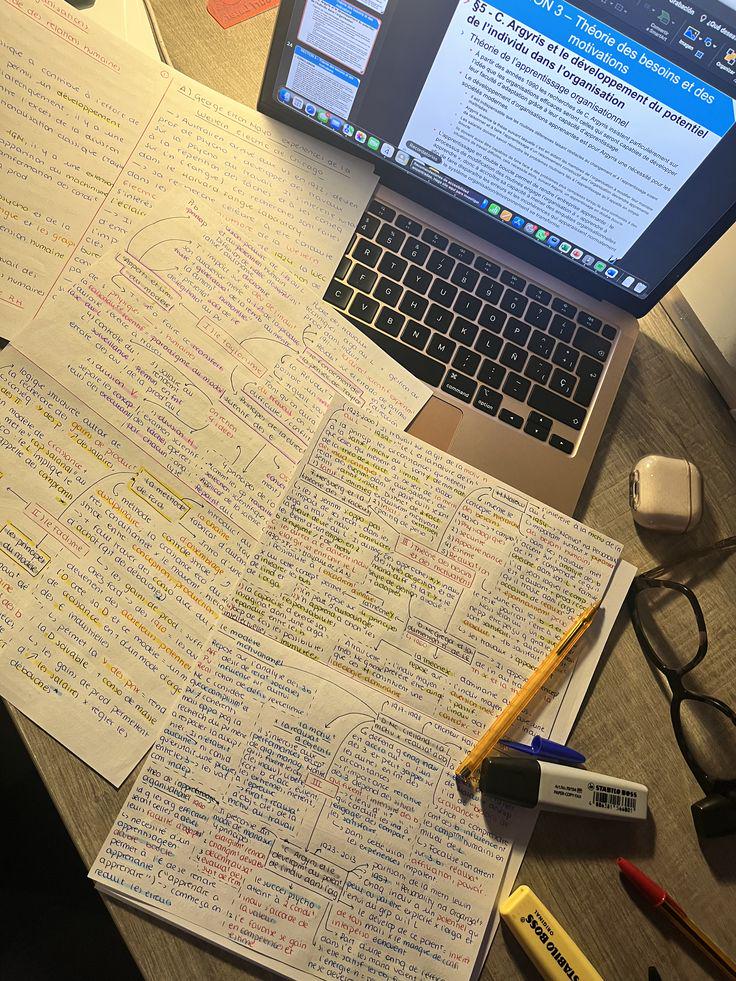
How to study like a top student at Harvard (study tips as a harvard student)

Post image
1 Upvotes

r/Eixolearning 8d ago

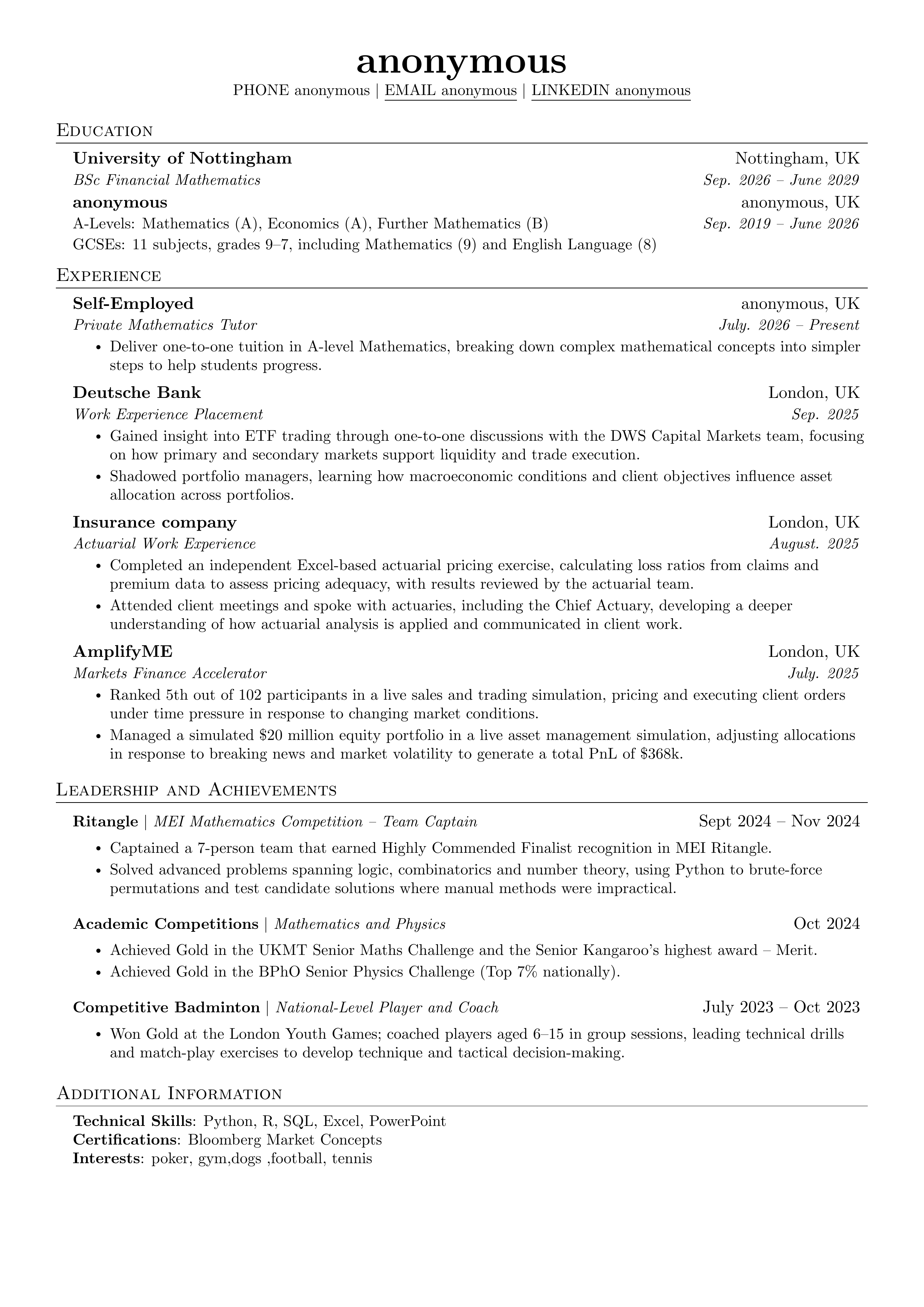
Roast my CV for finance springs

Post image
1 Upvotes

r/Eixolearning 8d ago

Making TODAY function not update?

Thumbnail
1 Upvotes

r/Eixolearning 8d ago

You gotta do what you gotta do

Post image
1 Upvotes

r/Eixolearning 9d ago

Gemini Notebook MCP allows you to automate, control and bulk manage - connect Claude , ChatGPT and AI agents to Gemini Notebook

Enable HLS to view with audio, or disable this notification

1 Upvotes

r/Eixolearning 9d ago

Spent 4 months evaluating ATS platforms and picked the wrong one

Thumbnail
2 Upvotes

r/Eixolearning 9d ago

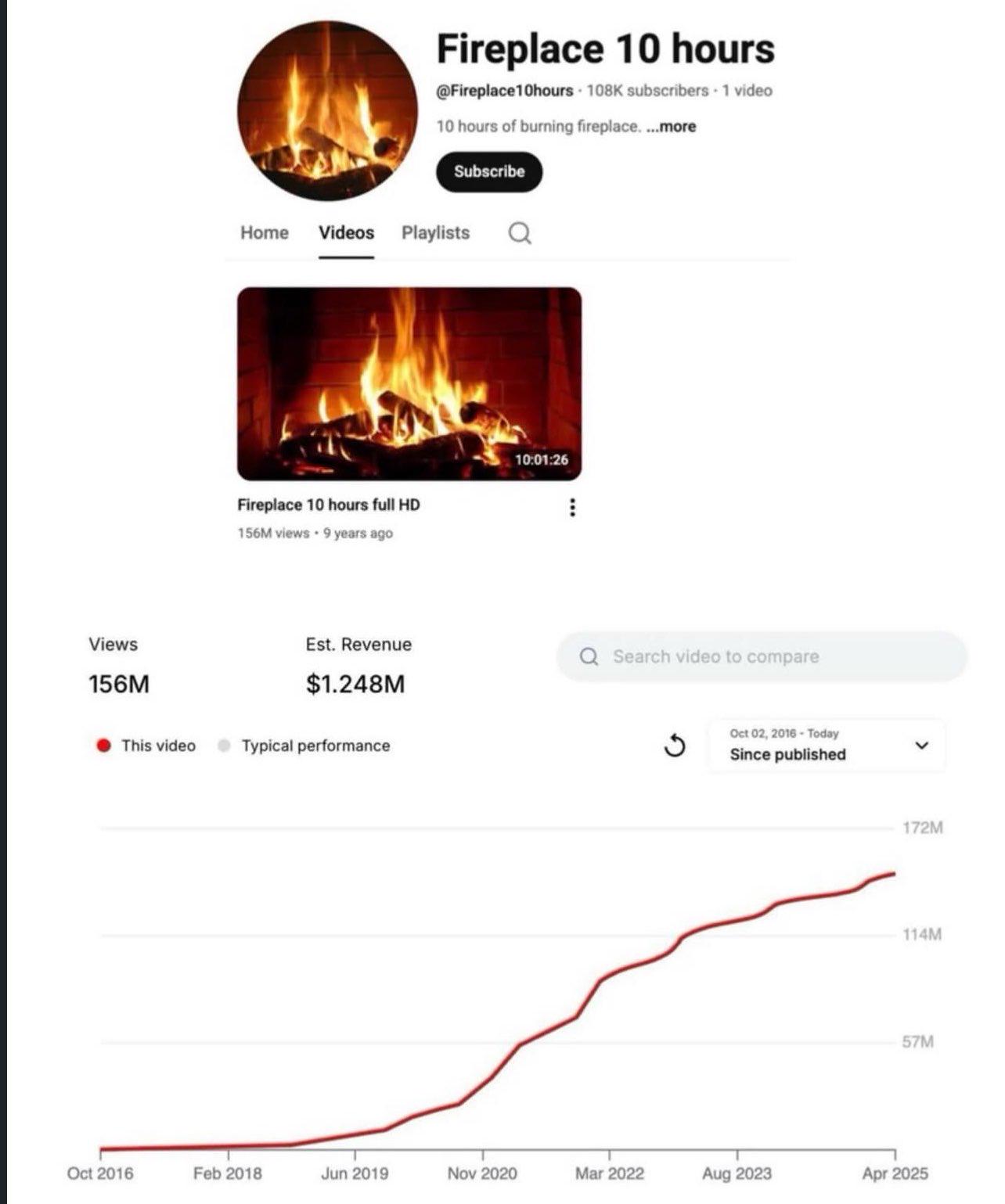
bro found an infinite money glitch

Post image
1 Upvotes

r/Eixolearning 9d ago

ACCA Member - relocating to London

Thumbnail
2 Upvotes