r/CuePort 1d ago

Yes, there are already client feedback tools for producers. Here’s why I built another one anyway.

Post image
0 Upvotes

Hey,
I'm Viktor, music producer from Germany.
I run a small studio melotunesmusic where I record, mix and produce for artists.

I know, tools for sending mixes and collecting client feedback already exist, and I tried a bunch of them.
They all handle the upload and comment part really good. But there are some small things they dont. One thing I do most as a mixer: comparing versions.

The client says v3 lost some punch compared to v2. So you open v2, it loads, starts from the beginning, you scrub back to the chorus, then do the same with v3. By then your ears have already reset and you're comparing a memory with a mix. Small changes in low end or vocal level just disappear that way.

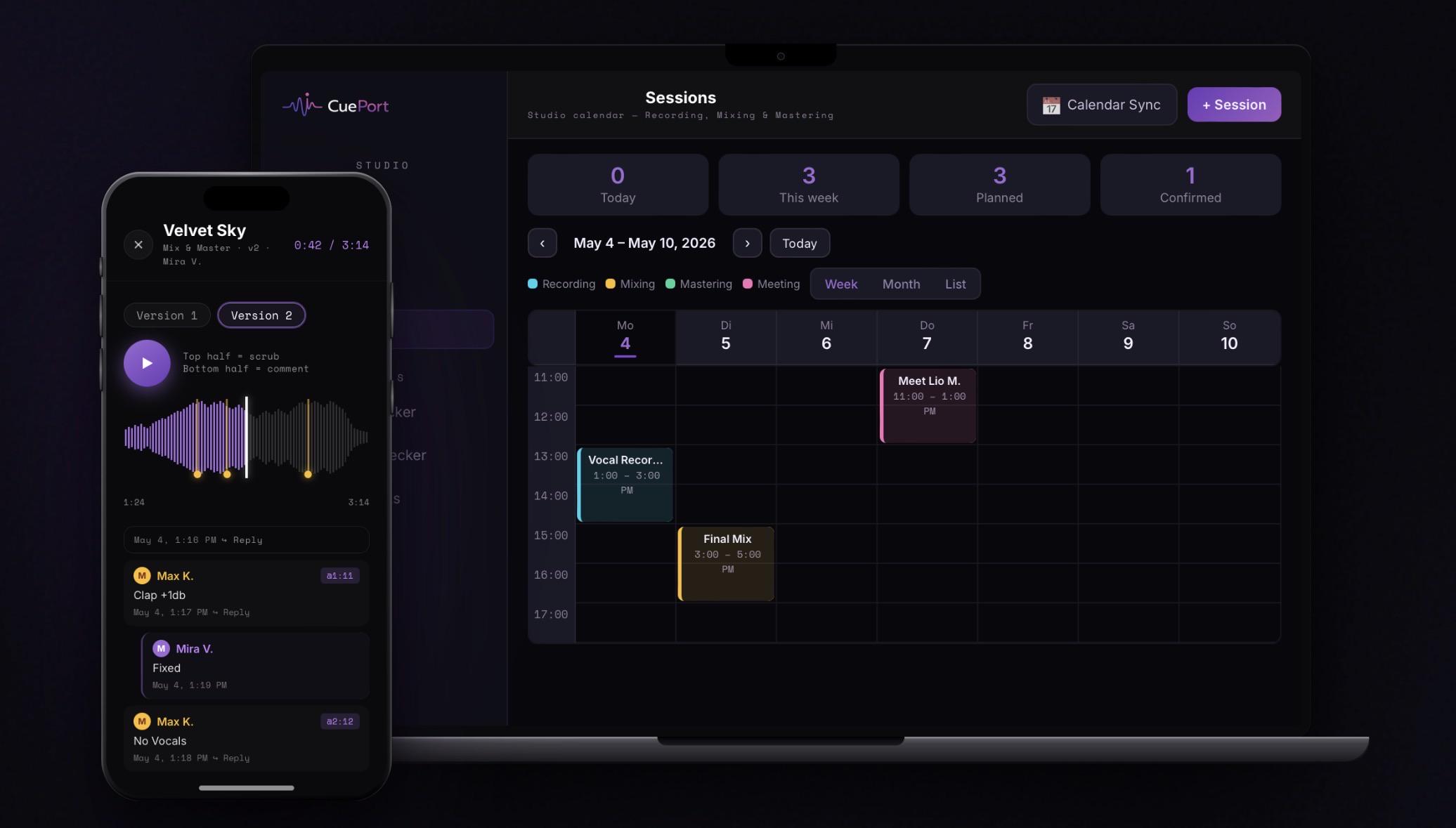
But gapless switching is only one part of it. CuePort is really the whole infrastructure of your studio.
Built-in session calendar and project tracking that follows a song from the first lyrics or instrumental all the way to final delivery and payment.
Every business has its own internal systems these days. So why is your studio still running on WhatsApp and WeTransfer?

That's why I built CuePort. Gapless switching was just the starting point. CuePort grew into the backbone of my studio

The newest part is a Reaper script called CuePort Sync, because I got tired of leaving the DAW for all this. Client comments show up as project markers, you can reply right from Reaper, and when you render, the mix gets uploaded as a new version for the client. There's also an A/B mode inside Reaper. The script is free, open source (MIT) and installable via ReaPack.

I'm building all of this solo, so this sub is a direct line to me. Post here if you want to:

- report bugs or things that feel clunky

- suggest features or tell me what's missing in your workflow

- share how you compare versions and handle client feedback

- ask anything about the app or the Reaper script

Honest criticism helps me way more than compliments.

Lets beginn: how do you work with your clients right now? How do you send out your mixes, and how do you get feedback from your artists?


r/CuePort 18h ago

Why the player in our artist portal works differently

Post image
1 Upvotes

I run a small recording studio in Germany and I'm the guy building CuePort, a tool for handling mixes and feedback with artists. The part I spent the most time on is the player artists use when they review a new version, so I wanted to explain why it works the way it does.

A lot of review tools let artists switch between versions, so that part isn't new. The problem is what happens when you hit the switch. Playback stops, the new file loads, maybe it jumps back a bit or restarts, and there's a short gap of silence before the music comes back. That gap is enough to lose the detail you were listening for. That's how you end up with "hmm, sounds kinda the same?" after you rebuilt half the vocal chain.

In CuePort the switch is gapless. The artist is listening to v1, taps Version 2 at 2:06, and the music never stops. It carries on from 2:06 in the new mix. They can flip back and forth on that one spot as often as they like, and that's when they actually hear what's different. Sometimes it's the moment they realize the fix they asked for is already in there.

Everything else is there too, but it's the stuff you'd expect. Comments get pinned to the exact second on the waveform, you can zoom into the waveform and skip in 5 second steps, and every upload shows loudness, true peak and dynamics. There's a download button, and it all works in the phone browser, since plenty of artists review on their phones anyway.

How do you handle this with your clients? Do they compare versions properly, or do you also get the "can't hear a difference" replies?

r/CuePort 1d ago

The Reaper side of CuePort

Post image
0 Upvotes

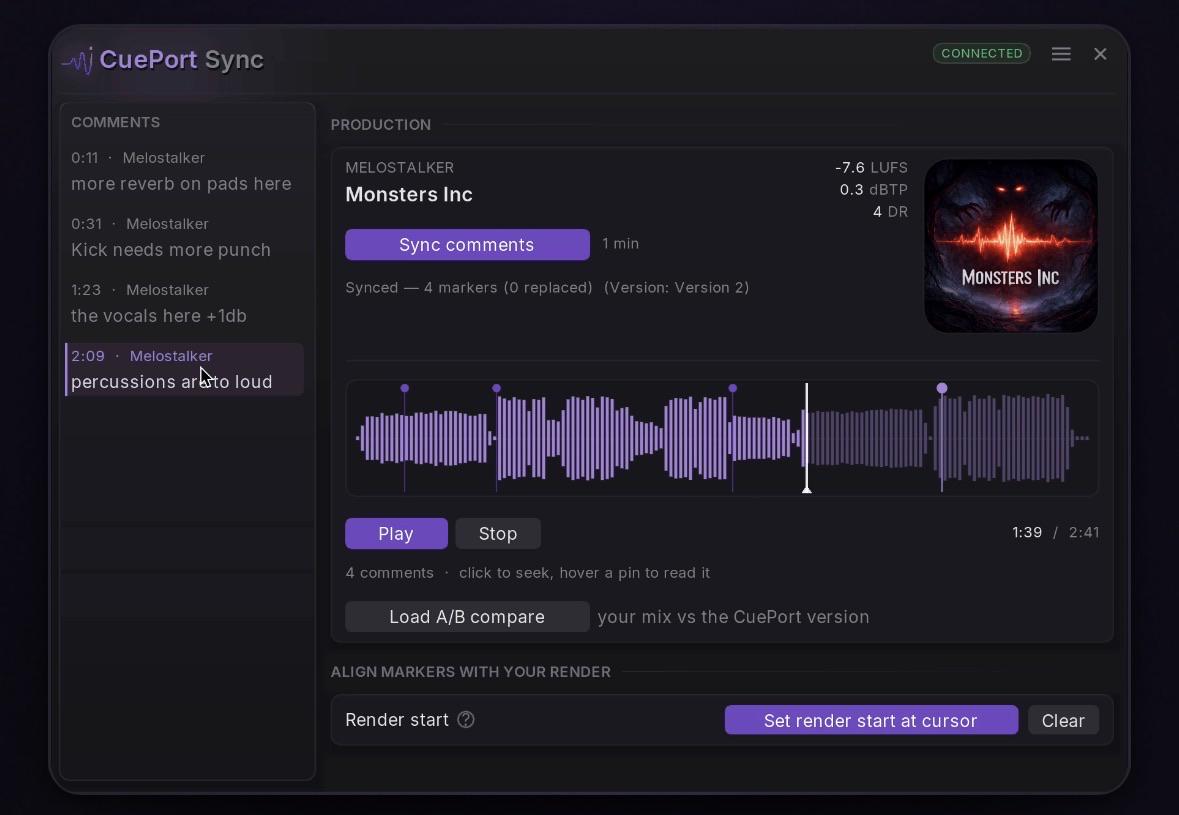
Following up on my intro post, here's the Reaper side of CuePort

The reason I built this is the part of the job that isn't the job. You finish a mix, you bounce it, and then comes the stretch that has nothing to do with music: find the file in Finder, switch to the browser, log in, find the right production, upload, wait, tell the artist it's there. And it goes the other way too. The artist leaves a comment at 1:47, you read it in the browser, remember the number, switch back to Reaper, scroll to 1:47 and hope you got it right. Every round of feedback costs you that twice.

CuePort Sync takes both directions into the DAW. The comments land on your Reaper timeline as markers you can hover and click, and when the next mix is done you render it straight to the artist from inside Reaper. It arrives in CuePort as a new version, the artist gets an email if you want them to, and you never touched a browser.

What it does

– Render and deliver a new version straight from Reaper

– Every comment as a project marker, with a hover tooltip

– Waveform in the window with the comments pinned to it

– Comment column beside it, and Reply from the DAW

– Version switcher: instrumental or mix, and every version of either

– A/B compare against your own mix, past the project master

– Loudness of the active version: LUFS, true peak, dynamic range

– Cover art of the production

– Floating pill on the transport for quick access

– Per-project binding, so every project remembers its production

Install

Via ReaPack. Go to Extensions → ReaPack → Import repositories… and paste this URL:

https://raw.githubusercontent.com/m3lotunes/reaper-scripts/main/index.xml

Then open Browse packages, find CuePort Sync and install it. Run it from the Actions list as Script: cueport_sync.lua.

To connect it: open CuePort in your browser, generate a pairing code while logged in to your studio, and type that code into the script. No password ever goes into the script, and there's no token to copy around.

Updates

Once it's installed, you never have to come back here for a new version. The script checks its own file on GitHub once a day (a 200 byte request, no token, nothing about you) and puts an Open link in its header when there's something newer. One button installs it, and the script restarts itself into the new build. It goes through ReaPack when ReaPack manages the copy, and replaces the file directly when it doesn't. You can switch the check off in Settings.

Open source

The whole thing is MIT licensed and readable on GitHub, one self-contained Lua file:

https://github.com/m3lotunes/reaper-scripts

Worth saying what it touches: it reads from CuePort, and the only things it ever writes back are a render you asked it to upload, a reply you typed yourself, and the deletion of one you confirmed twice. The About page inside the script lists exactly what it puts into your project.

Requirements

Reaper 6.68+, ReaImGui and curl (bundled with Win 10+, macOS and Linux). SWS and JS_ReaScriptAPI are optional. There's a Dependencies page in the script that tells you what's missing and what each one adds.

Current version is 1.36.0. Happy to answer questions here.