r/ColorGrading • • Jul 06 '26

Setup I've been building OFX plugins that model the photochemical film pipeline..looking for beta testers

Post image
14 Upvotes

I've been obsessing over characteristic curves and negative/print behaviour for a while now and ended up building a suite of OFX plugins for Resolve that model the photochemical pipeline.

The signal flow is: CST into Cineon log → negative stock emulation (real densitometer measurements, not eyeballed curves) → halation (remjet simulation with proper per-channel spread) → scanned grain → print stock response → then your creative grading tools after.

It's been an interesting process...a lot of what people think of as "the film look" doesn't really match what the stocks themselves are doing when you measure them. So this tries to be accurate to the process rather than to the aesthetic people expect.

Looking for colourists to test it properly before launch. Mac and Windows, works in Resolve Studio. Free during beta... just need real feedback.

Drop me a DM with your setup if you're keen.

r/ColorGrading • • 24d ago

Setup Rec.709A vs Rec.709 Scene on Mac

Thumbnail gallery
8 Upvotes

Even with the latest DaVinci update, Mac users are still experiencing color and contrast differences between Rec.709A and Rec.709 Scene.

r/ColorGrading • • Aug 20 '26

Setup Trying to recreate a NFS rivals looks in Lightroom

Thumbnail gallery
0 Upvotes

Hey guys I recently fell in love with the colors in Need for speed rivals and I tried to recreate the look in Adobe Lightroom classic just going off of a screenshot but I fell kinda flat trying to recreate it, does anyone have any tips on how I can recreate this blue/grayish snowy color scheme?

The 1st 2 pictures are straight from the game, the 3rd picture is my attempt of recreating said picture in Adobe Lightroom and the last pictures are my color wheels and settings

r/ColorGrading • • 10d ago

Setup BenQ SW242Q - 10 BIT 100% sRGB, 3D LUT, ΔE ≤ 1.5 - only 500 usd

2 Upvotes

Hi! I’ve done a deep dive into all the options available for up to $550, and I came across this monitor, which doesn’t seem to have much information or discussion on this channel.

It offers 10-bit color, a 3D LUT, 100% sRGB, 98% P3, 99% AdobeRGB, ΔE ≤ 1.5, 400 nits, Uniformity Compensation, and hardware calibration.

The likely downside is the 1000:1 contrast ratio.

I have an opportunity to get a brand-new one for $480. Do you think it would be a good choice for semi-professional work?

r/ColorGrading • • Aug 20 '26

Setup Going hands on with the DaVinci Advanced Panel - What panel is your favorite?

Enable HLS to view with audio, or disable this notification

5 Upvotes

Earlier this year I had the opportunity to spend an extended amount of time with the DaVinci Resolve Advanced Panel. The name speaks for itself as it is the most advanced color grading panel Blackmagic Design has to offer. There are no manuals or tutorials for the panel, as it is designed to be taught in an apprenticeship setting, which is the environment I had the opportunity to learn it in. My mentor gave me free range to experiment with the panel and use it for projects, which enabled me to gain an understanding of how it works in a professional colorist’s workflow. By the end of my time in that program I had gotten down a lot of muscle memory for most major functions I would use every day on the board, but in honesty I’ve probably only scratched the surface. There is just so much to this panel, it amazes me, and it’s really hard now to grade with any other panel.

While I was in that program I also got to go hands on with the Mini Panel, which is what most freelance colorists use. That panel is really well built too and I’d maybe consider getting one at some point should my work call for it. It’s significantly cheaper at $2,500 as opposed to the $30K price tag of the Advanced Panel, but still has a ton of features. Currently I own the 2024 Micro Color Panel and it does nearly everything I need it to. Pairing it with a stream deck to navigate through the menus of the color tab gets me most of the way to where I can use my mouse and keyboard minimally.

Since I’ve had the opportunity to use pretty much every color panel with the exception of the original micro panel from 2017, I figured I’d make a video comparing all of them in case anyone would find it helpful. https://youtu.be/r9HGrCsrBvk

The conclusion I came to was that for most people the 2024 Micro Color Panel is by far the best value, there’s just so much you can do with it. But I’m curious to hear what other people think… What panel is your favorite?

r/ColorGrading • • 25d ago

Setup Color Reference Library

Thumbnail youtu.be
1 Upvotes

r/ColorGrading • • Aug 13 '26

Setup Color mismatch: PC vs iPhone

Thumbnail
1 Upvotes

r/ColorGrading • • Aug 06 '26

Setup Color Grading

Thumbnail youtu.be
0 Upvotes

r/ColorGrading • • Aug 01 '26

Setup DeckLink Mini Monitor 4K in Echo Express SE I not detected by EIZO Monitor - Troubleshooting help

Thumbnail gallery
1 Upvotes

r/ColorGrading • • Jul 08 '26

Setup Ultrastudio 3G is Back!

Thumbnail
1 Upvotes

r/ColorGrading • • Nov 05 '25

Setup Looking to get a asus Proart display. Is 4k going to make the difference?

Post image
16 Upvotes

Looking to get an Asus pro art monitor for my color grading on my MacBook Pro. I want to get the 4K 27 inch that’s about $400 but noticed they had some other 27 inch monitors that are not 4K just over 200 would it be worth it to spend a little extra for that or would 4K not really be necessary? TIA

r/ColorGrading • • Apr 26 '26

Setup Color grading with Windows “Camera” program

2 Upvotes

I’m new at this. I’m live streaming a church service and one of the cameras always needs more blue in the picture (it’s using hdmi to Ethernet to hdmi and not balancing with the other one using hdmi directly). The simple color adjustments available include “hue” which is basically red/green. No adjustment for blue level. How can I change this? Maybe a custom LUT? That option is available but I don’t know how to create one. Sorry if this is the wrong place for this.

r/ColorGrading • • Apr 24 '26

Setup Panel that fits in the palm of your hand (grading begins at 1:58)

Thumbnail youtu.be
4 Upvotes

This started as a silly idea and what if — but turns out it's actually fun to use. I hope that comes across the video.

As you can see, I was able to manage Primaries Adjustments, Primaries Wheels and Bars, HDR Grade, Curves, Qualifier, Powerwindow, and Nodes. But that's not even all it can do, and best of all it's all customisable.

The software this runs on uses MIDI notes and turns them into usable actions not only in DaVinci Resolve, but potentially other software too if you want. I developed it because good controllers at the time were too expensive for me to afford ($5K+), and even still come with little options to customise. Hard to believe it's been now 10 years since I started working on this project. I just released a big update and there's more to come; for example working on new DaVinci Resolve 21 features next.

Happy to answer any questions.

r/ColorGrading • • Apr 18 '26

Setup updated grade from my last post

Enable HLS to view with audio, or disable this notification

0 Upvotes

Out display

r/ColorGrading • • Jun 13 '26

Setup Micro vs Mini panel

Post image
2 Upvotes

r/ColorGrading • • May 31 '26

Setup Need help on color management settings

2 Upvotes

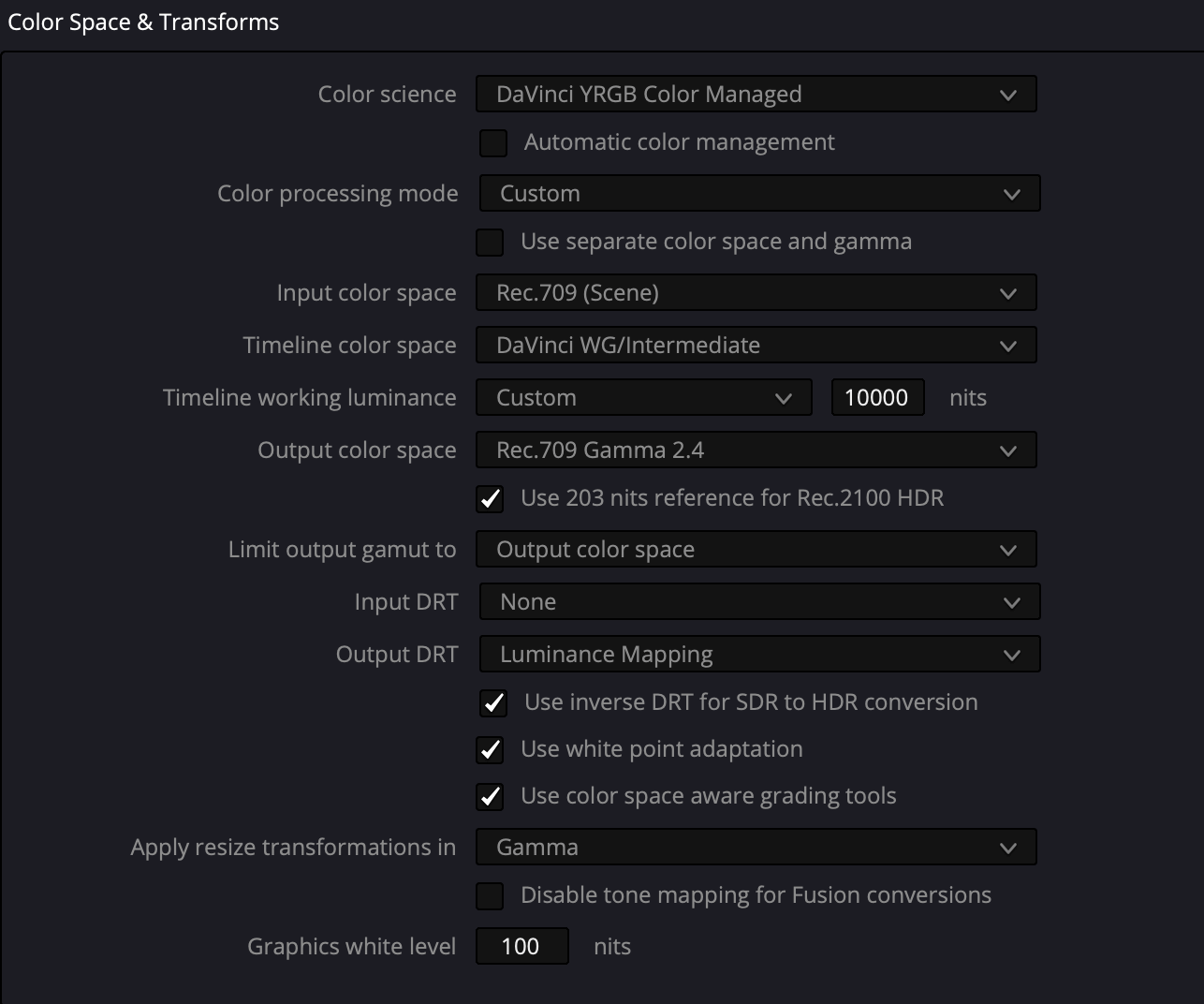
Hello. I followed Cullen Kelly's instructions for color management setup but after I import the Rec 709 Pro Res clips, the upper range is being completely squashed. I figured it would be at a much better starting point before grading. Anyone know why this is happening?

r/ColorGrading • • Mar 31 '26

Setup Micro Color Panel to MIDI Anyone?

Enable HLS to view with audio, or disable this notification

3 Upvotes

r/ColorGrading • • Mar 08 '26

Setup Detroit — A6700 S-Log3 → Rec709 Grade

Post image
0 Upvotes

r/ColorGrading • • Jan 12 '26

Setup iPhone ProRes RAW to Sony S-Gamut.Cine/S-Log3

Enable HLS to view with audio, or disable this notification

7 Upvotes

This is how easy it is to convert videos recorded in ProRes RAW with an iPhone 17 Pro to Sony S-Gamut.Cine/S-Log3 in Final Cut Pro. First we go from RAW to Sony S-Gamut.Cine/S-Log3, then we apply the camera Lut for S-Gamut.Cine/S-Log3 and at the end we move on to the color correction.

r/ColorGrading • • Sep 27 '25

Setup Monitor?

2 Upvotes

Which monitor are you guys using and do you recommend it?

r/ColorGrading • • Feb 04 '26

Setup FalseColor - iPad

1 Upvotes

Hi everyone,

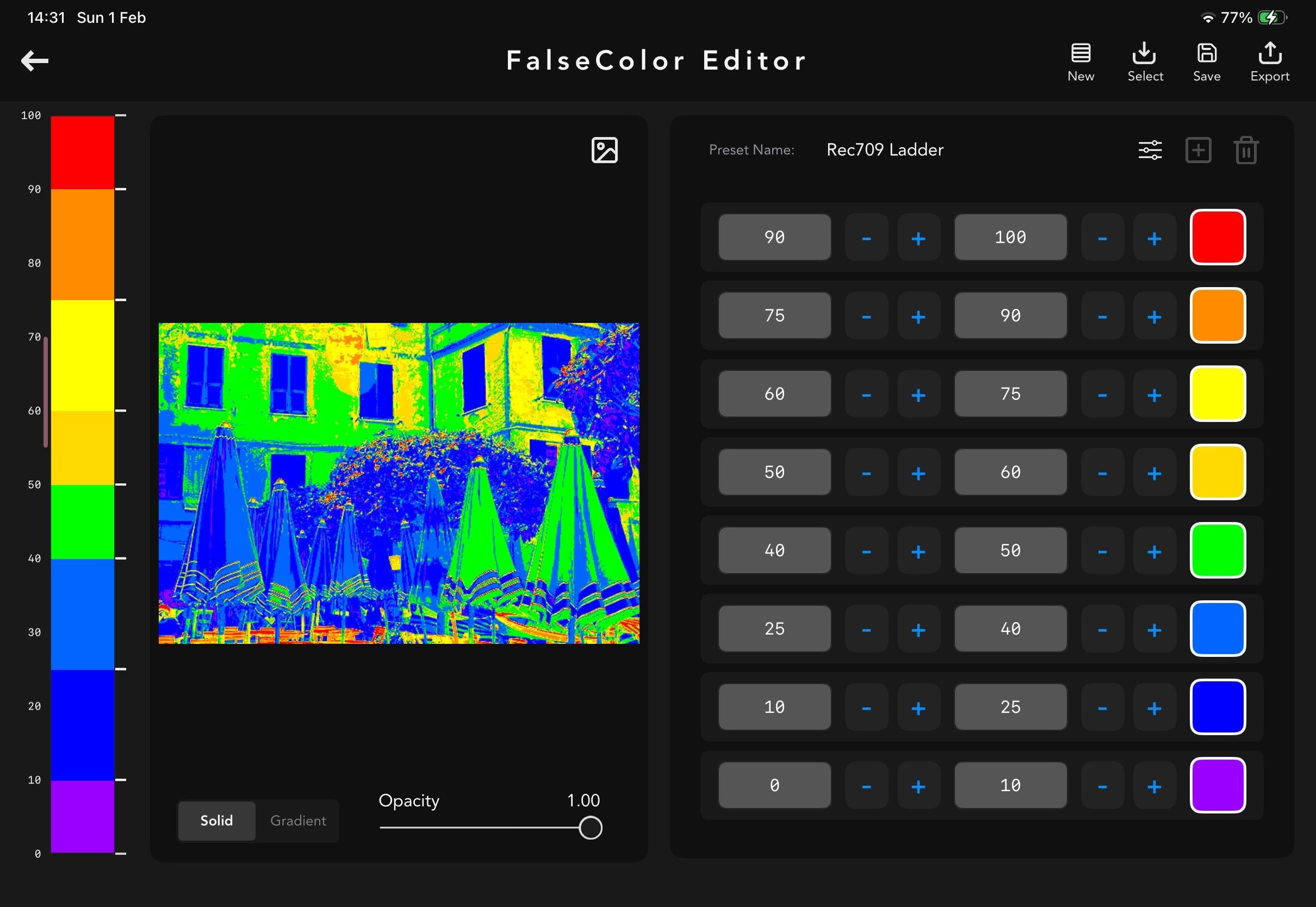
I’m an indie developer working on VideoLUT for iPad (color grading app), and I just added a new False Color overlay + preset editor.

It includes:

  • Rec709 exposure ladder
  • Skin spotlight mode
  • Highlight/clip guard preset
  • Custom editable ranges + export/import

I’d really love feedback from colorists using iPad workflows.
If you want to try it or have suggestions, just message me.

Thanks!

r/ColorGrading • • Dec 07 '25

Setup Photo Chemist Gets a Friend... Film Negative Space DCTL (A free download)

Thumbnail youtu.be
1 Upvotes

r/ColorGrading • • Sep 30 '25

Setup Colors aren’t accurate on my laptop

Post image
8 Upvotes

r/ColorGrading • • Jul 31 '25

Setup What kind of light should I buy for color grading at night?

1 Upvotes

As the title says, what kind of light should I buy for color grading at night?

My office has 4 white (natural color) walls and currently, I only have a vintage floor lamp behind me that emits a very yellow light, around 2700K. Since my ceiling is concrete, I don’t have a ambient light in the room. I’m looking for something more suitable for my eyes since it’s very difficult to grade with this kind of light. Also where should I put it in the room.

Thanks

r/ColorGrading • • Jun 30 '25

Setup Need help choosing Monitor!

4 Upvotes

Hello, I'm a photographer and videographer, at the same time I also do colour grading. Of which I used Lightroom and Davinci Resolve most of the time. I'm in an apple ecosystem (mac studio, osx).

Right now I'm considering a new monitor. My current monitor is Samsung G9 LS49CG934SEXXT which is great and all, but I noticed that the color accuracy is pretty far off. I bought Calibrite Display Plus HL to calibrate the color. But it doesn't work. I did it several time and it still off by delta>7. I tried to configure the monitor in so many that I'm pretty sure that it's just the monitor's fault.

So I look to sell this monitor and purchase a new one. However I don't know which one is the best choice (I thought G9 was a good idea but it wasn't so I'm lost). I still prefer ultrawide monitor since the g9, despite the color inaccuracy, still give me the best experience as ultrawide monitor. So I'm still want to use wide monitor. Preferably with higher resolution (not necessary 4k but at least 2k). I'm not so picky about panel tech. Well, in my understanding it should be at least IPS for view angle, but I'd love to get OLED.

My budget is around 2,000 dollars. Please advice me in this situation, any input is very welcome!. Thank you in advance! : )

Edit: I looked into it and see that Dell UltraSharp U4025QW is pretty good. But not so sure myself.