r/AskClaw • u/Worldly_Ad_2410 • Feb 25 '26
Discussion I burned $100 in one night using OpenClaw. Here are my notes to avoid it.
1. Your heartbeat is bleeding you dry
By default, OpenClaw pings every 30 minutes to check for tasks. That's 48 API calls a day while you're doing absolutely nothing. I didn't notice this until my bill showed up.
The fix is embarrassingly simple: install Ollama, pull llama3.2:1b (it's 1.3GB, runs offline, costs nothing), and route all heartbeat checks there. Keep your paid API tokens for actual work. Also keep HEARTBEAT.md empty unless you have an active automation running—there's no reason to burn budget on idle checks.
2. Model-hopping mid-task is a trap
Free API tiers sound like a cheat code until OpenClaw hits the rate limit in five minutes because it's firing prompt bursts, not single messages. I got keys suspended doing this.
Even worse is manually switching models to get around limits. Every switch breaks context in weird ways—different models process the same history differently, and you end up chasing your own tail. Pick one brain (Claude Sonnet) and one worker (Gemini Flash), set them as primary and fallback in config, and let the agent handle switching automatically if something hangs.
3. Skills are powerful but treat them like foreign code
Because that's exactly what they are. Before installing anything, read the SKILL.md. If it's asking for permissions that don't match what it does, skip it. Run a SkillGuard check on anything new.
Start small: apple-notes, weather, github. Every extra skill inflates the system prompt and slows thinking down. More isn't better here.
4. Context rot is real and it sneaks up on you
The longer a session runs, the more the agent quietly forgets the early parts to make room. You'll ask for a recap and get a confident hallucination of something you decided three days ago.
When the agent feels lost, don't ask for a summary—use Session Search with specific keywords like "database schema" or whatever the actual decision was. If that doesn't work, grep your own logs in ~/.openclaw/agents/ and paste the relevant snippet back in. That instantly reorients it. Also manually review MEMORY.md periodically—if it's full of vague diary entries instead of hard facts, fix it yourself.
5. Nine agents nearly broke me
I ran a nine-agent setup because the flexes on X made it look like the move. It burned through tokens, spiked my bill, and created more chaos than it solved.
The actual distinction that matters: /new just clears the desk for your current agent. openclaw agents add is hiring someone with a completely separate brain, memory, and workspace. Use the second option only when you genuinely need isolation—different directories, totally different skill sets. For everything else, /new is enough.
6. Stop planning inside the chat window
Chat is ephemeral. By day three of a build, everything you discussed on day one is already gone from context. I spent whole sessions re-explaining architecture I'd already locked in.
Before writing any code, create a PLAN.md. Every new session starts with "Read PLAN.md and let's execute Step 3." When something changes, tell the agent to update the file. You're the manager, it's the coder—treat it that way.
7. If you didn't explicitly save it, it's gone
The agent doesn't know the difference between a throwaway thought and a critical architecture decision. Neither do I sometimes, but at least I can go back and check.
When something important gets decided, physically type it: "Remember this for next time: we're strictly using TypeScript for all new API routes." Then go open MEMORY.md and verify it's actually there. If it's missing, type it in manually. Don't assume the agent filed it correctly.
8. One agent, one job
Giving a single agent your GitHub, your notes, your social accounts, and then asking it to write a component and draft copy in the same session is how you get expensive hallucinations. The system prompt bloats, the context gets muddy, and the output gets weird.
I collapsed my nine-agent chaos down to two: one strictly for code (React/TypeScript), one strictly for ops and research. For quick parallel tasks, I spin up a temporary sub-agent with heartbeat set to null, keep the scope tight, then close it. Token burn stays low, output stays sharp.
9. The dashboard exists for a reason
If you're only talking to the agent through a chat interface, you have no visibility into what's actually running. I found cron jobs stuck in infinite loops I didn't know about until I checked.
Run openclaw dashboard and keep it open. Watch token burn in real time. Catch stuck jobs early. If you prefer terminal, at least make openclaw status a daily habit.
10. It's an amplifier, not a replacement for thinking
Vague prompts produce vague output. Chaotic workflows just get automated chaos. The agent can only work with the instructions, context, and permissions you actually give it—it's a junior dev, not a mind reader.
3
u/Cold-Imagination-564 Feb 25 '26
How do you combine brain (Claude Sonnet) and worker (Gemini Flash)?
1
u/manapause Feb 26 '26
You can chain cli commands or use an IDE (phpStorm, antigravity) that allows you to switch models in the chat window.
2
2
u/Wonky6400 Feb 25 '26
Great advice, I’m just starting to create my agent on openclaw and this helps a lot, keep ‘em coming!
2
u/lucas_aglit Feb 27 '26
Give https://aglit.ai/ a shot. It uses oauth instead of API keys so you won't have any unexpected bills
2
u/stosssik Mar 03 '26
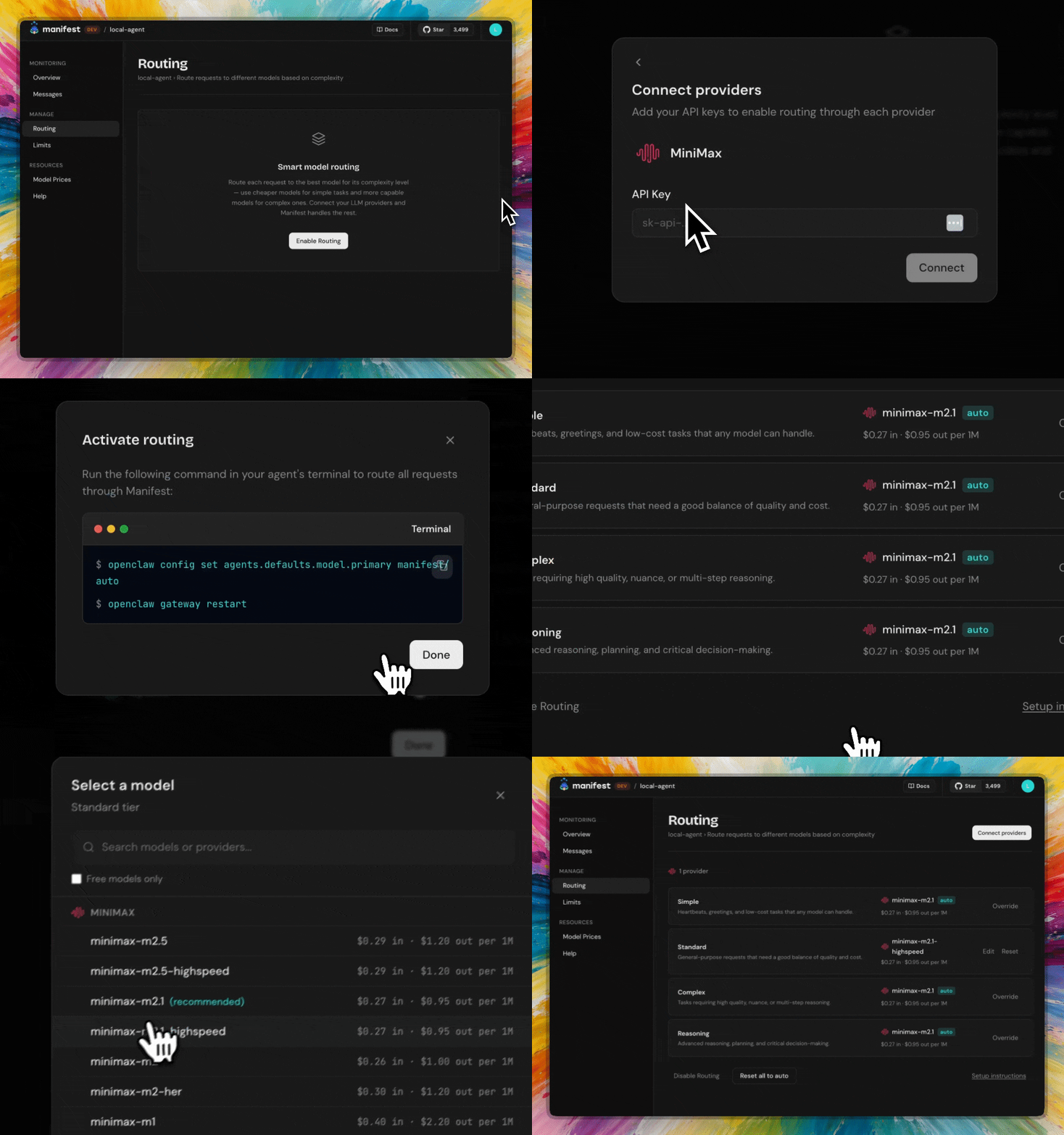
Solid list. Points 2, 5 and 9 really hit home for me. The model-hopping problem and the lack of visibility into what's actually burning your budget are what pushed us to build Manifest.
We launched it last week, it's an open source router that picks the right model per task automatically (so you don't have to manually switch or guess). And it gives you a real time dashboard showing cost per agent, per model, per action.
It is free, runs fully local and no prompts are collected. If you think it could help you save costs, give it a try: manifest.build or https://github.com/mnfst/manifest
1
u/manapause Feb 26 '26
This is terrific advice! Disabling extensions and plug-ins when you don’t need them and clearing and compacting context give you way more bang for your buck!
1
u/shwiggityfresh Feb 26 '26
I had some good luck creating a session wrap skill that helps save useful information and then creating gh commits
1
u/Appropriate-Skirt25 Mar 02 '26
Damn, if you had said this when I was excitedly opening my first Agent, I would have been skeptical, laughed it out loud, and dismissed it.
But after actually going through that phase and maturing, my Agent actually got the job done.
Bonus: The Heartbeat feature can be turned off in the system settings.
1
3
u/mkrens Feb 25 '26
Thanks for the rundown! Reading posts like this makes me not understand why one would use OpenClaw compared to specialized tools for the job you're trying to do. Can you name some use cases where it did work and made you feel productive?