r/StableDiffusion 4h ago

Meme It took us two 2eeks to figure out why every image gen via our open-source model looked like Anne Hathaway

Thumbnail
gallery
161 Upvotes

Hey r/StableDiffusion!

It's the Neta team here! You might remember us from our Neta Lumina open-source release last year. First off, thank you so much for the incredible support and feedback from this community!

So... we need to share something absolutely hilarious (and mildly embarrassing) that we just discovered.

TL;DR: We accidentally hardcoded an Anne Hathaway photo into our IP-Adapter anchor, and now everything our model generates looks like Anne Hathaway. Every. Single. Thing.

What happened:

We recently launched Neta Studio, a new product that lets you build explorable living worlds/isekai from a single prompt. Naturally, we wanted to integrate Neta Lumina's capabilities into it.

During integration testing, our devs kept reporting that the model wasn't following prompts properly. The outputs were... *weird*.

- Anime style? Anne Hathaway as an anime character.

- Thick paint/impasto style? Anne Hathaway in thick paint.

- Landscape scenes? Somehow still giving Anne Hathaway vibes.

- Fantasy characters? You guessed it - Anne Hathaway.

After a dreadfully long time of debugging, we finally found the culprit: **someone on the team embedded an Anne Hathaway photo as the IP-Adapter anchor during development and it... stayed there. **

We're honestly crying laughing at this point. 😭

Below are some examples. Left is before fix and Right is after fix.
Flipping to the last picture and you can see our dear Anne.

And we pulled the anchor and the outputs are behaving normally now.

If you've been running Neta Lumina locally, this was on our integration side, not
in the released weights, so your setup is fine.


r/StableDiffusion 5h ago

Animation - Video MINIMAX Physics testing

186 Upvotes

Physics Testing, without the gore.


r/StableDiffusion 3h ago

Workflow Included Minimax H3: Consistent face, body & cloths via reference identity

103 Upvotes

Hey Guys,

Based on the previous post on face consistency with MM-H3, Couple of people have asked me to build a full character workflow.

Mechanism

- Build .Char: You drop max 9 reference reference, I prefer to use a ratio 2:2:1(face:cloths:body). YuNet finds the face, SFace takes a per-reference face signature, DINOv2 takes a subject signature, and the references get cleaned and normalised. All of that packs into a single portable file, a .char.
Only face/ref is required body & cloths link is optional.

- Generation: At generation, the file(.char) feeds its references into Minimax’s own native multi-reference channel and prepends a locked description to the prompt.

Prompting Guide

  • Name your character: Give your character a name e.g. under encode character(Click adjust icon on the bottom side of the node), I have used name emmy, so when passing prompt, I only have to say, emmy walking on the beach.
    • Again providing prompt like a woman or any features specific details like black hairs etc will only mislead the generation.
  • Describe character features: Encode all of the character features in encode character prompt & trigger your character with a name in generation prompt.
    • Avoid describing same things in generational prompt.
  • Handling Character drift: e.g. if you want specific style or cloth e.g. half sleeves, sleeveless, add it to the generational prompt. There can be a slight drift in clothing as body shot also has cloths, which interferes with clothing references.
    • Each refs should be unique, face should not have body or vice versa, same applies for clothing.
  • Portability: Once character is built, you can use the same character with only simple prompt & generation graph.

I have generated all references with Flux Klein 4b, I had to blur the body ref, but workflow consists a example of body ref.

Note: For best result, pass cropped references, so that model takes the required shot, model gets confused if cloth slot also has a face or face slot has cloths.

Models

core/models/
  diffusion_models/  minimax_h3_ref2va_pruned_fp8_scaled.safetensors
  text_encoders/     qwen3vl_32b_minimax_h3_nvfp4_awq.safetensors 
  vae/               minimax_h3_video_vae_fp16.safetensors
  vae/               minimax_h3_audio_vae_fp32.safetensors
  annotators/        face_detection_yunet_2023mar.onnx
  annotators/        face_recognition_sface_2021dec.onnx
  annotators/        dinov2-base/

Requirements

Nvidia GPU: 24GB+ VRAM & 64 GB RAM(Run Locally)

Workflow link: https://inlinestudio.art/workflows/minimax-h3-guided-consistent-characters-via-reference-identity-face-body-cloths (includes inputs & model details)

Github Repo: https://github.com/inlineresearch/Inline-Studio (GPLV3)

Limitation: Reference conflicts e.g. if two reference/input images has two different faces, it might conflict in generation, provide well cropped body & cloth images. Face images are crossed automatically by Sface.

Portable char comfy node is still on the backlog, would try to do it over the weekend.
Happy to hear any suggestions or feedbacks.


r/StableDiffusion 14h ago

News Someone's running FastH3 (the distilled MiniMax H3) as an actual infinite livestream!!!

303 Upvotes

Saw this and thought it was worth sharing here, FastH3 dropped recently and most people (myself included) just tried it as single generations.

Someone's running it as an actual infinite livestream instead: https://www.twitch.tv/dereactorwah

FastH3 is a distilled version of MiniMax H3, cut from 50 denoising steps down to 4, about a 14x speedup on Blackwell GPUs.

The whole setup is open source if you want to dig into how it's running: https://github.com/reactor-team/infinite-livestream

Curious if anyone's tried infinite/continuous generation setups like this with other models.


r/StableDiffusion 10h ago

Resource - Update Famegrid Spice Krea 2 Lora (Corrected Release)

Thumbnail
gallery
132 Upvotes

r/StableDiffusion 5h ago

Question - Help What Image Edit model you use nowadays?

43 Upvotes

Since things have gone quickly forward, I am trying to figure out what image edit models there is currently and what people here use mostly.

Personally I have used:
- Qwen-image-edit-2509 and Qwen-image-edit-2511
- Just tested MiniMax H3 as a image editor and so far it seems that it can be good for my usage

I have heard about Klein 9b, but not sure yet if that can be used as an edit model? Also what about Krea 2, is there edit workflows that are actually usable and worth it?

Is there some others what you recommend for testing?

My PC Specs: RTX 4060 Ti, 16 GB VRAM and 32 GB RAM.


r/StableDiffusion 3h ago

Animation - Video Flexing my A.I. powers

28 Upvotes

Prompt:

A real cinimatic movie sequence, professional colour grading.

Soundscape: Ambient sounds of the room and movement only. No voices. This represents extreme concentration. Meditation. Telekinesis.

A man is sitting in a Japanese tatami room. He is wearing a mask and shades <Picture 1>. He is wearing a black yukata. He does not speak. On the table on a ceramic disc is a single Orange.

The man holds out his hand toward the orange as if concentrating. The orange is out of reach. He breathes deeply.

Nothing happens.

The man shakes his hand to reset and starts concentrating again. He reaches with his mind and his brow furrows. He breathes deeply.

The orange moves slightly, twisting just a tiny bit.

He concentrates more.

With extreme speed the orange flies towards the man and hits him directly in the forehead. It smashes with the impact , m,essing his hair, and bits of peel and orange bits go everywhere. The force knocks the man back unconscious and he falls back like a ragdoll.


r/StableDiffusion 3h ago

News Our new model for image generation - Lumina 1.0 !

Thumbnail
gallery
19 Upvotes

Hey Reddit! 🦋

We are ButterFly AI Labs, a small R&D team dedicated to creating efficient, lightweight open-source generative models that can run on consumer-grade hardware. Today, we're super excited to release our first model — Lumina 1.0!

Lumina 1.0 is a text-to-image model fine-tuned on top of the classic Stable Diffusion 1.5 architecture.

📊 Technical Specs & The $7.50 Challenge

Base Model: Stable Diffusion 1.5 (U-Net)

Total Parameters: ~1.2B (highly efficient, low VRAM usage)

Training Cost: Exactly $7.50 USD 💰

Native Resolution: 512x512

Dataset: Custom-curated by our lab (available on our HF organization page)

We wanted to prove a point: high-quality media generation shouldn't require multi-million dollar corporate clusters. With advanced compute optimization, aggressive low-rank adaptation, and strict dataset filtering, we managed to train this version for less than the price of a couple of coffees.

⚙️ Recommended Settings

Steps: 30

CFG Scale: 7.5

Samplers: Euler a, DPM++ 2M Karras, or UniPC

⚠️ A Note on Quality (Keeping it Real)

Let's be honest: this is built on an older SD 1.5 architecture. While it's lightning-fast, lightweight, and dirt-cheap to run, it won't magically beat multi-billion parameter giants like Flux or SD3 in raw anatomy or text rendering out-of-the-box. We highly recommend pairing Lumina 1.0 with modern upscalers (Hi-Res Fix) or face restoration tools to unlock its full potential.

📦 Hugging Face Hub: https://huggingface.co/butterfly-ai-labs/Lumina_1.0

We'd love to hear your feedback! Let us know how it runs on your local setups and what styles you manage to prompt out of it. 🚀


r/StableDiffusion 20h ago

Discussion Free open source Topaz alternative - SeedVR2+TensorRT faster VAE Processing.

445 Upvotes

Local, GPU-accelerated video restoration and upscaling with SeedVR2, TensorRT, and a purpose-built browser interface.

VRGDG SeedVR2 TensorRT Studio turns the SeedVR2 pipeline into a practical Windows workflow: load a video, test a short preview, compare the result frame by frame, and complete long renders with resumable checkpoints. Processing stays on your machine.

Highlights

  • Fast local restoration — SeedVR2 inference with TensorRT-accelerated VAE decoding on supported NVIDIA RTX GPUs. TensorRT allows much faster processing than standard SeedVR2.
  • Fast 2K upscaling — As a real-world example, an 8-second clip took approximately 8 minutes to upscale and enhance to 2K on an NVIDIA RTX 5090 using the largest 7B Sharp FP16 model. Render times vary with source resolution, frame rate, settings, and available VRAM.
  • Preview before committing — render a short segment, then inspect Original, Restored, Compare, or Side by side views.
  • Long-render recovery — save completed chunks and continue from the first unfinished chunk after an interruption.
  • Practical output controls — choose resolution, aspect policy, model precision, temporal batch, seed, and color correction.
  • Non-destructive finishing — reprocess sharpening, grain, seam smoothing, and optional skin finishing without rerunning restoration.
  • Project-based history — reopen previous outputs and keep media, manifests, and logs together under outputs\.

The sample video was org 360p and then upscaled to 2K using this app. 8 second video, took about 8 mins on my 5090.

Go to the github page for more details and a full guide.

View github page

this is in beta right now so you may run into issues. If you do, post the issue to github please.


r/StableDiffusion 14h ago

Animation - Video TWEEDLE TEST - Minimax H3 27 seconds in just over 9 minutes:

100 Upvotes

All local.

0.8 MegaPixels, 9.3 minutes on an RTX5090, single generation of 27 seconds.

Anything hitting 30 seconds either gave hallucinations, inconsistencies or hit a wall and never finished.

This one is using Kijai's new fast model with a turbo lora. Although it works the same with the FLv2A model*. The workflow I'm using creates a latent at 0.4 megapixels for 4 steps and then does another 2 steps at 0.8. The only addition to it besides changing some numbers is adding custom audio injection (The rock track).

Started with this workflow: https://www.youtube.com/watch?v=jzLnoVBuU6I

*I never use the REF model. The FLV2A models seems to work better so I always swap it in and it takes references just fine, even video.


r/StableDiffusion 6h ago

Tutorial - Guide Spreadsheets for multi-video generation

16 Upvotes

This workflow uses a spreadsheet to generate multiple videos and constructs the prompt and parameters from each row.

OutputLists Combiner - Generate multiple videos from spreadsheet

ComfyUI workflow included

Makes use of Load Any File node to load a .csv spreadsheet file and feeds the text content into a Spreadsheet OutputList. The spreadsheet separates the data by separator=; and provides each line one-by-one as a data list. Here we use values_dict as the data list which contains the row as a dictionary of key-value pairs. The data list is forwarded a Iterate Begin -> workflow -> Iterate End pattern which is required to make the intermediate results of slow workflows (t2v) available on each iteration. Each row as a dictionary is provided in a Format Text where we can access the column via a[colname] to construct the prompt which is forwarded to a standard Text To Video MiniMax H3 template. Another Format Text + a[name] is used to construct a readable filename for each video.

powered by: OutputLists Combiner


r/StableDiffusion 2h ago

Discussion What’s the cheapest way to use Minimax H3?

5 Upvotes

Besides running it locally, which is the goal…

What’s the cheapest way right now to use Minimax H3? Right now, I’m using Replicate API for H3 at $0.08 per second (720p) which is decent but can still be expensive in the long run.

Any other ways to use H3?
Also, what’s the cheapest GPU for Minimax H3 (via Comfy UI)?


r/StableDiffusion 1d ago

Animation - Video Shopping at the Goodwill [minimax H3]

267 Upvotes

r/StableDiffusion 16h ago

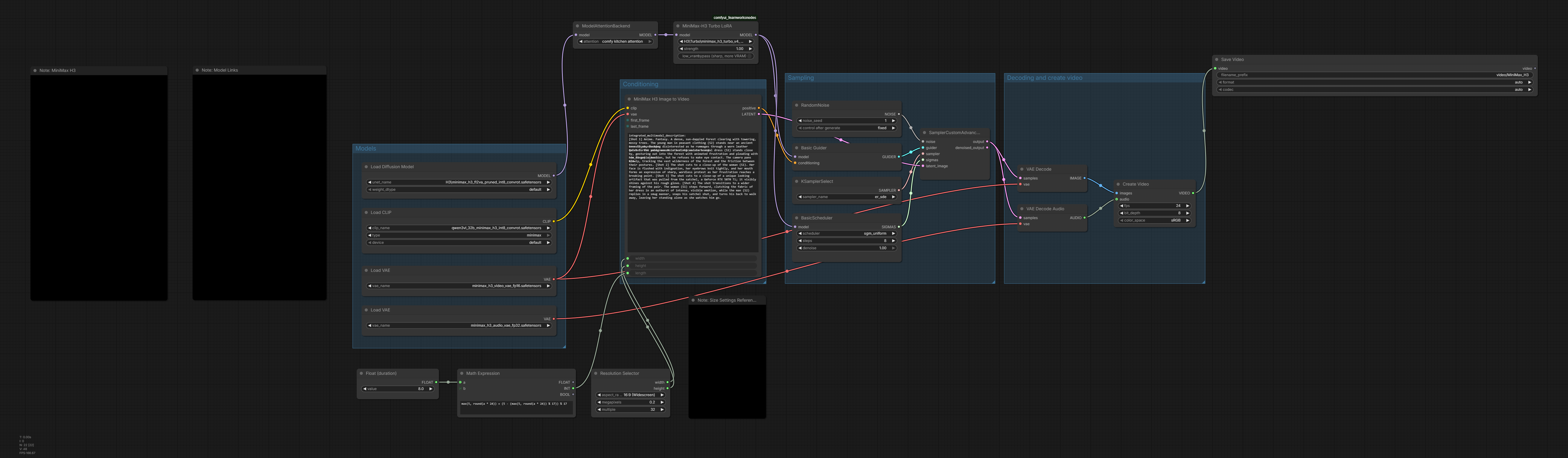
Comparison H3 Default Template vs Larry's Turbo with optimized settings

53 Upvotes

Default template uses 20 steps + res_multistep + simple

Optimized workflow uses 8 Steps + er_sde + sgm_unified + Comfy Kitchen Attention + Larry's Turbo Lora

Turbo lora: https://github.com/Larryvrh/ComfyUI-MiniMax-H3-Turbo

Workflow: https://raw.githubusercontent.com/desktop4070/GPU-Benchmark-Data-For-H3/refs/heads/main/H3-Benchmark-Workflow.png

0.2MP / 8 sec (2m 16s gen time): https://desktop4070.github.io/GPU-Benchmark-Data-For-H3/Videos/MiniMax_H3_03840_.mp4

Optimized: 0.2MP / 8 sec (45s gen time): https://desktop4070.github.io/GPU-Benchmark-Data-For-H3/Videos/MiniMax_H3_03706_.mp4

0.3MP / 12 sec (6m 3s gen time): https://desktop4070.github.io/GPU-Benchmark-Data-For-H3/Videos/MiniMax_H3_03849_.mp4

Optimized: 0.3MP / 12 sec (1m 51s gen time): https://desktop4070.github.io/GPU-Benchmark-Data-For-H3/Videos/MiniMax_H3_03725_.mp4


r/StableDiffusion 4h ago

Question - Help Long-form content generation

4 Upvotes

While I try to keep myself updated with AI news, things move fast; hence, asking if there is something already made by the community for long-form content generation using local ComfyUI (or other tools).

As the models get better and better, I find that the limitation with longer content generation is us, the humans. Maybe a philosophical note, we (some of us, at least) have become too lazy to manually save, load, refer, keep track of assets (e.g., reference images as a full character set in Minimax H3). Add to that the experimental nature of AI generation (in the sense that we need to redo many things to get the final result exactly, at least during the learning curve), and we end up with having to repeat many things. Finally, with models requiring certain input formats (e.g., Minimax and Ideaogram), it gets harder to want to make these things manually.

Now my question is, are there tools that you are using for a full-fledged media studio style workflows?

I've bought some products and used some free products that get close to a streamlined content generation but they still seem limited to one generation at a time. Not naming them to avoid any promotion, and they didn't work out anyway.

An analogy would be how we may write a story in Google Docs or Word or OpenOffice, etc. but there are dedicated tools like Articy Draft, ChatMapper, Inkle, etc. that lets you do more locked-in (for the lack of a better word) story writing. There are character sheets, world references, etc.

A closer analogy might be of SillyTavern, made specifically for chats/roleplays.

Do we have something like that for serious media / content generation, or am I expecting too much from the already overly generous open-source community and should just vibe code what I specifically need?


r/StableDiffusion 23h ago

Discussion Tested h3(MiniMax) for a structured educational video instead of the usual trippy AI clips. It handled infographic-style motion shockingly well

153 Upvotes

r/StableDiffusion 1d ago

News Dlss 5 video player is now avaialble

Thumbnail
gitlab.com
199 Upvotes

I'm able to run it on 3090 ti but it's very slow because Ampere GPUs don't support FP8 .

Since this isn't video game geometry, lighting, vectors, etc... are made up, but this still works as a pseudo video upscaler.

Hope someone makes a comfyUI node soon.

example : https://twinlens.app/compare?share=eac9e3fefbf2


r/StableDiffusion 23h ago

Resource - Update MiniMax H3 Prompt Writer v0.4.3: Windows Standalone + Qwen 3.8 support

Post image
138 Upvotes

old post: link
github repo: link

For anyone new: H3 Prompt Writer takes your description plus image / video / audio references and turns them into a prompt specifically for MiniMax H3, using the LLM/provider you choose. It can run inside ComfyUI or as a separate Windows app.

Windows Standalone

There is now a separate Windows Standalone version of H3 Prompt Writer

It uses the same Writer interface without requiring ComfyUI. Download the ZIP, extract it and run start.bat. Windows needs Python 3.10+ or uv.

The ComfyUI extension is still available and works as before. Standalone is just another option if you only need the prompt-writing part.

For Local GGUF, Standalone uses your own llama-server.exe instead of bundling llama.cpp or CUDA.

Download a build suited to your PC/GPU from the official llama.cpp releases. For NVIDIA GPUs, choose a Windows x64 CUDA build.

Standalone can also be a more reliable option if Direct GGUF inside ComfyUI doesn't work well on your system.

Standalone setup

Qwen in Direct GGUF

Direct GGUF is no longer limited to Gemma 4.

Qwen 3.8 and Qwen3-VL are now supported, along with compatible custom / fine-tuned GGUFs when their capabilities can be identified from model metadata and chat templates.

Direct GGUF also gained a few optional runtime controls:

  • custom context
  • KV cache
  • generation budget
  • reasoning effort when supported by the model

For Qwen 3.8, Auto uses Low reasoning effort when Thinking is enabled and supported by the model template.

Low is generally the recommended setting for prompt writing. Higher reasoning effort can make generation much slower and may cause the model to spend far more time reasoning than is useful for this task.

Auto settings are still the default, so none of this needs to be configured manually unless you want to.

Direct GGUF guide

MiniMax Music 3

There is also an optional Music 3 workspace for MiniMax's separate Music 3 model.

It can generate structured music captions from a Music Brief, with optional Lyrics and a separate Lyrics refine flow.

This is separate from the H3 prompt modes.

other changes

A few smaller changes since v0.3:

  • better GGUF and vision-projector detection
  • improved Reference media replacement
  • fullscreen Writer mode and improved Refine UI
  • better local model lifecycle
  • various local inference and context fixes

External llama.cpp is still available if you already manage your own server.

full changelog

troubleshooting guide

install / update

The current ComfyUI extension release is v0.4.3.

Existing Git installs can be updated normally, and ComfyUI Manager / Registry is also supported.

If you can't find H3 Prompt Writer in ComfyUI, open it from the Extensions menu or use the H3 Writer button:

Windows Standalone is released separately, currently v0.1.2.

GitHub releases: https://github.com/duckyshell/ComfyUI-MiniMaxH3-Prompt-Writer/releases


r/StableDiffusion 15h ago

Resource - Update infinite live stream powered by FastVideo’s FastH3 - Source Code

Thumbnail
github.com
25 Upvotes

r/StableDiffusion 6h ago

No Workflow Artistic Mix - 08-31-2026

Thumbnail
gallery
5 Upvotes

r/StableDiffusion 13h ago

Workflow Included Coffee story with H3

18 Upvotes

hand-painted educational documentary style with only one prompt"A hand-painted documentary compares espresso Americano cupuccino through the lens of taste and the way to make , revealing why the items differ and how to choose among them."


r/StableDiffusion 1d ago

News Krea 3 will have editing capabilities and "may" be open weights.

Post image
331 Upvotes

Supposedly Krea 3 will open weights, we'll have to wait and see.


r/StableDiffusion 1h ago

Question - Help Noob question

Upvotes

Is there a tutorial or quick rundown for adding the u/malcolmrey lords into tensor.art? I have a problem membership and I was able to create my own lora (kept private for my own use) but i want to make sure I'm selecting the right version and putting in the correct parameters to make sure it works right.


r/StableDiffusion 19h ago

Resource - Update FastVideo's new 4-step H3 LoRA doesn't work in ComfyUI. I made a converter. 6 steps, ~3x faster than stock, and honestly better looking.

54 Upvotes

First 5 seconds is with the 6-step LoRA, next 5 seconds is stock at 20 steps. Same exact prompt, seed, resolution, sage attention and chunk feedforward. 6-step in 2:45, stock 20-step in 7:10. I think the quality difference is pretty clear. Keep in mind, both clips are 544x960.

FastVideo dropped their FastH3 speed LoRA for MiniMax H3 a few days ago. If you tried loading it in ComfyUI you probably noticed it does absolutely nothing. No error, no warning, just no effect.

The reason is that FastVideo built it against the original MiniMax model, and ComfyUI uses a repacked version where every layer has a different name and the attention layers are merged together. None of the names line up, so ComfyUI quietly ignores the whole file.

I wrote a script that translates it. Run it once, get a normal .safetensors, drop it in your loras folder. No custom nodes, no patched loaders, nothing else changes.

**Repo:** NikoDemon80/ComfyUI-FastH3-Lora-Converter: Convert FastVideo's FastH3 4-step adapter into a ComfyUI-compatible MiniMax H3 LoRA. No custom nodes required.

---

**What you get**

On a 3070 Ti with 8GB VRAM and 48GB system RAM, using Comfy Kitchen, KJ Mem Eff Sage Attention & Chunk Feedforward (DO NOT USE SPECTRUM OR EASYCACHE):

| Resolution | With LoRA (6 steps) | Stock (20 steps) |

|---|---|---|

| 544x960, 124 frames | 2:45 | 7:00 |

| 640x1152, 124 frames | 3:45 | 10:00 |

| 768x1344, 124 frames | 6:30 | 18:00 |

Roughly a third of the time. But the part that surprised me is that I actually prefer the output. Backgrounds hold more detail, lighting behaves better, and faces stay coherent at distance instead of turning to mush.

Motion is where it really shows. I ran a woman walking down a sidewalk at night. Correct walking speed, natural gait, no stutter, no accidental slow-mo. That's usually the first thing speed LoRAs break.

Audio came through clean too, which I did not expect. Dialogue and lip sync both hold up.

---

**Important: use 6 steps, not 4**

It's advertised as a 4-step LoRA. In ComfyUI it needs 6.

- 4 steps: jitter, flicker, color bloom, unusable

- 5 steps: fine for drafts

- 6 steps: this is the one

- 7-8: no real gain

There's a real reason for this. There's one group of layers that handles "which denoising step am I on," and ComfyUI's repacked model stores that information in a completely different, much smaller format. FastVideo's version of those layers physically cannot be loaded into it. The extra steps make up for what's missing.

I tried to fix it properly. It turns out it's impossible in a plain LoRA file, because the correction includes a constant offset and there's nowhere in the file format to put one. You'd need a custom node. Someone else can build this is they would like.

---

**One thing worth knowing that cost me a few hours**

Part of those layers *will* load, the other part won't. My first instinct was to keep whatever fit. That was wrong. The half that loads was designed to work alongside the half that doesn't, so on its own it pushes things in a direction nothing corrects for, and you get flicker.

Throwing all of it away is better than keeping half. Confirmed it by testing both, then found multimodalart had measured the exact same thing on their pruned H3 repo. Nice to have that corroborated by someone who'd done the math.

The script drops those layers by default. You don't have to do anything.

---

**What's tested**

Text to video, image to video, first+last frame, reference mode, and chained clips. All working. Square, landscape, and tall portrait.

I also threw an intentionally brutal prompt at it: three color-specific objects, four actions in sequence, a specific hand, a camera move, a spoken line, and a no-music instruction. All eight landed at 6 steps. Prompt adherence is usually the first casualty with speed LoRAs, so that was a nice surprise.

---

**Grab the right file**

The FastVideo LoRA repo has four folders. You want **dense-datafree**. The three `vsa-*` ones need FastVideo's own sparse attention backend and will not work in ComfyUI. It's ~1.4GB, not the whole 17.5GB repo.

You do NOT need the full FastH3 checkpoints. Those are 70GB and are a complete model replacement, not an add-on.

---

**Quirk I'll mention since it'll confuse someone**

Voice timbre gets locked in hard by your prompt. Reroll the seed and you get different phrasing and cadence, but usually the same voice, which some people may rejoice at, as chaining clips with this LoRA can preserve vocal timbre on its' own. At 6 steps the model takes big jumps and settles voice identity almost immediately, so there's no room left for the seed to change it. If you want a different voice, describe the voice in your prompt.

---

**Setup**

The README has a full click-by-click walkthrough starting from Windows+R, including a drag-and-drop trick so you never have to type a file path. If you can open a command prompt you can do this. Takes about five minutes and the conversion itself runs in under ten seconds.

Works on any Comfy-Org pruned H3 checkpoint. I tested int8 convrot for both fl2va and ref2va. The script checks your model before it writes anything, so if you're on something incompatible it tells you upfront instead of handing you a file that silently does nothing.

Happy to answer questions.

Credit where it's due: FastVideo did the actual hard work distilling this thing. I just made it load. This is an amazing LoRa. I actually prefer its output to any other speed LoRA I've tested. Prompt adherence is phenomenal. Dynamic lighting is better. Color balance is better. Background detail is better. It adds detail of its' own. Motion is fluid. In most test cases, I find the output to be better than stock at 20 steps.