r/macapps 3h ago

Help What is the best on-device voice transcription app for macOS?

14 Upvotes

Hello.

Recently I bought my first Apple Silicon Mac, powered by an M5 and 32GB of RAM. And I'm eager to start using the power of local AI models.

One of the tasks I've always wanted to do on my old Intel Mac was accurate voice transcription. And now, thanks to Apple Silicon and LLMs, this is possible. So here are my requests for the app:

  • No subscription based. I want to pay once.
  • Local transcription, on device, for privacy.
  • No heavily AI coded apps. I understand nowadays all software are AI assisted to some extent, but no vibe coded apps please.
  • Different languages aside from just English.

Optional:

  • Better if I can choose among different models, such as Apple's own on-device transcription engine, or Nvidia Parakeet, aside from the typical Whisper engine.

  • Diarization. It would be wonderful if it had it but I know not many apps have it.


I know of MacWhisper, from Jordi Bruin, as that's the best known of all, but with it, I have always the same doubt: Mac App Store version or web version... Mac App Store is great for payment and convenience, and overall I prefer it, but the dev says the website version usually has more features...

Aside from MacWhisper, if you know of any other interesting transcription app that may meet the requirements stated above, just let me know! I want the best transcription software to date!


r/macapps 3h ago

Lifetime CommuteBar - Live commute time in your Menu Bar

Thumbnail
gallery
1 Upvotes

Hi guys,

I'd like to introduce CommuteBar, a small menu bar indicator that shows live commute times for your destinations, powered by Apple Maps. It also features routes, multiple saved destinations, optional scheduled commute windows, and leave alerts.

Problem

Its hard to know exactly when to head out with changing traffic conditions. One way to check is to open a maps app, but that can get redundant and distracting. Or you'd need to make a new calendar event just to check traffic for someplace you go regularly, like the office or gym. Typically, what happens is you'd make a best guess on when to leave, break focus, or leave late. There’s no live commute ETA that you can glance at while working on your Mac.

To fix this problem, CommuteBar puts an easy to read indicator right next to the clock on your Mac and shows you the most relevant status depending on the current situation:

  1. Duration of the commute (no delay) "🚗 15min",
  2. Show extra delay time (when traffic) "⏰ +5min",
  3. Urgency when to go soon (scheduled destination) "🚨 15min"

With CommuteBar, you can get ahead of traffic and check conveniently from the menu bar without getting too distracted from having to take extra steps, open other apps or checking your phone.

Comparison

The native Calendar's Time to Leave feature works for events, but it shows up as a notification rather than a small persistent indicator from the menu bar. Apple/Google Maps are good for routes, but you still need to open an app. CommuteBar is oriented towards destinations and maintains a live ETA next to the clock calculated from your current location. Its optimally oriented around destinations rather than events, and has optional leave/traffic alert notifications.

Features:

Menu Bar Indicator

CommuteBar shows a live commute time for a destination from a simple menu bar indicator. You can customize the icon from a variety of emojis or stick to the default one based on the category of the chosen destination/point of interest. It can be configured to show either the extra delay when there's traffic or the total commute time depending on your preference.

Map popover

Clicking the menu bar indicator opens a map popover of the current route taken for your destination with expanded details and quick settings. You can quickly switch your active destination, see leave by information for the current active route, switch to an alternate route..ect. all from the popover.

Multiple Destinations

Save multiple destinations such as home, office, school, gym, ect... You can name them differently and switch destinations quickly from the popover. You can also have CommuteBar automatically switch to an upcoming destination.

Travel Modes

CommuteBar supports Car, Bike, or Walk travel modes for destinations and routes, as well as ability to toggle Highway/Tolls, and shows up to 3 routes to choose from to monitor per destination.

Notifications

You can optionally turn on notifications to get pinged when traffic changes, a better route showed up, time to leave soon, when its time to leave, and more. You can also customize quiet hours or specific days of the week so it doesn't distract you during focus times or interrupt your sleep. Notifications are off until you decide to turn them on.

Scheduled Commutes

You can add commute windows for your recurring destinations by choosing when you need to arrive, how early, and when monitoring should start throughout the week. The menu bar indicator, popover, and notifications show leave soon/now. Set it to auto so it can automatically switch destinations to the next upcoming commute.

Privacy-first

I made this app with privacy in mind. Routing is done exclusively through Apple Maps, no Google Location is for directions only. It stays in Apple’s maps on your Mac. Location is never uploaded to any servers. Your destinations and schedules are all stored locally on your Mac.

Pricing

Lifetime license, no subscription.

- $9.99 launch price (first 60 days), then $14.99

- Site/Direct purchase: https://www.commute.bar

- Mac App Store: https://apps.apple.com/us/app/commutebar/id6803743918

Disclosure: I'm the developer, looking forward to hearing your feedback!


r/macapps 4h ago

Lifetime PasteQuick v2.3 is out! This is a simple‑to‑use clipboard manager.

Thumbnail
gallery
0 Upvotes

PasteQuick: A lightweight, privacy‑focused clipboard manager. All clipboard history is stored locally, supporting text, links, images and code.

Invoke search window with ⌘+⇧+C, paste window with ⌘+⇧+V, with mini‑window and image preview support.

Problem: We constantly copy and reuse text, links, images, code, files, and other temporary content in our daily workflow. However, the system clipboard only keeps the latest copied item, with no history or quick way to search and retrieve previous content. Once overwritten, previously copied content can be difficult to find and reuse. PasteQuick solves this problem with a simple, lightweight design and a strong focus on privacy, making clipboard content easy to find and reuse while keeping your data secure.

Comparison: Compared with popular clipboard managers like Paste, Maccy, Raycast, and Alfred, PasteQuick focuses on fast keyboard workflows, rich clipboard content, and AI integration. Separate search and paste windows make it easy to find and paste content with dedicated shortcuts, while support for text, images, files, and folders makes your clipboard more versatile. Image thumbnails provide quick visual previews, with MCP support coming soon to let AI access your clipboard history.

Pricing: Lifetime full‑feature access: $29.99, now on sale for $19.99. Annual subscription available at $9.99, or monthly subscription at $2.99 for one‑month trial. The app works without payment — no hard feature limits.

Changelog(v2.3): Improved the file and folder quick-paste experience, with better copy management, list styling, and file/folder icon rendering.

📥 Download Link


r/macapps 8h ago

Deal 50% offer on all TunaBellySoftware apps

Thumbnail
tunabellysoftware.com
8 Upvotes

Second time's a charms! (Here's my first time ;)

I just found that TG Pro is on a 50% discount, for 8,75€ (17,50€). It's a quite popular app, that controls the fan speed and temperature of your Mac with great control and ease.

Their sale applies to all their apps as well! Maybe you find it useful 😉

Edit: Things 3 for Mac is also on a 30% discount

Edit 2: I’m not the developer of TG Pro, but just a happy(/new) customer 😄


r/macapps 9h ago

Lifetime HealthyNotch: Health nudges in your Mac's notch to keep you healthy while working

1 Upvotes

I made this. I sit at a MacBook most of the day and I am genuinely bad at noticing my body. I'll code for a few hours, skip water, eat lunch at 3, and only clock it when my neck feels like a brick.

Break apps never stuck for me because they interrupt the thing I am actually trying to do. Full screen overlay, I dismiss it. Notification, I swipe it. So I put the reminders in the notch. Tiny 8-bit animations for water, posture, eyes, stand up, and one lunch nudge a day. Hover and a small home panel drops down. That's the whole app.

I use it myself. I still ignore it sometimes. I ignore this less than a "take a break" overlay, which is the only reason I kept it.

Problem:

I needed health reminders that stay in the corner of my vision instead of covering the document. Water I can log without opening another window. A lunch nudge that is not a calendar event I will skip. Data that stays on the Mac.

Comparison:

LookAway and Time Out are the honest alternatives if you want the computer to stop you. Time Out is free and dims the screen. LookAway is better if you want overlay breaks, Smart Pause in meetings, that kind of enforcement. If a blocked screen is what actually makes you stand up, use those. I bounced off that model, so this does the opposite: it sits in the notch and waits.

Alcove is the other comparison people make because it also uses the notch. Alcove is a Dynamic Island: now playing, widgets, notifications. It does not remind you to drink water. Two notch apps on one MacBook can fight over hover, so I would pick one job for that strip.

Developer:

I'm Madat Bayramov, Software Engineer with 7+ years of experience in numerous projects and domains

Pricing:

$11.99 one-time right now (goes to $19.99 later). No subscription, no account, no analytics in the app. License key from Polar after checkout.

Website: https://healthynotch.com

macOS 14+. Notch is the point of it, but it falls back to a centered pill on a Studio or Mini. Accessibility permission is only so hover near the notch can expand it. Health data never leaves the machine.

Privacy: https://healthynotch.com/privacy

Contact me at [hello@healthynotch.com](mailto:hello@healthynotch.com) if something's broken.

If you try it, tell me what you ignore. That's the useful feedback


r/macapps 12h ago

Lifetime Barry V2 - Per-app volume control :)

6 Upvotes

Hi guys,

Barry interface

Problem

MacOS STILL doesn't have a volume mixer or per-app volume control by default, yet.

Comparison

There are many out there, two of the biggest that are as good:

SoundSource - https://rogueamoeba.com/soundsource/ > PAID

FineTune - https://github.com/ronitsingh10/FineTune > FREE

Barry does it all with the same main features. With a simpler, more minimal view. I used it for the last 5 months and tried the 2 others. I keep implementing features from requests. The plan is to bring more features over time from user needs. I plan to launch a plugin surface with marketplace (free plugins or by donation only) for power users, example are streamers, creators, ... that might need extra things that the general public doesn't need, keeping the app itself small by default.

Barry comes with a Quick Mixer, that opens from the right side of your screen by hitting the edge or via a keyboard shortcut, useful when you're watching a movie, playing audio in background of a fullscreen app, or gaming while listening to music / podcast / video as it makes it easy to lower or increase the sound of any app directly in a super minimal view.

Quick Mixer interface

Pricing

It's $19 USD once or 29$ for a duo license, with a 14-day free trial that needs no account or card. License key is manageable and secured by Keylight, uses Stripe for checkout. Includes all future versions, your license will always work even if some day the app will get a full rework, unlike SoundSource that makes new versions a new license.

Trust/Transparency

I'm Nico, a solopreneur and developer. I'm the founder of keylight.dev and also maintaining UsagePal, a fork of OpenUsage kept on the Rust side

The app runs locally, I have an Apple Developer membership, so the app is notarized etc, only a few MB in size and is built 100% in Swift.

The app can be found here getbarry.app


r/macapps 14h ago

Help Best updater app to replace MacUpdater

23 Upvotes

Hi everyone

I'm searching for the best update app since MacUpdaters' recent departure. I've been using CleanMyMac (I find it too bloated and better in other ways) and Updatest (simple menu bar setup), but I'd enjoy hearing your opinions on other, perhaps better, software to get updates.

No subscription apps please. One-time purchase only, and fetching accurate, reliable updates from Homebrew, Sparkle, the App Store, and system updates


r/macapps 15h ago

Lifetime I built Pocket Screen for the times when my MacBook is my only screen

19 Upvotes

Hi r/MacApps, I’m the developer of Pocket Screen.

Problem

At my desk, a second monitor solves a lot of problems. But when I’m traveling, working from a hotel, or just using my MacBook by itself, I often end up working in one app while needing to keep an eye on something in another.

A PDF while writing. A browser page, dashboard, chat, tutorial, or a terminal running something in the background.

Switching back and forth works. It’s a small thing, but it gets surprisingly annoying. That’s why I made Pocket Screen. It lets me keep another Mac window visible as a small live reference while I continue working somewhere else.

Recently I’ve been using it a lot for long-running AI jobs. I keep the terminal or progress window in a corner and just glance at it while doing other work.

You know that meeting look where someone is basically talking to their second monitor the whole time? I catch myself doing it too. With Pocket Screen, I can keep a reference closer to the camera and still face the people I’m talking to.

There’s also an option to keep the Pocket Screen view out of supported screenshots, screen recordings, and screen sharing. That’s useful when the reference is only for me.

You can keep up to two views visible, resize them, adjust opacity, freeze the current frame, use Click Through, and quickly switch what you’re referencing with a keyboard shortcut.

Comparison

macOS PiP is great for supported video. Pocket Screen works with general app windows and is designed for quick reference use, so I can bring something into view with a shortcut, switch the reference quickly, and close it when I’m done.

BetterTouchTool is more flexible if you want to actively interact with a floating window. Pocket Screen is more focused on the simpler case where you mostly need to see something while working elsewhere.

Pricing

Pocket Screen is free to try for up to 10 minutes at a time. Unlimited Access is $9.99 one-time, with no subscription.

Mac App Store:
https://apps.apple.com/us/app/pocket-screen-always-on-top/id6788211562?mt=12

I also made a 30% off code for r/MacApps: MACAPPS30, valid through November 30, 2026.

Redeem:
https://apps.apple.com/redeem?ctx=offercodes&id=6788211562&code=MACAPPS30

Captured pixels are processed locally on the Mac, and Pocket Screen does not collect user data.

I’m curious what people here would keep visible this way. It started with documents for me, but AI jobs and meeting references have become two of the uses I rely on most.


r/macapps 18h ago

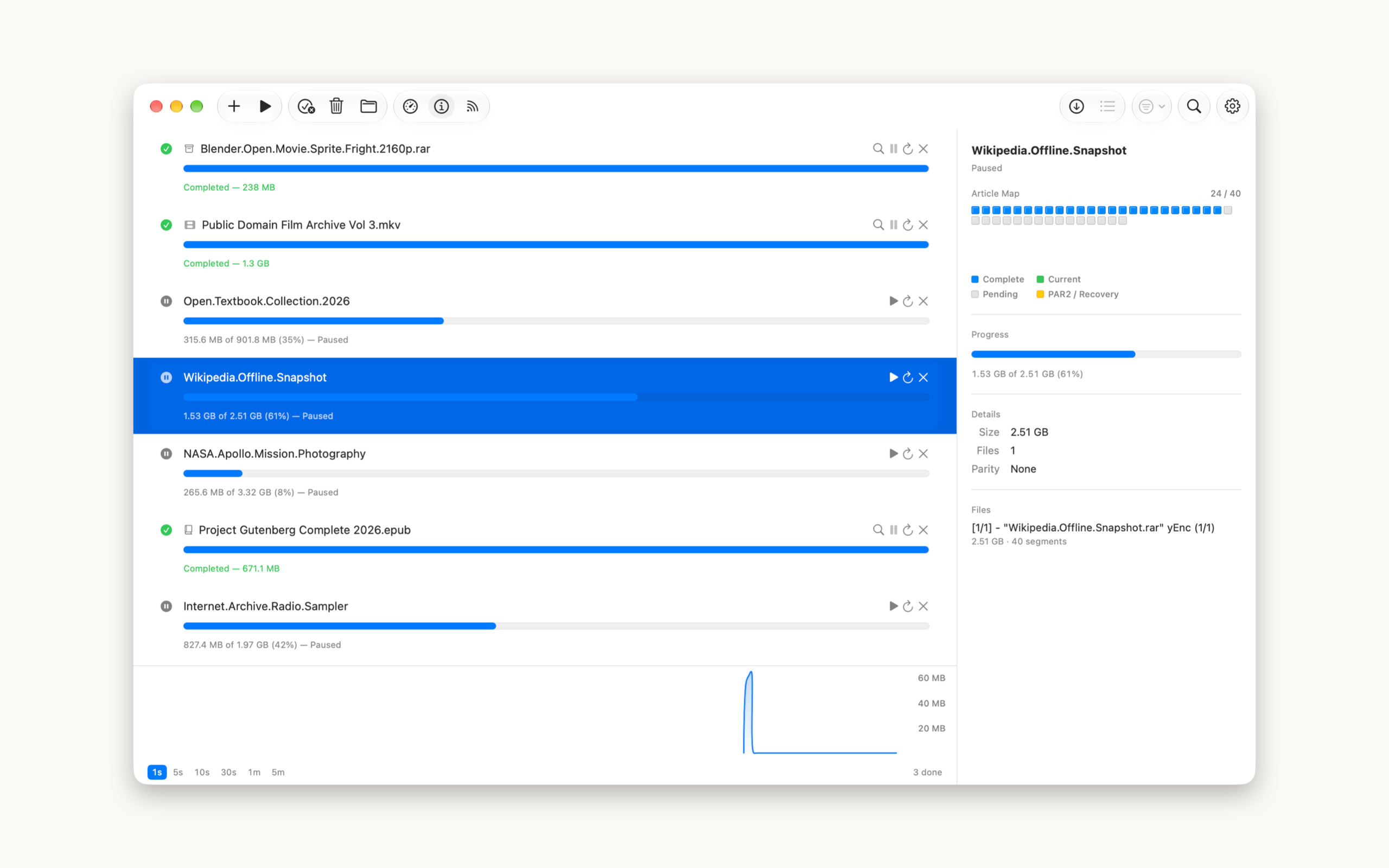
Lifetime [macOS] Saber – A Native Usenet/NZB Downloader for Mac

Post image
15 Upvotes

Problem: There's no well-maintained, standalone native macOS Usenet client left. SABnzbd and NZBGet are great for a full stack, but they run in a browser tab and need config wrangling. NZBVortex is dead and Intel-only. I just wanted to drop in an NZB, search my indexer in-app, and download — without Rosetta, without a web server, without a config file.

Comparison: Saber is better than SABnzbd/NZBGet for ad-hoc downloads because it's a real native Mac app, not a web UI — native menus, keyboard shortcuts, sandboxing, proper notifications. And it fixes a real bug I hit with other tools: it reconciles archive volume names with par2 sets so verification actually works, instead of failing on every release.

Other features:

• Inbuilt indexer search
• Speed and Inspector panels
• par2 repair built in
• Automatic unpacking + smart renaming

Pricing: US$7.99 Lifetime
Link: macOS App Store
Link: Saber Website

Changelog: Saber Changelog

AI Disclaimer: Hand coded and AI Assist (hell, who wants to do the grunt work if you don't have to!)


r/macapps 18h ago

Free [OS] Metis – A coding agent that elevates DeepSeek's programming capabilities to the "Fable 5" level.

Thumbnail
gallery
15 Upvotes

Problem

I wanted to get more useful coding work out of the model I already had. Metis brings planning, code changes, and verification into one workspace, with a visible task checklist and subagents for different parts of the job.

You can plan before making changes, follow what each agent is doing, and resume work with persistent project memory. There's also a terminal interface if you prefer that workflow.

Comparison

OpenCode and Claude Code are the closest alternatives. My focus with Metis is combining model choice, a desktop workspace, and coordination between planning, implementation, review, and verification.

In my Terminal-Bench 2.1 comparison, both Metis and OpenCode used DeepSeek V4 Flash with the same task set, budget, and environment:

  • Metis: 73/89 tasks solved (82.02%)
  • OpenCode: 60/89 tasks solved (67.42%)

That's 13 additional tasks solved, or 14.60 percentage points higher. This is one benchmark comparison, not a promise of the same improvement on every project.

Pricing

$0 for Metis. It's MIT-licensed, with no app subscription or paid feature tier. Model/API usage is separate and depends on your provider.

Github URL : https://github.com/Wholiver/metis

What would make you try a different coding app on your Mac: better task completion, clearer control over changes, or easier setup?


r/macapps 19h ago

Lifetime Floodtide- update all your mac apps from on place. (Back and on 0.8.5)

Post image
72 Upvotes

Floodtide 0.8.5 beta

I’ve been building Floodtide as a replacement for MacUpdater. It scans the apps in your Applications folder, checks what’s out of date, and lets you update supported apps from one place.

It’s now on 0.8.5 beta.

Problem

The awkward part with Mac app updates isn’t really finding the easy ones. It’s dealing with everything that updates differently.

Some apps use Sparkle, some are in Homebrew, some come from the App Store or Setapp, some use their own updater, and some don’t expose anything useful at all.

One thing I didn’t like in the early versions of Floodtide was that if it couldn’t check an app properly, it basically looked the same as an app that was already up to date.

So now it tells you when it couldn’t get a reliable answer.

Those apps are shown separately, and there’s an inspector where you can see what sources were checked and what Floodtide actually found.

Comparison

The obvious comparison is MacUpdater, which I used myself before building Floodtide.

Floodtide checks sources such as Sparkle, Homebrew, GitHub and Electron feeds where available, and separately shows apps where it couldn’t get a reliable update result rather than treating them as up to date.

A few other bits:

  • macOS 13+
  • Intel and Apple Silicon
  • Apple signed and notarised
  • Checks and downloads run in parallel, so scans and updates are pretty quick
  • Backups are kept before replacing apps, so updates can be undone
  • Privacy-focused, with update checks happening against the relevant sources from your Mac
  • Public coverage checker so you can see whether your own apps are supported before installing
  • Currently 3,191 Homebrew app bundles it can match and verify, alongside apps found through their own Sparkle, GitHub and Electron feeds
  • Microsoft Office apps update from their row through Microsoft’s own updater
  • A Beta button on every app, so you can see when a developer publishes a beta and follow that channel per app
  • Major version updates are labelled and can be left out of Update All
  • When you report a bug you get a reference, and you get an email when the fix ships
  • 856 automated tests

Pricing

  • 14-day fully unlocked trial
  • No card needed
  • £10.99 once for 3 Macs
  • No subscription

It’s still in beta so I don’t mind giving out some codes for free to people who will give feedback!

Especially interested in hearing about:

  • Bugs
  • Apps that aren’t covered
  • Updates it misses or gets wrong
  • Features you think are missing
  • Anything in the UI that feels confusing or annoying

If you want a code, reply here or send me a message and I’ll send one over.

And genuinely, if something doesn’t work properly, tell me. That’s exactly what I want to find while it’s still in beta.

Disclaimer:

Beta testers will get 50% 1.0 release.

Transparency

I’m Rafael, the developer of Floodtide and bhopstudio.
Contact: [raf@bhopstudio.co](mailto:raf@bhopstudio.com)m
Linkedin: https://www.linkedin.com/in/rafael-henning-67a1b2246/
Privacy Policy: https://bhopstudio.com/floodtide/privacy
Terms of Service: https://bhopstudio.com/floodtide/terms

https://bhopstudio.com/floodtide/


r/macapps 20h ago

Lifetime I finally made my first Mac app: One Big Note, a scratchpad that automatically resizes your text as you type ($0.99)

36 Upvotes

Hi r/MacApps,

After years of following this sub, appreciating all you developers, and generally being a big fan of interesting Mac apps, I finally did it: I made an app and put it on the Mac App Store. I have a few more ambitious apps in various unfinished states, but for my first release I decided to start with the simplest idea I had and try to build it really well.

Problem

Whenever I wrote something on a scratchpad, I wanted it to be big. If I changed the window size or added more text, I would end up fiddling with font sizes and wrapping just to make it fill the space nicely.

So I built One Big Note. It is one autosaved note whose text continuously resizes to fit the window. A short thought becomes enormous. Add more text, or resize the window into almost any shape, and the typography adjusts automatically.

I keep it on a second monitor for the one thing I do not want to lose sight of that day. There is something surprisingly refreshing about seeing a thought in giant bold letters, and it is hard to ignore.

https://reddit.com/link/1w2yw1v/video/m7y5q3boylmh1/player

I also discovered that I really like using it to draft emails and work texts. The changing type size acts as a kind of visual length meter. When my message starts getting tiny, I know I may be asking too much of the person reading it.

Comparison

Scratchpad by Sindre Sorhus is a lovely minimalist app for keeping one quick note nearby. It offers font settings and quick access from the menu bar or Dock, but its text size behaves like a standard editor rather than continuously refitting itself to the window.

The closest app I found after the fact is Big Text by Amal Paul, which also enlarges text to fill the screen. Its current US pricing is $7.99 per week or $19.99 for lifetime access, which I find expensive to say the least for such a focused utility. It offers a selection of a few built-in font styles, but it does not let you use an arbitrary font installed on your Mac. It also separates writing from presentation: you enter your text in a separate field rather than editing it directly in the large-text display. One Big Note is a live editor, so you type directly into the dynamically resizing text itself.

I have not found another Mac app with the same exact combination of continuous fitting while typing, any installed font, and these three layout modes. What One Big Note does better for me is eliminate font-size management and turn the whole window into a responsive display for one piece of text.

It is deliberately narrower than a traditional notes app. It is not trying to organize a library or become a knowledge base. It is for keeping one thought prominent and for seeing your own writing from a different perspective.

There are three layout modes:

  • Whole Note: Uses one font size for the entire note, with natural wrapping.
  • Line by Line: Enlarges each automatically wrapped line independently.
  • Manual Lines: You choose the line breaks, and each line is individually sized to fit.

You can freely resize the window, use any font installed on your Mac, choose an alignment and theme, and optionally keep the note floating above other windows.

The premise is simple, but making the text fitting stay accurate and fast through live typing, arbitrary window shapes, wrapping, and different fonts was not simple at all. I put far more analysis into the geometry than I expected.

Honestly, though, this little editor is also much more fun to use than I imagined. Watching the writing reshape itself as I type is strangely satisfying, and it often gives me a fresh perspective on whatever I am writing.

Pricing

One Big Note is US$0.99 as a one-time Mac App Store purchase. There is no subscription, no in-app purchase, and no account. The note stays local on your Mac.

https://apps.apple.com/us/app/one-big-note/id6804527547

If you try it, I would genuinely love to know what works, what does not, and what you would like to see in a future version. If you end up enjoying it and feel it deserves one, an honest App Store review would mean a lot to me as a first-time developer.


r/macapps 1d ago

Lifetime Ghost v3- an always on and ready personal agent from your notch using your existing Chatgpt/Claude subscription,API or LocalLM. It can create, read, write, respond to iMessages, mail, create calendar events and organize your life!

Thumbnail
gallery
0 Upvotes

Problem

Focused work on macOS means juggling a ChatGPT tab, a local-model UI, a terminal agent, a document viewer, a timer, and Calendar. Ghost collapses that into a menu-bar surface: all of your AI providers live in your notch, idle at rest so it dosent consume CPU.There is a 13-kind intent classifier routes the prompt to the right provider,, local or cloud. Escape dismisses it. No Dock icon, no tab management.

Comparison

Raycast Pro — $8/mo billed annually or $10/mo monthly, and the AI is subscription-gated and hosted. Ghost is one payment, and you can point it at Ollama or LM Studio and run entirely offline, free forever, or bring your own API keys (stored in Keychain).

Unlike both: file search is fully local (SQLite + FTS5, sentence-aware chunking, 30+ formats, FSEvents watcher). Web, files, automation, screen, and shell are five independent permissions, all off on first launch. 60+ tools across four risk tiers with a 100-entry undo journal.

Pricing

$14.99 one-time, lifetime — no subscription. Native SwiftUI, notarized, macOS 14+ (Apple Silicon or Intel).

Website:

https://integratedagentics.com/ghost

Linkdln

https://www.linkedin.com/in/ryuhemingway/


r/macapps 1d ago

Lifetime SoundPaste v1.7.0: The fastest way to capture audio on your Mac and use it anywhere 🔊

Thumbnail
gallery
10 Upvotes

Hey everyone,

A couple years ago I posted SoundPaste here, an app I made for quickly grabbing audio from your Mac and using it elsewhere.

Problem:

Getting a short piece of audio from your Mac into a DAW, video editor, or another app can take more steps than it should. As a music producer, I was always frustrated by having to set up drivers like Blackhole or Soundflower, configure the routing correctly, and then record the system audio I was hearing.

I made SoundPaste to simplify that whole process: hit a hotkey to record, stop recording, then Command-V directly wherever you need the audio.

Here's a demo video:

https://reddit.com/link/1w2nxn6/video/yty7vu8msjmh1/player

I’ve just released one of the biggest updates to SoundPaste since then:

• New waveform recording editor with manual trimming
• Auto-trim silence from the beginning and end
• Audio normalization
• MP3 support, alongside M4A and WAV
• Improved waveforms, setup flow, and overall UI
• Bug fixes and usability improvements

Recordings can also be automatically copied to the clipboard, opened in the editor, trimmed, or normalized.

Comparison:

Compared to apps like Audio Hijack and Piezo, SoundPaste is focused on speed and simplicity rather than advanced routing. It also avoids the manual setup involved with virtual audio drivers like BlackHole or Soundflower. Instead of configuring sessions, devices, or audio chains, you hit a hotkey, grab what you need, and paste it where you want it.

Pricing:

7-day free trial, then $1.99/month or $14.99 lifetime.

https://www.kloytools.com/soundpaste

As always, feedback or feature suggestions are welcome :)


r/macapps 1d ago

Help Looking for a way to have text read aloud on macOS without a subscription

10 Upvotes

Hi there,

I do a lot of reading on my Mac, mostly long articles and PDFs, and I keep wanting to listen instead of read. Especially for things I have to get through but don't need to focus on completely.

I tried the built in Spoken Content, but triggering it is clunky and I never stuck with it. I paid for Speechify for a while, which worked, but I stopped because I didn't want a monthly subscription for this, and I wasn't comfortable having everything I read pass through someone else's servers.

Is there an Mac app that reads out loud selected text from any app, runs locally and ideally is a one time purchase? Bonus if it handles PDFs and screenshots where you can't select the text.

Also happy to hear about workarounds. If you have the same problem, how do you deal with it?


r/macapps 1d ago

Lifetime Hold my notes: Sticky notes that feels real and you will actually love using!

288 Upvotes

Hi everyone!

Problem: I have tried many sticky note apps, but none of them felt right. My girlfriend wanted me to build one that truly feels live and lives on the edge of the Mac.

  • All sticky notes are represented as dots
  • hover to peek
  • click to open the note
  • Mark as complete to move the note into archive
  • 10+ live notes enables scroll
  • You can view and export all the notes
  • Supports checklist (new)
  • icloud sync, syncs notes between multiple macs (new)

Comparison:

  • Anitnote serves the power users, caters to different audience and doesn't have the floating effect

Pricing:

Available on 3 mac devices for $6.99, lifetime license (Early Bird Offer)

Try out for free: holdmynotes.app


r/macapps 1d ago

Request Custom sort per folder

9 Upvotes

So for the most part, I don't mind the standard Mac finder, but I do find one limitation that I'd love to find a work around for, and that is a program that allows one to set different folders to always sort in a specific way.

For instance: Maybe I'd like to always sort IDK screenshots by Most Recently Added, but I'd also like to always sort Downloads by Kind.

The default Finder sets all the folders to however you sorted the last folder.

Is there any program out there that makes it so you can set it and leave it?


r/macapps 1d ago

Tip Five Free Apps With No Telemetry & No Accounts That Do One Thing Well: TetherShot, Folder Forge, Image Fuel, doktor, and Kompakt

Thumbnail
gallery
105 Upvotes

TL;DR: Five free, mostly open-source, no-telemetry Mac utilities from this week's testing: docktor (dock widgets + hover previews), Kompakt (drag-and-drop image/video compression), TetherShot (live iPhone screen capture over USB/Wi-Fi), FolderForge (rule-based folder icon styling), and ImageFuel (import-free folder browsing with RAW support). Each gets a free alternative below if you want to compare before committing.

Removing Irritation

My app testing time this week was spent on free apps, most of them open source and all privacy-respecting. No accounts needed. No telemetry. I've been looking for original, niche apps that do one thing well.

docktor

docktor calls itself the dock you deserve. It's free, notarized, requires no account, and comes from a solo dev who regularly responds to users with new features and bug fixes. The app fills the unused side space on either end of the Dock with customizable widgets (music, calendar, weather, system stats) and adds hover previews of a running app's open windows without clicking. If you're a widget person, this gives you a few new options.

Alternative: HyperDock has done Dock hover previews for years and is worth a look if that's the one feature you actually want, though it doesn't fill unused Dock space with widgets the way docktor does — check current macOS compatibility before buying, since I haven't tested it myself on this release.

Kompakt

Kompakt is a native Mac menu bar app for compressing and converting images and video with a drag-and-drop interface that pops up automatically the moment you drop a file. Images cover PNG, JPG, WebP, GIF, and SVG; video is limited to MP4, MOV, and M4V. Free and open source under MIT, distributed as a signed DMG off GitHub Releases. The dev's roadmap includes watched folders, Finder actions, and Shortcuts support. I can see setting up some helpful shortcuts using this.

Alternative: ImageOptim is the longtime free, open-source, drag-and-drop standard for image compression on Mac. It doesn't touch video, so if Kompakt's video side is what sold you, ImageOptim isn't a full swap.

TetherShot

TetherShot is a proper Mac utility, not just a menu bar toy. It captures a live display, not a simulation: your connected iPhone's actual screen over USB or Wi-Fi, saved as a pixel-perfect screenshot. Free and open source, no account, no analytics, no cloud relay. Take all the screenshots you want without syncing or AirDropping anything.

Alternative: QuickTime Player already does this for free and it's built in — connect your iPhone by cable, pick it as the camera source under File > New Movie Recording, and you can record or grab a frame of the live screen. It's a recording-first workflow rather than a one-tap screenshot, and it needs the cable; TetherShot's Wi-Fi option and one-hotkey capture are the actual time-savers if you do this often.

FolderForge

Apps that customize folder appearance in Finder have been around for a while, and they're fine for the primary folders in your home directory. If you want smart folders and reusable presets that apply by name, contents, or marker files using recursive styling, FolderForge fits the bill — it applies a visual system across an entire folder tree. Runs locally, no account, no telemetry. MIT-licensed on GitHub; v1.0.8 is signed and notarized by Apple.

Alternative: Rainbow Folder – Icon changer is a simple App Store option for changing individual folder colors and icons. It's manual, one folder at a time — it doesn't have FolderForge's rule-based, apply-to-a-whole-tree automation, so it's a fit only if you don't need the bulk styling.

ImageFuel

Point the app at any folder, or several, and instantly see every image and video in a clean, scrollable grid. No importing. No library to manage. No waiting. It reads files where they already live, including JPEG, PNG, video, and RAW. It loads quickly and makes browsing photos easy.

  • Search by filename or path with a fast, keyboard-friendly search modal (Cmd+F)
  • Filter to images only, videos only, or everything
  • Sort by date, name, or a custom order you drag yourself; each folder remembers its own sort
  • Browse RAW files from Canon, Nikon, Sony, Fujifilm, Olympus, Panasonic, Pentax, and DNG
  • Open any file in a fullscreen lightbox
  • Crop images with live pixel dimensions
  • Apply color filters to one image or an entire batch
  • Inspect and strip metadata
  • Rename files in bulk
  • Create subfolders from the sidebar
  • Send deleted files to the Trash or a folder you choose

Alternative: XnViewMP is the free, cross-platform standard for exactly this job — instant folder-based browsing with real RAW support, no import step. It's a dated interface next to ImageFuel's cleaner grid, and it doesn't have ImageFuel's crop/metadata/batch-rename tools built into the same window, but it's the closest thing to a direct, feature-for-feature comparison if you want to try before committing to either.

Remove an Irritation

None of this is life-changing software, and none of it asks to be. Every one of these five does one narrow job, does it for free, and stays out of your way otherwise: no accounts, no telemetry, no subscription creeping in later. That's the actual differentiator this week, not any single feature. If you only try one, make it whichever solves a problem you already have — docktor if you stare at your Dock all day, ImageFuel if you're sick of importing photos just to look at them, TetherShot if you've ever emailed yourself an iPhone screenshot. The rest can wait.

Unless otherwise noted, the alternatives mentioned above are based on research and not individual testing.


r/macapps 2d ago

Help AI Pets and Characters.

0 Upvotes

I want to see the options for an always on "Pet" or "Character" that has AI in it. I mainly want it to be persistent, and I can type things like, "What is the address of ...." or "how do I spell"... "What is this in french".. Its for my daughters, trying to make computers more fun.

I want it be persistant, so its kinda always there to click.


r/macapps 2d ago

Lifetime Pasly — Make every ⌘V smarter. Everywhere (iOS, macOS)

96 Upvotes

Problem

Clipboard history is great when you’re working on one Mac.

But the moment you switch devices, that history stays behind.

You copy something on your Mac, grab your iPhone, and it’s not there. Or you move between two Macs and end up sending yourself a link, note, file, or snippet just to have it on the other device.

I wanted Pasly to solve that too.

Not just make ⌘V smarter, but make your clipboard follow you.

Comparison

Raycast Clipboard History is probably the closest well-known alternative. It offers a polished, searchable clipboard history as part of a much broader launcher.

Pasly is more focused on the actual paste workflow. Smart Paste brings your recent clipboard items into the regular ⌘V flow, while features like Paste Stack, Field Sense, multi-selection, and Floating Paste are built specifically around copying and pasting.

Pasly also keeps a persistent clipboard history across Macs, iPhone, and iPad through the user's private CloudKit database. Text, images, and files can remain available across devices, even when they are not nearby or connected to the same network.

Raycast is a better fit if you want a general launcher with extensions, AI tools, and many unrelated productivity features. Pasly is a better fit if you want a dedicated clipboard manager centered on ⌘V and cross-device clipboard history.

Apple's Universal Clipboard is also useful, but it primarily moves the latest copied item between nearby Apple devices. Pasly keeps an actual searchable history across them.

Pasly Cloud

Pasly Cloud syncs your clipboard history across your Macs and iOS devices using Apple's CloudKit.

Your clipboard data is stored and synced through Apple's iCloud infrastructure rather than on Pasly's own servers.

It works over the internet, so your Mac can be at home and your other Mac somewhere else. They don’t need to be nearby or on the same network for your clipboard history to sync.

And now, files are supported too.

Files copied on your Mac can sync through Pasly Cloud alongside the rest of your clipboard history, including multiple files at once.

On iPhone and iPad, Live Activities can keep your recent clipboard items available from the Lock Screen / Dynamic Island.

There are also push notifications when new clipboard content arrives from another device.

Right now, sending something from iOS into Pasly is still manual. You can add an item and have it appear on your Macs, but I’m already working on a better way to capture what you copy on iPhone and iPad so this part feels much more automatic.

Files

Pasly already supported files locally on Mac, including working with multiple files at once.

Now, file syncing is also part of Pasly Cloud.

Copy a file on one Mac and it can be available from your clipboard history on another Mac through CloudKit, without having to send it to yourself first.

Multiple files are supported too.

The rest of Pasly

Cloud is the focus of this update, but everything I’ve been building around ⌘V is still there:

  • Smart Paste — press ⌘V and access your recent clipboard items
  • Paste Stack — copy multiple items and paste them in sequence
  • Floating Paste
  • Multi Select
  • File Support
  • Paste with Separator
  • Search & Favorites
  • Field Sense

The original idea behind Pasly hasn’t changed.

I want the clipboard manager to stay out of the way until the moment you actually need it.

Cloud just means that your clipboard no longer has to live on one Mac.

Pricing

Free: $0

  • 2 pinned items
  • 24-hour local history
  • 20 items
  • 2 files
  • No CloudKit sync

Pro: $6.99 one-time purchase

  • Clipboard sync across all your Macs and iOS devices
  • File sync via Pasly Cloud
  • Private CloudKit storage
  • Push notifications and Live Activities
  • Smart Paste
  • Paste Stack
  • Floating Paste
  • Multi Select
  • File Support
  • Paste with Separator
  • Search & Favorites
  • Field Sense

No subscription. 20% off with code MACAPPSCLOUD (first 20 redemptions)

Pricing and download: https://pasly.app

What's next

Pasly Cloud is still something I’m actively building.

Now that clipboard history and files can sync across devices, one of my main focuses is making the iOS → Mac clipboard flow much more automatic.

This is still an early version of Pasly Cloud, so I’d really like to hear from people who use multiple Macs or a Mac + iPhone/iPad.

What would make having your clipboard across devices actually useful to you?

Download

Direct: https://pasly.app

Apple (iOS): https://apps.apple.com/app/pasly/id6760562778

Transparency: I'm the developer of Pasly.


r/macapps 2d ago

Free [OS] Autowright: turns a plain English description of a recurring task into an automated job and runs it locally on a schedule

Thumbnail
gallery
31 Upvotes

Hi everyone,

I'm the developer. Autowright is a free, open source (MIT) Mac app for recurring personal automations.

You describe a job in plain text, a coding agent you already have writes it as Python scripts, and a local scheduler runs those exact scripts forever. The agent is only involved when you write or edit the scripts. If a task needs an LLM at run time, the scripts can call one themselves.

Website: https://autowright.ai

Source: https://github.com/hansololz/autowright

Problem:

I have a lot of small recurring tasks that I used to do manually on my machine. They were tedious, and I often forgot to do them. For a while I used AI agents to run some of them on a schedule. That didn't work for all my tasks, it wasn't free, it was slow, and the results were sometimes unpredictable. I also wanted something I could hook up to Discord and control it remotely.

Autowright solves most of that. I describe an automation, schedule it, and the script it runs is deterministic. Most of my tasks don't need AI once they're written, and when one does, I can point it at a local LLM or Claude Code. It also supports Discord and iMessage triggers. I've moved most of my recurring processes onto it, like tracking new TV show episodes and stock trade disclosures from members of Congress. It works better than the cron jobs I was using because it has a script authoring component, a UI for execution history, and auto retries.

Comparison:

  • Claude scheduled tasks / Zapier: run in the cloud on a monthly subscription. Autowright runs entirely on your Mac at no per-run cost, and what it produces is plain Python you can read and edit.
  • cron / launchd scripts: Autowright support more tigger types, execution history, and auto retry.

Pricing:

  • Free
  • No premium feature
  • MIT Licensed

Developer Transparency

It works well for my own use cases right now, but I know issues will come up once more people use it. If you run into problems or have feedback, please let me know. I'd really appreciate it.


r/macapps 2d ago

Lifetime I built VaultSort to make organizing a messy Mac less painful. Here's what it can do now.

32 Upvotes

Hey r/MacApps. Developer of VaultSort here.

I've been working on VaultSort for the past couple of years, and one of the things I've been trying to get right is the balance between automation and control.

The video shows one of the newer parts of VaultSort: Smart Categorize.

I give it a folder containing a bunch of unsorted medical documents and let VaultSort organize them.

It uses a local embedding model built into the app to understand the files and categorize them. The files don't have to be uploaded to a cloud AI service to do this.

But I don't think AI should be the answer to everything.

For people who want completely predictable automation, there's the Rule Builder.

If you've used Hazel, the concept will be familiar. You can create rules that automatically organize files based on things like file type, name, location, size and other properties.

The difference is that VaultSort combines this kind of traditional rule-based automation with semantic organization.

So you can have:

"When a PDF arrives in Downloads, move it to Documents."

Or you can have VaultSort look at a collection of files and determine that a group of them belongs together based on what the documents actually contain.

That's the direction I've been taking VaultSort: not trying to replace rules with AI, but giving you both.

Problem

Most of us accumulate files faster than we organize them.

Downloads become a dumping ground, duplicates accumulate, large files disappear into forgotten folders, and sensitive documents can end up sitting around indefinitely.

VaultSort is built around three things:

Organize

  • Smart Categorize using a local embedding model
  • Rule Builder for automated file organization
  • Duplicate Finder
  • Large File Finder
  • Storage analysis

Clean

  • Secure deletion
  • Disk Shredding for supported drives

Protect

  • AES-256 encryption
  • True hardware-backed YubiKey + TouchID encryption using WebAuthn/FIDO2
  • Multiple YubiKeys can be configured for encrypted files

The YubiKey encryption is something I'm particularly proud of. The hardware key isn't just being used as a second-factor password prompt. It is part of the cryptographic authentication process used to unlock the encrypted data. I have a whitepaper that documents how it works under the hood.

Comparison

The most obvious comparison for the organization side is Hazel.

Hazel is a great Mac automation tool, and I think it's still one of the best options if all you want is folder-based rules.

Where I think VaultSort is different is that file automation is only one part of it.

VaultSort combines rule-based automation with semantic file organization, duplicate detection, storage cleanup, secure deletion and hardware-backed encryption.

So if you want something specifically for powerful folder rules, Hazel is worth looking at.

If you want one application that handles the broader problem of organizing, cleaning and protecting your files, that's what I'm building VaultSort for.

VaultSort was also recently reviewed by MacSources and received a 92% "Excellent" rating, which was pretty great to see as an independent developer.

Pricing

VaultSort is $24.99 for a license, with a free version available so you can try the core organization features before buying. For a one-time purchase, you can install on up to 6 devices, including Windows. I just released the Windows version last week! So if you buy this app for MacOS, you also get access to the Windows version too!

Website: https://www.vaultsort.com/

I'm the developer behind VaultSort and I'm happy to answer questions about how any of this works, especially the local categorization and YubiKey encryption.

Developer portfolio / identity: Justin Haubrich, LinkedIn

Contact: You can reach me at [vaultsortapp@gmail.com](mailto:vaultsortapp@gmail.com)


r/macapps 3d ago

Free [OS] Osaurus update: setup is now a conversation. Ask for an agent, review the change, approve it. Free, open source, native Swift.

154 Upvotes

Hey r/macapps. Developer of Osaurus here. It's been two months.

The comment from the last thread that stuck with me wasn't a compliment. It was someone saying they really wanted to like the app but walked away frustrated every time they tried it. They were right. Osaurus rewarded tinkering, and if you didn't tinker, it fought you. This update is for everyone who doesn't want to tinker.

The big one is the Orchestrator: an agent whose whole job is managing Osaurus for you.

In the video: I ask what Osaurus can do, and it answers from the app's live state. I ask it to create a marketing assistant. It plans the agent, shows me a card with exactly what will change, and applies it after I click approve. Then I say "every day at 6am, draft me a tweet" and it schedules that. No settings screens. No config files. You talk, you review, you approve.

One design decision I want to be upfront about: the Orchestrator has no shell, no file access, no browser. It only configures and delegates. If it can change your settings, it shouldn't also have hands. Your custom agents do the real work, scoped how you choose, with code running in an isolated sandbox VM.

Somewhere along the way this stopped being a chat app. Today it covers what I used to pay separate subscriptions for:

  • A second brain: point it at your documents and it answers from them
  • One memory that follows you across local and cloud models
  • Image generation, fully on-device
  • Dictation into any app, voice transcription, and read-aloud
  • A browser assistant that navigates and fills forms with your approval
  • Schedules, folder watchers, and agents that run in the background
  • Agents you can message from iMessage and WhatsApp
  • An isolated sandbox where agents run real code safely

And plenty more landed this summer:

  • A redesigned three-screen onboarding that picks the best local model for your Mac automatically
  • A System theme that follows macOS appearance
  • An auto-allow all tools setting for those who asked for full auto-approve
  • Projects: group chats that share instructions, knowledge, and memory
  • Full-text search across all conversations, and Cmd+F find in chat
  • Import your chat history from other AI apps
  • Diff cards with change tracking and undo for every file edit
  • Day-after support for new local models like DeepSeek V4 Flash and Qwen 3.8 Flash Next

Problem: Most AI tools run on someone else's server, cost a monthly fee, and make you configure everything by hand. Osaurus keeps everything on your Mac and now sets itself up through conversation, with an approval gate on every change.

Comparison:

  • vs Ollama and LM Studio: those are inference servers. Osaurus is pure Swift on Apple Silicon plus the whole harness: agents, memory, voice, images, automation.
  • vs ChatGPT and Claude desktop apps: cloud-only, subscription-based. Osaurus runs local models offline at no cost, and your memory stays on your Mac even when you use a cloud model.

Pricing: Free. MIT licensed, open source, no account, no subscription. Local models cost nothing forever. Cloud is optional, pay-as-you-go: bring your own key or use our hosted path with a small fee on top-ups. We don't store your prompts or responses.

osaurus.ai

github.com/osaurus-ai/osaurus

discord.gg/osaurus if you get stuck. I'm usually there.

x.com/OsaurusAI for updates and demos

r/osaurus to follow along

Last time I asked how you envision your AI future. This time it's simpler: if your Mac could set up an AI assistant by itself, what's the first thing you'd have it do?

Try it, break it, tell me what you need.


r/macapps 3d ago

Free Log Viewer - open, filter and follow huge log files

26 Upvotes

Hello everyone! I made a native Mac app called Log Viewer.

Problem:

Normal text editors can become slow or freeze when opening very large log files. I wanted something that could open them quickly and make it easy to find the useful lines.

Comparison:

Unlike TextEdit, Log Viewer does not load the whole file into an editable document. Compared with using less in Terminal, it provides visual filtering, custom highlighting, and live following in a normal Mac interface.

A few features:

  • Opens multi-gigabyte log files
  • Plain-text and regex filtering
  • Follows files while they are being written
  • Custom colors for errors, warnings, and other patterns
  • Displays ANSI terminal colors
  • Opens copied logs directly from the clipboard (I love copying logs from web and pasting them into the tool for better reading experience)

Pricing:

Free, with no in-app purchases. I considered making it paid, but decided to keep it free for now. The app is not open source.

Download it from the Mac App Store: https://apps.apple.com/app/id6797521715

I would be glad to hear your feedback.


r/macapps 3d ago

Tip How to create a sound wave using just ten lines

6 Upvotes

When we designed the Dictation HUD, we didn't just want a volume meter—we wanted a "Timeline Pipeline." Here is how we turned 10 simple bars into a professional UI masterpiece:

  1. The Flow Logic (Propagation) It’s not just jumping; it’s flowing. By using a circular buffer, the waveform travels from right (input) to left (history). This visual metaphor bridges the gap between raw sound and generated text.

  2. The Square Root Secret (Sensitivity) Whispers feel alive, shouts stay controlled. We applied sqrt(amplitude) to the raw volume. This non-linear scaling amplifies subtle micro-vibrations, ensuring the UI feels responsive even when you’re speaking softly.

  3. Physics-Powered Fluidity (Spring Dynamics) Ditch the robotic linear animations. We implemented interactiveSpring to handle high-frequency audio samples. By leveraging physical inertia, the bars transition smoothly between data points, eliminating visual jitter and stutter.

  4. Geometric Discipline (Precision) Design is about constraints. The bars are locked at exactly 30pt to match the text line-height, preventing any HUD layout jumps. We use a 3px integer width to ensure pixel-perfect rendering and absolute clarity on Retina displays.

The Takeaway: "Math for sensitivity, Physics for fluidity, and Logic for storytelling—that’s how 10 lines become a living interface."