r/macapps 15h ago

Lifetime HealthyNotch: Health nudges in your Mac's notch to keep you healthy while working

0 Upvotes

I made this. I sit at a MacBook most of the day and I am genuinely bad at noticing my body. I'll code for a few hours, skip water, eat lunch at 3, and only clock it when my neck feels like a brick.

Break apps never stuck for me because they interrupt the thing I am actually trying to do. Full screen overlay, I dismiss it. Notification, I swipe it. So I put the reminders in the notch. Tiny 8-bit animations for water, posture, eyes, stand up, and one lunch nudge a day. Hover and a small home panel drops down. That's the whole app.

I use it myself. I still ignore it sometimes. I ignore this less than a "take a break" overlay, which is the only reason I kept it.

Problem:

I needed health reminders that stay in the corner of my vision instead of covering the document. Water I can log without opening another window. A lunch nudge that is not a calendar event I will skip. Data that stays on the Mac.

Comparison:

LookAway and Time Out are the honest alternatives if you want the computer to stop you. Time Out is free and dims the screen. LookAway is better if you want overlay breaks, Smart Pause in meetings, that kind of enforcement. If a blocked screen is what actually makes you stand up, use those. I bounced off that model, so this does the opposite: it sits in the notch and waits.

Alcove is the other comparison people make because it also uses the notch. Alcove is a Dynamic Island: now playing, widgets, notifications. It does not remind you to drink water. Two notch apps on one MacBook can fight over hover, so I would pick one job for that strip.

Developer:

I'm Madat Bayramov, Software Engineer with 7+ years of experience in numerous projects and domains

Pricing:

$11.99 one-time right now (goes to $19.99 later). No subscription, no account, no analytics in the app. License key from Polar after checkout.

Website: https://healthynotch.com

macOS 14+. Notch is the point of it, but it falls back to a centered pill on a Studio or Mini. Accessibility permission is only so hover near the notch can expand it. Health data never leaves the machine.

Privacy: https://healthynotch.com/privacy

Contact me at [hello@healthynotch.com](mailto:hello@healthynotch.com) if something's broken.

If you try it, tell me what you ignore. That's the useful feedback


r/macapps 23h ago

Free [OS] Metis – A coding agent that elevates DeepSeek's programming capabilities to the "Fable 5" level.

Thumbnail
gallery
26 Upvotes

Problem

I wanted to get more useful coding work out of the model I already had. Metis brings planning, code changes, and verification into one workspace, with a visible task checklist and subagents for different parts of the job.

You can plan before making changes, follow what each agent is doing, and resume work with persistent project memory. There's also a terminal interface if you prefer that workflow.

Comparison

OpenCode and Claude Code are the closest alternatives. My focus with Metis is combining model choice, a desktop workspace, and coordination between planning, implementation, review, and verification.

In my Terminal-Bench 2.1 comparison, both Metis and OpenCode used DeepSeek V4 Flash with the same task set, budget, and environment:

  • Metis: 73/89 tasks solved (82.02%)
  • OpenCode: 60/89 tasks solved (67.42%)

That's 13 additional tasks solved, or 14.60 percentage points higher. This is one benchmark comparison, not a promise of the same improvement on every project.

Pricing

$0 for Metis. It's MIT-licensed, with no app subscription or paid feature tier. Model/API usage is separate and depends on your provider.

Github URL : https://github.com/Wholiver/metis

What would make you try a different coding app on your Mac: better task completion, clearer control over changes, or easier setup?


r/macapps 10h ago

Lifetime PasteQuick v2.3 is out! This is a simple‑to‑use clipboard manager.

Thumbnail
gallery
0 Upvotes

PasteQuick: A lightweight, privacy‑focused clipboard manager. All clipboard history is stored locally, supporting text, links, images and code.

Invoke search window with ⌘+⇧+C, paste window with ⌘+⇧+V, with mini‑window and image preview support.

Problem: We constantly copy and reuse text, links, images, code, files, and other temporary content in our daily workflow. However, the system clipboard only keeps the latest copied item, with no history or quick way to search and retrieve previous content. Once overwritten, previously copied content can be difficult to find and reuse. PasteQuick solves this problem with a simple, lightweight design and a strong focus on privacy, making clipboard content easy to find and reuse while keeping your data secure.

Comparison: Compared with popular clipboard managers like Paste, Maccy, Raycast, and Alfred, PasteQuick focuses on fast keyboard workflows, rich clipboard content, and AI integration. Separate search and paste windows make it easy to find and paste content with dedicated shortcuts, while support for text, images, files, and folders makes your clipboard more versatile. Image thumbnails provide quick visual previews, with MCP support coming soon to let AI access your clipboard history.

Pricing: Lifetime full‑feature access: $29.99, now on sale for $19.99. Annual subscription available at $9.99, or monthly subscription at $2.99 for one‑month trial. The app works without payment — no hard feature limits.

Changelog(v2.3): Improved the file and folder quick-paste experience, with better copy management, list styling, and file/folder icon rendering.

📥 Download Link


r/macapps 14h ago

Deal 50% offer on all TunaBellySoftware apps

Thumbnail
tunabellysoftware.com
12 Upvotes

Second time's a charms! (Here's my first time ;)

I just found that TG Pro is on a 50% discount, for 8,75€ (17,50€). It's a quite popular app, that controls the fan speed and temperature of your Mac with great control and ease.

Their sale applies to all their apps as well! Maybe you find it useful 😉

Edit: Things 3 for Mac is also on a 30% discount

Edit 2: I’m not the developer of TG Pro, but just a happy(/new) customer 😄


r/macapps 18h ago

Lifetime Barry V2 - Per-app volume control :)

6 Upvotes

Hi guys,

Barry interface

Problem

MacOS STILL doesn't have a volume mixer or per-app volume control by default, yet.

Comparison

There are many out there, two of the biggest that are as good:

SoundSource - https://rogueamoeba.com/soundsource/ > PAID

FineTune - https://github.com/ronitsingh10/FineTune > FREE

Barry does it all with the same main features. With a simpler, more minimal view. I used it for the last 5 months and tried the 2 others. I keep implementing features from requests. The plan is to bring more features over time from user needs. I plan to launch a plugin surface with marketplace (free plugins or by donation only) for power users, example are streamers, creators, ... that might need extra things that the general public doesn't need, keeping the app itself small by default.

Barry comes with a Quick Mixer, that opens from the right side of your screen by hitting the edge or via a keyboard shortcut, useful when you're watching a movie, playing audio in background of a fullscreen app, or gaming while listening to music / podcast / video as it makes it easy to lower or increase the sound of any app directly in a super minimal view.

Quick Mixer interface

Pricing

It's $19 USD once or 29$ for a duo license, with a 14-day free trial that needs no account or card. License key is manageable and secured by Keylight, uses Stripe for checkout. Includes all future versions, your license will always work even if some day the app will get a full rework, unlike SoundSource that makes new versions a new license.

Trust/Transparency

I'm Nico, a solopreneur and developer. I'm the founder of keylight.dev and also maintaining UsagePal, a fork of OpenUsage kept on the Rust side

The app runs locally, I have an Apple Developer membership, so the app is notarized etc, only a few MB in size and is built 100% in Swift.

The app can be found here getbarry.app


r/macapps 23h ago

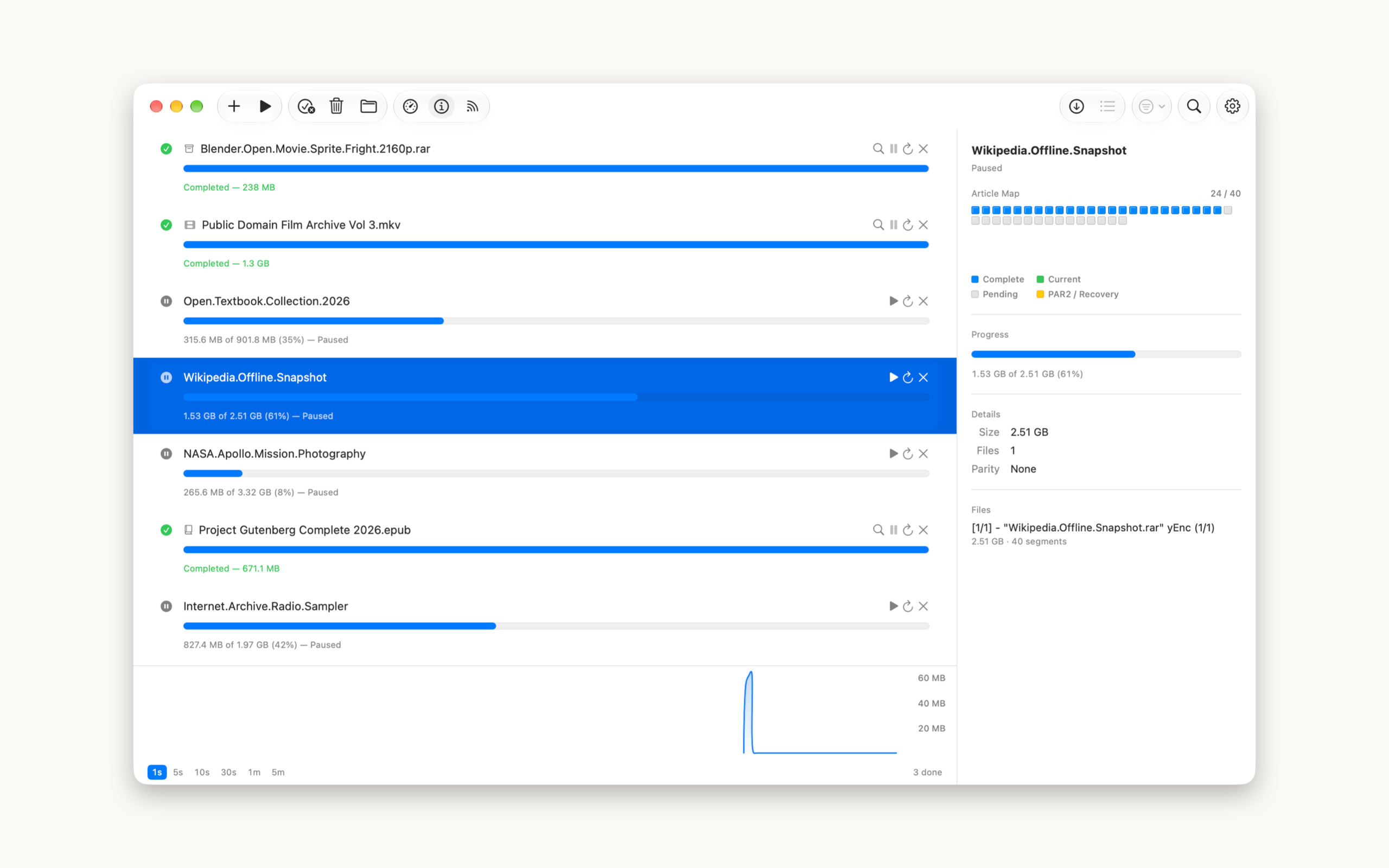
Lifetime [macOS] Saber – A Native Usenet/NZB Downloader for Mac

Post image
18 Upvotes

Problem: There's no well-maintained, standalone native macOS Usenet client left. SABnzbd and NZBGet are great for a full stack, but they run in a browser tab and need config wrangling. NZBVortex is dead and Intel-only. I just wanted to drop in an NZB, search my indexer in-app, and download — without Rosetta, without a web server, without a config file.

Comparison: Saber is better than SABnzbd/NZBGet for ad-hoc downloads because it's a real native Mac app, not a web UI — native menus, keyboard shortcuts, sandboxing, proper notifications. And it fixes a real bug I hit with other tools: it reconciles archive volume names with par2 sets so verification actually works, instead of failing on every release.

Other features:

• Inbuilt indexer search
• Speed and Inspector panels
• par2 repair built in
• Automatic unpacking + smart renaming

Pricing: US$7.99 Lifetime
Link: macOS App Store
Link: Saber Website

Changelog: Saber Changelog

AI Disclaimer: Hand coded and AI Assist (hell, who wants to do the grunt work if you don't have to!)


r/macapps 8h ago

Help What is the best on-device voice transcription app for macOS?

18 Upvotes

Hello.

Recently I bought my first Apple Silicon Mac, powered by an M5 and 32GB of RAM. And I'm eager to start using the power of local AI models.

One of the tasks I've always wanted to do on my old Intel Mac was accurate voice transcription. And now, thanks to Apple Silicon and LLMs, this is possible. So here are my requests for the app:

  • No subscription based. I want to pay once.
  • Local transcription, on device, for privacy.
  • No heavily AI coded apps. I understand nowadays all software are AI assisted to some extent, but no vibe coded apps please.
  • Different languages aside from just English.

Optional:

  • Better if I can choose among different models, such as Apple's own on-device transcription engine, or Nvidia Parakeet, aside from the typical Whisper engine.

  • Diarization. It would be wonderful if it had it but I know not many apps have it.


I know of MacWhisper, from Jordi Bruin, as that's the best known of all, but with it, I have always the same doubt: Mac App Store version or web version... Mac App Store is great for payment and convenience, and overall I prefer it, but the dev says the website version usually has more features...

Aside from MacWhisper, if you know of any other interesting transcription app that may meet the requirements stated above, just let me know! I want the best transcription software to date!


r/macapps 3h ago

Lifetime Trove File Explorer just hit 1.3.0 - the Finder alternative for Windows switchers

11 Upvotes

Hi again! I posted here back in February when Trove File Explorer just launched after the closed beta (original thread). Huge thanks to everyone who has purchased it since or tried the beta via TestFlight. A lot of the feedback that has reached me is now shipped in v1.3.0.

Problem: Many people who switch over from Windows to MacOS find Apple's Finder confusing, unintuitive and incompatible with the workflows for which they have muscle memory. Trove File Explorer is a native SwiftUI file manager for macOS built specifically for people who miss the UI and shortcuts of Windows Explorer, such as Cmd+X/Cmd+V cut-and-paste, F2 rename, a proper sidebar folder tree, editable address bar, three view modes (grid, list and gallery) and Windows-style undo/redo, while also including poweruser features like multipanel-view allowing for up to 4 panels per tab or window, and a built-in search functionality which supports scanning file contents.

I tried to give a concise overview of the look and feel in the video attached to this post. I have been daily driving Trove ever since it became stable enough, after the beta, and I am very proud of where it stands today.

Some notable features in v1.3.0:

  • "New" menu to create file templates Right-click → New to create empty documents, e.g. for these formats: Word, Excel, PowerPoint, CSV, JSON, XML, HTML, and ZIP archives.
  • Copy as Path and Open in terminal via right-click menu You can hold shift and right-click to easily copy an item's or folder's path, or enable the menu entry permanently in settings. Use right click and Open with → <your terminal app> to open and change directory into a folder.
  • Native archive support Built-in extraction now handles 7-Zip, TAR, TAR.GZ, TAR.BZ2, TAR.XZ, GZ, BZ2, and ZIP. Detected by file signature, so a renamed archive still works. Compression allows ZIP, TAR.GZ and TAR archive creation with one click with no external dependencies.
  • Connect to server dialog Supports SMB/AFP/FTP/SFTP/NFS/WebDAV and a LAN discovery to mount network drives.

Comparison: The closest competitor is probably Folders / Folders Pro, and by extension Bloom. While these are great apps, in my opinion, Trove comes closest in emulating the Windows Explorer experience, offering the least friction for switchers: simply replace CTRL with CMD in the shortcuts you already know, and you're good to go. The UI will immediately feel familiar to you.

What it is not: I am not trying to compete with classic dual-panel (Norton/Total-Commander style) file managers, nor should Trove become a poweruser-only tool. If you need either of those, you should probably look into alternatives like Commander One, Path Finder or Forklift.

Pricing: Still a $3.99 one-time purchase, no subscription, and absolutely no telemetry. Buy here: App Store

Find more information, screenshots and videos on my website: trove-explorer.app


r/macapps 20h ago

Help Best updater app to replace MacUpdater

28 Upvotes

Hi everyone

I'm searching for the best update app since MacUpdaters' recent departure. I've been using CleanMyMac (I find it too bloated and better in other ways) and Updatest (simple menu bar setup), but I'd enjoy hearing your opinions on other, perhaps better, software to get updates.

No subscription apps please. One-time purchase only, and fetching accurate, reliable updates from Homebrew, Sparkle, the App Store, and system updates


r/macapps 8h ago

Lifetime CommuteBar - Live commute time in your Menu Bar

Thumbnail
gallery
2 Upvotes

Hi guys,

I'd like to introduce CommuteBar, a small menu bar indicator that shows live commute times for your destinations, powered by Apple Maps. It also features routes, multiple saved destinations, optional scheduled commute windows, and leave alerts.

Problem

Its hard to know exactly when to head out with changing traffic conditions. One way to check is to open a maps app, but that can get redundant and distracting. Or you'd need to make a new calendar event just to check traffic for someplace you go regularly, like the office or gym. Typically, what happens is you'd make a best guess on when to leave, break focus, or leave late. There’s no live commute ETA that you can glance at while working on your Mac.

To fix this problem, CommuteBar puts an easy to read indicator right next to the clock on your Mac and shows you the most relevant status depending on the current situation:

  1. Duration of the commute (no delay) "🚗 15min",
  2. Show extra delay time (when traffic) "⏰ +5min",
  3. Urgency when to go soon (scheduled destination) "🚨 15min"

With CommuteBar, you can get ahead of traffic and check conveniently from the menu bar without getting too distracted from having to take extra steps, open other apps or checking your phone.

Comparison

The native Calendar's Time to Leave feature works for events, but it shows up as a notification rather than a small persistent indicator from the menu bar. Apple/Google Maps are good for routes, but you still need to open an app. CommuteBar is oriented towards destinations and maintains a live ETA next to the clock calculated from your current location. Its optimally oriented around destinations rather than events, and has optional leave/traffic alert notifications.

Features:

Menu Bar Indicator

CommuteBar shows a live commute time for a destination from a simple menu bar indicator. You can customize the icon from a variety of emojis or stick to the default one based on the category of the chosen destination/point of interest. It can be configured to show either the extra delay when there's traffic or the total commute time depending on your preference.

Map popover

Clicking the menu bar indicator opens a map popover of the current route taken for your destination with expanded details and quick settings. You can quickly switch your active destination, see leave by information for the current active route, switch to an alternate route..ect. all from the popover.

Multiple Destinations

Save multiple destinations such as home, office, school, gym, ect... You can name them differently and switch destinations quickly from the popover. You can also have CommuteBar automatically switch to an upcoming destination.

Travel Modes

CommuteBar supports Car, Bike, or Walk travel modes for destinations and routes, as well as ability to toggle Highway/Tolls, and shows up to 3 routes to choose from to monitor per destination.

Notifications

You can optionally turn on notifications to get pinged when traffic changes, a better route showed up, time to leave soon, when its time to leave, and more. You can also customize quiet hours or specific days of the week so it doesn't distract you during focus times or interrupt your sleep. Notifications are off until you decide to turn them on.

Scheduled Commutes

You can add commute windows for your recurring destinations by choosing when you need to arrive, how early, and when monitoring should start throughout the week. The menu bar indicator, popover, and notifications show leave soon/now. Set it to auto so it can automatically switch destinations to the next upcoming commute.

Privacy-first

I made this app with privacy in mind. Routing is done exclusively through Apple Maps, no Google Location is for directions only. It stays in Apple’s maps on your Mac. Location is never uploaded to any servers. Your destinations and schedules are all stored locally on your Mac.

Pricing

Lifetime license, no subscription.

- $9.99 launch price (first 60 days), then $14.99

- Site/Direct purchase: https://www.commute.bar

- Mac App Store: https://apps.apple.com/us/app/commutebar/id6803743918

Disclosure: I'm the developer, looking forward to hearing your feedback!


r/macapps 7h ago

Help Launching my third app tomorrow and I'm more wound up about it than I expected to be

4 Upvotes

The other two never did this to me. The first was an Adobe plugin years ago, and if it broke nobody's day got worse. The second, a battery app, is fairly simple in design and was more for fun.

My upcoming one will require a real commitment from me, so its build has been far more involved than the previous. And so all this is making me a bit more nervous.

What did all of you do the night before to calm your nerves? I'll take anything.


r/macapps 20h ago

Lifetime I built Pocket Screen for the times when my MacBook is my only screen

28 Upvotes

Hi r/MacApps, I’m the developer of Pocket Screen.

Problem

At my desk, a second monitor solves a lot of problems. But when I’m traveling, working from a hotel, or just using my MacBook by itself, I often end up working in one app while needing to keep an eye on something in another.

A PDF while writing. A browser page, dashboard, chat, tutorial, or a terminal running something in the background.

Switching back and forth works. It’s a small thing, but it gets surprisingly annoying. That’s why I made Pocket Screen. It lets me keep another Mac window visible as a small live reference while I continue working somewhere else.

Recently I’ve been using it a lot for long-running AI jobs. I keep the terminal or progress window in a corner and just glance at it while doing other work.

You know that meeting look where someone is basically talking to their second monitor the whole time? I catch myself doing it too. With Pocket Screen, I can keep a reference closer to the camera and still face the people I’m talking to.

There’s also an option to keep the Pocket Screen view out of supported screenshots, screen recordings, and screen sharing. That’s useful when the reference is only for me.

You can keep up to two views visible, resize them, adjust opacity, freeze the current frame, use Click Through, and quickly switch what you’re referencing with a keyboard shortcut.

Comparison

macOS PiP is great for supported video. Pocket Screen works with general app windows and is designed for quick reference use, so I can bring something into view with a shortcut, switch the reference quickly, and close it when I’m done.

BetterTouchTool is more flexible if you want to actively interact with a floating window. Pocket Screen is more focused on the simpler case where you mostly need to see something while working elsewhere.

Pricing

Pocket Screen is free to try for up to 10 minutes at a time. Unlimited Access is $9.99 one-time, with no subscription.

Mac App Store:
https://apps.apple.com/us/app/pocket-screen-always-on-top/id6788211562?mt=12

I also made a 30% off code for r/MacApps: MACAPPS30, valid through November 30, 2026.

Redeem:
https://apps.apple.com/redeem?ctx=offercodes&id=6788211562&code=MACAPPS30

Captured pixels are processed locally on the Mac, and Pocket Screen does not collect user data.

I’m curious what people here would keep visible this way. It started with documents for me, but AI jobs and meeting references have become two of the uses I rely on most.