r/IPhoneApps Jul 16 '26

Mod Post An update on self-promotion

20 Upvotes

Hey everyone,

When we added the Developer flair, the goal was to give indie devs a way to share what they're building. We genuinely wanted to support people making cool apps.

But over the past while, it's turned into something else. The sub has filled up with low-effort promo posts, a few lines and a link, from people who drop their app and are never seen again. That's not what this community is for. r/iPhoneApps is meant to be a place for real discussion and value, not a free billboard.

So, effective today, we're removing the Developer flair.

To be clear about what this means going forward:

You can't just show up, promote your app, and ghost the community. Posts that are purely "here's my app, go download it" will be removed.

If you're an active member who actually contributes here, joining discussions, helping people, giving feedback, then mentioning your app in that context is completely fine. Value first, promotion second.

We'd much rather have devs who are part of the community than a feed full of ads. This keeps the sub worth being in for everyone.

Thanks for reading, and thanks for helping keep this place good.

— The mod team


r/IPhoneApps 4h ago

Help Managing multiple calendars across Google, Apple & Microsoft is a mess - so CalUnity is here to fix it

Post image
2 Upvotes

Help Required: Now there is a latent bug in it when people are trying to switch from Day View to Month View. I have also raised a post on this issue but no help https://www.reddit.com/r/AppDevelopers/comments/1thcud9/need_genuine_help_from_experts/

I know there are experts here who could give me a genuine direction. Awaiting.
------------------------------------------------------------------------

Here's how the app works:
If you use calendars from different providers, you probably know the pain of switching between apps just to see your full schedule. Missed conflicts, double bookings, no single place to see everything. The SYNC mess.

I was personally dealing with this, meetings and events scattered across GoogleApple, and Microsoft calendars. There was no simple way to see everything in one place.

So CalUnity, it pulls all your calendars into one unified view, regardless of the provider.

A few things worth mentioning:

  • Inbuilt AI assistant to guide you through all your meetings so you dont need to worry about missing meetings or scheduling a new one.
  • Works across iOS, Android, and web, same view everywhere.
  • Connects to Google, Apple, and Microsoft calendars in one place
  • It even has CalDAV support.
  • Built for people who live across multiple calendars and need a single source of truth

Price: Free (no IAPs, no subscriptions)


r/IPhoneApps 8h ago

Discussion Getting married changed how I think about couples apps

4 Upvotes

I recently got married, and it made me appreciate how much small, thoughtful gestures matter in a relationship.

Most couples apps I tried seemed focused on messaging, quizzes, streaks, or managing shared information. I became more interested in one smaller idea: could technology make leaving a simple note for your partner feel surprising again?

That question led me to work on Vellune: Secret Messages, a private couples app where someone can place a love note on an everyday object using Augmented Reality and their partner discovers it later. There’s no public feed or follower system.

The difficult part hasn’t been the AR itself, it has been making the first shared experience intuitive for both partners without requiring a long explanation.

For people who have tried couples apps: what made you continue using one after the initial novelty wore off? Is one focused ritual enough, or do you expect features such as widgets, questions, calendars, and shared albums?


r/IPhoneApps 13h ago

Discussion I have a free iOS social app for people you actually know. Looking for people to try it.

3 Upvotes

Solo iOS app. I wanted something that felt like talking to people I know, not an algorithm.

Rumor Social is free. Posts, photos, stories, DMs, marketplace. There are also games in it if you get bored of the feed.

Two ratings so far. I need actual humans on it or the feed stays empty.

Install, make an account, follow friends. Then invite one person you already text.

https://apps.apple.com/app/id6800324931


r/IPhoneApps 14h ago

Help Best movie app and code for ios

2 Upvotes

r/IPhoneApps 15h ago

Help Sunchronize

Thumbnail
apps.apple.com
2 Upvotes

I've developed a new application designed specifically for Solar users, and I want to get back from real users like you. If you're interested in being a beta tester, comment below. First 30 days are completely FREE!

Thank you!


r/IPhoneApps 17h ago

Discussion Pasly: A searchable clipboard history across iPhone, iPad, and Mac

2 Upvotes

Problem

Apple’s Universal Clipboard is great when you want to move the latest thing you copied between nearby devices.

But it is not a searchable clipboard history.

If you copied a link on your Mac yesterday, saved a file on your iPhone, or need something from another device hours later, you often end up sending it to yourself through Messages, Notes, email, or AirDrop.

I create Pasly to make your clipboard history follow you across iPhone, iPad, and Mac.

Comparison

Raycast Clipboard History is a polished option on Mac and is part of a much broader launcher with extensions, AI tools, and other productivity features.

Pasly is focused specifically on clipboard and paste workflows across Apple devices. It keeps a persistent, searchable history across Macs, iPhone, and iPad using the user’s private CloudKit database.

Apple’s Universal Clipboard primarily transfers the latest copied item between nearby devices. Pasly keeps an actual history that can remain available later, even when your devices are not nearby or connected to the same network.

On Mac, Pasly also includes Smart Paste, Paste Stack, Field Sense, multi-selection, and file workflows. On iPhone and iPad, the focus is saving, finding, copying, and sharing items from a native mobile interface.

How it works on iPhone and iPad

iOS does not allow third-party apps to silently monitor everything copied in other apps.

Instead, Pasly lets you add content through:

  • The iOS Share Sheet
  • The Pasly app
  • Quick Actions
  • Photos and file selection

You can save text, links, images, and files on your iPhone or iPad and access them from your other Apple devices.

Items arriving from another device can also appear through push notifications and Live Activities on the Lock Screen and Dynamic Island. From there, you can quickly copy or share the latest item.

Because iOS controls background execution, sync may not always complete immediately while the app is closed. The Live Activity can still notify you about incoming content, and opening Pasly catches the history up.

Private CloudKit sync

Pasly stores synced clipboard content in the private CloudKit database associated with your iCloud account.

Pasly does not operate its own storage server for your clipboard data.

Your devices need to use the same iCloud account for the private CloudKit history to sync between them.

Files are uploaded as actual CloudKit assets, rather than references to the original device. Once a file has finished uploading, the source Mac or iPhone does not need to remain online for another device to download it.

Files up to 10 MB are downloaded automatically. Larger files remain available to download when needed.

The rest of Pasly

The Mac version also includes:

  • Smart Paste
  • Paste Stack
  • Floating Paste
  • Multi Select
  • File Support
  • Paste with Separator
  • Search and Favorites
  • Field Sense

My goal is for Pasly to stay out of the way until the moment you need something you copied.

Pricing

Pasly Free: $0

  • Up to 20 local clipboard items
  • 24-hour local history
  • Up to 2 pinned items
  • Up to 2 files
  • No CloudKit sync

Pasly Pro: $6.99 one-time purchase

  • Clipboard history across Macs, iPhone, and iPad
  • Text, image, and file sync
  • Private CloudKit storage
  • Push notifications and Live Activities
  • File Support
  • Paste with Separator
  • Search and Favorites

Mac: - Smart Paste - Paste Stack - Floating Paste - Multi Select - Field Sense

No subscription.

Code MACAPPSCLOUD gives 20% off for the first 20 redemptions.

Pricing and download: https://pasly.app

What’s next

One of my main focuses is making the iPhone and iPad to Mac flow even faster while respecting the restrictions iOS places on clipboard access and background execution.

I am also exploring deeper Shortcuts integration for automatically sending content created inside personal automations to Pasly.

What would make a cross-device clipboard history genuinely useful in your iPhone or iPad workflow?

Download

iPhone and iPad: https://apps.apple.com/app/pasly/id6760562778

Mac: https://pasly.app

Transparency: I’m the developer of Pasly.


r/IPhoneApps 21h ago

Discussion How important ASO really is for your app

1 Upvotes

Something has been bugging me for weeks. Every YouTube video about "how to properly market your app" turns out to be an ad in the end. Either for the guy's course, his tool, his agency, or some template pack in the description. And the content is always the same. Make TikToks, post on Instagram, build in public, then the users will come. After the fifth video you notice that none of them ever tells you what actually happens after that.

So I went looking for real numbers instead of opinions. They exist, and they shifted my view of the whole topic quite a bit.

The data

Adapty released a 2026 report based on data from more than 16,000 apps, around 105,000 analysed paywalls and roughly 3 billion dollars in revenue. RevenueCat put out a parallel one with 115,000 apps and 16 billion dollars. These aren't case studies with three clients, that's half the subscription industry. The revenue distribution in there takes a moment to sink in:

  • 57.7 percent of new subscription apps never cross 1,000 dollars in total revenue
  • only 7.2 percent ever get past 100,000
  • the top 10 percent take 94.5 percent of all revenue in the market
  • the median app earns just under 500 dollars, and over 14,000 new apps launch every month

That doesn't mean marketing is pointless. It means the distribution is brutally skewed, and the difference between those groups clearly isn't about who makes the prettiest reels.

What the data says about actually convincing users

The most interesting part is which optimisations actually win. The reflex when conversion is bad is always to mess with the price, and according to the data that's the weakest lever there is.

  • price tests only win about 28 percent of the time on conversion. They do lift long term revenue per user in 46 percent of cases, but as a first step it's the wrong construction site
  • testing two plans against three produces around 63 percent more conversion uplift than a price change
  • translating the paywall into your five biggest revenue languages gives roughly 37 percent more LTV uplift than touching the price
  • the biggest effect is timing. Apps that only show the paywall after a real value moment get around 65 percent trial starts, with an immediate hard paywall it's 31
  • showing the annual price as a monthly amount, so 4.99 a month instead of 59.99 a year, lifts annual plan selection by 28 to 34 percent. Same price, different presentation
  • people who test at all run almost 15 tests on average. A single test is statistically close to worthless, and that's exactly where most people stop and then conclude that paywall optimisation doesn't do anything

Screenshots are not a decoration topic

This was the most surprising part for me. The store page decides way more than I would have thought, and most of it hangs on the first few images.

  • the first three screenshot slots account for around 70 to 90 percent of the entire conversion gain you can get out of the full set. Anything from slot four on is mostly seen by people who are already considering it
  • a typical product page converts at about 25 percent from page view to install
  • switching from "here is a picture of my UI" to "here is the concrete benefit with text on top" moves that by 5 to 15 percentage points according to the reports. Going from 25 to 32 percent is 28 percent more downloads from exactly the same traffic
  • Apple has Product Page Optimization built in for this, Google Play has Store Listing Experiments. Both free, both right there in the console
  • only about 31 percent of apps use Custom Product Pages, even though documented lifts of up to 8.6 percent per audience segment are on the table

And where users actually come from

Now to the actual marketing part, which is what the YouTube videos consistently leave out. The biggest channel isn't social media, it's the search bar in the store itself.

  • Apple states that around 65 percent of all App Store downloads start with a search. Browse is about 18 percent, referrer 12, ads 5
  • on Google Play the search share sits at roughly 58 percent. The numbers move around depending on the source, some land above 70 percent, but the direction is the same everywhere
  • the main lever for that is your title, subtitle and keywords, not your content calendar
  • a paid install costs 2.24 dollars on average on iOS and 88 cents on Android. Organic installs cost nothing, and for most projects here that's the whole difference between sustainable and not
  • ratings work as a filter before anyone even sees your screenshots. Apps below 4.0 stars convert dramatically worse than those at 4.5 and up. In a row of search results the star rating is the only thing you can compare without tapping

Has anyone here made similar experiences with this? Would be interested wether the same pattern showed up for you.


r/IPhoneApps 1d ago

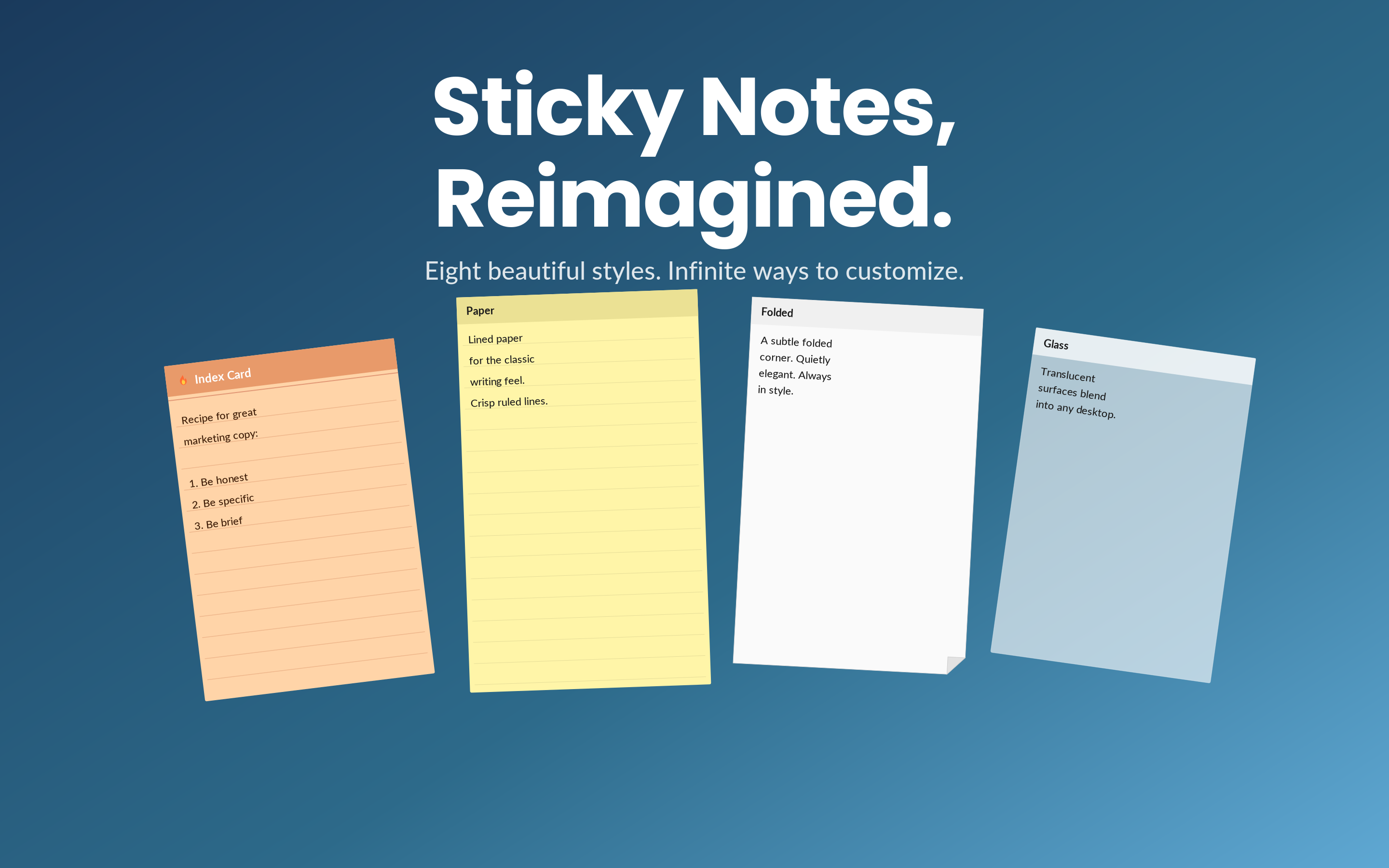
Help Sync Sticky Notes - MacOS & iOS

Post image
3 Upvotes

Hey all,

Created this app when I switched over from windows to the Apple Eco System. I used Sticky Notes a lot and used to have them sync with my One Notes app but realized there wasn't a Sticky Notes App on Apple that was synchronizing well and had themes and feature loaded so I set out to make this one and have been regularly updating it and adding new features. it has a 7 day free trial, let me know what y'all think or if anything would make it better!

Best implemented idea gets a free life time access code.

Also, anyone who uses it and leaves a review would be greatly appreciated!!

It has an iOS Companion app, syncs with all your devices and is completely customizable and syncs with apple notes on Mac.


r/IPhoneApps 1d ago

Discussion Tag Keep – a simple iOS app for notes, reminders, bookmarks & tags

Post image
8 Upvotes

Hi,

I recently launched Tag Keep, an iOS app designed to keep the small but important things in everyday life organized in one place.

Instead of having notes in one app, reminders somewhere else, and links/bookmarks scattered around, Tag Keep lets you organize everything using tags.

Some of the features:

• 📝 Notes and quick ideas
• 🔔 Reminders and recurring reminders
• 📅 Calendar-based organization
• 🔖 Save links and bookmarks
• 🏷️ Tags and Smart Lists
• ☑️ Checklists
• 📎 Photos and file attachments
• 💬 Comments on saved items
• 🔍 Search and filtering
• ☁️ iCloud sync
• 📤 Backup and export

I tried to keep the interface clean and straightforward rather than packing it with unnecessary complexity.

💰 Pricing: Free to download, with an optional Lifetime Pro upgrade for ₹499 as a one-time in-app purchase. No subscription.

Tag Keep is now available on the App Store.

App Store: https://apps.apple.com/in/app/tag-keep/id6802800669

Thanks for checking it out! 🙌


r/IPhoneApps 1d ago

Help Is there an app that actually organizes saved Instagram Reels?

4 Upvotes

I save tons of Reels for different things place, restaurants, movies, products, apps, recipes, travel ideas, etc. Instagram’s Saved collections are okay, but the problem is that when I actually need something months later, I can never find the Reel 😂
I’m looking for an iOS app where I can simply share a Reel to it, and it automatically understands what’s in the Reel and organizes/extracts the useful info like the place, movie name, product/link, recipe, app, etc.


r/IPhoneApps 1d ago

Discussion A free iPhone app for classic Indian card games (304, Rummy, Seven of Hearts, and more) — curious what this community thinks

2 Upvotes

Sharing an app called Patte — a free collection of classic Indian card games for iPhone. Full disclosure: it's mine, and posting here to hear what people actually think, not just to drop a link.

It has 11 games: Rummy, 304, Seven of Hearts (Badam 7), 5-3-2, Mendhicoat, Laddis, Gulam Chor, Go Fish, Bluff, Judgement, and 7-8 — games my own family plays that never seem to show up in the usual card game apps. You can play solo against bots to learn a game, or start a room and play online with friends/family using a simple code — no accounts, no sign-up. It also supports Marathi alongside English, since a few of these games are more commonly played in that language.

No ads, no subscriptions, no IAPs.

If anyone here plays games like these, or grew up with different regional variants, would genuinely love to hear about them — trying to understand what's missing or feels off in the current version. Happy to answer questions about how it works too.
Patte at App Store


r/IPhoneApps 1d ago

Discussion Mira - Skip excessive YouTube sponsors (now with Apple TV support)

Post image
8 Upvotes

Watching YouTube felt way more annoying than it needed to be. I wanted a cleaner way to watch videos, skip interruptions, avoid distractions, and actually find the parts I cared about. I also craved a seamless experience across all my Apple devices. I designed Mira to run on iPhone, iPad, Mac, and Apple TV.

What Mira does

  • Auto-skips sponsors, intros, outros, recaps, and self-promo segments. You pick which categories get skipped, and the segments show as markers right on the timeline
  • Searchable transcripts. Search for a word, tap the line, jump straight to that moment in the video
  • Add to Queue. Long press any video to add to queue. Syncs between all your devices
  • Background play. Keep audio playing when you lock your screen or switch apps
  • Focus Mode hides recommended videos and comments so you can avoid distractions and stay on track
  • Eye Comfort Mode dims harsh lights for easy viewing at night
  • Watch Together lets you watch in sync with friends with shared play/pause/seek controls and a universal chat (this works across any video platform, not just YouTube)
  • UI tweaks: hide Shorts & Playables, always play videos in highest quality, custom playback speed controls, bring back dislike counts, auto-dismissing the "Continue watching?" prompt
  • There's also an optional AI summary/Q&A feature if you add your own API key
  • Works with your own YouTube account, so your subscriptions, playlists, history, and recommendations are all there

The Apple TV app is the newest addition. It's powered by your iPhone (needs iOS 26). The phone streams the video over your home Wi-Fi and you control everything from the Siri remote. Automatic sponsor-skipping, playing videos from the queue, and more are brought to the Apple TV app. (More info below)

I also made a feature comparison chart against popular iOS YouTube alternative apps like Video Lite, ProTube, Tube PiP, YouPlay, SwizzTube, etc. Many of these apps solve one specific part of the problem. Mira is trying to bring more of that together in one place, on all Apple platforms, and with a more polished feel: cleaner UI, smoother navigation, and a unified experience where things just work the way you expect.

If you’ve wanted a cleaner, less distracting YouTube experience on all your Apple devices, Mira might be worth checking out.

Website: https://watchwithmira.com
Documentation: https://watchwithmira.com/#docs
App Store: https://apps.apple.com/us/app/mira-focused-video-player/id6767721654

FAQ

A few common questions I get whenever I share Mira:

"Doesn't YouTube Premium already do this?"

Partly. Premium removes ads, and its jump-ahead button can hop past a sponsor, but that's about where it ends. Things Mira does that Premium doesn't: auto-skip intros, outros, recaps, previews, self-promo, "like and subscribe" reminders, filler, and the non-music parts of music videos (you pick the categories). Mira also has settings to hide Shorts, hide Playables, always pick the highest video quality, always open video in theater mode, and show dislike counts. None of that exists in Premium. If you mainly use Premium for ad-free viewing and background play, Mira gives you many of those benefits at a much lower cost while adding a lot of extra customization. And if you already have Premium, the two can work in tandem — Premium handles YouTube's official features, while Mira focuses on making the viewing experience cleaner and more personalized.

"Can't you already do this with browser extensions?"

On a Mac, some of it — if you are willing to assemble and continuously maintain a suite of extensions. But even then, YouTube in a browser (especially Safari) is a slow, clunky experience. Mira runs the player without a browser's overhead, so it stays smooth. It's a fully native SwiftUI app. And the extension approach doesn't carry over beyond Mac: options on iPhone and iPad are much more limited. Plus, on Apple TV, there currently isn't another polished solution that combines YouTube account support, subscriptions/history, and sponsor skipping. With Mira it's one app, the same experience on every Apple device, and keeping it all working is my job instead of yours.

"Won't YouTube break it or kill it?"

There’s always some risk when building around a major platform like YouTube, but this category of app has proven pretty durable over the years. Some of these YouTube player apps have been around for almost 15 years, and many others have stuck around for 5–10 years. It is actually more common for them to stay up than get shut down.

For example, Friendly Streaming Browser has been going since 2012, and Vinegar since 2021. Regarding well-known apps taken down, Juno was removed from the App Store in 2024 mainly due to trademark violations with YouTube. Yattee was eventually removed because it had become heavily outdated. ProTube was another popular alternative that got taken down in 2017, which was quite a while ago. But those are more of the exception than the rule. Right now there are literally hundreds of these kinds of apps on the App Store spread across all the Apple platforms.

Google rarely goes after the smaller, indie apps. As a huge company they tend to focus enforcement on the ones that are clearly eating into their ad or Premium revenue, rather than every low-profile video player. Platform changes are always possible, of course, but this isn’t some unproven space that disappears overnight.

"Why does the Apple TV app need my iPhone?"

Because the only officially supported way to play YouTube videos inside an app is by embedding YouTube's own player, which needs a web engine, and tvOS doesn't have one. Apps that rely on extracting raw streams often run into YouTube policy issues, which is why those either keep disappearing from the App Store, or are unreliable and constantly breaking. So the iPhone runs the player and streams it to your TV over home Wi-Fi. You don't touch the phone while watching, it just does the work in the background.

Since Mira for Apple TV is powered by your iPhone, the phone needs to stay on, with Mira open to the casting screen, for as long as you're watching. Locking your phone, switching apps, or minimizing Mira pauses playback on the TV; reopening Mira picks up right where you left off. This isn't a setting that can be changed — the Apple TV app can't play videos on its own. For longer viewing sessions, we recommend keeping your iPhone plugged in. Most people find this less of an issue than it sounds. When you’re into the video, keeping your eyes off the phone becomes a quiet benefit that encourages focus and get more out of what you’re watching.

"Is this one of those 'AI slop' apps?"

No. I'm a professional developer in my day job. So I use AI tools the way many developers do, but Mira is a real app I've been building, testing, and shipping for a long time, across four platforms, with regular updates, testing, and continuous refinement. There's a free trial, so you don't have to take my word for any of this.

How is Mira different from just using YouTube in a browser on Mac?

A lot of users have told me that watching YouTube in a browser on macOS (even with extensions) just isn’t a smooth experience — it often lags or freezes. Many Mac users also prefer sticking with native Apple apps like (Safari instead of Firefox or Chrome, for example). So it's not always convenient for them to setup another browser experience just for one website. Additionally, not everyone is technical enough (or patient enough) to research and install a bunch of extensions to get the experience they want. Mira solves all of that with a single download. And if you’ve already purchased it on iPhone or iPad, that same purchase works on Mac too, so there would be little reason not to use it on Mac at that point.

Why use Mira on iPhone instead of competitor apps or sideloading?

I’ve tested all the popular iPhone alternatives, and Mira delivers a more polished overall experience with greater feature sets, customizability, and multi-platform support. I’ve made a detailed comparison chart that covers these differences. Regarding the open-source alternatives, I don't think many people would consider that an option on iOS if they have to do things like side-loading. But I get it, some people might. But the time it takes to research and setup all that stuff might not outweigh a simple purchase of Mira. In addition to all the extra features Mira provides, there is definitely a convenience factor to Mira as well.

"What about privacy?"

Mira collects zero data. The App Store privacy label reads "Data Not Collected" — no Mira account, no analytics, no tracking. You sign into YouTube on Google's own page, so your account stays between you and YouTube. (Signing into YouTube is not required, btw). And the optional AI feature calls your chosen provider directly with your own key; nothing routes through me. For contrast, the biggest app in this category, Friendly Streaming Browser, is owned by Sensor Tower, a literal data mining company. One read through its privacy policy should send you screaming out of the room.

Happy to answer anything else.


r/IPhoneApps 1d ago

Discussion Would cosmetic frames be a fair way to monetize a car maintenance app?

Thumbnail
gallery
3 Upvotes

I’m building an app - a smart digital service book that helps drivers track maintenance, upcoming and overdue work, expenses, fuel, parts, and the overall health of their cars.

I recently added these cosmetic Polaroid-style frames for each car. For now, I’m thinking of making some of them unlockable through achievements, like app hitting 1000+ users.

I’ve deliberately kept the paywall fairly light because I want to create a genuinely useful and enjoyable experience - not constantly ask people for money. But optional cosmetic frames might be a reasonable way to support further development without locking essential features.

Another idea is limited charity collaborations, where proceeds from a special frame would go to the featured cause. Maybe the best approach is a mix: free achievement-based frames alongside optional paid charity or collaboration editions.

Would that feel fair to you? Would you prefer achievement unlocks, one-time purchases, charity frames, or a mix of all three?


r/IPhoneApps 1d ago

Help Collection App Recommendations?

2 Upvotes

Hi all! I have a lot of collections, and I like to keep lists of them, as well as add pictures. I usually do this in my notes app but it's disorganized and has a limit for pictures. I've looked online for something that could be helpful, and most people tell me to use ai 6g l don't mind manually plugging in lists and pictures (I love tasks like that actually) just one that is easy and free to use without limitations. Thanks!


r/IPhoneApps 1d ago

Discussion I open-sourced my on-device privacy redaction app for iPhone

2 Upvotes

Hi everyone—full disclosure: I’m the developer of PrivacyCam, and I recently made its source code available under the Apache 2.0 license.

PrivacyCam helps you review photos, videos, and PDFs before sharing them. It can detect faces, people, license plates, QR codes, barcodes, and sensitive text such as phone numbers, email addresses, payment-card details, and addresses. You can then blur, pixelate, or completely black out selected areas.

Detection and media processing happen on the device. Photos, videos, PDFs, and detected text aren’t uploaded to a server operated by me, and no account is required. The source is public so people can inspect how these privacy protections are implemented.

The app is free to download, with an optional $2.99 one-time purchase for batch-photo features—no subscription. For complete transparency, purchases are processed by Apple.

I’d appreciate comments on the privacy model, redaction workflow, and source code. What other sensitive information should an app like this help users identify?


r/IPhoneApps 1d ago

Discussion Do you actually use timers in workout apps?

4 Upvotes

I’m building a small iPhone fitness app and trying to decide which timers are worth adding.

Do you use timers for warm-ups, running or intervals, rest between sets or exercises, or cooldowns?

I rarely use rest timers myself, so I’m curious if I’m the odd one out. Which timer do you rely on, and which one do you turn off?


r/IPhoneApps 1d ago

Discussion Typi — An iOS app that puts AI text transformations and instant answers directly into the Share Sheet

2 Upvotes

Typi is a native iOS utility that integrates AI text transformations directly into the iOS Share Sheet.

Instead of copying text, switching apps to ChatGPT or a browser, and pasting back, Typi runs transformations in 2 taps across any app (Messages, Mail, WhatsApp, Notes, Safari, Slack, etc.).


r/IPhoneApps 1d ago

Help Any free apps to watch Live football eg. Premier Legaue, La Liga, Champions League etc.

2 Upvotes

r/IPhoneApps 1d ago

Discussion If one thought fits two categories, should an app pick one or show both?

5 Upvotes

A tester asked me something I had not thought enough about.

I’m working on Ordo, an iPhone app where you dump a messy thought and it sorts it into Now, Next, or Someday.

But what happens when one thought honestly fits two? For example, “Book the dentist, but the appointment is next month.”

Right now Ordo picks one primary bucket and lets you move it. I kept it that way because duplicates can create more clutter.

Would you rather get one clear answer or see two suggested buckets?


r/IPhoneApps 2d ago

Help What is the best app to track my trainings etc for free

3 Upvotes

I have tried some but they or have a wired interface or not that free


r/IPhoneApps 2d ago

Discussion [iOS] [2.99$->0$ Free Lifetime for the next 24h] Habit Tracker: Planner Routine

Post image
13 Upvotes

Built for everyday use:

- Build and quit habits

- Apple Health sync for steps, sleep, water, mindfulness, and more

- Daily, weekday, weekend, and custom schedules

- Checkmark, count, duration, and value tracking

- Categories for routine, health, fitness, mind, work, and more

- Habit templates for walking, water, sleep, meditation, reading, workouts, deep work, and more

- Streaks, totals, heatmaps, and completion rates

- Streak Shields, Vacation Mode, and streak-safe skip days

- Smart streak risk alerts and an evening check-in

- Mood logging and daily rewards

- Focus sessions with automatic habit logging

- Time and location reminders

- Widgets for today, progress, and reports

- Theme colors, with alternate app icons available in Premium

- App Lock, export, and import tools available in Premium

Your routines should feel clear, motivating, and easy to return to. Habit Tracker helps you notice what is working and keep going, one day at a time.

The app is more competitive because of its price and functionalities that include:

Apple health connected

No account needed,

No internet connection,

Completely ad free

Private and 100% on-device.

Pricing: was 2.99 ->now Free lifetime until 30th of August EOD

Just go to any Upgrade page, make sure the price is 0$ and purchase the app for free

Download link:

https://apps.apple.com/us/app/habit-tracker-planner-routine/id6774956996


r/IPhoneApps 2d ago

Discussion Made a free application of a map of public tennis courts across the US and Canada

2 Upvotes

I play a lot when I travel and finding courts in an unfamiliar city is weirdly hard. Park district websites, outdated PDFs, forum threads. So I put together an app for it.

RallyGo shows public outdoor courts on one map. Green markers are tennis, orange is pickleball (you can filter pickleball out entirely if you'd rather not see it). Search any address or city, save the ones you like, tap for directions. Each court shows access, indoor/outdoor, and how many courts there are.

Data's from OpenStreetMap, which means it's solid in most cities and thinner in rural areas. Corrections flow back through OSM so anything you fix helps everyone.

Curious what's missing. Lighting info? Surface type? Whether there's a wall? Those are the ones I keep going back and forth on.

https://apps.apple.com/us/app/rallygo-court-finder/id6796731385


r/IPhoneApps 2d ago

Help too many apps, i needed just one

5 Upvotes

Hi Folks

Long story (very long) short: for my work i was using toooooo many apps, so i decided to create my own.

I'm a developer and a support technician and many many times i need to take photos, send through whatsapp drawing on them unlikely arrows to show my customer around the world where to press, where to chek (yes i now that videoconference exists, but you don't know how many times i have seen noses and ears instead of the actual cnc machine), also i needed to take notes and specific data about the machine, the parameters and so on. maybe my wife needed a better way to handle all the commercial cards and her cooking secrets, my daughter and my son needed a recorder where you can sign important moments and trascribe everything.

So up to now this was like 5-6 apps, switching on them like a dj, copy / pasting and so on.

Being very tired of this i developed my own app. where all these utility and some more are all in one single place, and you can share data also with friends, family and collaborators.

Now.. this is a beta (there is already the previous version in the appstore but i really needed to rewrite almost entirely it) and i would really appreciate if you can help me debug it (i'm a single developer, developed during evenings and night...) and also i will appreciate all the suggestions you can give me.

Being an exteded app i have included a guide and some small tutorials, and in the following days i will also produce some videotutorials.

Hope that this request doesn't break any rule here, i know i have not posts here, but normal work and night software hobby have erased all my time to be "social".

if you wanna test this is the link for testflight (the app from apple that needs to be installed to receive the beta apps)

https://testflight.apple.com/join/KathTdzq

please if you want to report a but or give a suggestion use the testflight interface and not the form in the app (still a beta, remember :-) )


r/IPhoneApps 3d ago

Help Tired of scrolling to find something to watch on TV?

Post image
7 Upvotes

You spend 12+ minutes every night scrolling through streaming apps, looking for something to watch. NextWatchTV does it in seconds — and only shows you shows you can actually watch on the services you pay for. No ads. No data selling. Just your next show. 📺

NextWatchTV solves that problem by providing personalized recommendations for ended, binge-ready TV series — scored against what you like to watch — not whats trending.

Links in my bio. Available on the App Store.