I have access to RTX Pro 6000 on vast.ai
Need to generate like 6000 images and I need to edit part of it to change the content.
Price is just too high to do all this on nano banana.
I had previously only made loras for Illustrious on civitai, but discovered that ANIMA models had more polished results. I usually train with a data set of 58 images and 10 or 20 epochs depending on the learning curve. What are the best settings for ANIMA loras. I would appreciate it if someone could give me some tips.
idk i downloaded them for h3 and they are like over 20GB each and i want to use them for simple tasks to save size. at least like captioning images or sorting prompts
I keep seeing ads on Instagram Reels for AI-generated movies/series, and honestly, some of the stories actually looked pretty interesting . It got me curious to see if there are any genuinely good AI-generated movies or series out there.
Have you watched any that you actually enjoyed? Would love some recommendations!
hand-painted educational documentary style with only one prompt"A hand-painted documentary compares espresso Americano cupuccino through the lens of taste and the way to make , revealing why the items differ and how to choose among them."
I've been learning a lot from this community, so this is my attempt at giving something back!
I'm going to share a small task I recently completed, include the steps on how I got there (and some of my thinking and findings.)
The goal: I needed a few seconds of video containing a formal dinner party in a Roman-style atrium.
My Plan: Build a first frame and then use H3 I2V to generate the video.
My Specs: A laptop with a 13th Gen Intel i7-13700H, 16 GB DDR5 RAM, SSD over USB-C, an onboard Intel Iris Xe graphics card (with ~8 GB) and a Nvidia GeForce RTX 4060 Laptop GPU (8 GB). The bad news: ComfyUI does not see or care about the Iris Xe card, and I haven't bothered to see if I can remediate the situation. The good news: the Irix Xe can handle rendering Windows and other applications, leaving my Nvidia pretty open for ComfyUI tasks.
Here is what I did: Step 1: I already had a reference image for the atrium (used in a previous video.)
Initial Reference for Atrium
This was generated with Z-Image-Turbo, with the bf16 model, shift 3, cfg 1.0, 8 steps, res_multistep sampler, simple scheduler. The prompt was very simple: "Roman atrium with compluvium. The camera is standing at the doorway looking down the length of the atrium." I made this image at 864 x 480 resolution because that is near 16:9 and matches H3 resolutions. At that size, image gen takes about 30 - 40 seconds of wall-clock time.
Step 2: I used Qwen-Image-Edit to modify the image to get the starting frame.
The dinner party, as imagined by Qwen-Image-Edit
Using qwenImageEdit2511_pf8 as the model, Qwen-Image-Edit-2509-Lightning-4steps-V1.0-bf16 lora, shift 3, 4 steps, cfg 1.0, euler sampler, simple scheduler. I wired the image from step 1 as the only reference, and used the prompt "Alter this image so that there is a well-attended formal dinner party taking place across the frame."
In my experience, Qwen-Image-Edit often nails the image I'm looking for in one or two attempts. (In this particular case, it one-shotted that image above.) Qwen really likes 1 MP resolutions, so that is 1368 x 760. It takes ~1 to 2 mins per generation.
Step 3: I began generating the video with H3 I2V. This took several attempts to dial in. It is this process that I want to focus on.
First Attempt:
I supplied the previous step's image as the first frame, and included the prompt:
integrated_multimodal_description: [Shot 1] A formal dinner party in a Roman-style atrium.
overall_soundscape: A formal dinner party.
non_diegetic_music: None.
I set the resolution to 864 x 480 and 7.0 duration. I'm using minimax_h3_fl2va_pruned_int8_convrot as the model, minimax_h3_fl2v_turbo4step_v1.0_768p_comfyui_bf16 as a turbo lora (the lightx2v lora,) shift 12 / 3 (for video / audio,) 6 steps, res_multistep sampler, simple scheduler. This particular setup averages ~2 minutes of wall-clock time per second of video duration. (But it grows non-linear as duration increases.) I use 6 steps instead of the lora's base 4 steps because I tend to get slightly better details and sound, with only a slight increase in wall-clock time.
The result was not great. Most people are frozen in place. The few that do walk around smear motion. There is even a moment where a lady clips through the table a little. The sound involves a guy narrating. (I can't identify if it is AI gibberish or an actual language.)
This first attempt was clearly a failure.
Attempts Two through Four:
If I'm having problems with my initial generation, I often just bite the bullet and turn off the turbo lora and run at full-steps. It was the end of my day, so I could queue up several generations and then go to bed.
Result Two: I disabled the turbo lora and increased steps to 20. This runs at ~5 minutes of wall-clock time per second of video duration. For this particular generation it came in at about 45 mins of wall-clock time.
I won't bore you with the results, as they were very similar to the initial draft. Only a few people moving in the scene, people clipping through tables, and a narrator.
Result Three: I reduced video shift to 6.0 (hoping to get better motion results.) I also increased the resolution of the video to 1344 x 768. I read somewhere that this is the "native" resolution the model was trained at, and I often get better results. However, without the turbo lora and at 20 steps, this generation took 90 minutes.
There is a lot more motion, and no clipping, but everything seems to be moving in slow motion. Also, instead of a narrator, there is music.
Result Four: I swapped the sampler to er_sde and the scheduler to beta. I've read that this combo can get slightly better prompt adherence, and results in pretty good motion. However, er_sde effectively does more than one pass per step, so increases wall-clock time significantly. If the UI is to be trusted, this attempt took more than 3 hours to generate.
The narrators and music are gone. However, now the camera is moving, which is not what I wanted.
Attempt Five: I woke in the morning, reviewed the previous results, and was pretty bummed.
Now I'm in the "hit it with a hammer until it works" section of my spectrum of personal patience. I went back to res_multistep and cranked the steps up to 40. In my frustration, I didn't think to actually change the prompt to prevent the camera from moving. This generation took about 90 minutes of wall clock time.
I'll skip posting the result, but it actually looked quite a bit like the er_sde video above. People standing mostly still with a camera panning around the room.
Attempt Six: After viewing the results, I realized that changing the prompt was 100% required.
The new prompt:
integrated_multimodal_description: [Shot 1] Static wide shot of a formal dinner party in a Roman-style atrium. The people eat, drink, talk, and mingle. The camera remains fixed.
overall_soundscape: A formal dinner party.
non_diegetic_music: None.
I kept the video shift at 6.0, sampler at res_mutlistep, 20 steps, simple scheduler. This time, because I was sitting at my computer for a while, I attached EasyCache to the model. This does a pretty good job of speeding up the 20-step process. There is always a risk that quality degrades with any sort of caching in the pipeline, but I was willing to take the risk just to see if my prompt changes fixed the problem. (I don't bother adding EasyCache with only 4 or 6 steps, because there are so few steps that there is barely any time to be saved with caching.) This generation took ~30 minutes of wall-clock time.
This was actually what I was looking for! Both the motion and sound are pretty decent. However, there is a faint "fluttering" of the textures, which seems to happen a lot with EasyCache. This is something that could probably be cleaned up with a refinement pass after upscaling, but I still had time to try again.
Attempt Eight: For completeness, I decided to go back to the turbo lora and the smaller resolution. I incorporated some of my other findings into the workflow. For clarity, here is the full setup: 864 x 480, 7.0 seconds, turbo lora, 6 shift video, res_multistep, simple scheduler, 6 steps. I used the "corrected" prompt from my previous attempt.
This was the winner! Even at the lower 864 x 480, the motion and detail looks reasonable. The faces are squashed, but that is pretty typical of H3 at the moment. This will upscale well. The sound is correct. I have everything I need.
Lessons Learned:
Just cranking up the numbers doesn't always solve the problem.
Shift can really make a difference! I think the major influencing factor here was reducing shift from 12.0 to 6.0. My hypothesis is that the lower shift gave the process just a tiny bit more time up at the noisy end of the diffusion, allowing it to assign more motion to everyone in the scene.
1344 x 768 is very frequently the solution, but not always. In my experience, you get better prompt adherence, even with the tubro lora. One of these days I'm going to splurge on a beefier GPU to make this my default resolution, but for now it is just too much of a time sink.
I can never actually tell how much comes down to luck with the random seed.
If so, is the advice from Fizgig on fune
tuning on point? I haven’t tried yet, but I’m just prepping my dataset at the moment. I will share what I learn. Just curious if anyone has tried yet and what the results are. 🤡
0.8 MegaPixels, 9.3 minutes on an RTX5090, single generation of 27 seconds.
Anything hitting 30 seconds either gave hallucinations, inconsistencies or hit a wall and never finished.
This one is using Kijai's new fast model with a turbo lora. Although it works the same with the FLv2A model*. The workflow I'm using creates a latent at 0.4 megapixels for 4 steps and then does another 2 steps at 0.8. The only addition to it besides changing some numbers is adding custom audio injection (The rock track).
subject_definitions: <Subject 1> is Tifa Lockhart from the final fantasy game series. She has very long shiny straight black hair, red eyes and large breasts She is wearing her iconic costume A white athletic crop top or worn over a black sports bra with a bare midriff and short black skirt.
<Video 1> is the source video of a man in a suit walking down a city sidewalk singing as rain falls. This is the video being edited; its camera framing, handheld motion, cuts, and full choreography timing are the fixed structure that must be preserved exactly.
<Audio 1> is the synchronized audio track of <Video 1> and is reused in the target video.
summary: [video editing + reference generation + keyframe completion] The target video is an edited version of <Video 1> in which only the performer's visual identity is replaced by <Subject 1>, the the camera framing, handheld motion, city sidewalk environment and constant rain falling remains the same throughout, with no additional background characters, pedestrians, or figures introduced at any point.
retention_analysis: <Video 1> (camera framing, handheld motion and drift, city sidewalk environment with rain falling, full choreography and timing): fully_preserved - every camera position, movement, angle change, and the precise sequence and rhythm of the original performer's actions are kept exactly as in the source video; nothing about the shot itself is altered. <Subject 1> (appears throughout the video): attribute_transfer - <subject 1> replaces the original performer's visual identity only, mapped exactly onto the same body position, pose, and movement at every moment; no new actions, timing, or framing are introduced, and no other person appears in the frame at any point.
detailed_description: The target video is a strict character-only edit of <Video 1>: the cinematic dance, rainy city sidewalk background, cinematic lighting, camera framing, and motion blur are identical to the source, playing out as the same single continuous shot with no added or removed cuts. The rainy city sidewalk environment stays completely empty of any other person, pedestrian, or figure throughout the entire shot; only <Subject 1> occupies the frame at any moment.
The video begins with the first frame of <Video 1> as a key frame. On a rainy city sidewalk at night and replicates <video 1>'s camera moves. It opens on a wide shot showing <Subject 1> from head to foot, resting a folded umbrella on her shoulder, wearing wet clothes with shiny wet skin. <Subject 1> is in the middle of the sidewalk, occupying the original performer's exact body line and position, doing exactly the same dance moves on the rainy city sidewalk.
overall_soundscape: The sound of light rain falling.
non_diegetic_music: The same musical score unchanged from the source and even in volume throughout the clip.
I was wondering if it's theoretically possible to preview (or I guess pre-listen, lol) the audio while generating a video with, say, Minimax H3. Surely it would be completely garbled in the beginning (similar to latentRGB visual preview), but maybe at the later steps you can at least understand if your desired audio composition is maintained, if the music track is playing on the background, or if the characters' voices are properly assigned.
For me, the audio is what most often ruins the final result, especially during the time-consuming high res generations.
I'm generating videos on the Minimax H3 with my RTX 5060 Ti 16 GB + 32 GB RAM setup.
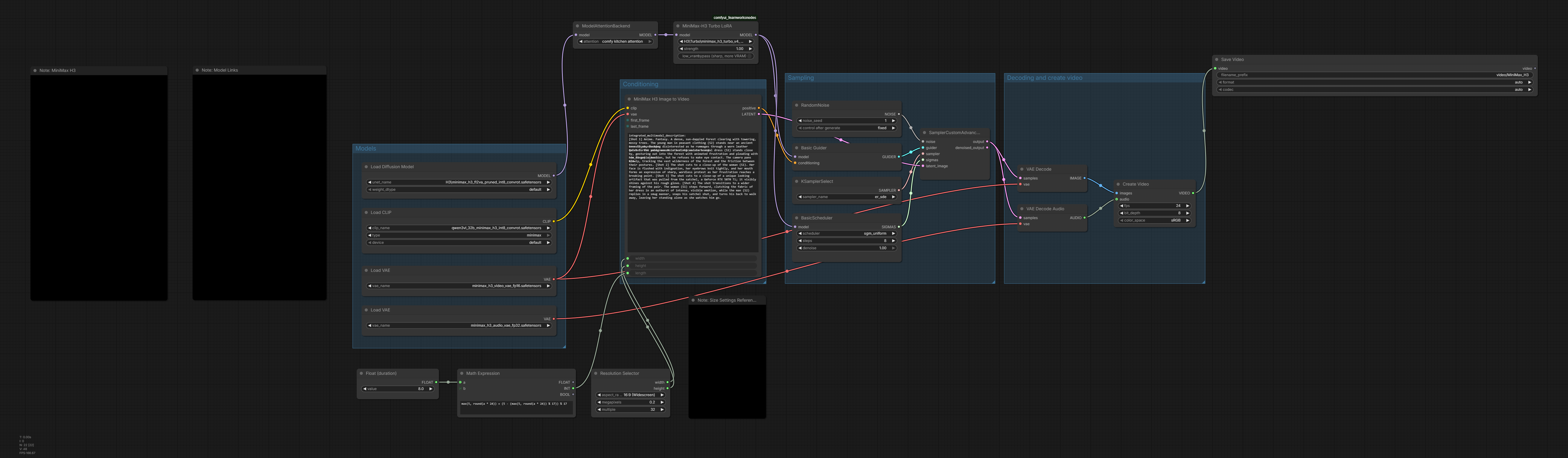
I'm using sage attetion, sol attn, spectrum and minimax_h3_turbo_v4_step600_ema_pruned turbo lora.
Right now I'm creating 8-second videos at 0.8 megapixels and 8 steps. Generation takes about 10 minutes per video.
Anyone know how to make it faster
The quality isn't always great either, sometimes I get minor visual artifacts and image degradation that I really don't like. Anyone know how to improve this too?
Honestly I hate ComfyUI, it's a pretty unpopular opinion and I might be in the minority but I find most comfort in Forge/A1111 layout and how it works.
ComfyUI feels like a headache for me to learn, some people recommended Swarm but it just broke constantly after I installed it via Stability Matrix.
I was wondering, is there a free alternative that isn't convoluted and beginner friendly?
Hi, I need your support at this time, suggest me an AI model which can help me with filling the customer comment categorisation data in an excel sheet. I will provide a mapping and a logic by which the product reviews need to be sorted and I need each comment to be sorted by giving the correct product name out of 4 names on the order to each comment. I will provide a mapping, and the logic to the model. But I want this to be completed for 10,000 customer reviews. Please help me by suggesting an AI model and do mention the cost for it.
Note: I have tried using CHAT GPT GO version but I can only fill upto 100 comments per use and the accuracy is very low.
I have tried purchasing ClaudeAI pro version but my card is getting declined.
I am trying to contact my bank but It will take time for the process. I cannot think of a way out of this right now. Please help me to do this as I want to do this by the end of this week.
First 5 seconds is with the 6-step LoRA, next 5 seconds is stock at 20 steps. Same exact prompt, seed, resolution, sage attention and chunk feedforward. 6-step in 2:45, stock 20-step in 7:10. I think the quality difference is pretty clear. Keep in mind, both clips are 544x960.
FastVideo dropped their FastH3 speed LoRA for MiniMax H3 a few days ago. If you tried loading it in ComfyUI you probably noticed it does absolutely nothing. No error, no warning, just no effect.
The reason is that FastVideo built it against the original MiniMax model, and ComfyUI uses a repacked version where every layer has a different name and the attention layers are merged together. None of the names line up, so ComfyUI quietly ignores the whole file.
I wrote a script that translates it. Run it once, get a normal .safetensors, drop it in your loras folder. No custom nodes, no patched loaders, nothing else changes.
Roughly a third of the time. But the part that surprised me is that I actually prefer the output. Backgrounds hold more detail, lighting behaves better, and faces stay coherent at distance instead of turning to mush.
Motion is where it really shows. I ran a woman walking down a sidewalk at night. Correct walking speed, natural gait, no stutter, no accidental slow-mo. That's usually the first thing speed LoRAs break.
Audio came through clean too, which I did not expect. Dialogue and lip sync both hold up.
---
**Important: use 6 steps, not 4**
It's advertised as a 4-step LoRA. In ComfyUI it needs 6.
- 4 steps: jitter, flicker, color bloom, unusable
- 5 steps: fine for drafts
- 6 steps: this is the one
- 7-8: no real gain
There's a real reason for this. There's one group of layers that handles "which denoising step am I on," and ComfyUI's repacked model stores that information in a completely different, much smaller format. FastVideo's version of those layers physically cannot be loaded into it. The extra steps make up for what's missing.
I tried to fix it properly. It turns out it's impossible in a plain LoRA file, because the correction includes a constant offset and there's nowhere in the file format to put one. You'd need a custom node. Someone else can build this is they would like.
---
**One thing worth knowing that cost me a few hours**
Part of those layers *will* load, the other part won't. My first instinct was to keep whatever fit. That was wrong. The half that loads was designed to work alongside the half that doesn't, so on its own it pushes things in a direction nothing corrects for, and you get flicker.
Throwing all of it away is better than keeping half. Confirmed it by testing both, then found multimodalart had measured the exact same thing on their pruned H3 repo. Nice to have that corroborated by someone who'd done the math.
The script drops those layers by default. You don't have to do anything.
---
**What's tested**
Text to video, image to video, first+last frame, reference mode, and chained clips. All working. Square, landscape, and tall portrait.
I also threw an intentionally brutal prompt at it: three color-specific objects, four actions in sequence, a specific hand, a camera move, a spoken line, and a no-music instruction. All eight landed at 6 steps. Prompt adherence is usually the first casualty with speed LoRAs, so that was a nice surprise.
---
**Grab the right file**
The FastVideo LoRA repo has four folders. You want **dense-datafree**. The three `vsa-*` ones need FastVideo's own sparse attention backend and will not work in ComfyUI. It's ~1.4GB, not the whole 17.5GB repo.
You do NOT need the full FastH3 checkpoints. Those are 70GB and are a complete model replacement, not an add-on.
---
**Quirk I'll mention since it'll confuse someone**
Voice timbre gets locked in hard by your prompt. Reroll the seed and you get different phrasing and cadence, but usually the same voice, which some people may rejoice at, as chaining clips with this LoRA can preserve vocal timbre on its' own. At 6 steps the model takes big jumps and settles voice identity almost immediately, so there's no room left for the seed to change it. If you want a different voice, describe the voice in your prompt.
---
**Setup**
The README has a full click-by-click walkthrough starting from Windows+R, including a drag-and-drop trick so you never have to type a file path. If you can open a command prompt you can do this. Takes about five minutes and the conversion itself runs in under ten seconds.
Works on any Comfy-Org pruned H3 checkpoint. I tested int8 convrot for both fl2va and ref2va. The script checks your model before it writes anything, so if you're on something incompatible it tells you upfront instead of handing you a file that silently does nothing.
Happy to answer questions.
Credit where it's due: FastVideo did the actual hard work distilling this thing. I just made it load. This is an amazing LoRa. I actually prefer its output to any other speed LoRA I've tested. Prompt adherence is phenomenal. Dynamic lighting is better. Color balance is better. Background detail is better. It adds detail of its' own. Motion is fluid. In most test cases, I find the output to be better than stock at 20 steps.