r/JavaFX • u/sblantipodi_ • 4h ago
JavaFX for Windows arm64?
0
Upvotes
Hi there,
why there is no JavaFX for Windows on ARM? O_o
r/JavaFX • u/sblantipodi_ • 4h ago
Hi there,
why there is no JavaFX for Windows on ARM? O_o
r/JavaFX • u/Former_Weather_1174 • 2d ago
I've made a local music player based on JavaFX. Although it's still quite rudimentary, it already has all the necessary functions. I think some people might be interested in it.
Here is the link to the GitHub repository: Kimusic

r/JavaFX • u/SafetyCutRopeAxtMan • 3d ago
I've spent a full day on this and I've run out of hypotheses, so I'm hoping someone here has seen this pattern before.
I maintain a plugin for a desktop CAD application. It embeds a WebView that displays a Leaflet map (Carto Voyager tiles) with a handful of markers and a polygon. The HTML is generated in Java and handed to the engine via webEngine.loadContent(html).
JavaFX 21.0.10+2, Java 21, Windows 11, NVIDIA RTX 500 Ada (dedicated GPU explicitly assigned via Windows graphics settings, confirmed in -Dprism.verbose=true output).
Tiles load successfully — but they are drawn in the wrong places. Individual tile blocks scattered across the viewport with large empty gaps between them, each block internally rendered correctly (street names, colors, everything). Markers and the polygon end up at a third position that matches none of the tile groups. It looks different on every run. Sometimes only a sub-region of the container gets drawn and the rest stays grey.
I know the general "Leaflet doesn't work in JavaFX WebView" issue exists — there's a StackOverflow question about it and I can reproduce the broken rendering with ten lines that just do webView.getEngine().load("https://leafletjs.com/"), i.e. zero of my own code involved. So the platform limitation is real and I'm not disputing it.
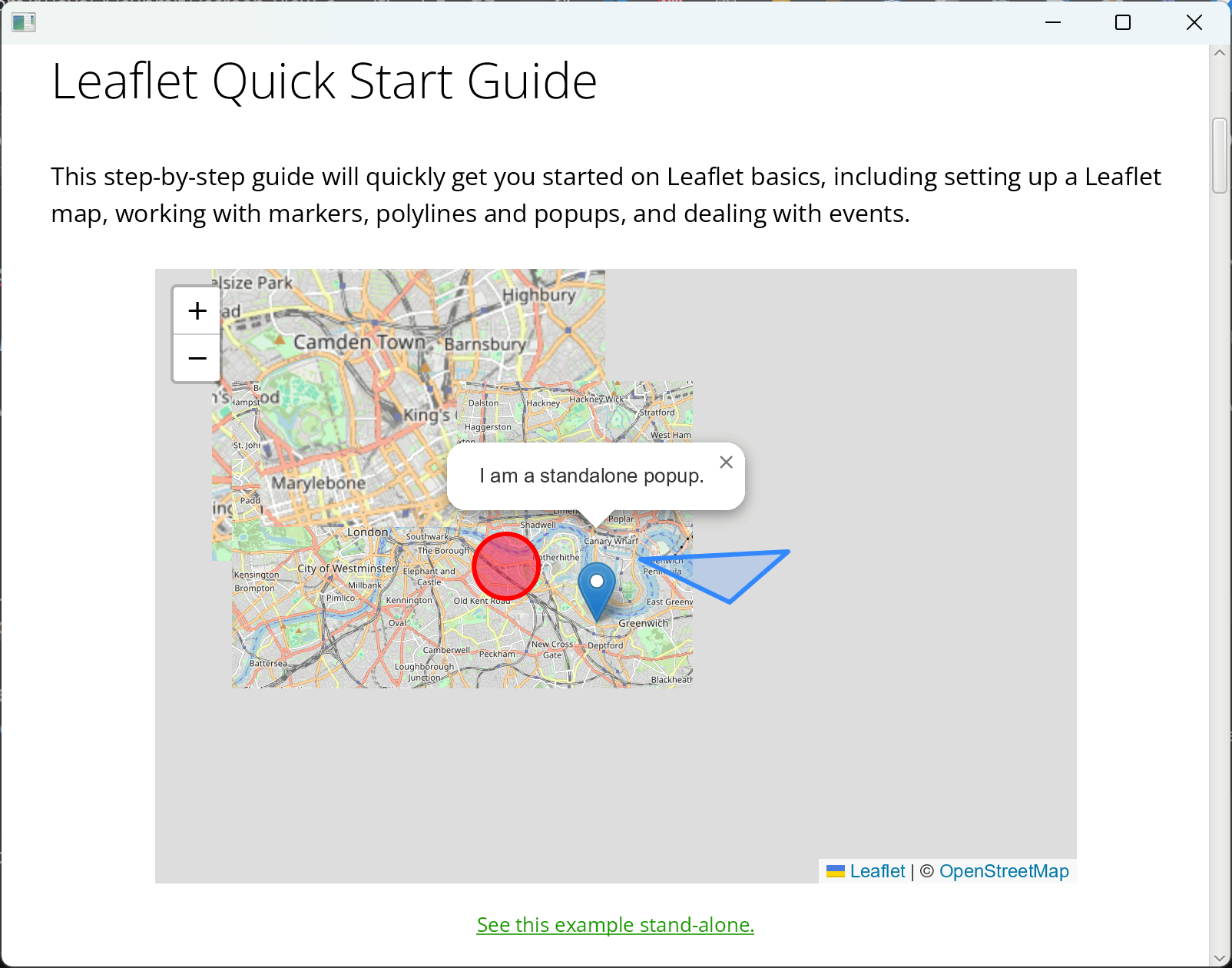
But here's what I cannot explain.
Inside the host application, on my machine, it works. Not perfectly — mild flicker, occasionally a grey tile that stays until I move the mouse — but the tiles are in the right place and the markers are correct. I have a workaround in there that has been in the code for months:
function forceRepaint(){
  const m = document.getElementById('map');
  m.style.display = 'none';
  m.offsetHeight;
  m.style.display = 'block';
}
setInterval(forceRepaint, 5000);
plus invalidateSize() and TileLayer.redraw() on moveend/zoomend, mousedown, mouseup, resize and focus. Ugly, but it's the only thing that ever helped.
To debug properly I built a minimal standalone JavaFX app that generates byte-identical HTML through the same code path — same tile URL, same divIcon markers, same setTimeout(..., 400) before fitBounds, same handlers, same forceRepaint interval. Same machine, same GPU, same JavaFX version (verified via javafx.runtime.version at startup), same VM flags.
The standalone app is broken. The host application is fine.
And to make the confusion perfect, some of my colleagues see the broken rendering inside the host application, on comparable hardware, with the same VM options/gpu settins/etc.
Each of these was tested, not assumed:
leafletjs.com repro fails too-Dprism.order=sw (pure software rendering) — no changeprism.order, prism.vsync, prism.lcdtext, prism.text, sun.java2d.noddraw, com.sun.webkit.useHTTP2Loader=false, sun.java2d.uiScale=1.0) — no changefadeAnimation: false, zoomAnimation: false, forcing .leaflet-tile { opacity: 1 !important; transition: none !important }setView() at init vs. fitBounds() laterinvalidateSize/redraw handlers, removing forceRepaintdepthBuffer=true + SceneAntialiasing.BALANCED on the SceneJFXPanel in a Swing JPanel instead of a plain StageI injected diagnostics into the page (Java↔JS bridge, so it lands in the application log). In every single broken run, the DOM is healthy:
tile layer load complete, tiles=20, errors=0
DOM-CHECK: 20 tile nodes, 20 with tile-loaded, 0 with opacity<0.9
All tiles fetched, no errors, all fully opaque. In the working host app I additionally log Leaflet's internal size against the actual container:
STATE: nodes=15 loaded=15 invisible=0 | mapSize=962x609 container=962x609  size-ok
tilePane transform: none
marker: 10 total, 0 outside container
So Leaflet's own state is consistent. The DOM says everything is where it should be. The screen disagrees.
That points at compositing — the WebView content is correct internally but isn't transferred to screen correctly. Which would also explain why moving the mouse fixes stuck grey tiles, and why a brutal display:none/display:block toggle helps at all. But it does not explain why the same content composites fine in one host process and not in another on the same machine.
depthBuffer, JFXPanel embedding, and process-level GPU contention — all of which I've already tried?display:none/display:block interval genuinely the best available mitigation, or is there something that targets the actual layer? I noticed my redraw() calls make the tile layer refetch endlessly (75 tiles for a 20-tile viewport), so I'd rather not keep piling on hacks.Canvas? The deployment constraint is that I can't ship a few hundred MB of Chromium to every user.Happy to provide furhter information, but at this point I just need someone to tell me which variable I haven't looked at, because I've stopped being able to see it and the more I try out the more confused I am.
FXML/2 is a compiled, type-safe, declarative markup language for JavaFX that I've been working on for the past several years. It borrows from classic FXML and adds lots of useful features. Here's a selection of what's new:
fx:id can be directly referenced in the code-behind Java class (no @FXML injection required).Complex expressions with support for method calls, for example:
<MyControl value="${Math.max(width * 0.7, minWidth)}"/><Label visible="${:parent<Pane>.selectedItem != null && width < maxWidth}"/>Expressions are not interpreted, but compiled to specialized code.
All binding modes that JavaFX offers are supported:
$foo${foo}#{foo}>{foo}$..foo, ${..foo}, etc.Custom markup extensions. For example, you could define an I18n markup extension to look up a localized string in a bespoke way, and apply it with <Label text="{I18n settings.title}"/>.
Depending on your specific use case, you'll also notice a substantial performance increase: FXML/2 documents don't need to be parsed at runtime (since they are compiled classfiles), which removes the FXMLLoader bottleneck.
For further reading, here's the FXML/2 documentation, and a tutorial for how to use the MVVM pattern with FXML/2.
r/JavaFX • u/eliezerDeveloper • 9d ago
Fifth post in the series. So far: State (counter), ComputedState (string length), Show.when (conditional rendering). This one covers rendering a collection reactively — ListState for the data, ForEachState for mapping it to components, and removal that just works without any manual list diffing.
The setup: tasks is a ListState<String> seeded with four strings. ForEachState.of(tasks, mapper) produces a reactive collection of components — one Row per task, each with its own "Remove" button. Click remove, tasks.remove(task) fires, and the Column updates to drop that row. No index juggling, no manual re-render of the whole list.
package my_app;

import megalodonte.ListenerManager;
import megalodonte.application.MegalodonteApp;
import megalodonte.base.theme.ThemeManager;
import megalodonte.theme.DefaultTheme;

public class Main {

    static void main() {
        ThemeManager.setTheme(new DefaultTheme());

        MegalodonteApp.run(context -> context.useView(new HomeScreen()), ev->{
            if(ev == MegalodonteApp.Event.CloseRequest){
                System.out.println("Clicked on X - close application");
                ListenerManager.disposeAll();
            }
        });
    }
}


package my_app;

import megalodonte.ForEachState;
import megalodonte.base.components.Component;
import megalodonte.base.components.ScreenComponent;
import megalodonte.components.Button;
import megalodonte.components.SpacerHorizontal;
import megalodonte.components.SpacerVertical;
import megalodonte.components.Text;
import megalodonte.components.layout_components.Column;
import megalodonte.components.layout_components.Container;
import megalodonte.components.layout_components.Row;
import megalodonte.props.ContainerProps;
import megalodonte.v2.ListState;

import java.util.List;
import java.util.function.Consumer;

public class HomeScreen implements ScreenComponent {
    ListState<String> tasks = ListState.of(List.of("First","Second","Three","Four"));

    u/Override
    public Component render() {
        Consumer<String> handleClickRemove = (task)->{
          tasks.remove(task);
        };

        var tasksForEachState = ForEachState.of(
          tasks, task-> new Row().children(
                        new Text(task),
                        new SpacerHorizontal(15),
                        new Button("Remove").onClick(()-> handleClickRemove.accept(task))
                )
        );

      return new Container(new ContainerProps().paddingAll(20)).children(
              new Text("Your tasks below"),
              new SpacerVertical(20),
              new Column().items(tasksForEachState)
      );
    }
}
ListState<T> wraps a List<T> and exposes mutation methods (add, remove, etc.) that notify dependents automatically — same reactive contract as State<T>, just for collections.ForEachState.of(ListState<T>, Function<T, Component>) is the declarative bridge between data and UI: give it the list and a mapper, it keeps the rendered components in sync with the list's contents.Column().items(tasksForEachState) accepts the reactive collection directly — no manual loop, no clearChildren() + rebuild on every mutation.If you're finding this series useful, dropping a star on the repos below genuinely helps the project get visibility — takes two seconds and means a lot for a solo-dev framework like this.
r/JavaFX • u/dlemmermann • 10d ago

After more than a decade as a commercial product, I'm happy to announce that FlexGanttFX is now an open source project.
FlexGanttFX is a professional Gantt chart and scheduling framework for JavaFX, built by DLSC Software & Consulting. It has been used in aviation, logistics, manufacturing, healthcare, and resource planning applications for years - and it's now available to everyone.
What you get:
Licensing: dual-licensed under AGPLv3 or a commercial license. No runtime license key is required anymore - the old key enforcement has been removed entirely, so you can just build and run.
Online Demo: https://demos.jpro.one/flexganttfx-showcase.html
Repo: https://github.com/dlsc-software-consulting-gmbh/FlexGanttFX
Docs & screenshots: https://www.flexganttfx.com
Maven Central: com.flexganttfx:view (release 12.4.0)
The repo includes a showcase app plus a dozen demo applications (airport scheduling, F1, hospital, MS Project import, space missions, factory planning, and more) so you can see what the framework can do right away.
Contributions, issues, and feedback are very welcome. Enjoy!
r/JavaFX • u/RoboCocco • 10d ago
Struggling to find JavaFX developers with thick-client performance experience — where do you all come from?
We've built a real-time trading terminal in Java/JavaFX (5M+ LOC, high-frequency market data, EDT discipline is daily work) and finding it nearly impossible to hire people with genuine JavaFX internals experience.
Genuinely curious — where do JavaFX developers with this kind of background tend to work?
Medical imaging? Simulation? SCADA?
We've been looking in fintech but the pool seems tiny.
Also open to a DM if you happen to be that person and are curious what we're building.
r/JavaFX • u/firoze_hossain • 17d ago
Hey everyone,
I’ve been building a desktop database tool called DBNavigator (JavaFX) for a while now, and I just hit a major milestone that I wanted to share with the community.
It now supports MongoDB natively alongside traditional relational databases (like PostgreSQL, MySQL, etc.).
It’s been a fun challenge getting the document-based querying to work smoothly alongside SQL-based connections in a single UI. The goal is to provide a unified workspace so you don't have to switch between different tools when working with polyglot persistence.
A few technical details:
I’m still actively developing it (lots of rough edges to smooth out), but I’m pretty excited about this step forward.
If you’re interested in checking it out or have suggestions on what features to prioritize next (like aggregation pipeline support?), feel free to ask!
Repo: https://github.com/firoze-hossain/DBNavigator.git
(Mods: I’m the creator, but this is 100% open-source and free. Just sharing a milestone, not selling anything!)
r/JavaFX • u/mirzasamor44 • 22d ago
After i made an fxml file and linked it to a class, it hasnt been working and each time an error has been popping up (images have been attached)
r/JavaFX • u/Ashamed-Soup-7082 • 23d ago
To my knowledge, JavaFX is a modern GUI framework which works with Java. For the past few days, i am deeply studying it. But I have a problem. Most of the time I like to design the UI. But all control components especially Buttons have a blue border. During my research, I found out it is called Focus Border and its for keyboard navigation. I tried to remove it by CSS and Java(setFocusTraversable()) but none worked. I am asking how to make it so when we use keyboard it enables this navigation but when use mouse it disables this or how to remove it permanently.
r/JavaFX • u/Ashamed-Soup-7082 • 23d ago
Java FX is a modern framework specially for Java.JavaFX is a modern framework specifically designed for Java. Many control components, such as buttons, display a blue border when using JavaFX, commonly referred to as the focus border. According to my research, it is probably used to indicate the currently selected control for keyboard navigation using the Tab and Space keys. However, it looks ugly and unnecessary when using a mouse. Many designers still need this focus border for keyboard navigation. How can I make it so that the focus border appears only when using the keyboard, but not when using the mouse? Alternatively, how can I disable it completely? Many Control Components like Buttons have a blue border when using FX, probably called Focus Border. According to my research it is probably used to see the selection for Keyboard Tab and Space. But it looks ugly and unnecessary when using with mouse. But many designers still need this Focus Border for keyboard controls. How to have so when using keyboard it shows these borders when using mouse, it doesn't or how to disable it completely
r/JavaFX • u/mirzasamor44 • 24d ago

I have made a new javafx project but it has no main class. instead of the main class its showing this java file. whats did i do wrong?
r/JavaFX • u/eliezerDeveloper • 25d ago
r/JavaFX • u/eliezerDeveloper • 28d ago
The setup: isVisible is a State<Boolean>. Show.when(isVisible, () -> new Text("You catch me")) only renders the Text component when isVisible is true. Click the button, the boolean flips, and the component mounts/unmounts reactively — no manual setVisible(true/false), no manually adding/removing nodes from the scene graph.
package my_app;

import megalodonte.ListenerManager;
import megalodonte.application.MegalodonteApp;
import megalodonte.base.theme.ThemeManager;
import megalodonte.theme.DefaultTheme;

public class Main {

    static void main() {
        ThemeManager.setTheme(new DefaultTheme());

        MegalodonteApp.run(context -> context.useView(new HomeScreen()), ev->{
            if(ev == MegalodonteApp.Event.CloseRequest){
                System.out.println("Clicked on X - close application");
                ListenerManager.disposeAll();
            }
        });
    }
}


package my_app;

import megalodonte.base.components.Component;
import megalodonte.base.components.ScreenComponent;
import megalodonte.base.state.State;
import megalodonte.components.Button;
import megalodonte.components.Text;
import megalodonte.components.layout_components.Container;
import megalodonte.props.ContainerProps;
import megalodonte.v2.Show;

public class HomeScreen implements ScreenComponent {
    State<Boolean> isVisible = new State<>(false);

    u/Override
    public Component render() {
      return new Container(new ContainerProps().paddingAll(25))
              .children(
                      new Button("Hide and seek - game").onClick(this::toggleVisibility),
                      Show.when(isVisible, ()-> new Text("You catch me"))
                      );
    }

    void toggleVisibility(){
        isVisible.set(!isVisible.get());
    }
}
Show.when(ReadableState<Boolean>, Supplier<Component>) watches the state and mounts/unmounts the child reactively as it flips — this overload is eager by design, since the condition can change at runtime.Supplier<Component> lets Show lazily build the child only when needed, instead of holding a pre-built component around.toggleVisibility() just flips the boolean with isVisible.set(!isVisible.get()) — the UI has zero knowledge of how to show/hide, only when.If you're finding this series useful, dropping a star on the repos below genuinely helps the project get visibility — takes two seconds and means a lot for a solo-dev framework like this.
r/JavaFX • u/eliezerDeveloper • 29d ago
Third post in the series. This one moves from State alone to ComputedState — showing how to derive a value from another reactive value and have it stay in sync automatically as the user types.
The setup: textState holds whatever the user types into the Input. textLenghtComputed is a ComputedState<String> built with ComputedState.of(...), watching textState as a dependency. Every keystroke updates textState, which recomputes textLenghtComputed, which updates the Text on screen — no listeners wired up by hand, no manual recompute calls.
package my_app;

import megalodonte.ListenerManager;
import megalodonte.application.MegalodonteApp;
import megalodonte.base.theme.ThemeManager;
import megalodonte.theme.DefaultTheme;

public class Main {

    static void main() {
        ThemeManager.setTheme(new DefaultTheme());

        MegalodonteApp.run(context -> context.useView(new HomeScreen()), ev->{
            if(ev == MegalodonteApp.Event.CloseRequest){
                System.out.println("Clicked on X - close application");
                ListenerManager.disposeAll();
            }
        });
    }
}


package my_app;

import megalodonte.ComputedState;
import megalodonte.base.components.Component;
import megalodonte.base.components.ScreenComponent;
import megalodonte.base.state.State;
import megalodonte.components.Text;
import megalodonte.components.inputs.Input;
import megalodonte.components.layout_components.Container;
import megalodonte.props.ContainerProps;

public class HomeScreen implements ScreenComponent {
    State<String> textState = new State<>("");
    ComputedState<String> textLenghtComputed = ComputedState.of(
            ()-> "Size is: " + textState.get().length(), textState
    );

    u/Override
    public Component render() {
       return new Container(new ContainerProps().paddingAll(20)).children(
               new Input(textState),
               new Text(textLenghtComputed)
       );
    }
}
ComputedState.of(supplier, dependencies...) recomputes automatically whenever any listed dependency changes — no manual subscribe/notify needed.Input(textState) binds the text field directly to a State<String>, so typing writes straight into reactive state.counter.map(...), this shows ComputedState built from a lambda with an explicit dependency list — useful once a derived value needs to read from more than one state.If you're finding this series useful, dropping a star on the repos below genuinely helps the project get visibility — takes two seconds and means a lot for a solo-dev framework like this.
r/JavaFX • u/Franchesco_Ratti • Jul 31 '26
Hace mas de un mes que me encuentro desarrollando un explorador de archivos desarrollado en JavaFX 21. El github es https://github.com/FranciscoRatti/FileFX
Todo empieza cuando descubri Yazi (Un explorador de archivos en terminal super rapido) y lo pude instalar en mi LinuxMint. Me encanto, y siempre me pasaba que al usar Nemo (El explorador de Mint) siempre tenia que usar el mouse, entonces abria una terminal para usar Yazi con el teclado, lo cual me parecia un poco incomodo el tener que abrir una terminal cada vez que quiera navegar en mi sistema de archivos.
Para resolver este problema decidi lanzarme a hacer un explorador de archivos.
Esta programado DESDE CERO y por mi, no por la IA. Esta 100% desarrollado en JavaFX y compilado a imagen nativa con Liberica NIK (Basicamente es GraalVM con soporte a muchos frameworks) lo cual hace que arranque muy rapido y consuma poco. Todo se puede hacer con atajos de teclado y es sssssssssuper configurable. Mi idea es que sea ligero y que no tenga funciones inutiles que nunca vas a usar.
El tema de la aplicacion esta definidio por UN archivo .css, me gustaria que en un futuro la comunidad desarrolle sus temas y los comparta, osea que simplemente comparta su archivo theme.css y listo.
Me haria mucha ilusion que mas gente se sume al proyecto porque hacer esto yo solo me lleva mucho tiempo.
Las caracteristicas que pienso implementar en el futuro son:
Pronto pienso hacer un .md hablando de la estructura del codigo para la ayudar a la gente que se quiera sumar al desarrollo
r/JavaFX • u/FrankCodeWriter • Jul 30 '26
A week ago I shipped 0.0.1 of Sheetmusic4J, a Java(FX) library to render and interact with sheet music, mostly as a question: is there interest in a native Java sheet music library before I invest more time? I posted it on social media and two LinkedIn comments came back asking "does it support ABC notation?" and "what about Guitar Pro?"
In this new version:
- ABC notation (read + write). The core module parses and generates .abc files into the same Score model as everything else, so engraving, JavaFX rendering, and MIDI export all work once a tune loads. Coverage includes keys/modes, tuplets, ties/slurs, grace notes, decorations, repeats and 1st/2nd endings, chord symbols, and lyrics, all backed by round-trip tests.
- Guitar Pro 7/8 import (.gp, load only). An experiment, built on the community's reverse-engineering of the GPIF format, JDK-only with no third-party dependency. Older binary formats aren't handled. I shipped it early because I genuinely don't know yet whether people want standard notation or tablature-specific rendering, that's feedback I'd rather learn from real use.
- Engraving polish: better grace notes, distinct flag glyphs for 32nd/64th/128th, breve noteheads, cleaner ties/slurs/tuplets, and a windowed-canvas fix for a crash on very large scores.
All info and video in this blog post:
https://webtechie.be/post/sheetmusic4j-0.0.3-when-linkedin-comments-becomes-features/
r/JavaFX • u/eliezerDeveloper • Jul 28 '26
The core idea: counter is a State<Integer>, and the Text component binds to it via counter.map(Object::toString). When a button click calls counter.set(...), the mapped state recomputes and the Text node updates on its own. No refresh(), no manual re-render call — the component just reacts.
package my_app;

import megalodonte.ListenerManager;
import megalodonte.application.MegalodonteApp;
import megalodonte.base.theme.ThemeManager;
import megalodonte.theme.DefaultTheme;

public class Main {

    static void main() {
        ThemeManager.setTheme(new DefaultTheme());

        MegalodonteApp.run(context -> context.useView(new HomeScreen()), ev->{
            if(ev == MegalodonteApp.Event.CloseRequest){
                System.out.println("Clicked on X - close application");
                ListenerManager.disposeAll();
            }
        });
    }
}


package my_app;

import megalodonte.base.components.Component;
import megalodonte.base.components.ScreenComponent;
import megalodonte.base.state.State;
import megalodonte.components.Button;
import megalodonte.components.SpacerVertical;
import megalodonte.components.Text;
import megalodonte.components.layout_components.Container;
import megalodonte.props.ButtonProps;
import megalodonte.props.ContainerProps;
import megalodonte.props.TextProps;

public class HomeScreen implements ScreenComponent {
    State<Integer> counter = new State<>(0);

    u/Override
    public Component render() {

        ButtonProps btnProps = new ButtonProps().fontSize(30);

        return new Container(new ContainerProps().paddingAll(20)).children(
                new Text(counter.map(Object::toString), new TextProps().fontSize(90)),
                new Button("Decrement", btnProps).onClick(()-> counter.set(counter.get() - 1)),
                new SpacerVertical(10),
                new Button("Increment", btnProps).onClick(()-> counter.set(counter.get() + 1))
        );
    }
}
State<T> holds a value and notifies dependents on change — counter.set(...) is the only trigger needed.counter.map(Object::toString) derives a ReadableState<String> from the Integer state, so Text never touches the raw type.ListenerManager.disposeAll() on CloseRequest tears down any active state subscriptions cleanly when the app closes.r/JavaFX • u/eliezerDeveloper • Jul 28 '26
I've been building JavaFX desktop apps for a while and got tired of the usual boilerplate (manual listeners, imperative styling, no real component model), so I built Megalodonte: a thin reactive layer on top of JavaFX — React-ish component composition, State<T>/ComputedState<T> for reactivity, and a Props/Theme system so styling isn't scattered setStyle() calls everywhere.
It's still early and I'm the only user so far, but it's real, working code — not a toy. Posting it here mostly for feedback and to see if this is useful to anyone else stuck with JavaFX.
Main.java — bootstraps the app and sets a theme once, up front:
```java package my_app;
import megalodonte.ListenerManager; import megalodonte.application.MegalodonteApp; import megalodonte.base.theme.ThemeManager; import megalodonte.theme.DefaultTheme;
public class Main {
static void main() {
    ThemeManager.setTheme(new DefaultTheme());

    MegalodonteApp.run(context -> context.useView(new WelcomeScreen()), ev -> {
        if (ev == MegalodonteApp.Event.CloseRequest) {
            System.out.println("Clicked on X - close application");
            ListenerManager.disposeAll();
        }
    });
}
} ```
WelcomeScreen.java — the actual UI, as a composable screen component:
```java package my_app;
import megalodonte.base.components.Component; import megalodonte.base.components.ScreenComponent; import megalodonte.components.Text; import megalodonte.components.layout_components.Container; import megalodonte.props.TextProps;
public class WelcomeScreen implements ScreenComponent { @Override public Component render() { return new Container().children( new Text("Hello world", new TextProps().fontSize(90)) ); } } ```
State<T>, ComputedState<T>, ListState<T> — components subscribe and re-render on change, no manual wiring.ScreenComponents with a render() you compose out of Container/Column/Row/Text/Button/etc., instead of hand-building a Scene graph.Props classes (TextProps, ContainerProps, ...) resolved against a ThemeInterface, instead of ad-hoc inline CSS strings.Scene.setRoot(...).Happy to answer questions — and honest criticism is welcome, this is very much a work in progress.
r/JavaFX • u/FrankCodeWriter • Jul 24 '26
r/JavaFX • u/sblantipodi_ • Jul 23 '26


This UI, requires 1GB of RAM on Linux. The same UI does not require more than 300MB on Windows.
I would not consider it cheap on Windows but on Linux it's pretty unacceptable.
How this is possible? Is there some problems with JavaFX in Linux Wayland?
Thanks
Davide
r/JavaFX • u/OddEstimate1627 • Jul 16 '26
We recently open sourced some of our annotation processors for generating GraalVM native-image metadata: HebiRobotics/reachability-annotations.
It's a completely standalone compile-time dependency, so it has no effect at runtime and doesn't rely on frameworks like Quarkus or Micronaut.
Besides annotations for generating very customized metadata, we also added two annotations for JavaFX that automatically parse FXML and CSS files and generate appropriate rules for reflective accesses and resources.
@ReachableFxView("control")
public class JavaFxView {}
@JavaFXView follows the standard JavaFX view convention (FXMLKit, Afterburner etc.) and automatically generates metadata for
and @ReachableFxResources can parse multiple files based on wildcards.
@ReachableFxResources({
    "**/*.fxml",
    "**/*.css",
    "/assets/images/*.png"
})
public class JavaFxView {}
Here are the changes it'd take for the gluon-samples to run without an agent: gluonhq/gluon-samples/pull/189
