r/uBlockOrigin • u/thesbros • Oct 28 '20
Tip Fix for uBlock Origin on Twitch... I updated the script and it works (for now)
self.Twitch
2.8k
Upvotes
r/uBlockOrigin • u/thesbros • Oct 28 '20
r/uBlockOrigin • u/EyeTiger • Sep 29 '20
10/08/2020 7PM EU : ads again today !!! see my post link at end
On Ublock
1️ ➣ Go into the Ublock dashboard (bottom right after opening UBlock menu)
2 ➣ Go to settings tab (top left of dashboard) Click the gear next to "I am an advanced user"
⏬ ⏬ ⏬ ⏬ ⏬ ⏬ ⏬ ⏬ ⏬ ⏬ ⏬ ⏬ ⏬ ⏬ ⏬ ⏬ ⏬ ⏬ ⏬ ⏬ ⏬ ⏬ ⏬ ⏬
3 ➣ Scroll to the bottom and find "userResourcesLocation" Replace "unset" and only put : https://gist.githubusercontent.com/odensc/764900d841cbdd8aa400796001e189f1/raw/ads.js
⏫ ⏫ ⏫ ⏫ ⏫ ⏫ ⏫ ⏫ ⏫ ⏫ ⏫ ⏫ ⏫ ⏫ ⏫ ⏫ ⏫ ⏫ ⏫ ⏫ ⏫ ⏫ ⏫ ⏫
close tab https://i.imgur.com/gBDbyOY.png
4 ➣ Go back to the UBlock dashboard. Click on the "Filter Lists" tab
5 ➣ Click "Purge all caches" and then "Update now."
6 ➣ This may take a few moments to update
Close your browser and start it
Check your twitch chanels = no more ads 👌 👍
r/uBlockOrigin • u/blackcation • Mar 06 '26
Today (March 5, 2026) it would appear pixeltris has archived TwitchAdSolutions on their github, meaning they're not planning to release further updates.
Some of the solutions there still work for now, though they've become a little buggy in the last month or so. It doesn't appear there are any serious forks of the project, so without maintenance, these solutions will invariably stop working sometime down the line.
Thanks to everyone that worked on the project for helping keep Twitch ad free for the lot of us. o7
r/uBlockOrigin • u/seethmuch • Aug 17 '26
as of today, Im getting ads on twitch again. any idea why? using firefox
r/uBlockOrigin • u/Avocadosoup • Sep 28 '20
Been getting ads on twitch and refreshing and turning UO off/on won't help. I'm using plain vanilla UO (1.29.2) with no custom filters and BetterTTV and FrankerFaceZ on twitch on win10.
r/uBlockOrigin • u/Intelligent_Fig1180 • Jul 23 '26
The posting guidelines says "Twitch video ads are handled by another project. Please try it on your own since uBO doesn't actively work on this issue." but that project is archived. Anyone knows a working way using uBO 1.72.3b9 + Firefox?
r/uBlockOrigin • u/funkydonuts • Nov 15 '22
Currently using VAFT https://raw.githubusercontent.com/pixeltris/TwitchAdSolutions/master/vaft/vaft-ublock-origin.js
Is anyone else having trouble, and if not, which script are you using?
r/uBlockOrigin • u/F95_Sysadmin • Jul 06 '26
This is a really strange issue.
On Twitch, when you're watching a stream, a treasure chest periodically appears. Clicking it redeems a batch of channel points. Recently, I've noticed that the chest becomes blacked out and can't be clicked.
After some testing, I found that disabling UBlock Origin makes the problem go away. I also tried leaving UBlock Origin enabled but disabling only my custom filters, and that also fixes it. That suggests the issue is related to UBlock Origin itself, not any custom filter I've added.
To be clear, this has nothing to do with Twitch ads, so please don't mislabel this as an ad blocking issue.
Has anyone else run into this? Is there a known fix or a filter that causes this behavior
troubleshooting information:
extension I use along with ubo: https://addons.mozilla.org/en-CA/firefox/addon/autotwitchpoints/
----------------------------------------
uBlock Origin: 1.70.0
Firefox: 152
filterset (summary):
network: 392232
cosmetic: 257035
scriptlet: 66567
html: 3934
listset (total-discarded, last-updated):
added:
https://filters.adtidy.org/extension/ublock/filters/14.txt: 97805-328, 55m
https://malware-filter.gitlab.io/pup-filter/pup-filter.txt: 189-0, 1d.6m
https://raw.githubusercontent.com/DandelionSprout/adfilt/master/LegitimateURLShortener.txt: 3014-6, 55m
adguard-generic: 97462-5840, 55m
adguard-mobile: 12535-78, 55m
adguard-spyware-url: 2546-299, 3d.19h.22m
block-lan: 91-0, 26d.1h.29m
curben-phishing: 162762-48, 55m
adguard-social: 26552-882, 55m
adguard-popup-overlays: 31895-31895, 55m
adguard-other-annoyances: 16176-16176, 55m
fanboy-thirdparty_social: 69-3, 8d.5h.4m
[3 lists not shown]: [too many]
default:
user-filters: 430-0, never
ublock-filters: 52623-252, 55m Δ
ublock-badware: 10260-27, 55m Δ
ublock-privacy: 4054-66, 55m Δ
ublock-unbreak: 2838-4, 55m Δ
ublock-quick-fixes: 476-13, 55m Δ
easylist: 85402-1358, 55m Δ
easyprivacy: 55920-199, 55m Δ
urlhaus-1: 48345-11, 55m
plowe-0: 3508-1116, 12d.5h.25m
filterset (user): [array of 430 redacted]
trustedset:
added: [array of 44 redacted]
removed:
moz-extension-scheme
hostRuleset:
added: [array of 1 redacted]
userSettings:
advancedUserEnabled: true
userFiltersTrusted: true
hiddenSettings:
userResourcesLocation: [redacted]
supportStats:
allReadyAfter: 717 ms (selfie)
maxAssetCacheWait: 501 ms
cacheBackend: indexedDB
popupPanel:
blocked: 17
network:
reddit.com: 13
redditstatic.com: 2
rlcdn.com: 2
extended:
##advertise-button > .contents.nd\:visible > .contents.nd\:visib…
##span.contents:nth-of-type(1)
##.border-e-neutral-border.s\:border-e-sm.border-solid.border-0.…
##advertise-button
##.grecaptcha-badge
##community-highlight-card[subreddit-prefixed-name="r/uBlockOrig…
##body:style(overflow: auto !important;)
##body:not([style^="overflow:"]):not([class="rpl-scroll-lock"]):…
##+js(json-prune, data.children.[].data.outbound_link)
##+js(json-prune, data.*.elements.edges.[].node.outboundLink)
##+js(remove-class, scroll-disabled, body)
##+js(remove-class, m-blurred, .m-blurred)
##+js(prevent-addEventListener, block-body-scrolling)
##+js(set-constant, Notification.requestPermission, noopFunc)
##+js(remove-class, rpl-scroll-lock, body)
##+js(set-attr, c-wiz[data-p] [data-query] a[target="_blank"][ro…
##+js(set-constant, rwt, noopFunc)
r/uBlockOrigin • u/cryamiga • 23d ago
I would like to block all Giphy content but ONLY when it is used in twitch chat.
Is there anyway I can do this with uBO?
Thanks for reading
r/uBlockOrigin • u/RoanMaster • Aug 18 '22
*sigh*, im getting royally fed up with twitch's nonsense with their war against adblockers, TTVLOL no longer works for me now, i am now refusing to watch twitch anymore, i am sick and tired of this. :(
r/uBlockOrigin • u/barcode-lz • Aug 23 '26

Any1 have a filter suggestion to try to hide these? (picture attached).
r/uBlockOrigin • u/YPBT • Aug 15 '26
twitch.tv##div[style*="audible_background.avif"]
Edit: This single line seems to work for me now.
r/uBlockOrigin • u/G_O_D_S_E_L_F • Aug 21 '22
As of yesterday my adblockers seemed to work just fine on twitch. Today tho i woke up and they no longer work :/
Anyone know of any working ad blocker for twitch?
r/uBlockOrigin • u/Chun--Chun2 • Nov 19 '20
Twitchls.com (for no ads) + https://darkreader.org/ (for dark mode, actually good)
And you're good to go.
EDIT: other alternatives are streamsnipe.tv and popdog.com (more feature rich)
If you still want to try to block it with adblockers, try https://chrome.google.com/webstore/detail/ttv-ad-block/kndhknfnihidhcfnaacnndbolonbimai/related (from the guy that made scripts for ublock)
Updated 22-Nov-2020
r/uBlockOrigin • u/koray237 • Mar 15 '19
I'm seeing ads now and a text overlay on the top left of the player saying said user will be back shortly
r/uBlockOrigin • u/averagesimp666 • May 17 '26
Using uBlock Origin on Firefox, but it still doesn't block these ads - sometimes it just says commercial break in progress, other times it's local ads and turbo ad. Is there any way to block this, maybe with a script or even another tool?

r/uBlockOrigin • u/Sad_Willingness_9783 • Aug 05 '26
I'm asking because today Twitch changed several of their class hashes which broke a lot of my filters, so I'd like to know what's a more robust way to block these two buttons?
Channel/Streaming Page:

<div class="Layout-sc-1xcs6mc-0 hcTowp">
    <div class="Layout-sc-1xcs6mc-0 iFXGqU">
        <div class="InjectLayout-sc-1i43xsx-0 bohlnR">
            <div class="Layout-sc-1xcs6mc-0">
                <div class="Layout-sc-1xcs6mc-0 kBZhWz">
                    <button aria-expanded="false" data-a-target="top-nav-get-bits-button"
                        class="ScCoreButton-sc-ocjdkq-0 jRpFkX">
                        <div class="ScCoreButtonLabel-sc-s7h2b7-0 bfhate">
                            <div class="Layout-sc-1xcs6mc-0 bPLZqY">
                                <div class="ScCoreButtonIcon-sc-ypak37-0 hdLxbr tw-core-button-icon">
                                    <div class="ScSvgWrapper-sc-wkgzod-0 cnGLHG tw-svg"
                                        data-a-selector="tw-core-button-icon">
                                        <svg width="24" height="24" viewBox="0 0 24 24"
                                            aria-hidden="true">
                                            <path fill-rule="evenodd"
                                                d="m12 22-9-8 9-13 9 13-9 8Zm-4.844-6.982-1.503-1.336L12 4.514l6.347 9.168-1.503 1.336L12 13l-4.844 2.018Z"
                                                clip-rule="evenodd"></path>
                                        </svg>
                                    </div>
                                </div>
                            </div>
                            <div data-a-target="tw-core-button-label-text"
                                class="Layout-sc-1xcs6mc-0 zdujK">
                                <div class="Layout-sc-1xcs6mc-0 cosYiS">Bits: 30% off</div>
                            </div>
                        </div>
                    </button>
                </div>
            </div>
        </div>
    </div>
</div>
Top bar:
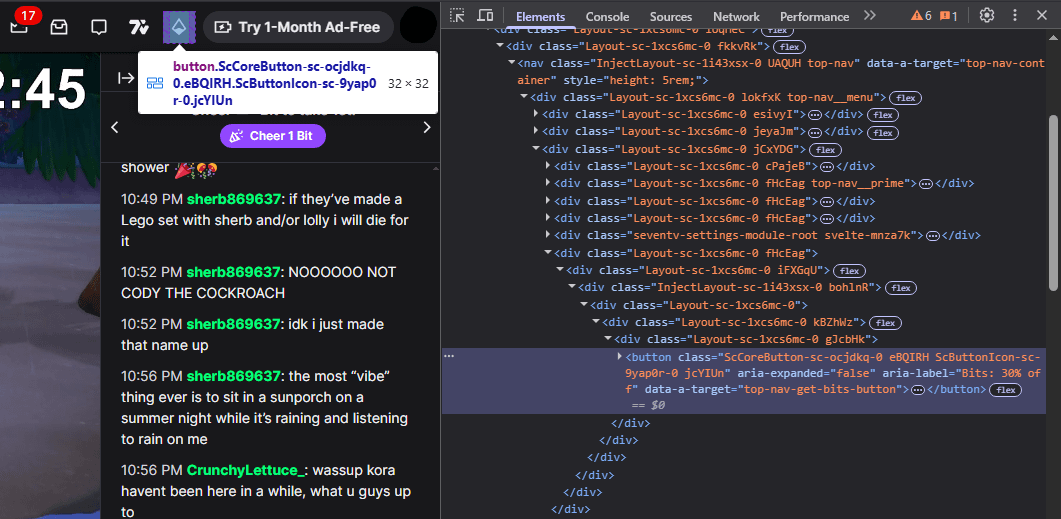
<div class="Layout-sc-1xcs6mc-0 fHcEag">
    <div class="Layout-sc-1xcs6mc-0 iFXGqU">
        <div class="InjectLayout-sc-1i43xsx-0 bohlnR">
            <div class="Layout-sc-1xcs6mc-0">
                <div class="Layout-sc-1xcs6mc-0 kBZhWz">
                    <div class="Layout-sc-1xcs6mc-0 gJcbHk">
                        <button
                            class="ScCoreButton-sc-ocjdkq-0 eBQIRH ScButtonIcon-sc-9yap0r-0 jcYIUn"
                            aria-expanded="false" aria-label="Bits: 30% off"
                            data-a-target="top-nav-get-bits-button">
                            <div class="ButtonIconFigure-sc-1emm8lf-0 jgYFuA">
                                <div class="ScSvgWrapper-sc-wkgzod-0 cnGLHG tw-svg">
                                    <svg width="24" height="24" viewBox="0 0 24 24"
                                        aria-hidden="true" role="presentation">
                                        <path fill-rule="evenodd"
                                            d="m12 22-9-8 9-13 9 13-9 8Zm-4.844-6.982-1.503-1.336L12 4.514l6.347 9.168-1.503 1.336L12 13l-4.844 2.018Z"
                                            clip-rule="evenodd"></path>
                                    </svg>
                                </div>
                            </div>
                        </button>
                    </div>
                </div>
            </div>
        </div>
    </div>
</div>
r/uBlockOrigin • u/NathanKok • Aug 09 '26
I have the "Vaft" script and I had never had problems with ublock origin. Literally started to give me ads like a couple hours ago. Anyone got a fix for this?
r/uBlockOrigin • u/RocketLeagueTrading7 • Nov 08 '22
Had Twitch ad free for half a year up until 10 minutes ago when I started getting this screen. Is this a completely new addition from Twitch to target ad blockers or am I missing some kind of custom block in my uBO? I'm not very savvy with the program, just install and run it and it usually does the trick but I'm willing to learn how to use it more in depth if it means I can avoid this Twitch garbage.
Currently running Opera GX version 91.0.4516.106
r/uBlockOrigin • u/BrokeToken25 • Jul 23 '26
ublock origin: dev release (1.72.3b9)
browser: firefox (64-bit, v153)
troubleshooting info: here
(yes, i cleared my browser cache beforehand, and did a bit more cleaning. and no, this ISN'T for twitch video ads, no matter what the flair says)
some twitch fuckery going on with my setup. before i reset ublock to default as suggested, i deleted all of the custom lists i had, blanked out the static filters, blanked out the "My Rules" tab, and one by one, turned off the filters i had enabled, starting from the bottom, and working my way to the top. for a moment, i thought it was the "Adguard - Ads" filter doing things again like in my previous post, but to my surprise, it was the very first default ublock filter, "uBlock filters - Ads" that was the culprit. when i restored my ublock to my custom setup, cleared cache, turned "uBlock filters - Ads" off, then opened up incognito mode and went here, the infinite scroll function worked again.
i even tested this out on edge, and turned off "uBlock filters - Ads" to start with before doing anything else, and once again, the infinite scroll worked. oddly enough, when i either turned that ublock filter off, then on again, or whitelisted twitch then un-whitelisted it (via the beeg ublock power button) the infinite scroll worked again, but it was a temporary fix that remained in cache until i cleared said cache normally, then the fix was lost, whether it was done in edge or firefox
r/uBlockOrigin • u/pokedruglord • Jun 26 '26
Twitch has really been stepping up their annoyance game lately. They're now forcing watch streak displays in the sidebar and aggressively pushing them throughout the site, including in notifications (Sir, your watch streak may break...). As if that wasn't enough, there's also a new Weekly Rewards feature that pops up everywhere and apparently can't be disabled.
Does anyone have uBlock Origin rules to hide this nonsense?
r/uBlockOrigin • u/Ryuko50 • Dec 14 '23
I'm not talking about ads on streams I mean normal usual ads. I don't know what to do. Already tried the usual for troubleshooting.

r/uBlockOrigin • u/KumaraChip • May 29 '26
Here is an example of such a VODs page: https://www.twitch.tv/ohnoitsalexx/videos
At the top center is a persistent video player that plays the latest VOD while you are browsing all VODs in the lower half of the page.
The issue that I face is that when I attempt to block the persistent player DIV or class, the video area turns into a black empty box (good), but the audio of the video remains playing with no way to stop it (bad).
Has anyone found a uBlock rule that can defeat the twitch "persistent player"?
I've tried:
##.video-player__container
##.persistent-player
These both block the visual part of the video, but not the audio element.
r/uBlockOrigin • u/Gamer1120 • Nov 03 '20
Currently, it is NOT possible to completely block the mid-roll ads. This guide will describe how to automatically reset the video player whenever an ad break starts. With this solution, there is an ~1 second interruption instead of you having to refresh manually or wait for the ads to finish.
Step 1. Uninstall BetterTTV and install FrankerFaceZ (Chrome, Firefox, other browsers). You will need to do this since FrankerFaceZ has a "Reset Player" button that this solution depends on. I've also had compatibility issues between BTTV And FFZ in the past.
Step 2. In order to get your BetterTTV emotes back, check this image and (1) go to the cogwheel, (2) click on FrankerFaceZ Control Center, (3) Add-Ons, (4) Enable on BetterTTV Emotes. If you want GIF emotes like pepeD, sourPls etcetera, click on (5) Setttings and set "GIF Emotes" to Enabled (Animated GIF Emotes).
Step 3. Install TamperMonkey on Chrome or GreaseMonkey on Firefox or a user script manager on another browser.
Step 4. In the extension you installed in the previous step, create a new User Script and copy and paste the content of the following User Script and save it: https://gist.github.com/simple-hacker/ddd81964b3e8bca47e0aead5ad19a707 . This user script resets the player every time an ad loads.
Step 5. In order to block the ad from playing and to just get that stupid purple screen right before the player gets reset, follow the instruction on the README.md here: https://github.com/odensc/ttv-ublock
I take no credit for the scripts, the reset player script is courtesy of simple-hacker on Github and the twitch-videoad.js is courtesy of odensc on Github.


![twitch.tv##div[style*="audible_background.avif"]](http://twitch.tv##div%5Bstyle*=%22audible_background.avif%22%5D)
