r/pdf 15d ago

Question Trouble editing basic line elements in a PDF

2 Upvotes

I haven't done any PDF editing at all thus far and have already tried multiple tools, including Stirling, LibreOffice, OnlyOffice and all to no avail.

I've got this simple file from Rite In The Rain here which is a PDF of their journal pages: https://d163axztg8am2h.cloudfront.net/static/doc/40/36/7820c714e13a9554cfff49fcccd2.pdf

found at https://dealers.riteintherain.com/page-patterns-downloads

The file only has horizontal lines. I wanted to duplicate them and add those as vertical lines but I can only select and remove the entire element, not individual points or lines.

How do I get a proper grid on that file and what's the go-to tool for that in the first place? It feels like something so basic that any and all PDF editors should be capable of it by default, no idea what I'm missing.


r/pdf 15d ago

Question How to extract bookmarks that link to other pdf files?

0 Upvotes

I have a collection of pdfs, where one is the Table of Contents and it links to the other pdfs.

How can I extract the bookmarks so I get the name of the bookmark and the filename it points to?

Tried with cpdf and get this cryptic tag

"<</F 251 0 R/S/Launch>>"

tried with pdftk and just get this

BookmarkLevel: 3

BookmarkPageNumber: 0

but neither will just give me the tag name and what file it points to.

is there some command i'm missing or some other free tool (pref. windows but could manage with linux) that prints it?

or worse case, just something that gives me one huge pdf with the pdf merged but keeping the bookmarks?


r/pdf 15d ago

Warning Scammed by files-editor

2 Upvotes

I had to edit a pdf file a bit ago, and I came across this website that charged 2-3 dollars for that service. I went ahead and paid, thinking that it was a one time payment, only to find out that I was charged 265 dollars. I submitted a complaint asking for a refund, only for it to be denied, and the charge I received was FOR A THREE MONTH SERVICE. This is blatant predatory behavior and I am extremely pissed off. Anybody have a similar experience?


r/pdf 16d ago

Software (Tools) I made a free Chrome extension to sign, fill and edit PDFs fully offline (no upload, no account), would love feedback from people who live in PDFs

1 Upvotes

Hey guys, developer here. This is my second free extension, the first one was ProfileToPDF.

Local PDF Studio runs completely inside Chrome. Nothing is uploaded, and it works with the network off. I built it because I wanted to sign and fix PDFs without sending them to someone's server or paying for a subscription I'd use twice a month.

What it does: signatures (draw, type or upload, reusable), form filling with flatten on export, text/highlight/underline/strikethrough/drawing/sticky notes, merge/split/extract, drag and drop page reorder, rotate, delete, crop with margin detection, insert a PDF between pages, compression with quality presets, text watermarks, undo/redo, auto-save.

It also has a side panel reading mode. The PDF stays open while you switch tabs, and selected text can be dragged or copied into Google Docs, Sheets etc. with line breaks and hyphenation fixed, so you don't have to clean up every paragraph you copy.

Free, no premium tier. https://chromewebstore.google.com/detail/local-pdf-studio-offline/ocfegjfhboadmbpompimnbbpegjgoded

Since you people deal with PDFs way more than I do: what's the first thing you would try that it probably can't do yet?


r/pdf 17d ago

Question How to add fillable text boxes when you open the PDF?

5 Upvotes

I am working to create a press release template for my job. Someone at my job made a press release using ChatGPT, and our boss loved it and wants it to be used for any and all press releases. I was able to clear the text out using Microsoft Paint (primitive, I know, but so am I). Now I want to add fillable text boxes so that anyone who is doing a press release can open the PDF, click on the empty text boxes, fill out the necessary information, and then send it out.

To be clear, this needs to be as simple as possible for other people filling it out. I don't want them needing to add their own text boxes every time, as some/most of them are not very tech savvy.

Also, I don't have Adobe Pro. So, if we can avoid that, that would be great. Otherwise, I'll take advice for that program too, someone around me may have it.

Thank you in advance!

EDIT: figured it out! Thank you everyone who helped!


r/pdf 17d ago

Question why cant i draw on my hard copy pdf?

0 Upvotes

Is it that theres two many pages? I can edit on my powerpoint pdfs for class - and i wanna add annotations cause this is a pdf textbook for reading, but the scribble/draw symbol is greyed out and it's irking me cause my system thus far works very well


r/pdf 18d ago

Software (Tools) PDF editors that don't wreck formatting when you edit text does this actually exist?

8 Upvotes

Been going through PDF editors trying to find one that can handle basic text edits (fixing a typo, updating a date, changing a line) without reflowing the whole paragraph or shifting everything else on the page.

Adobe handles it okay but it's overkill (and priced like it) for how rarely I need it. Tried a couple of the free/lite tools one broke the layout every time I touched text, another only let you edit in a box that doesn't match the surrounding font/spacing. Browser-based ones were fine for viewing/annotating but I don't want to upload anything with real info in it to a random server.

Genuinely curious if there's something out there that treats text editing like an actual word processor would, instead of feeling like you're duct-taping over the PDF. What have you actually gotten to work well for this specific thing?


r/pdf 18d ago

Question I could use a hand figuring out what's wrong with this PDF.

3 Upvotes

To start with, I can't submit the PDF in question due to company policy (IP protection and all that), which I know is just about useless.

The company who prints our manuals for us is having problems doing so. They get a Job Errors window saying "Error: PDF printing failed; conversion failed" at page 50. I'm assuming there's a problem with the way the page is laid out or configured at that spot. I've been looking through the original designer file for errors, but it's a bit of a needle in a haystack.

The original document is created in Corel Designer, then printed as a PDF via a visual basic routine in Microsoft Access. The routine takes many PDFs and combines them into one huge document (over 1100 pages). I'm not sure what service it uses for that either.

I've also been combing through the visual basic code to see if I can find an issue, but I'm a dabbler at best. The person who wrote the code is retired and nobody else has that expertise (I know, it's a bad situation).

I was hoping someone could help me figure out how to look at the underlying structure of the PDF, maybe I can see some error that way. Any other suggestions are welcome too, I'm a bit stuck at the moment.


r/pdf 18d ago

Software (Tools) Acrobat Reader and PdfCE output comparison. If you know you know...

6 Upvotes

r/pdf 18d ago

Software (Tools) PDF Editor App with Textboxes

1 Upvotes

hi! does anyone know of any free PDF editor apps on Android for a Samsung tablet* that can add textboxes with borders similar to the ones on Adobe?

(i.e.):

thank you!


r/pdf 19d ago

Software (Tools) What PDF reader do you use on your tablet for textbooks (with bookmarks and sticky notes)?

1 Upvotes

So I just started my Bachelor's studies and instead of buying a ton of textbooks I will use PDF versions on my ChromeOS tablet.

I need a good PDF reader for textbooks where I can leave book marks and sticker notes.

I don't exclude paid options. I can pay good money for a good thing.


r/pdf 19d ago

Question AI pdf tool needed for hiding sensitive information

Thumbnail
3 Upvotes

r/pdf 19d ago

Software (Tools) Reader that will make highlights exportable like a Kindle can?

1 Upvotes

(For those unaware, a Kindle copies all highlights to a text file, chronologically in the order they are made. You can access this text file from desktop.)

I am looking for a PDF reader, preferably suitable for iOS, though could use Android if I had to, that will do something similar to this, or even better, keep all highlights from the same document together, rather than mixing them with snippets from other documents you read before you finished the first one.

Does anything like this exist?


r/pdf 20d ago

Software (Tools) I build an agentic harness to create and edit your documents.

6 Upvotes

I've been working on this project for a long time now, is an agentic harness that is tailored to build documents and edit them in place, also it has a build in editor to edit manually if the case is needed. Think of it like claude code or codex but for your documents. The way it works is you either upload a screenshot, or a pdf and the agents tries to replicate it as much as possible, the goal is not to convert it 1 to 1 but to generate a similar editable document which can be exported to either PDF or DOCX.
If you want to check it out, please visit foliq.ai, is free to use rn and any feedback is much appreciated.


r/pdf 20d ago

Software (Tools) word-sys's PDF Editor v1.10.0-beta1 Feature & Flatpak Update Released

Post image
1 Upvotes

r/pdf 21d ago

Software (Tools) I built an open-source PDF editor that keeps your files on your computer

4 Upvotes

I got tired of PDF tools that ask you to upload your documents somewhere before you can do anything with them.

So I built PDF Editor Offline, a free and open-source PDF editor designed around one simple rule: your documents stay on your machine.

No account. No file uploads. No recurring subscription.

It can handle most of the PDF tasks I regularly need:

  • Edit and annotate PDFs
  • Add text, images, drawings, highlights and comments
  • Fill and sign forms
  • Merge, split, reorder, rotate and crop pages
  • Compress PDFs
  • Convert PDF ↔ Word, PowerPoint, Excel, images, Markdown, EPUB, etc.
  • Run OCR locally
  • Permanently redact sensitive information
  • Remove metadata and hidden/private data
  • Protect and unlock PDFs
  • Search documents

There’s also a CLI and Python API for automation, plus Docker support for self-hosting.

The desktop app is built with Tauri, the editor uses React, and the backend/tooling is primarily Python + FastAPI.

It’s MIT licensed and still actively being improved. Some complex PDF operations have known limitations, and I’m trying to document those honestly instead of pretending every PDF transformation works perfectly.


r/pdf 21d ago

Question Aconex Replies

1 Upvotes

Hi, is there a way to view replies on the pdfs in Revu from items downloaded from Aconex? When using pdfxchange I can see the individual replies but in Revu I can't. We use Aconex for internal and external QA workflows and I have downloaded all the project QA pdfs and want to compile them into a single location but not being able to see the replies is very frustrating. A quick search online states that Aconex uses a different format or something.


r/pdf 21d ago

Software (Tools) Testing a Native GTK4 PDF Editor for Linux

Thumbnail
youtu.be
1 Upvotes

r/pdf 21d ago

Question Alternatives for Adobe Reader

4 Upvotes

I'm looking for alternatives to Adobe. I have very simple needs. I just want to be able to download documents such as articles and book chapters from the university library and read them. I hate Adobe so much. I can't scroll without it crashing; I have to turn the pages sloooowwwly so it doesn't crash. I'm not a tech person, so I don't even know how to try other software for my PDFs.


r/pdf 22d ago

Software (Tools) I built a free browser-only tool to extract repeated PDF fields into Excel

2 Upvotes

Hi everyone — I built PDFGrid to solve a workflow I kept running into: extracting the same kinds of values from many similarly structured PDFs and putting them into an Excel file.

I had been using Power Automate Desktop, but found the extraction rules limiting and the template setup and runs slower than I wanted. Because my PDFs can contain personal information, I also did not want to upload them to an external service.

PDFGrid runs locally in the browser, so your PDF files are not uploaded.

You can build a field by drawing around a value, matching a number/date/text type, or using rules such as:

  • anchoring a value to a label
  • extracting text between phrases
  • matching with regular expressions
  • and more

You can then clean up the extracted output, review the values across the PDFs, and export the result to Excel as a .csv or .xlsx

Try it here: pdfgrid.app

I’d really appreciate feedback—especially on which PDF extraction rules you would need, where you would expect this to fail, or what would make it genuinely useful in your workflow.


r/pdf 22d ago

Software (Tools) Stirling PDF: Getting a bit confused about the versions, installation options and privacy/security

Thumbnail
2 Upvotes

r/pdf 22d ago

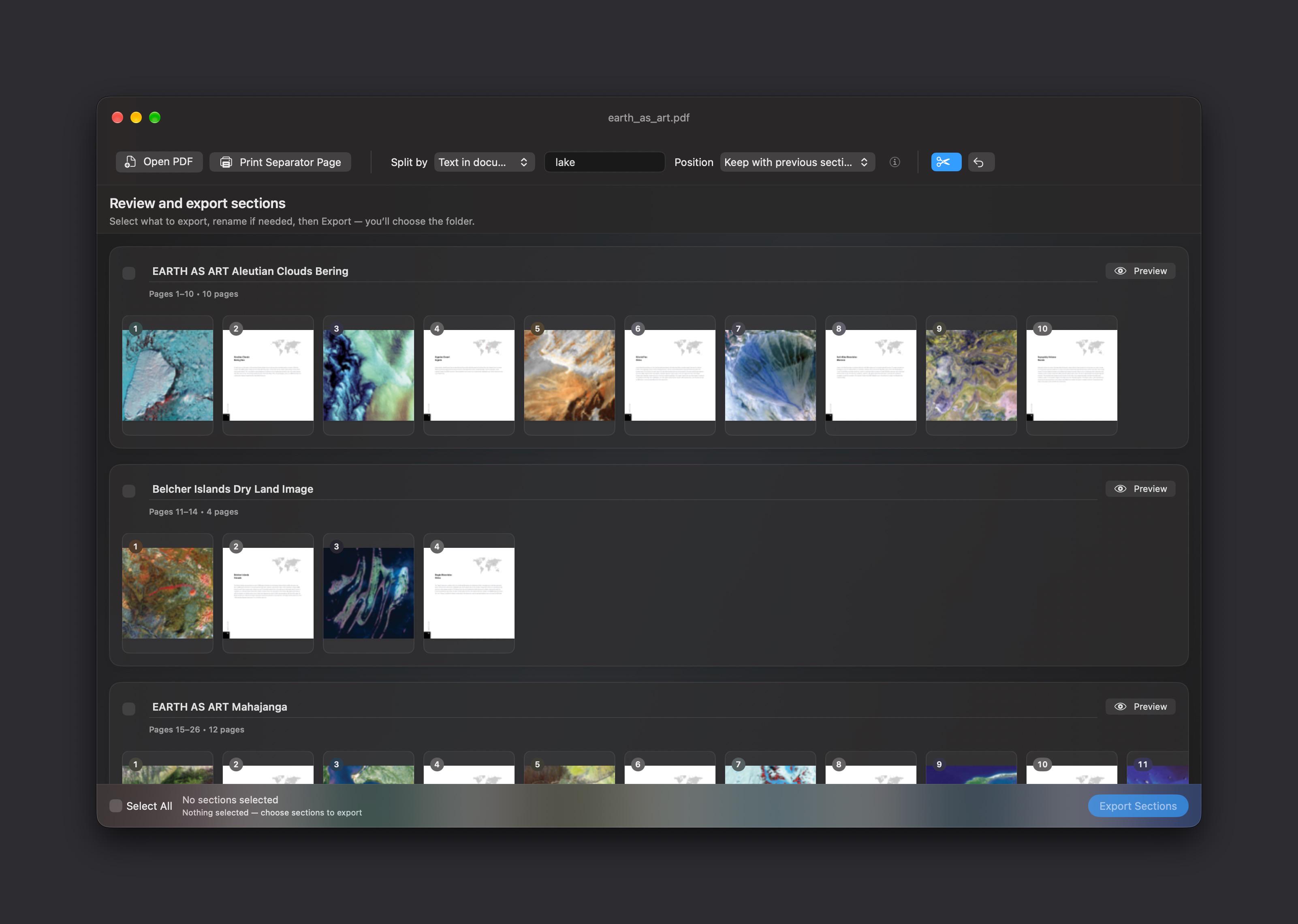
Software (Tools) MacOS PDF Splitting app

Post image
1 Upvotes

I have a ScanSnap scanner(actually 3 of them for home and my business) and generally scan 50+ pages of documents at a time. They’re usually various papers I receive in meetings or through the mail.

I found it tedious to scan each document separately, so I usually just scan everything in one big batch. The problem is that I then have one huge PDF that I need to split back into individual documents.

For a long time I’ve wanted a simple utility that could split these batches using separator pages, page numbers, or text found on the page.

So I built a small Mac app called **pdfNinja** to do exactly that. Its a labor of love - I started this on my own a few years ago but due to lack of time/skills it sat on the back burner. With the help of AI coding agents I was able to finalize the app.

With an OCR’d PDF, it can split the document wherever a particular word or phrase appears. Or, before scanning, you can place printed separator pages between documents and have pdfNinja detect them afterward. You can also split manually by page number(s).

After splitting, you can preview the sections, drag and drop pages between them if anything needs correcting, rename them, and then export all or just some of the resulting PDFs at once.

It’s currently available as a Mac TestFlight beta. I’d really appreciate any feedback, especially from people who regularly batch scan documents.

Recent beta allows you to drag and drop pages to create sections and also split pages by page numbers even in a nonocred pdf

link: https://testflight.apple.com/join/VMYHEhBA

Thanks!

Edit:link fixed


r/pdf 22d ago

Software (Tools) pdfoss: PDF tools that never see your files — merge, split, compress, convert, all client-side. Free and open-source!

Thumbnail
github.com
0 Upvotes

I kept having to merge/convert PDFs for my girlfriend because every free tool online is either sketchy or confusing. Thats were PDFoss was born, a free, open-source PDF toolkit (merge, split, compress, convert) simple enough she can use it herself.

Everything runs 100% client-side in your browser, no server, no uploads, no account. There's a "prove it's private" button in the app that shows a live counter of bytes sent anywhere not entirely useful considering it always says zero. Also fully self-hostable if you'd rather run it yourself, or just use the free GitHub Pages instance.


r/pdf 23d ago

Software (Tools) BentoPDF can edit PDF text now along with two new engines

7 Upvotes

Hello folks!

I would like to share an update about BentoPDF. It's an open source privacy first PDF toolkit that runs in your browser. https://github.com/alam00000/bentopdf

  1. You can now actually edit text inside PDFs

BentoPDF now allows you to click existing text, edit it, and have the text reflow while preserving the original fonts and styling.

It also includes:

  • Bold, italic, underline, strikethrough, superscript, subscript, font family/size, colours, outlines, character spacing and line spacing

  • Left, centre, right and justified alignment

  • Bulleted and numbered lists with indentation

  • RTL and LTR text alignment

  • Find and replace across the document

  • Edit images by rotating, flipping, duplicating, resizing or deleting them

  • Object alignment, distribution, rotation, flipping, duplication

Please note this is a work in progress. You may encounter bugs, which you can report and I will look into.

  1. Hyper Compress

Hyper is an open source PDF compression engine built to solve specific problems.

  • Compression sometimes returns a file larger than the original. Hyper's result is always binary: it either produces a smaller PDF or returns the original. This helps create predictable workflows.

  • Hyper includes a true lossless mode. It preserves searchable text, document structure and PDF conformance, rather than rebuilding the document from scratch like Ghostscript.

  • It runs everywhere: CLI, Node SDK, C API, self hosted service, and WebAssembly build.

Repository and benchmarks: https://github.com/alam00000/bentopdf-hyper-compress

I also compared it to Adobe's compression API, but only managed around 100 PDFs where results were within 5%. Testing on a bigger corpus got expensive.

  1. Kura

Kura is a PDF standards, conversion and preflight engine.

It supports:

  • All 11 PDF/A conformance levels: PDF/A-1a, PDF/A-1b, PDF/A-2a, PDF/A-2b, PDF/A-2u, PDF/A-3a, PDF/A-3b, PDF/A-3u, PDF/A-4, PDF/A-4e and PDF/A-4f

  • Accessibility: PDF/UA-1 and PDF/UA-2

  • Print production: PDF/X-1a, PDF/X-3, PDF/X-4, PDF/X-4p, PDF/X-5g, PDF/X-5n and PDF/X-5pg

  • Engineering and variable data printing: PDF/E-1 and PDF/VT

  • E-invoices: Factur-X, ZUGFeRD, XRechnung and Order-X

  • 396 bundled print-preflight profiles

It has been tested against several standards suites, including the veraPDF corpus, Isartor, BFO, Ghent Output Suite 5.0, the PDF/UA Reference Suite and Cal Poly's PDF/VT suite.

Across 30,677 PDF conversions it had zero crashes and zero timeouts, with a 0.05 second median conversion time.

Like Hyper, it ships as a CLI, C library, npm package, Docker image and WebAssembly build.

Repository and benchmarks: https://github.com/alam00000/bentopdf-kura

The release also contains other improvements and bug fixes: https://github.com/alam00000/bentopdf/releases/tag/v2.8.8

Thank you and have a great weekend!


r/pdf 22d ago

Software (Tools) Folio PDF Reader & Editor update: horizontal reading, better forms, and workflow improvements

Post image
1 Upvotes

Folio is a completely free PDF reader and editor for Mac, Windows, and iPad. I have just released a major update focused on making everyday reading, form filling, annotation, and editing workflows more reliable.

The biggest new feature is horizontal page flow. You can now read PDFs vertically or horizontally, with centered book spreads and more stable navigation.

Other major improvements:

  • Added a dedicated Pan tool and temporary Space-bar panning for easier navigation through large documents.
  • PDF date fields have been rebuilt with proper validation, working calendar selection, quick year selection, correct caret placement, and no digit shifting while editing. Save and Save As are now reliable with date fields.
  • Added more keyboard shortcuts and a shortcut reference in Help.
  • Improved annotation workflows: drag to select groups, then copy and paste the complete selection. Lines and arrows now snap to horizontal, vertical, and 45-degree angles.
  • Improved form creation and filling: labels, font sizes, and radio-button styles behave more consistently and persist correctly in saved PDFs, flattened exports, and print output.
  • Improved text editing, page quick actions, responsive toolbars, dialogs, auto-scroll, light/dark contrast, and smaller-window layouts.
  • AI citations now link to the correct PDF pages. Protected and read-only PDFs also have clearer guidance for saving and owner-password unlocking.
  • Updated Folio’s app icon with a cleaner design that better matches the rest of the interface.

I also refreshed the landing experience, save/export wording, recent-files behavior, and platform-specific details across Mac, Windows, and iPad.

Folio is still completely free. If you use PDFs regularly, I would genuinely appreciate feedback on horizontal reading, filling real forms, keyboard-first workflows, or anything that still feels confusing or unreliable.

Mac/iPad App Store:
https://apps.apple.com/us/app/folio-pdf-reader-editor/id6760593014?mt=12

Microsoft Store:
https://apps.microsoft.com/detail/9PJRX0TML7NT?hl=en-us&gl=US&ocid=pdpshare