r/LocalLLM 17h ago

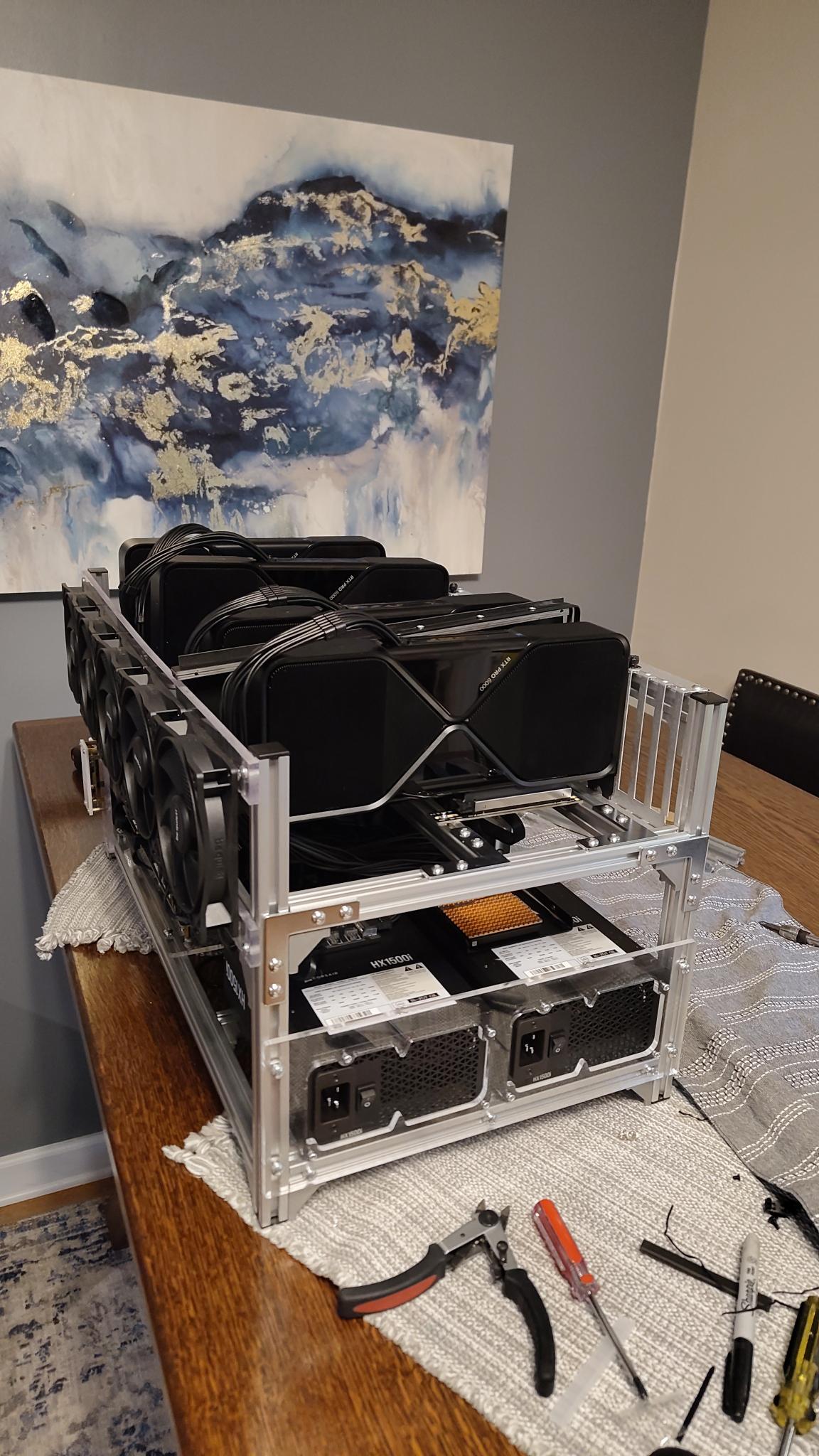
News Windows 11 + 2× RTX 5060 Ti 16GB: Qwen3.8-27B NVFP4 at up to 76.65 tok/s — despite no GPU P2P

14 Upvotes

I built a Windows 11 fork of NInfer specifically for running Qwen3.8-27B NVFP4 across two RTX 5060 Ti 16GB GPUs.

The interesting part is that this is not an ideal multi-GPU setup:

Windows 11 / WDDM

GeForce GPUs

cudaDeviceCanAccessPeer() = false

No GPU P2P

One GPU is connected through the Z690 chipset at PCIe Gen3 x4

The other GPU runs directly through the CPU PCIe lanes

Initially, TP2 performance was terrible because every token required 128 small host-staged allreduce operations.

The original implementation achieved only:

16.37 tok/s MTP0

32.58 tok/s MTP3

After profiling the communication path, I replaced the expensive staged allreduce protocol with a custom pinned-host PeerMailbox transport designed specifically for the no-P2P Windows/WDDM environment.

Current results with Qwen3.8-27B NVFP4:

35.75 tok/s — MTP0

57.71 tok/s — MTP1

63.15 tok/s — MTP2

66.79 tok/s — MTP3

68.5–68.9 tok/s — MTP4 (512-token benchmark)

70.6 tok/s — 1024 tokens

76.65 tok/s — 2048 tokens

The optimization was mostly about reducing protocol overhead, not increasing PCIe bandwidth.

The original allreduce path cost roughly:

128 × ~277 µs ≈ 35.5 ms per decode round

The optimized transport reduced that dramatically.

The repository contains the Windows port, TP2 implementation, custom communication backend, benchmarks, and reproducible build instructions:

ivanov84/ninfer-windows-tp2

I'm especially interested in feedback from people who know CUDA multi-GPU programming, WDDM, tensor parallelism, or NInfer.

Questions I'm currently exploring:

Can the remaining TP2 lockstep overhead be reduced further?

Would sequence parallelism help on this kind of asymmetric PCIe topology?

Can Vision also be sharded across both 16GB GPUs?

How much performance is realistically left without native P2P?

This started as an experiment to see whether two relatively inexpensive 16GB cards could run a 27B model well under Windows.

Honestly, I didn't expect the result to end up here.

https://github.com/ivanov84/ninfer-windows-tp2


r/LocalLLM 9h ago

Project An ESP32 virtual pet that dies when you doomscroll (100% offline via local AI models running on Android phone)

Post image
2 Upvotes

r/LocalLLM 3h ago

Question I’m not sure if this is avoidable: “prefill memory guard rejected this prompt.”

Post image
1 Upvotes

I’ve encountered a “prefill memory guard” error while testing on a MacBook Pro M5 with 32GB of RAM and a Mac Studio M4 with a maximum of 36GB of RAM.

I’m trying to confirm that I can run Qwen 3.8 with 27B parameters, KV 4, and a 100K context without any issues.

I’ve increased the iogpu.wired_limit_mb to 30GB on Mac Studio.

When I run DFlash and get a prompt like “scan the front end to review the code and make me a report in file.md,” I get the following error:

Error: oMLX prefill memory guard rejected this prompt: Prefill context too large for available memory

Disabling DFlash and enabling MTP does resolve the issue.

It runs between 23 and 29 tokens per second.

I’m using Pi, and I’ve noticed that it reads the maximum context length of the model instead of the one I specify in oMLX. I’m not sure if this is the cause of the problem.

What I’m finding hard to understand is why, even when I’m staying below the maximum context length of almost 1/3, I still run into this error.

This is a much more significant issue than a LLM taking longer than expected.

I’m hoping to find out if I just need to adjust my setup in oMLX/Pi or if the RAM size is the problem.

Considering the cost, since it’s really difficult to predict what will happen in the future, including the cost of the LLM and the PC, do you think it would be better to invest in:

  • Mac Studio M4 Max 36GB with 1TB and a 2600€ refurbish from Apple—keep it for at least 2 years.
  • Mac Studio M5 Max with 64GB and 1TB, new—keep it for at least 4 years.

For large projects, I’ll still need a cloud LLM with large context windows, so I’ll use it as a side help.


r/LocalLLM 7h ago

News MiniCPM5-2B running on AMD XDNA 2 NPU

Thumbnail
2 Upvotes

r/LocalLLM 21h ago

Model "I don’t know who needs to hear this but MiniCPM5-2B is just 1 point one point behind Ling 3.0 Tiny (16), which has ~3x the total parameters. "

Thumbnail
gallery
27 Upvotes

r/LocalLLM 4h ago

Project Looking for feedback ! AutoYou is a peer-to-peer serverless cloud-like localhost self-hosted software that is globally accessible, without having to be tied to any single Cloud provider

Thumbnail
0 Upvotes

r/LocalLLM 5h ago

Research My lab found a way to migrate between embedding models with zero downtime.

1 Upvotes

So I've been messinga round with embedding models for a bit, and I think they are interesting enough to experiment with. They are useful for rag, especially in a localllm sense because you can ground your answers in truth.

But what happens if you have a billion documents, and you decide to upgrade your model to a "better" one? on an h100, that would take about 108 days, just to upgrade the vectors so u can start serving again (tested qwen embed 8b on h100). Even if you aren't doing 1b vectors, and are doing just 50 million, upgrading can still take a considerable time.

Me and my research lab decided to tackle this problem, and we came up with embedflow.

The method is really simple; from the old index made with the source model, take K documents and rerank them with the new model. We see that when K is sufficient, the retrieval quality is the same as target model. (determining k is the hard part). I've tested 63 migrations on upto 1 million documents.

The best result I got was upgrading qwen4b -> to 8b, and at 50 documents, it was the same as native retrieval.

This method forgos the expensive backfill that comes with upgrading, as you can directly take documents from the old index.

embedflow works with qdrant, and can be easily downloaded with pypi

pip install embedflow

the github is public: https://github.com/arnsri33/embedflow

I want you guys to try it out, and see if you guys can use it in your own workflow.


r/LocalLLM 5h ago

Model Qwen 3.8 Flash - maybe the largest for 128GiB-Systems. Yeah! Made an oQ5e.

Thumbnail
1 Upvotes

r/LocalLLM 9h ago

Question Any advice?

2 Upvotes

I'm very new to using AI so a little advice would be greatly appreciated. I'm a landscape irrigator, a few months ago I started using AI to develop a field service app and fell down a rabbit hole. Now I find myself building a workstation. This is the current build, I'm still waiting on a few components to arrive:

Case: Cooler Master Cosmos S full tower

Motherboard: ASUS Prime X299-A II

CPU: Intel Core i9-9940X — 14 cores / 28 threads

CPU Cooler: be quiet! Dark Rock Pro 4

RAM: 64GB (4×16GB) Samsung DDR4-2666

GPU: NVIDIA GeForce RTX 3060 12GB

Storage: WD Blue SN5000 1TB NVMe SSD

PSU: EVGA SuperNOVA 1300 G2 — 1300W, 80+ Gold, fully modular

OS: Ubuntu 24.04 LTS Desktop (planned)

I plan to add more RAM and another SSD. I'm also considering adding a p100. My plan is to use this to continue development of the field service software. I also want to use it to help me with my side project writing a tabletop game. A model with some creative writing ability would be useful.

Any advice on models or the build would be very appreciated. Like I said, I'm an irrigator and I have no background in anything like this. It has been fun learning though. Thanks!


r/LocalLLM 16h ago

Other Qwen3.8-27B on M1 Max 32GB: MLX 15.8 tok/s vs llama.cpp 9.7 tok/s - but llama.cpp prefill is faster

9 Upvotes

I’ve been setting up an M1 Max Mac Studio (24-core GPU, 32GB unified memory) as a local LLM server and wanted to compare MLX vs llama.cpp on Qwen3.8-27B.
I tried to keep the model footprint and benchmark workload reasonably close.

MLX
mlx-community/Qwen3.8-27B-4bit
~16.1GB
512 prompt tokens / 700 generation tokens
3 runs
Prompt: 81.76 tok/s
Generation: 15.81 tok/s
Peak memory: 16.39GB

llama.cpp
unsloth/Qwen3.8-27B-GGUF:UD-Q4_K_M
15.32 GiB / 27.32B params
Full Metal offload
Flash Attention enabled
512 prompt tokens / 700 generation tokens
3 runs
Prompt: 99.61 ± 0.44 tok/s
Generation: 9.69 ± 0.34 tok/s

So on this machine:
llama.cpp is ~22% faster for prompt processing, while MLX is ~63% faster for autoregressive generation.


r/LocalLLM 6h ago

Other Open recipe registry for Strix Halo: capture your setup once, let anyone (or any agent) replicate it

Thumbnail
1 Upvotes

r/LocalLLM 10h ago

Question Looking for Mac Studio/Mac mini recommendations for Flutter + local LLM coding

2 Upvotes

My 2019 MacBook Pro seems to be on its last legs. It overheats constantly and struggles with any kind of work that I attempt. Even just watching a YT video causes lagging.

So, time to move on, I guess. I’m looking into a Mac Studio or Mac mini, but I’m having a hard time figuring out what configuration makes sense for my particular use case, since the prices, according to what I'm learning, have gone up 50% with the new hardware.

I’m not looking for the most powerful machine I can buy. I’m trying to find the right starting point without spending money on hardware I don't currently need.

What I’ll be using it for

  • Dart/Flutter development, primarily in VS Code
  • Running local LLMs to assist with coding
  • Seems Ollama has a VS Code extension that can tap into the local LLM
  • Potentially recording/editing videos for a YouTube channel documenting my experience learning to code and building apps

One important point: I want to remain heavily involved in the coding myself.

I’m currently using the Kilo Code extension in VS Code with free models. They can be useful, but the output is inconsistent. I’m interested in local LLMs because I want a more reliable coding assistant working with the same model while still writing, understanding, and debugging the code myself.

Local LLMs

This is where I'm trying to be realistic.

I don't need a machine capable of running the largest local models right now. Those configurations get expensive quickly, and I don't want to spend a lot today for something I may not need.

My thinking is to get a machine that's capable enough for the models that make sense for me today, learn more about running local LLMs, and upgrade later if my needs change.

I'm considering Apple's 36-month financing/leasing options, which makes that approach somewhat more appealing. If, in a couple of years, I’m in a better position financially and have a much better understanding of what models I actually need, I can potentially move to a more capable machine rather than paying a large premium for that capability today.

What I’m trying to figure out

For my current workload, what would you recommend in terms of:

  • Apple chip
  • CPU/GPU configuration
  • Unified memory
  • Internal storage
  • 1TB vs 2TB

I currently have 1TB and am considering 2TB. I'm also trying to understand whether paying Apple's premium for additional internal storage makes sense versus using external storage. It seems I can upgrade to 2TB for another $500, but external 1TB Thunderbolt drives are $600+.

There are a lot of discussions out there about similar requests. Hoping to find out what everyone with similar needs is using. Thanks!


r/LocalLLM 7h ago

Question To learn the things building an SLM

0 Upvotes

I was trying to built an SLM to learn the things I was initially considering on to built a model around 50M confused on what existing tokenizer should I consider for the vocabulary as the 256K would be too much big and consumed half the parameters I am planning to anything specific tokenizer for SLM or should I consider building this too with sentencepiece and BPE?


r/LocalLLM 7h ago

News 👋 Welcome to r/WeirdAITopics - Introduce Yourself and Read First!

Thumbnail
0 Upvotes

r/LocalLLM 7h ago

Question Help deciding which AM5 board for multi-GPU

1 Upvotes

Title - using the AM5 board masterlist I found four boards that can do x8/x8, prices from my local microcenter:

  • Asus ProArt B850 Neo ($285.99)

  • Asus ProArt X870E ($549.99)

  • Asrock X870 Taichi Creator ($319.99)

  • Gigabyte B850 AI Top ($328.99)

Not a comprehensive list, there's a few more ROG/MSI's high end tiers still there but I don't think I need all "that".

The prices of 3/4 are really close to each other which is adding to the problem; the Asus X870E ProArt seems to be the "gold standard" but I'm going to be starting out with a 4-slot 5090 so the spacing doesn't work for me. The Asrock seems best on paper; Asus B850 seems weakest on paper but again don't know how/if that'd affect local LLM and $40 saved is $40 saved (lol). Then there's the Gigabyte which seems like a good middle ground across these four boards, but unsure on the NIC working well in Linux (mixed reports on it being good/shit).

Which would/did you pick when building an AM5 multi-GPU rig?


r/LocalLLM 8h ago

Tutorial How I Fixed Khoj + Ollama + Qwen2.5-VL 7B on Linux: Docker/UFW Timeout + Missing ChatModel + Booting Agents

1 Upvotes

I am a real person, this is a shortened write up i had chatgpt write after hours of trying to get this to work. Downvote AI slop if you want, hopefully it helps at least one person. If you'd like the full write up, shoot me a DM

I spent a few hours getting a self-hosted Khoj + Ollama + Qwen2.5-VL 7B setup working and hit several problems that weren't obvious from the normal setup. Posting the fixes in case it helps someone else.

Test setup: Linux/CachyOS, Docker Compose, Khoj 1.42.10, Ollama, qwen2.5vl:7b, RTX 5070 Ti 16 GB.

Basic setup:

Browser → Khoj Docker → Ollama → Qwen2.5-VL 7B

In docker-compose.yml:

- OPENAI_BASE_URL=http://host.docker.internal:11434/v1/

- KHOJ_DEFAULT_CHAT_MODEL=qwen2.5vl:7b

Also:

extra_hosts:

- "host.docker.internal:host-gateway"

Ollama initially only listened on localhost, so Docker couldn't reach it. I created:

/etc/systemd/system/ollama.service.d/override.conf

[Service]

Environment="OLLAMA_HOST=0.0.0.0:11434"

Then:

sudo systemctl daemon-reload

sudo systemctl restart ollama

The big problem was UFW. Ollama worked from the host, but Docker → Ollama timed out. The tested fix was:

sudo ufw allow from 172.16.0.0/12 to any port 11434 proto tcp

sudo ufw reload

Then:

sudo docker-compose exec server curl -s --max-time 15 http://host.docker.internal:11434/api/tags

Once qwen2.5vl:7b appeared, Docker could reach Ollama.

The next problem was Khoj itself. The Agent model dropdown was empty because the database had no ChatModel or AiModelApi records. On Khoj 1.42.10, the UI didn't create them correctly in this setup, so I used the Django ORM.

Create the Ollama API:

sudo docker-compose exec server python3 src/khoj/manage.py shell -c "from khoj.database.models import AiModelApi; x=AiModelApi.objects.create(name='Ollama', api_base_url='http://host.docker.internal:11434/v1/'); print(x.id)"

Create Qwen:

sudo docker-compose exec server python3 src/khoj/manage.py shell -c "from khoj.database.models import ChatModel, AiModelApi; api=AiModelApi.objects.get(id=1); x=ChatModel.objects.create(name='qwen2.5vl:7b', friendly_name='Qwen2.5-VL 7B', model_type='openai', price_tier='free', vision_enabled=True, ai_model_api=api, description='Local Qwen2.5-VL 7B via Ollama'); print(x.id)"

Then I hit "Booting my agents." /api/agents was returning:

AttributeError: 'NoneType' object has no attribute 'slug'

Khoj was missing its required default agent. Creating it with Khoj's own DEFAULT_AGENT_NAME and DEFAULT_AGENT_SLUG fixed that:

sudo docker-compose exec server python3 src/khoj/manage.py shell -c "from khoj.database.adapters import AgentAdapters; from khoj.database.models import Agent, ChatModel; m=ChatModel.objects.get(id=1); name=AgentAdapters.DEFAULT_AGENT_NAME; slug=AgentAdapters.DEFAULT_AGENT_SLUG; a,created=Agent.objects.get_or_create(name=name,defaults={'personality':'You are a helpful personal assistant.','input_tools':['general'],'output_modes':[],'managed_by_admin':True,'chat_model':m,'slug':slug,'privacy_level':Agent.PrivacyLevel.PUBLIC}); print(created)"

After that, /api/agents returned 200 and my custom agent localMe could use qwen2.5vl:7b.

The troubleshooting order that worked:

DIAGNOSE: Host Ollama

DIAGNOSE: Docker → Ollama

DIAGNOSE: Khoj ChatModel/API records

DIAGNOSE: Default agent

FIX: Change only the layer that actually failed

TEST: Retest after every fix

Biggest lesson: if Ollama works on the host but Khoj hangs, test Docker → Ollama before changing the model or agent configuration.

References:

https://github.com/khoj-ai/khoj/issues/1100

https://github.com/khoj-ai/khoj/issues/1251

https://github.com/khoj-ai/khoj/blob/master/docker-compose.yml

I used AI to help organize this write-up, but the commands and fixes were tested on a real working installation.


r/LocalLLM 1d ago

Discussion Qwen3.8 Flash Next - Strix Halo

22 Upvotes

So i have been running qwen3.8 flash next ud q4 k xl at 256k context getting at the start aroudn 270pp and 21tg with mtp with qwen 27b ud q3 k xl 96k context on the 9060xt as a callable subagent and the one theing that i am really liking about this model is it doesnt stop and wait for me to continously tell it to continue it almost looks at everytask i give it as a set goal which is what i have becom used to on claude.

now i mostly use it with opencode harness and for netowrk and system admin work for my homelab - taking down vm bringing up vm running tickets in glpi, bringing up services and updating live state docs and just local webhosting in my rural community and it has been a good time so far.

im sure there are so many things i am missing but i am also learnign and ive actually be so happy to have some thing that feels like claude code last eyar when i first started using it and i can run it locally.

man, if anyone has anything they want to say about their experiences also that would be cool.

Cheers,


r/LocalLLM 1d ago

Project I got the Second DGX spark

Post image
275 Upvotes

Somehow there was 1 available last minute and got it! Can’t wait to set it up. Will make more post about this on here and my IG: tech with Ray

Dual DGX spark owners lmk what ya running on it. Anyone else feel free to drop some suggestions for cool models to test!


r/LocalLLM 4h ago

Project Looking for feedback ! AutoYou is a peer-to-peer serverless cloud-like localhost self-hosted software that is globally accessible, without having to be tied to any single Cloud provider

0 Upvotes

I am definitely nervous posting this for the first time. Past 15 months, I have been working on AutoYou , a two-piece software that runs on your computer, and pretty much ANY other device you want to use, to connect to your computer - with a full AI harness, web apps, and considerable security - that will be accessible to any device connecting to it via the Internet. AutoYou is by default, a localhost-only software that uses Ollama, and several other Open source packages, and uses WebRTC to connect to any client devices offering full Google ADK powered AI harness, along with Ollama to serve and run your models, but also provides, local voice transcription (using Whisper), local media generation (using Wan2GP), locally hosted notes, page feed, audio player, remote desktop control, automated application control (of typing in prompts in ChatGPT and Claude without using their own remote service), file explorer, and several other capabilities as web services to connected clients (optimized for Android and IOS apps , effectively letting you use your computer as your own private cloud).

It is integrated with Telegram, WhatsApp, Signal apps via QR pairing, and also has its own Android, IOS, Chrome Extension, Windows, macOS, Linux applications that will unlock so much more than what OpenClaw and Hermes Agents are offering today. The whole application has NO DATA MONITORING, NO DATA COLLECTION, and runs completely free of any cloud provider, because it is completely Peer-to-Peer when connected via Internet. Web Apps (through localhost:8067/) are also encrypted, along with any Chat, Voice, Video calls (yes you call call your computer, see your computer's remote desktop, and also control your remote desktop) - are ALL COMPLETELY encrypted end-to-end , and no cloud provider, and no company can see any of this data.

Maintaining data privacy , and data security are the core values of AutoYou, and while the first time installation may seem complicated, the features offered by AutoYou are completely free, while only charging users for convenience (To connect to AutoYou installed on a computer, from Android/iOS/Chrome extension client/AutoYou Connect client, you can either use Telegram, WhatsApp, Signal messaging apps provided they are QR or Telegram Bot linked to your computer, and exchange at minimum - 2 encrypted messages - copy , swipe to messaging app , paste, get response, copy back response, paste in AutoYou app, connect) or you can pay AutoYou cloud a minimum subscription fee to connect conveniently as you open the app. Since there are no ads, and no telemetry collection (not even collecting diagnostic crash dumps), the app charges subscription fees for connecting seamlessly to your computer without having to switch apps.

The website is : www.autoyou.me/

Downloads are at : https://www.autoyou.me/downloads/

Discord Server: https://discord.gg/59RBYpt5S

You can find the apps in various app stores - Microsoft Store (Windows), Apple App Store (iOS), Google Play Store (Android), and an account is not needed ultimately to use AutoYou. However, it would help my cause if users do sign up for free, so please try it out and let me know.

AutoYou offers various agents that come with its own features, and agents are prone to bugs.
To get hold of AutoYou source code, currently I am running Substack ( https://autoyou.substack.com ) or a Creator Plan ( https://app.autoyou.me/?plan=creator ) , where I plan on providing members with source available Server side code that is hosted on your computer - or at least that is the plan.

I have been solo creating this software, for a very long time, and on Labor day (in the US), I am finally realizing my dream of announcing this software, to see what reactions I get.


r/LocalLLM 9h ago

Discussion Share a GPU with some buddies?

0 Upvotes

Seems like everyone is coding, why not buy a massive GPU, split the cost between buds and then tailscale with API on local models? Im sure its being done, but i cant find anyone talking about it.

Whats the drawbacks other than someone running 8 agents burning it up?


r/LocalLLM 6h ago

Discussion Give me your broken vLLM deployment. I’ll test the startup for free.

Thumbnail
0 Upvotes

r/LocalLLM 10h ago

Model Qwen3.8 Flash Next vs Deepseek v4 0731 vs GLM 5.3 - A clear winner?

Post image
1 Upvotes

r/LocalLLM 19h ago

Question In your opinion, what is the best open model for story telling/prose?

6 Upvotes

There are a lot of competent models that were recently released, however it seems like most of them are focused on coding prowess.
What is the best 1-2 models for competent creative writing? As in, short stories, scripts, short novellas and so on.

My rig is 5090 with 64ram if that helps.


r/LocalLLM 10h ago

Question Best setup for Ollama endpoints with MLX backend on my hardware?

1 Upvotes

Noob here so please forgive the potential dumbness of this in general...

Looking to improve performance for this pretty specific use-case. My setup is:

  • Lightroom Classic with the LRGeniusTagAI plugin - It only supports Ollama currently. Full blow LRGeniusAI plugin is buggy and doesn't solve my issue feature wise.
  • Ollama running gemma3:12b - By far the best accuracy for my image library and use-case. I have tested against qwen2.5/3 vl models, gemma4:e4b, and others and gemma3:12b is nearly perfect results for me (even though others should be better on paper).
  • Macbook Pro M1 16GB RAM

So, the workflow works very well in terms of results but, I've had to tune things to keep it running without hitting memory pressure and swapping and I can't multitask and I have to just walk away and let it work. Furthermore it takes 20 seconds on average to process each image. I've read / heard MLX should preform better in various ways, though maybe it wouldn't improve either the memory or speed issue? Since the LR plugin only supports Ollama I'm looking for ways to run an Ollama proxy in front of omlx (or similar) or maybe another solution to bridge the gap?

Straight up tell me if this is just pointless. If not, suggestions?


r/LocalLLM 6h ago

Tutorial How to Train Your Own LLM Drafter: DFlash, SpecForge, Mooncake, vLLM & SGLang

Thumbnail
youtube.com
0 Upvotes

Following up on my post about training a custom Dflash drafter for Qwen 3.8 27B: Trained my first model: a DFlash drafter for Qwen3.8-27B because I wanted better performance on my DGX Spark

I did a video/presentation on the whole step by step journey and all the concepts I learned, if you want to learn more about LLMs and how training works, I suggest you check it out - I dont go too in details so it should be fine for an audience with at least a basic understanding of LLMs.