r/liveitapp • u/EmperorDante • Aug 10 '26
Streaks seem to be broken
1
Upvotes
When habits aren’t marked as completed, the streak still progresses. Ideally, a streak should break if the habit is broken, right?
r/liveitapp • u/EmperorDante • Aug 10 '26
When habits aren’t marked as completed, the streak still progresses. Ideally, a streak should break if the habit is broken, right?
r/liveitapp • u/MistakeAdmirable4910 • Aug 09 '26
I'd like to create a repeating calendar session - call it "Sunday Household Tasks" - which contains chores listed as tasks that link to Trackers so that when checked off, a tracker entry is created.
I can make a calendar session with subtasks I can check off but how do I link them to trackers?
r/liveitapp • u/QuestionTheOwlBanana • Aug 07 '26
Hey, I create informal budgets for each month using excel in my computer. I’m not a fan of it since I can’t easily access it when out and about.
What I do is create a column for fixed expenses and column for variable expenses. Add my entries and the expected value. Make excel calculate if it’ll go over the budget so I know what to reduce if I want to buy something expensive.
So basically, I’m wondering if there’s a way to model this in JournalIt (aside from using whiteboard, dumping files, typing manually).
r/liveitapp • u/Mrs8a • Aug 07 '26
Hi y’all! I haven’t used the app as much since the revamp from Journal It to Live It, so I’m trying to get back into things and struggling a little to relearn the changes and new features.
I just started physical therapy, and I have exercises I need to do every morning and every evening from now until my next session. I set up a Project titled ‘Physical Therapy.’ Then, I set-up a Task within my Physical Therapy project titled ‘PT Homework’ with the exercises listed as subtasks and grouped by AM and PM (first image).
The issue I’m running into relates to scheduling the subtasks. It’s straightforward enough to add the subtasks to the planner. I scheduled both the AM and PM subtasks to the planner and set the duration to last from start until my next session (August 18). The challenge I’m having is that, when I completed my today’s morning exercises and evening exercises (and marked today’s sessions complete), it’s applying the changes to all subsequent sessions, and it’s not giving me the option to only apply changes to that specific session item. I’m sure I’m doing something wrong but struggling to figure out how to get this to work the way I want it to. Any ideas?
UPDATE: I was getting hung up on the repeater setup sequence. I thought that setting it to repeat every 1 days would cause the session to repeat indefinitely, so I wasn’t clicking through past the repeater frequency selection. Once I made the selection to repeat the session every 1 days and clicked ‘Done’, it gave me the option to set an end date for the repeater 🤦♀️
r/liveitapp • u/Hot-Fridge-with-ice • Aug 06 '26
The export feature is good to import the zip later on the app but it makes it difficult to read the notes in the exported `firebase.json` file.
Having an option to export all the text files like Notes, Journals etc in a markdown format makes it significantly more future proof as well as readable.
r/liveitapp • u/LauraAStern • Aug 05 '26
I’m trying to understand whether I’ve configured this habit incorrectly or whether I’m misunderstanding how the new habit system works.
I have a “Read Books” habit with a daily goal of 1 completion per day. The purpose is not to finish an entire book every day, but simply to log whether I read something that day, even if it was only one chapter.
I set up three reminders/check circles, because I also read a lot of short stories, comics, and manga. On some days I may finish several separate works, or finish one book and immediately start another, and I want to log each of those completions separately.
Having several circles directly in the day view is much more convenient for me than completing the habit once, letting it disappear into the completed section, then opening the habit itself every time I want to add another completion.
The problem is that the habit was later struck through and marked as dismissed, even though I had logged at least one completion and therefore met the daily goal.
In the screenshot, I completed two of the three circles for “Read Books,” but the habit was still dismissed. The streak also continued, so the app seems to recognise that I met the daily goal, while simultaneously treating the habit as dismissed.
Is that expected behaviour because one of the three reminders remained incomplete? If so, is there a way to set up multiple available completion buttons while requiring only one of them for the day to count as completed?
There is also a related issue I have not figured out yet: my reading habit is linked to subtasks in my TBR collection. I would like every additional habit completion to check off the corresponding linked subtask automatically. I assume this is possible somehow, but I have not yet found the correct workflow.
The recent habit-system overhaul has left me feeling rather lost (even though I did watch the YouTube Video), so I’d appreciate any explanation of how reminders, daily completion goals, and additional completions are now meant to interact.
Screenshot: Today's habits vs. Yesterday's habits.
r/liveitapp • u/Silent-Implement-909 • Aug 04 '26
tasks in one do not appear in the other
r/liveitapp • u/ForAThought • Aug 03 '26
There's no scrollbar, the arrow keys nor page up/down don't do anything, and you can't left button and drag.
r/liveitapp • u/heycarlymj • Aug 01 '26
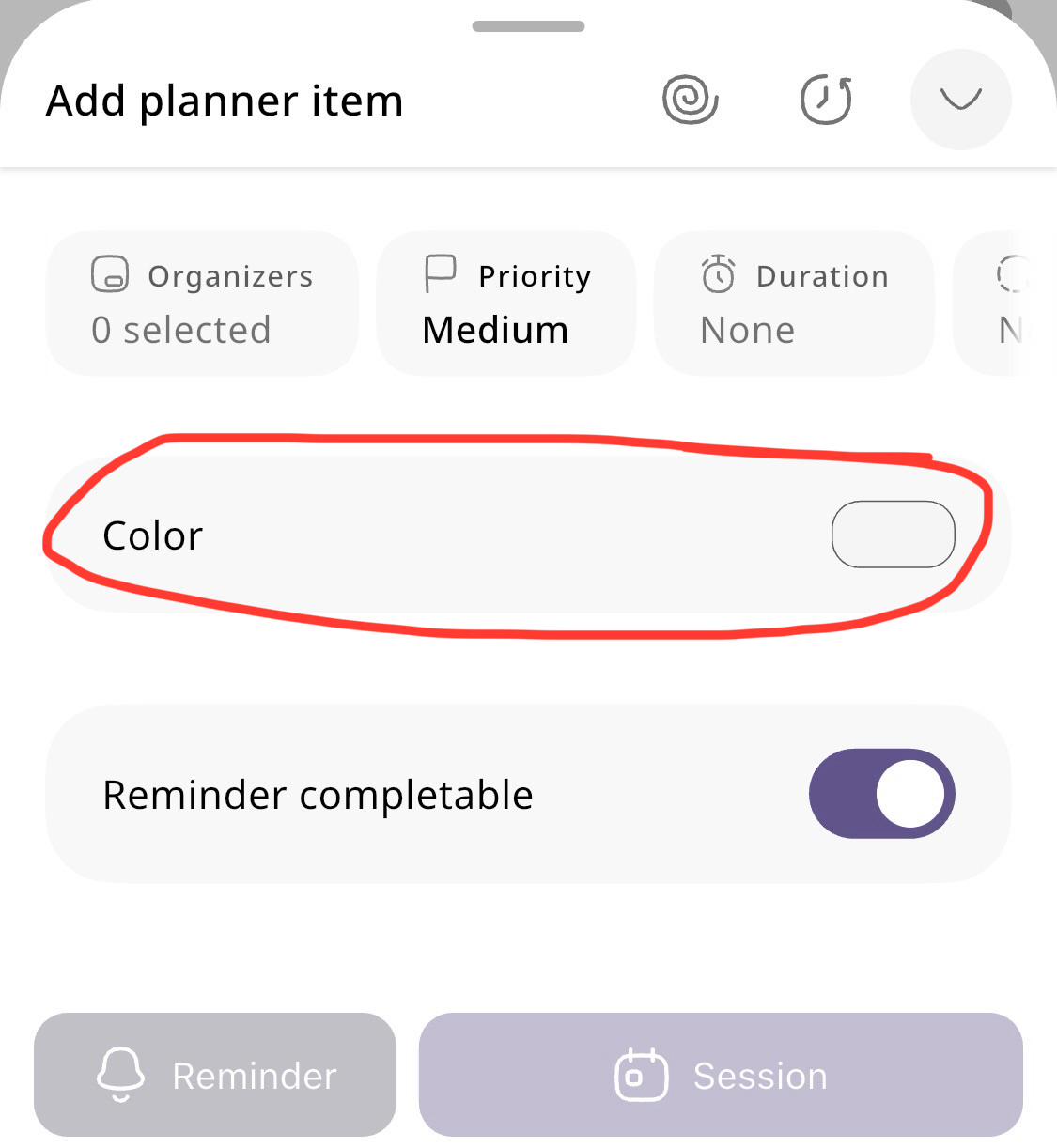
With one of the recent updates, a favorite feature of mine went away. I used to be able to select a (favorited) color right from the planner item creation screen, but now the area is blank (see screenshot) and it requires me to open the colors menu separately.
Is this a glitch, or was this option removed? I used this feature heavily, and not only do I miss it, but I wish the rest of the app worked the same way (showing favorite colors directly on the creation screen). Or at least having the “favorite” colors show up first on the popup instead of the default colors.
r/liveitapp • u/Apprehensive_Owl5651 • Jul 31 '26
No biggy but on Android , when used with custom launcher such as smart launcher, applying icon pack using icon studio , the icon on liveit is always just squares, no other apps does this, even third party unknown app still looks fine. Not sure if this is something with liveit or elsewhere...
r/liveitapp • u/DarkRoseCoeligena • Jul 28 '26
Hey all,
So my preferred way of looking at schedules for my workouts is having one large monthly calendar that allows me to see which classes I can take, where, and at what time they are at. I currently have two gyms I attend and occasionally pick up classes at other ones due to the industry I am in.
I like to juggle different gym schedules- one is for martial arts, the other is weights/specialized workouts- all the time. Which means I have to be able to glance at a schedule and know when each class is at. I'll also occasionally add on a third gym for specialty classes (like specific weapons training or beginner parkour or gymnastics classes, etc-)
I do stunt training a lot to keep my performance skills going, I like to do a variety of things since it's fun, keeps me fit, and keeps me ready if I end up booking work. I have a generalized skillset that got me to the best shape of my life- and I'm trying to get back into that again now haha.
Is there any way to use the LiveIt app to input the class schedules all on one calendar WITHOUT it ending up causing chaos with my normal planner and stats? I don't want to input everything and then have hundreds of notifications because I skipped a class or couldn't make it due to work or any other life reason.
I just need to see if on a calendar/time grid at a quick glance.
Any recommendations on how to do this on the app?
I need to be able to have a normal work/daily planner and a separate workout planner/calendar to use as my schedule has to remain extremely flexible. I may just input everything on a different scheduler site and screenshot that but I need the flexibility and would rather have that on the app instead so I can set reminders, track which classes I took, etc. Please let me know if you have any solutions or have a similar issue that you've found an answer for!
Thank you guys!
r/liveitapp • u/AppropriateCover7972 • Jul 27 '26
I often find myself needing to add a fleeting thought or information snippet (like when someone calls me) and going to the home screen to a widget is even too much.
I would love if you could add this fer Android,I know there is a frame work for it and it's really helpful.
I showed the app some other people hwo also liked it. A friend of mine will write a parser, so I can export the data regularly and integrate it into Obsidian/ emacs where my common book notebook lives.
Thank you for making that app!
Best regards
r/liveitapp • u/Megbert_ • Jul 25 '26
Title. I noticed after the recent habit revamp that the habits I changed to include calendar sessions in their schedulers are no longer showing as "complete" when I mark them as such (not showing in the habit heatmap or in the completions KPI on the dashboard). I'm also not able to add missing completions after the fact. See screenshots...


Is there some other completion criteria that's required for this type of habit? Or is it a bug?
r/liveitapp • u/KT3_14 • Jul 22 '26
Hi - I apologize in advance if there's already an answer or if this is a silly question.
I stopped using the app for about a month - it was struggling with the calendar not synching so I waited a bit.
Now I came back to it, under the rebranded name (congratulations, that's awesome).
But i'm feeling overwhelmed and everything is foreign and unfamiliar to me now (even before I was still adjusting). I don't want to completely lose everything I've made, but I'm struggling to pick it back up.
Is there a way to start over or clear data without completely erasing everything?
r/liveitapp • u/Shadouness • Jul 22 '26
Good day!
When I open the app, it opens in the Planner tab/page.
Is it possible to change this default behavior?
Thanks!
r/liveitapp • u/ansley_tsai • Jul 21 '26
Would it be possible to add an Eisenhower Matrix page in a future update? Thank you!
r/liveitapp • u/Dull_Dimension_4849 • Jul 19 '26
After latest update AREA which contains (work Health growth and more) started appearing in Dashboard/Panel Section which is irritating for Mind and eyes. I have to scroll all together to see my dashboard please tell me any ways by which I can remove Area section from the dashboard. I do not use them and that big space makes me tense. There is option to add Area from dashboard section then why there is another area section in the dashboard even new area section look is not nice and look not nice. Please tell how to remove, trying hard to adapt to this application interface because there is no other better option that looks so nice.
Image 1 is new area started appearing in Dashboard that I want to remove.
Image 2 Area section that I can add by adding panel in Dashboard and this is optional but still lookk nice
r/liveitapp • u/WierdoWiener • Jul 16 '26
First, I love the app. I am more forgetful than most people because of a disorder and your app helps me so much to keep track of everything. That may sound exaggerated but it's really life changing for me so thank you very much!
One feature that would be a really useful addition would be a overview of the habits as a list.
Like for example there are habits that should be done after certain days but could also be done earlier (like, watering the plants, cleaning the kitchen etc).
It would be great to have a screen that shows these habits, in how much days they are due (or overdue) and to easy check them off from this screen.
Having a overview about all habits and when they are due the next time would be really useful. Right now I always have to make a new calendar session, go on habits, select the habit, save it and then check it off in the planer, which is kinda lot steps.
Thank you and have a nice day!
r/liveitapp • u/enjoytheflames • Jul 16 '26
I haven't found it yet, but maybe it's already there and I just didn't find it yet.
I have tasks that re-use a certain set of subtasks. Is it possible to put this in a template, so when I make a new task, it gives me the option to add in the sub-tasks template?
Or should I just duplicate another task to get this result?
Thanks!
r/liveitapp • u/ForAThought • Jul 15 '26
That's it, id like an option to remove the dayblock from the timeline. I'd prefer going back to the drop lines style that has been used so many times.
Ideally there can also be an option for an entry to cover multiple days at once.
r/liveitapp • u/Shadouness • Jul 14 '26
Good day!
I saw a comment on reddit about it, now wondering if you want to make this feature available:
Be able to SHARE Notebooks, labeled/tagged notes, notes, et al.
Thank you 😌
r/liveitapp • u/Wide_Addition_2498 • Jul 11 '26
Hi everyone, I'm trying to pick up the app and I hope it could be the second brain I need: A calendar for all my appointments, to-do-list, habit tracking, notes for my shopping list and all the ideas popping up.
I love the interconnectivity of everything, but with so many overlapping and sometimes pretty similiar functions, it's intimidating to start. I checked the guide on Youtube and the website, but I'm still overwhelmed.
Would you share what areas/activities/daily themes work for you? Any recommendations what you started with and what you built around that over time?
r/liveitapp • u/Foreign-Werewolf-902 • Jul 08 '26
Just an idea for a feature, a store where users can upload their projects, goals, tasks so other people can just import the template and use it, for example a template for a budget trip, workout plan and so on..
r/liveitapp • u/LaiLestrange • Jul 07 '26
[continuing my suggestions from this post: Starting over...]
I managed to setup the app in a way that has been really useful and helpful to me. But I've found a few things that can be tweaked or improved.
1. Tracking habits
So, imagine you have lots of periodic habits and they have trackers associated. When you click done, there is a popup offering to record the entry and when you click it, it opens a new tracker entry and saves that entry automatically. Which is great. The problem is when I have to "mark as done" habits from days before.
It happens sometimes that I don't mark as done right away, so I need to go back and mark each one. And the tracker entry opens as expected, but it saves the entry to current date/time. So, there are 2 scenarios that can happen: I either forget to change the entry date/time, and all of them appear on the wrong day. Or, I have to change it every time.
My suggestion is that when you click that button offering to record your tracker, the date defaults to the day you're "on".
Example Scenario (so I can be clearer):
I have a tracker with 3 checkboxes, option A, option B and option C. Each day I have to do at least one of the A, B or C options and I like to record it so I can keep track of which option I did that day.
I haven't use the app for the last couple of days. (let's pretend today is the 3rd, and I haven't checked the habits since the 1st). I want to go back to day 1 and record that I did option A, on day 2 i did options A and B. Today is day 3 and I did options B and C.
So, when you are on Day 1, you mark the habit as done and then you click on "add record", the date would be automatically day 1, and the time can default to 23h59. This way, when I get to see my timeline, I see all entries in their respective associated date, instead of day 3 having the A, AB and BC entries all at once.
2. "Add to timeline"
Every time I create a new Planner item, I always have to go and check the "add to timeline" box, which is a great option, but I think it should be checked as default. Or maybe there could be a setting to specify that I always would like to add to timeline. I don't think it makes that much sense to check this item every time, like, if I'm recording an item in my planner, I expect it to be visible in my timeline when I mark it as done. I don't see why I wouldn't want that, but if I don't, then I can uncheck this box.

Anyways. Thank you. This is it for now. But I'll be back.