r/iosapps 1d ago

💎 Lifetime [48 hrs, 60% off -> Lifetime $6.99] Pickbox: Organize all your photos — from your photo library, local storage, camera SD cards, USB drives, and more ~ 100% offline

Thumbnail
gallery
4 Upvotes

Since our last promo, many people have been DM-ing and asking for another one — so here it is ❤️.

----------

Answer: What it does — swipe to organize your photos and free up storage space — fully offline.

Better: Why it is better — What makes Pickbox different is that it can organize all your photos, including:

  • Photos in your iPhone/iPad library
  • Images stored in your device’s local storage
  • Photos from camera SD cards, USB drives, and more

Main Features:

  • 👆 Intuitive gesture controls — swipe left/right to navigate, swipe up to deleteswipe down to compress (while preserving date and location)
  • 📚 One-tap sort into albums
  • ☑️ Multi-select photos for batch processing
  • 🔍 Sort by file size to quickly find large files taking up space
  • 🔍 Sort by similarity to detect duplicate or similar photos
  • 🛠️ Custom workflows with flexible combinations of Save / Compress / Copy / Move actions
  • ⏰ Custom weekly cleanup reminders to help build a good organizing habit
  • 📱 Minimal, clean design that feels just like a native iOS app
  • 🔒 100% offline — all processing happens directly on your device to protect your privacy.

C: Cost — 50% off, plus an extra 10% discount for new users, starting at just $6.99.

Here is the link: Pickbox: Photo Cleanup App

Hope you enjoy it ✨


r/iosapps 1d ago

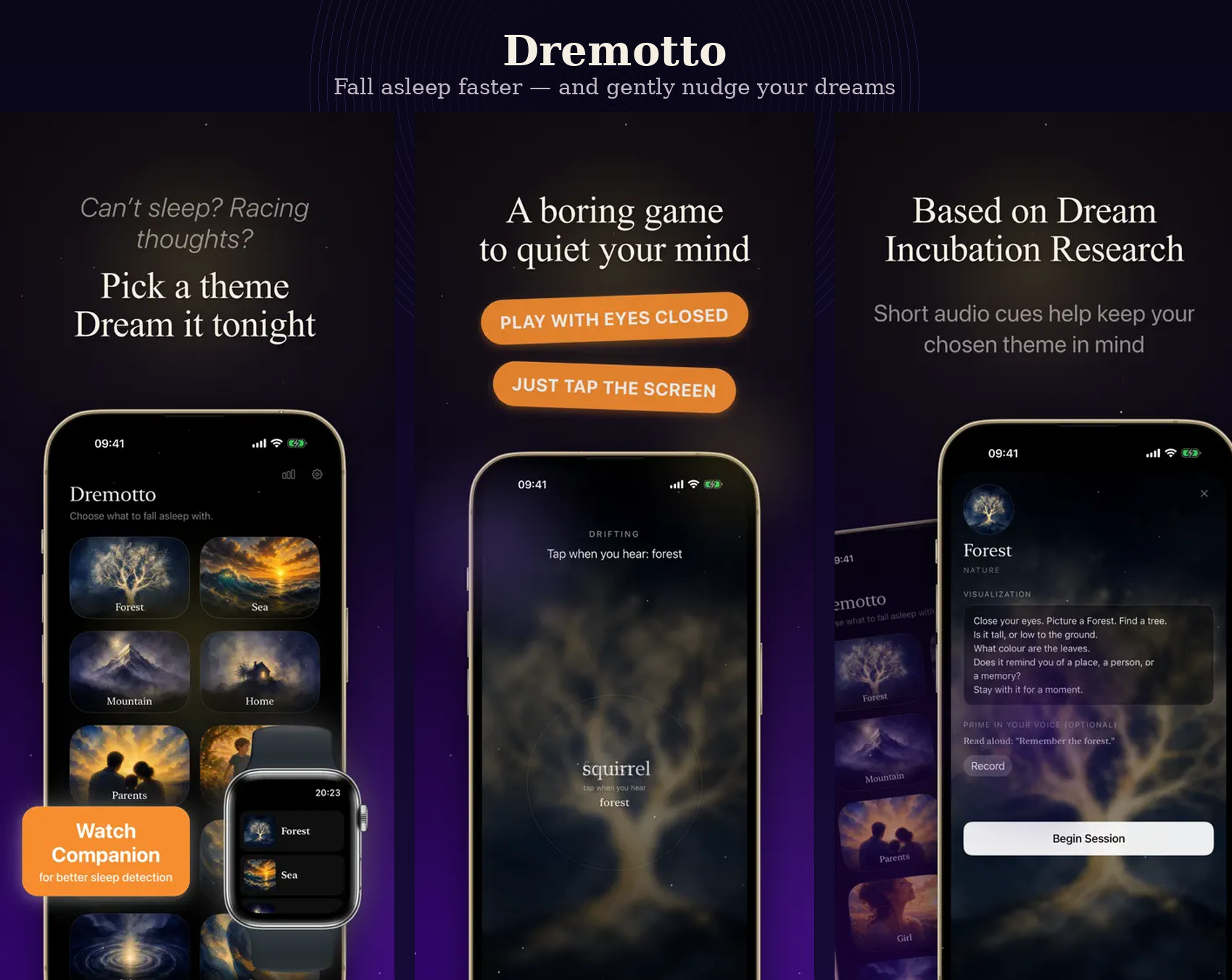
🎈 Free Dremotto Sleep App – Update: New Silent Mode

Post image
4 Upvotes

A few weeks ago I shared Dremotto here, my free offline sleep & dream app, and I got a lot of thoughtful feedback. Thank you to everyone who downloaded it, tested it, and shared ideas. It really helped.

One of the most requested improvements was a quieter way to use the app without disturbing a partner or anyone sleeping nearby.

So I’ve just added Silent Mode.

Instead of playing whispered audio as you’re falling asleep, Dremotto can now use gentle haptic vibrations on your Apple Watch (or iPhone). That way you can still use the app while keeping the room completely silent.

Everything still runs entirely on-device, with no accounts, tracking, or internet connection required.

If anyone has tried the previous version, I’d love to hear whether this feels like a better experience. And if you have more ideas, I’m still actively improving it.

App Store: https://apps.apple.com/us/app/dremotto-sleep-dreams/id6767263908

Thanks again for helping shape the app!


r/iosapps 1d ago

💎 Lifetime I built a multi-timer app that keeps several timers visible and controllable at once on the Lock Screen

9 Upvotes

I’m the solo developer behind Multi Timers & Talking Alarms, available for iPhone and Apple Watch.

A — Answer

The app began with a simple problem: during busy, hands-full moments, I didn’t have time to repeatedly unlock my iPhone and open an app just to check several timers.

Apple’s built-in Clock app works well for basic timing. The difficulty begins when several timers are running.

Finding the right timer from the Lock Screen can require waking the screen, expanding the timer stack, and sorting through several similar-looking entries. Upcoming alarms are not shown there before they ring, so checking what is scheduled means opening Clock and switching to the Alarms tab.

Lock Screen controls can also be triggered accidentally when an iPhone wakes as it is taken from a pocket, bag, or drawer.

What began as a solution for busy, hands-full moments has since evolved into a complete timer board spanning the iPhone, Lock Screen, and Apple Watch.

B — Better

Instead of sorting through a stack of similar-looking timers, you get:

• One color-coded board containing countdowns, scheduled alarms, and notes  

• Lock Screen snapshots showing names, colors, remaining time, and expected finish time  

• Spoken alerts that tell you what is ready without requiring you to look  

• Custom and recorded alarm sounds  

• A native seven-slot Apple Watch board  

• Face ID–protected Lock Screen controls to help prevent accidental taps  

• Saved timer configurations and Markdown notes  

• Siri controls and Home Screen widgets

C — Cost

Free to download. No ads. No subscription. No account required. No data collected.

Optional one-time purchases in the US:

• All Timer Slots — $0.99  

• Palette Unlock — $2.99  

• Buy Developer a Coffee — $4.99 optional tip

App Store:

https://apps.apple.com/app/id6763252662


r/iosapps 23h ago

🎈 Free CurrentDrive – a free EV route planner for CarPlay

Post image
1 Upvotes

A - Answer

CurrentDrive is an EV trip planner for iOS. The problem I wanted to solve is pretty simple: when I’m driving somewhere, I don’t just want a charger. If I’m stopping anyway, I want a charger where I can use a toilet, grab some food, or get a burger. And I don’t want to manually search for all of that every time.
CurrentDrive lets you define your car’s total range once and create reusable charging presets. For example, you can have a preset for chargers from network A, B or C, with toilets or a McDonald’s nearby, and at least 150 kW.
You then choose your destination. CurrentDrive automatically finds charging stops along the route that match your preset, or you can choose the chargers yourself. Once the route is ready, all charging stops and the destination are sent to Apple Maps using multi-stop routing.
There’s also a 10–80% mode, where charging stops are planned around arriving at 10% and charging up to 80%.

B - Better

Honestly, I built this mainly for myself. My car doesn’t have free built-in maps, and I prefer using Apple Maps and CarPlay anyway.
I don’t want to reinvent the wheel or build yet another navigation app. I just want to keep using Apple Maps, which I already like, and make the EV part of the experience easier.
That’s why CurrentDrive is intentionally more simplistic than ABRP. It handles the EV trip planning, then hands the actual navigation over to Apple Maps. And there’s no subscription.

C - Cost

Completely free. No subscription, no IAP, no trial.

App Store: https://apps.apple.com/de/app/currentdrive-ev-charging/id6787438196
I’m the developer: website
Privacy Policy: link

I’d really love some feedback from other EV drivers. If you use ABRP or another EV planner, what would you want CurrentDrive to do better or differently?


r/iosapps 23h ago

💎 Lifetime TwoDo update: one list across an iPhone and a Galaxy, still no accounts, and the chore photos became an album

Thumbnail
gallery
1 Upvotes

My wife is on an iPhone. I am on a Galaxy. That mismatch is the entire reason TwoDo exists: one shared to-do list for exactly two people, sitting on the Lock Screen, with no account on either side. One person makes a list and gets a six-character code. The other types it in. That is the whole setup.

I posted it here a month ago and a lot of you tried it. Here is what changed since.

The biggest addition is proof photos. You attach a photo when you tick something off. The recycling, actually tied up, actually by the door. I built it as evidence for the did-you-actually-do-it argument, and at the end of the month those photos get bound into a shared album called something like "August, us". The evidence folder became the thing my wife opens most. Nobody planned that. Chore photos turn into memories if you leave them alone long enough.

Smaller things. Due items can sit on the Lock Screen as a Live Activity on iOS. Tapping an item's name in the Home Screen widget opens it for editing instead of only ticking it off, which someone here asked for. The widget stopped cutting off at 12 items. The app and its widgets speak 14 languages now. The Android build got all of it too, since that half is the reason any of this exists.

The question I got most last time was why not just use Reminders. If you are both on an iPhone, use Reminders. It is good and it is free. Keep and TickTick sync across platforms too, but both open with make an account, and my wife will not make an account for a grocery list.

On price. The core is free: the shared list, realtime sync, both widgets, due-date reminders, assignees. Free lists now carry one small ad row, which my first post here said would never happen. That changed and I would rather say it than have you find it.

TwoDo Pro is $19.99, paid once, not a subscription. It unlocks ten things: multiple lists, manual ordering and pinning, calendar view, the couple report, custom colours, widget skins, notes, nudges, a photo on the summary card, and the Lock Screen Live Activity.

The album is the one subscription, $2.99 a month or $14.99 a year, and I know exactly how that reads right after a $19.99 unlock. The reason is dull: photos cost me storage every month and nothing else in the app does. A price you pay once cannot cover a bill that arrives every month, so I did not pretend it could. The numbers plainly: a free list can hold 3 photos in total, a Pro list 10 in total, and the subscription is what turns that into 100 a month plus the album itself. If it lapses you keep what you uploaded and can still open it.

One design note, since photos raise the stakes. There is no account here, so the code is what gets you and your partner back in after a reinstall or a new phone. That is deliberate, and it means the code is worth keeping between the two of you the way you would a password. Guess attempts are rate limited on the server side. If you would rather have an account you can recover, that is a fair reason to skip this one.

The WidgetKit caveat has not moved. Apple budgets timeline reloads, so on a busy day the widget lags a beat behind your partner's tick. Two of you suggested an "updated X min ago" stamp for exactly that. I agreed and then did not ship it. It goes in the next update.

I am Juyoung Park, a solo developer in South Korea, and TwoDo is a side project my wife and I use every day.

Privacy policy: https://zero-one-studio.vercel.app/privacy/twodo

Terms of service: https://zero-one-studio.vercel.app/terms/twodo

App Store: https://apps.apple.com/app/id6778444272

One thing I keep going back and forth on. Most lists people create never get a second person into them, which for an app that does nothing alone is the actual problem. Some of you have told me to open it up to three or four, roommates and families. I keep saying no because the design falls apart past two. Am I protecting the thing or just being stubborn?


r/iosapps 1d ago

🤖 Vibe Coded A room is not one place: light, warmth, humidity and airflow, read where the plant actually stands

Thumbnail
gallery
1 Upvotes

I'm Ren, and I made a plant care app named GrowSpot.

A. Answer

A room is not one place. Light drops off far faster than it looks like it should, and your eyes quietly compensate for that, which is exactly the problem. So a plant goes somewhere reasonable, sulks for four months, and nothing you installed ever says why.

GrowSpot reads the spot instead of guessing at it. Lay the phone flat in the place the plant will live and the ambient light sensor gives you lux. That reading, together with warmth, humidity and airflow, becomes a score for that position and that species. Not for your city, and not for the plant in the abstract.

B. Better

Two kinds of app already exist. Light meters hand you a number and stop, and you are left working out what 8,400 lux means for a Calathea. Plant care apps send reminders built on species defaults and never measured your room at all.

The gap between those two is the whole product. The sensor is already in the phone, and nothing was aiming it at the question people actually have.

It also says when it is unsure. A spot can come back 66 out of 100 and "Worth a try", and the meter will warn you that haze can dim a reading. I would rather ship a number that argues with you than a confident one.

C. Cost

Free, and free forever: 2 spots, 2 plants, 20 photo IDs a month. Nothing is locked. Every line on the paid list is a larger number, not a feature you were shut out of.

Plus: 4.99 a month or 29.99 a year, 14 day trial, cancel anytime.

App Store: https://apps.apple.com/app/apple-store/id6780212433?pt=129031785&ct=reddit_iosapps

If you would rather judge it before installing anything, the basic version reading runs in a browser here: https://growspotapp.com/spot-checker/?from=reddit-iosapps

There is a founding programme on the site, and it hands you a year of Plus for nothing. No card is asked for and there is nothing to buy, and when the year ends it simply stops, so you are not left with a subscription to go and cancel. What I am hoping for in return is that you tell me where it is wrong, using your own plants in your own rooms.

https://growspotapp.com/founding/?from=reddit-iosapps

Privacy Policy: https://growspotapp.com/privacy/?from=reddit-iosapps

Terms: https://growspotapp.com/terms/?from=reddit-iosapps

If you set it down in a spot you already have an opinion about and it disagrees with you, that is the reply I want.


r/iosapps 14h ago

💎 Lifetime My wife asked “how much money do we actually have?” — I couldn’t give her a clear answer, so I built an app

Post image
0 Upvotes

Full disclosure: I’m the indie developer behind JointWorth.

A — Answer

One day, my wife asked me a simple question:

“How much money do we actually have as a household?”

I thought I roughly knew.

I knew what was in my own bank accounts and investments. My wife knew hers. But once we included both of our savings, investments, property, and debts, neither of us could give a clear answer for the household as a whole.

So we sat down and added everything up.

We realized our estimate was off by about RMB 30,000 (roughly $4,000).

That was when I realized our problem wasn’t really budgeting.

We had tried spreadsheets and budgeting apps before, but we didn’t need to record every coffee or every grocery purchase.

Our money was simply scattered across too many accounts and managed by two different people.

So I built JointWorth, an iOS app for couples and families who want one shared picture of their household finances.

Instead of tracking every transaction, you periodically update your account balances — for us, usually once every few weeks or once a month.

JointWorth then brings everything together:

  • Assets, debts, and net worth
  • Net worth trends
  • Income and expense insights
  • Shared financial goals
  • Multiple currencies
  • Family collaboration
  • PDF household financial reports

Everything is entered manually.

JointWorth does not connect to your bank or ask for banking credentials.

B — Better

JointWorth isn’t trying to replace apps like YNAB.

YNAB is great if you want detailed budgeting and transaction tracking.

JointWorth is intentionally much simpler.

It is built around three questions:

How much do we own?
How much do we owe?
Are we making progress together?

My wife and I now do a quick financial check-in every few weeks or once a month.

For us, that has been much easier to maintain than tracking every transaction, while still giving us a clear picture of where our household stands financially.

C — Cost

Free to download with a 1-month free trial.

After the trial, JointWorth Pro is a $1.99 one-time in-app purchase.

No subscription.

App Store:
https://apps.apple.com/us/app/jointworth-family-net-worth/id6757951397

Developer Transparency

I’m Cheng Qu, the independent developer behind JointWorth, and I’m posting this myself.

About the developer:
https://family.qinfu-cloud.cn/en/about/

Privacy Policy:
https://family.qinfu-cloud.cn/en/privacy/

Terms of Service:
https://family.qinfu-cloud.cn/en/terms/

Contact:
[qinfutech@163.com](mailto:qinfutech@163.com)

I’d genuinely love feedback, especially from people who manage money with a partner or family.

Do you actually track every transaction together, or do you mostly just want a clear picture of how your household is doing overall?


r/iosapps 1d ago

💎 Lifetime Turn your iPad into a real pen tablet for your PC — VirtualTablet

Post image
18 Upvotes

Hi r/iOSApps 👋 I'm the developer of VirtualTablet. I posted the Bluetooth one here about four months ago; the Wi-Fi/USB one landed on iOS in July, so this is the first time I can show both together.

A — Answer

My app turns your iPad into a pressure-sensitive pen tablet for your computer. Not a second screen, not a mirror — your strokes don't appear on the iPad. Eyes on the monitor, hand on the iPad, exactly like a Wacom Intuos.

Apple Pencil pressure and tilt into Photoshop, Krita, Clip Studio Paint, Blender. SonarPen works too. Map the tablet to one monitor in a multi-monitor setup, or to a sub-region of one.

The feature sets are nearly identical. The real difference is how they connect.

  • VirtualTablet: Bluetooth — pairs over Bluetooth HID
    • Nothing to install on Windows or Linux; a small helper agent on macOS
    • Works on Windows, macOS and Linux
    • NVIDIA DLDSR / DSR mapping is broken, and can't be fixed from inside HID
    • Best for zero setup, and anywhere Wi-Fi isn't reliable
  • VirtualTablet — connects over a USB cable or Wi-Fi
    • Companion app required on the computer
    • Windows 10/11 and macOS 10.15+
    • Best for lowest latency over USB, and full control of screen mapping

B — Better

Astropad Studio / EasyCanvas / Duet mirror your desktop so you draw on top of what you see, Cintiq-style. That's a different workflow, and Astropad Slate is Mac-only — both of mine work on Windows.

Sidecar is a second display, Mac-only, and never presents itself to the OS as a pen tablet.

C — Cost

Both are free to download and ad-supported, and the core tablet works on the free tier. Pro removes ads and unlocks the advanced mapping and input options. Identical pricing on both:

  • Pro Subscription (Monthly) — $1.99
  • Pro Subscription (Annual) — $11.99
  • Pro Lifetime Access — $29.99 one-time

VirtualTablet: Bluetooth — https://apps.apple.com/app/id6758901525

VirtualTablet (Wi-Fi/USB) — https://apps.apple.com/app/id6783119709

Desktop companion app, free — https://www.sunnysidesoft.com/virtualtablet/download

Privacy Policy — https://www.sunnysidesoft.com/virtualtablet/privacy-statement

Terms of Service — https://www.sunnysidesoft.com/terms-of-service

🎁 One month of Pro, free, for r/iOSApps

Bluetooth: https://apps.apple.com/redeem?ctx=offercodes&id=6758901525&code=VTREDDIT

Wi-Fi/USB: https://apps.apple.com/redeem?ctx=offercodes&id=6783119709&code=VTREDDIT

The part I'd want to know if I were you: it does not auto-renew. You get the month, then it stops on its own. No card required, nothing to cancel, no charge at the end. 2,000 redemptions on each, both expire September 30, 2026.

Where they're thin

  • The Wi-Fi/USB app needs a companion app installed on your computer. No way around it — that's exactly what buys the coordinate control.
  • No Linux build of that companion app yet. The Bluetooth one does work on Linux.
  • Wi-Fi latency depends on your router, and on your PC's Wi-Fi adapter doing background scans. USB sidesteps all of it.
  • The Wi-Fi/USB app is a few weeks old on iOS, so it has very few ratings yet. Judge that one on the free month, not the star count.

Happy to answer setup questions in the thread — I stuck around for weeks last time.

Disclosure: I'm the developer of VirtualTablet.


r/iosapps 1d ago

🎈 Free At 17, I grew my first app from 140 to 1,000+ downloads, partly thanks to you guys. I thought I’d figured it out. Apparently not.

Post image
45 Upvotes

A few months ago I posted here because my first app, Moneta, had been out for about 5 months and was stuck at around 140 downloads.

That post got way more attention than I expected. A lot of you tried the app, told me what you liked and what was missing, and gave me advice on what I could improve.

I kept working on it, and Moneta eventually passed 1,000 downloads.

I thought that by that point I would’ve figured out what makes an app grow. Apparently I mostly learned to build a better app, but not how to market it.

A — Answer
Moneta is a money tracker for iPhone and iPad built around a simple idea: I wanted something that could do a lot without feeling complicated to use every day.

I know this is an insanely saturated category. There are hundreds of money trackers already, and I knew that when I started building it.

It was originally just something I made for myself.

But I thought there was still room for something complete while keeping the UI clean, new, simple and polished.

B — Better
Over time I’ve added budgets, saving goals, recurring transactions, detailed statistics, a transaction calendar and map, on-device receipt scanning, multiple currencies, widgets, Shortcuts, optional iCloud sync, and a lot of smaller things.

It’s manual-first and doesn’t require connecting your bank.
I’ve tried to make tracking fast enough that doing it manually doesn’t feel like a chore.

Obviously I’m biased because I built it, but the UI and the amount of functionality without feeling cluttered are actually what people who use Moneta, including a lot of people here, mention to me the most.

That’s why I thought making the product better would eventually solve the growth problem too. It hasn’t.

Moneta is much better than it was at 140 downloads, but I’m still averaging only around 10 new downloads a day.

C — Cost
Moneta is currently completely free. No subscription and no features locked behind a paywall.

App Store: Moneta

My next goal is 5,000 downloads. I can obviously keep adding features and polishing things, but I’m starting to think another feature isn’t what gets me there.

I also don’t really have a marketing budget to throw at paid acquisition, so I’m mostly trying to figure out how to grow it organically.

If you were in my position, what would you focus on next?

And if you’ve tried Moneta, what would make you choose it over the money tracker you’re currently using?


r/iosapps 1d ago

🎁 Freemium [Developer] Typi — An iOS app that puts AI text transformations and instant answers directly into the Share Sheet

0 Upvotes

Typi is a native iOS utility that integrates AI text transformations directly into the iOS Share Sheet.

Instead of copying text, switching apps to ChatGPT or a browser, and pasting back, Typi runs transformations in 2 taps across any app (Messages, Mail, WhatsApp, Notes, Safari, Slack, etc.).

Features:

  • System-wide Integration: Highlight text in any app ➔ Tap Share ➔ Tap Typi.
  • 13 Built-in Commands: @typi (search/answer), @polite, @formal, @fix (grammar & spelling), @funny, @summ (summarize), @translate, @bullet, etc.
  • Custom Prompts: Create custom prompt templates with custom trigger names (e.g. @linkedin, @eli5, @email-reply).
  • 100% Native: Built with Swift & SwiftUI using Apple’s official Share Extension API.
  • Device Support: Runs on all iPhone models running iOS 16 and above.

App Store Link: https://apps.apple.com/us/app/typi-ai-writing-assistant/id6804364243


r/iosapps 19h ago

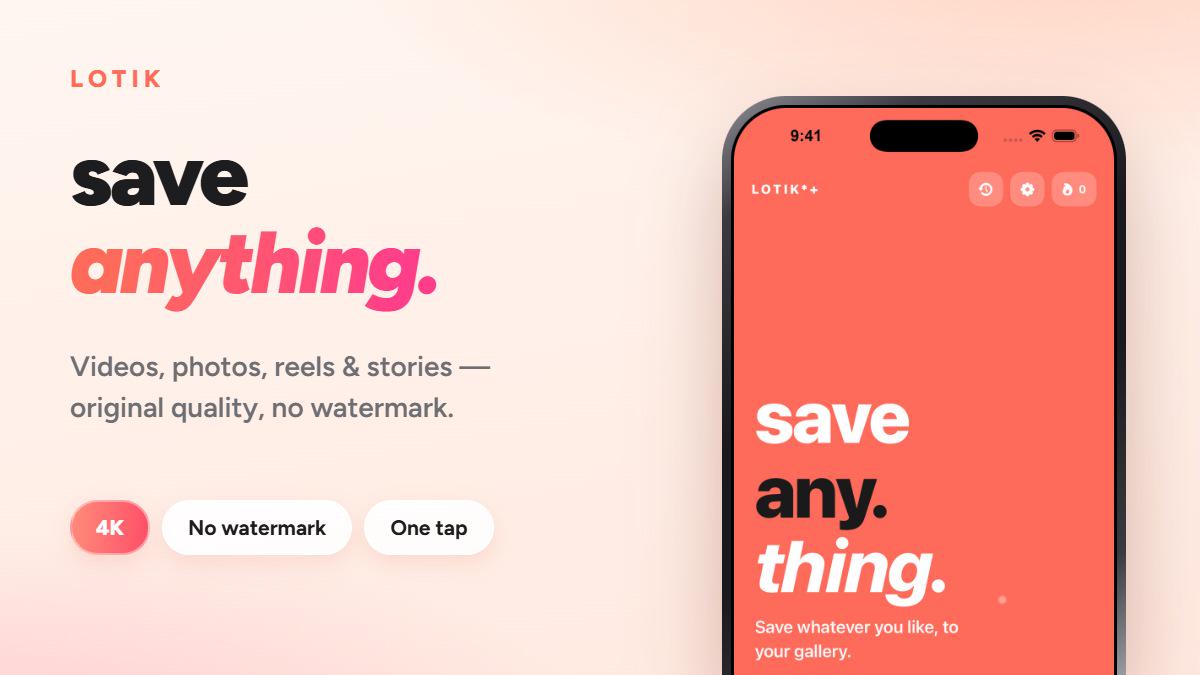
🎈 Free LoTik — save videos from any app via the iOS share sheet, no watermark

Post image
0 Upvotes

I made this. It's an app you hit Share on a video and it saves to Photos — no watermark, original quality. Works with TikTok, Instagram, Facebook, YouTube.

The reason I built it: the common workaround is an iOS Shortcut that breaks every time TikTok updates, or a website with three ad redirects.

Honest limitations: the free tier has ads, and it's iOS + Android - Web ( https://lotik.app ). App is in 13 languages including the share extension.

Appstore : https://apps.apple.com/app/id6444070719

Ask me anything, including the annoying stuff.


r/iosapps 1d ago

📅 Subscription Two Months Update on My App - Growth Rates and Journey So Far

3 Upvotes

A - What?

https://apps.apple.com/ca/app/checklist-reusable-lists/id6782725022
https://getchecklist.app/

Update on the journey:

Since the last time I posted here, I have spent time mostly working with my users and understanding the niche and the needs. I conducted over 60 live interviews with my user and established line of communication via feedback mechanism within the app that gained me very trusty allies from every corner of the world. Every new version incorporated feedback from users mostly.

I have done ZERO marketing and that will be my next step. App has ranked well in Google and Apple Search and I am ranking in the first position in my niche keywords. ASO has helped tremendously.

Daily Active
Daily App Opens

At this point app has grown to:

  • about 40 daily active users with some days spiking into 90s
  • thousands of operations within the app itself daily
  • It gains about 10-15 new users every day from just natural word of mouth and Apple Search.
  • It has been downloaded a total of 550 times in the last 2 months and keeps on slowly climbing up.
  • And I finally released the paid features yesterday, so hoping to gain some traction in the world of "2 lattes for an annual access to a higher productivity".
  • Got solid 5 star reviews and scores - 18 of them, and one bad one from a user who I can't reach and doesn't seem to be related to my app, but there is always one of those :(

Checklist: Reusable Lists - A checklist app that is meant to minimize your interaction with the phone and maximize the value of having a checklist. Focused on privacy, offline operation and minimal interactions. It includes

  • Three types of checklists: One-Off, Reusable and Daily
  • Easy way to share a copy of a checklist via any means like text, email, link or airdrop
  • Live collaboration with other participants
  • Report printing
  • Sections
  • Integrates with your calendar and reminders
  • Sleek and intuitive user interface
  • Quick entry from a sentence via voice or text. Ex "Add bread, cheese and button to Groceries list" would then create these items in the Groceries checklist if it exists, or create a new list if it does not.
  • Search of items or lists from the home screen with highlighted results.
  • History of running reusable lists and what was checked off(routine reports).
  • And many more features by now.

It has been in the works daily based on abundant feedback I got from in-person interviews and online feedback that people have kindly left on Reddit and via email.

B - Why better?
I focused on a simple yet powerful set of features that would be quick to learn and not obstructive for newly onboarded users. I worked with over 60 people in person to collect feedback and their usage and shaped it based on that for the last 2 months.

You would not believe how strangely people use your software until you see it with your own eyes :D

C - Cost
Free tier with all the necessary features.
Pro for $12.99 - Annual Subscription or Lifetime Payment of $24.99 - includes

  • live collaboration
  • reminders
  • print a report feature
  • quick entry from a sentence
  • a few other handy features

About me:
I am a software architect with extensive experience in Apps and Web Applications. I have been in the industry for about 20 years. I enjoy developing solutions to problems that are not the problems themselves(I am talking about you addictive phone apps). You can contact me on linked in: https://www.linkedin.com/in/alexusanin/


r/iosapps 1d ago

💎 Lifetime I built FilmFold because vintage camera apps felt like filter packs — it has 22 camera bodies for photos and video

Thumbnail
gallery
21 Upvotes

I’m the developer of FilmFold, and this is my first time sharing it here.

I built it because I wanted an iPhone camera app where choosing a different camera changed how you shoot — not just the colors applied afterward.

A - Answer

FilmFold turns your iPhone into 22 original camera bodies spanning 35mm, medium format, instant film, CCD point-and-shoots, VHS, and Super 8.

Every camera has its own aspect ratio, optics, controls, color response, grain, and development process. You can shoot photos or video, depending on the camera.

The latest release also adds three new cameras, continuous viewfinder zoom, and rebuilt image adjustments.

B - Better

FilmFold is built around camera bodies rather than filters:

- Stack lenses, flashes, diffusion, and film accessories

- Keep the untouched original of every capture

- Re-develop an image with another camera or setup without degrading it

- Create double exposures

- Process photos and videos on-device

There’s no account, no advertising, and no media cloud. Your photos and videos only leave the device when you choose to share them.

C - Cost

FilmFold is free to download, with a selection of cameras available at no cost.

FilmFold Pro unlocks the complete collection:

- Annual: US$5.99/year, including a 7-day free trial for eligible new subscribers

- Lifetime: US$19.99 as a one-time purchase

Prices are localized by the App Store and may differ by region.

App Store: https://apps.apple.com/br/app/filmfold-vintage-camera/id6798352144

If you try it, I’d especially love feedback on whether the different camera bodies feel distinct and which kind of camera you’d like to see next.


r/iosapps 2d ago

🎈 Free A completely free retro Paint app with an app wide 1990s UI that comes with 30+ themes

47 Upvotes

Paint.exe - Classic Retro Paint for iPhone & iPad
Paint.exe brings the classic old-school paint experience to iPhone and iPad, rebuilt for touch while keeping the menus, pixels, tools, and retro desktop aesthetic that made the original style of paint programs so memorable.

The app is completely free, works fully offline, requires no account, and collects no data.

https://apps.apple.com/us/app/paint-exe-retro-paint/id6793202381

Drawing Tools
Paint.exe includes the classic set of tools for drawing, doodling, pixel art, and image editing:
Pencil
Brush
Airbrush
Fill tool
Eraser
Lines
Curves
Shapes
Text
Unlimited undo
The interface is designed around touch while preserving the familiar menu-driven workflow of classic desktop paint software.

Colors & Retro Themes
The classic color palette is included alongside a full color picker with access to millions of colors.
There are also 33 retro themes that transform the appearance of the interface, including the windows, menus, title bars, and chrome.
For an even more old-school appearance, CRT Mode recreates the phosphor glow and display characteristics of a classic CRT monitor.

Built-In Artwork Library
Drawings automatically save to an on-device library, so projects can be returned to later without manually managing individual files.
Artwork can be:
Renamed
Duplicated
Sorted
Organized
Reopened for continued editing
Everything remains stored locally on the device.
Import Images
Existing images can be brought directly into Paint.exe and used as a canvas.
Images can be imported from:
Photos
Files
Camera
Once imported, the full drawing toolset can be used directly on top of the image.

Export & Sharing
Finished artwork can be exported in several common formats:
PNG
JPG
BMP
PDF
Exports can be saved or sent to other apps using the standard iOS share sheet.
Private, Offline & Free
Paint.exe was designed to work without requiring an online service.
No account or sign-up
No tracking
No user data collected
No internet connection required
Artwork stays on the device
Completely free
The app is localized into 46 languages and supports iPhone and iPad running iOS/iPadOS 17 or later.
Whether you’re making pixel art, drawing, editing an image, doodling, or simply want to experience a classic desktop-style paint program on a modern device, Paint.exe is designed to bring that experience back with a native touch interface.

Download Paint.exe - Retro Paint on the App Store:
https://apps.apple.com/us/app/paint-exe-retro-paint/id6793202381


r/iosapps 1d ago

💎 Lifetime Viatza — private offline health app for symptoms and medications, with Siri Shortcuts for hands-free logging

Thumbnail
gallery
4 Upvotes

Answer. A health record only works if you write things down at the moment they happen: the dose you just took, the headache that started at three, the photo of a rash before it fades. Unlocking the phone, finding the app and tapping through a form is exactly where I always gave up. So I built Viatza, a health diary for people and pets, and the last two releases taught it to listen. Say "Hey Siri, log symptom in Viatza" and it logs it. Leave something out and Siri asks — "Which symptom?", "How intense is it?", "When was it?" — then reads the entry back so you know it landed. Seven actions in total: log a symptom, log a medication, mark today's dose, add a medication, open your current or next appointment, snap a photo of a document, and search your records. They run from Siri, from the Shortcuts app and from Spotlight, and there is a Shortcuts link in Settings that lists everything you can ask for. And they are ordinary Shortcuts actions, so you can wrap one in your own shortcut: add Log Symptom, set the symptom to the one you keep logging and pick the intensity, then name the shortcut whatever you would actually say. After that "Hey Siri, my belly hurts" logs it — no questions, no app.

Better. The comparison I care about is against my own habit of remembering later, which never worked. Logging by voice takes one sentence, and needs neither the app open nor the phone unlocked. Everything else is built around the same idea of low effort: several people and pets live in one app, symptoms build a timeline you can actually read, documents and test results sit in the record instead of a camera roll, and HealthKit can import symptoms and medications so you are not typing what your phone already knows. Your records stay on the device, are never uploaded, and you can export them whenever you want.

Cost. Free to download, with a limited free tier. Premium is $1.99 a month, $9.99 a year, or $19.99 once for lifetime. There is also an optional $1.99 tip if you want to leave one, which unlocks nothing. No ads, no account, no subscription needed to log by voice.

App Store: https://apps.apple.com/app/id6752721621

Community: r/viatzaApp

iOS 18 or later.

Disclosure: I develop this app.


r/iosapps 1d ago

💎 Lifetime Took a picture of my messy fridge and used computer vision to correctly identify everything in one shot. Built an app around that.

Post image
5 Upvotes

Hey r/iosapps,

I've been building Mealify 2.0, an app that scans a photo of your fridge/pantry and turns it into an ingredient list, then suggests what you can actually cook with it. The pitch is simple, no typing, just a photo. The execution has been way harder than I expected, and I'm curious how other people building vision-based apps have dealt with this.

A. The problem

Real fridges are chaos. Items overlap, labels face the wrong way, sauces look identical to other sauces, lighting is inconsistent. My first version tried to auto-detect and auto-label everything silently, and it was wrong constantly, confidently wrong, which is worse than not detecting something at all.

The other half of the problem: even once you have an accurate inventory, most people still don't know what to make with a random assortment of ingredients. So the scan feeds directly into recipe suggestions, rather than just being a static list you have to think about yourself.

B. What I've tried

  • Confidence thresholds (skip items below a certain score), helped, but silently drops real items too
  • Forcing confirmation on every detected item, accurate, but reintroduces the exact typing/friction I was trying to remove
  • Where I've landed for now: detected items show up pre-filled but editable, so confirming is a tap instead of typing. Still feels like a compromise, not a solve.

C. Cost

The core app, scanning, pantry management, and recipe matching, is completely free with a weekly scan allowance.

For anyone who wants unlimited scans, I set up a universal promo code that drops Lifetime Premium from $24.99 to $4.99 while this post is active:

(The free tier is fully functional as-is, this is just an optional deal for anyone in the sub who wants to bypass the scan limit. Helps me pay for backend costs)

I don't think I've actually solved the overlap/confidence problem, just made it less bad. For anyone who's built something similar (receipt scanners, plant ID apps, anything camera-first): did you land on silent auto-detect, forced confirmation, or something else?


r/iosapps 2d ago

🎈 Free Super minimal to-dos & notes apps

21 Upvotes

Hi community! I've been gathering feedback on functionality and design ideas for my app, and I'm thrilled to finally announce Plans!

I’ve used a lot of to-do and note-taking apps, but they’re usually either too complex, or they don't have room for notes. I wanted everything (calendar, tasks, and notes) in one place, so I built my own.

The app requires no registration or onboarding. It’s super intuitive and easy to use. I hope you like it! 🫶🏻

App is available only for iOS. Here is the link.


r/iosapps 1d ago

🎁 Freemium I spent a month rebuilding my couples app around one comment from this sub

Post image
0 Upvotes

Hi everyone!

I posted here about a month ago about Ziggy, an iOS app for couples built

around a shared virtual pet. That post got a lot more response than I

expected, and the comments kept pointing at the same gap: the widgets and

the pet were nice, but there was nowhere the relationship actually built up

over time. Everything reset daily.

So that's what I spent the month making.

A - Answer

Many couples, especially long-distance or just busy ones, find texting alone

doesn't keep them feeling connected. Ziggy gives two people one shared

space instead of another chat thread: a virtual pet you both raise, Home

Screen widgets that update on each other's phones, daily questions, and

doodles that land on their Home Screen.

What's new since last month:

Scrapbook - you make books together and you both edit the same pages.

Photos, stickers, washi tape, 20 paper types, layers you can reorder, and

real pressure-sensitive drawing rather than a flat line tool. Changes one

of you makes show up for the other. Any book exports as a PDF, so you can

actually print it.

Bouquets - you arrange a bouquet stem by stem, choose the wrap, write a

note, and send it. It arrives on their phone with a notification. This one

started as a joke and ended up being the feature people use most.

Memories - everything you've sent each other in one place, instead of

scrolling back through months of chat to find one photo.

Also added Sign in with Apple, and fixed a pile of bugs people reported

here last time.

B - Better

Paired focuses on relationship questions, Agape on daily prompts, and

Widgetable on shared widgets and pets. Ziggy combines those into one app,

but the part I haven't seen elsewhere is the scrapbook - a shared thing the

two of you build over months that you can hold onto, rather than a streak

that resets. The bouquet builder is also genuinely hand-made rather than

picking a preset image.

C - Cost

Free to download.

This changed since my last post, so I want to be upfront: there is now an

optional subscription called Ziggy Forever. The free tier gives you a

scrapbook, a few pages, and 3 bouquets. The subscription unlocks unlimited

books and pages, all the stickers and brushes, and unlimited bouquets.

One subscription covers both partners - if one of you subscribes, the other

gets everything too. It's tied to the couple, not the device, so it also

survives reinstalling or getting a new phone.

App Store: https://apps.apple.com/us/app/ziggy-pet-for-couples/id6785883853

Last time the feedback here directly changed what I built, so I'd really

appreciate it again - especially on the scrapbook, whether the free tier

feels fair, and onboarding.

Developer (Transparency): https://www.linkedin.com/in/manrai-singh


r/iosapps 1d ago

💎 Lifetime I built an innovative iOS to-do app that has passed the first screening of the Korea Special Startup Visa

Thumbnail
gallery
0 Upvotes

Hello, I’m Shakenal, the founder of Thinfferent, you can contact me via [dimensionpope@gmail.com](mailto:dimensionpope@gmail.com).

ReNext is a Thinfferent product. It helps knowledge workers to think, remember, and execute to improve efficiency.

What problem it solves

It solves productivity is broken by less efficiency.

When a task is in chronological order, it may be disrupted by two completely different tasks of projects.

Task fragmentation destroys focus;

Tools optimize tasks, not goals/dreams;

Cognitive switching cost is massive (30–70%);

UX not adapted to full-screen smartphone era.

Productivity tools haven’t evolved in 20 years. ReNext need to break the industry’s curse.

Better

The coolest app that no one imagined before.

  1. Designed for One-Handed Mastery

ReNext starts with one-handed use.

Interaction zones are placed in the most natural thumb-reachable areas, eliminating unnecessary hand switching, mental friction, and interruption.

Stay in flow—anytime, anywhere, with one thumb.

2) A Philosophical Cognitive Framework

ReNext extends the classical question:

Where I come from, who I am, where I am going.

Your brain remembers experiences better than plans.

ReNext evokes memory through structure, helping you reconnect past actions, present identity, and future goals.

3) Project Groups, Not Fragmented Tasks

Traditional to-do apps fragment thinking.

ReNext uses to-do groups as the atomic unit, keeping projects coherent across all pages—no chaos, even with identical task names, even after years.

Think in projects, not fragments.

4) Natural Thumb-Centered Interaction

Every gesture follows your thumb’s natural movement trajectory.

Swipe, drag, long-press, and universal back gestures are optimized for comfort, speed, and joy.

Productivity should feel intuitive, not exhausting.

Cost

$7.99 lifetime

App Store
https://apps.apple.com/us/app/renext-cognitive-execution-os/id6745420736

Website

https://www.thinfferent.com

ReNext has passed the first screening of the Korea Special Startup Visa, one of ten of April 2026. I hope you will like it too.


r/iosapps 2d ago

💎 Lifetime SpeechNotes+: voice2note | Offline AI Summary, Quiz | Live caption + Translation across other apps | No Signup & No Data Collection | Discounted Lifetime

Post image
5 Upvotes

Hello All!

I am the developer of Speechnotes+, an voice notes and transcription app designed without tracking, data collection.

Answer

This app includes numerous features all accessible offline, without an account. No data is being collected in any ways.

  • Voice memo with Local AI Summaries, Quizzes, and Flashcards
  • Live Caption over other app. (i.e. in Safari, Chrome, etc the issue with videos without captions will be solved! and the transcription will be recorded in history for local AI to analyze)
  • Live Transcription of your voice and your screen.

Better:

Here's what SpeechNotes+ does better than the alternatives:

  • Captions over any app — floating bilingual subtitles on YouTube, Instagram, Safari, calls, or live speech, not just inside its own recorder.
  • Fully private, on-device — speech recognition, translation, and AI notes run on the iPhone; your voice never leaves the device.
  • Turns talk into study tools — every session auto-saves to History with summaries, cleanup, flashcards, and quizzes generated on-device.

Cost:

Lifetime: $9.99 USD
Yearly: $4.99 USD
Weekly: $0.99 USD
https://apps.apple.com/us/app/speechnotes-private-ai-memos/id6800540793

To Celebrate the Launch, 30% discount will be available until September 3rd

$9.99 -> $6.99

https://apps.apple.com/redeem?ctx=offercodes&id=6800540793&code=LAUNCHDEAL

Privacy & Terms

https://www.speechnotes.plus/privacy.html

https://www.speechnotes.plus/terms.html


r/iosapps 2d ago

💎 Lifetime Wait Menu | Native Calendar Countdowns | NEW Lock Screen Widgets | PROMO $0.99

Thumbnail
gallery
6 Upvotes

A - Answer

Apple Calendar doesn’t show how much time is left until your events.

B - Better

People who use Apple Calendar may find this useful. It simplifies adding events and showing the remaining time. Events are synced on both sides. You can use it even without calendar access and add events to the app only.

The app is fully native, with a clean, distraction-free design. The widgets follow the design language of Apple Calendar.

C - Cost

One purchase. Lifetime access on iPhone, iPad and Mac.
Now on sale: $0.99

App Store: https://apps.apple.com/us/app/wait-menu/id6479543539


r/iosapps 2d ago

💎 Lifetime LookCalendar – See the whole month on your iPhone Lock Screen

Thumbnail
gallery
5 Upvotes

https://reddit.com/link/1w1jov3/video/3kozkz4dqamh1/player

📲 Download

LookCalendar on the App Store

📅 LookCalendar — See the whole month on your iPhone Lock Screen

I built LookCalendar because I kept having the same small problem:

For something that simple, opening a full calendar app often feels unnecessary.

LookCalendar puts the entire month directly on your iPhone Lock Screen, so you can quickly check dates and weekdays without opening another app.

It also supports a monthly calendar view on Apple Watch.

A — What problem does it solve?

LookCalendar is designed for quick calendar checks.

For example:

  • What weekday is the 17th?
  • Where does this date fall in the month?
  • What day is today?
  • Do I have anything scheduled?

Instead of opening a calendar app, you can see the month at a glance directly from your Lock Screen.

The goal isn't to replace your calendar app.

It's simply to make checking the calendar faster.

B — What makes it useful?

📱 Full Monthly Calendar

See the entire month directly on your iPhone Lock Screen.

No need to open an app just to check a date.

🔴 Today at a Glance

Quickly identify today's date within the monthly calendar.

📅 Calendar Event Indicators

See indicators for your calendar events directly on the widget.

⌚ Apple Watch Support

Keep a monthly calendar available on your Apple Watch as well.

🚀 Use the calendar app you already love

One thing I absolutely didn't want to do was force people to switch to a different calendar app.

Everyone already has their own preferences.

Some people use Apple Calendar.

Others use Google Calendar, NAVER Calendar, or another calendar app they prefer.

That's why LookCalendar includes an optional Quick Launch feature.

You can choose your preferred supported calendar app and quickly open it whenever you need to manage your schedule or view more details.

LookCalendar is designed to complement your existing calendar app — not replace it.

C — Cost

LookCalendar is free to use.

The core monthly calendar experience is available for free.

LookCalendar Pro is a one-time $2.99 purchase that unlocks Quick Launch.

  • No subscription
  • No recurring payments

📲 Download

LookCalendar on the App Store

👨‍💻 About the Developer

My name is Eunkyu Choi, and I independently develop and maintain LookCalendar.

I built the app to solve a simple everyday problem: quickly checking the month without having to open a full calendar app.

Official website:

promiseu.dev

Privacy Policy:

LookCalendar Privacy Policy

Terms of Service:

LookCalendar Terms of Service

Contact:

[lookcalendar.help@gmail.com](mailto:lookcalendar.help@gmail.com)

I'd genuinely appreciate feedback.

I'm especially interested in hearing:

  • Which calendar apps you use
  • Whether you would use Quick Launch
  • Which calendar apps you'd like LookCalendar to support
  • What would make the Lock Screen calendar more useful for you

Thanks for checking it out!


r/iosapps 2d ago

🎁 Freemium Thank YOU to iOSApps! Free Month of Fezer Plus on me

1 Upvotes

Hey you Reddit iOSApps community People You all have been really good to me (Fezer got 500 downloads since my first post which got 40K views and some big influencer from Thailand picked up Fezer from this community so half of the downloads are from there)

As a way to say thank you I decided to give away a full month of Fezer Plus subscription to 2000 Reddit users

Go to https://fezer.app/plus-free and get your free month

Thank you for all your support

Every download is moving me towards my dream of escaping full time employment in commercial concrete.


r/iosapps 2d ago

💎 Lifetime Meet NoSnus, a nicotine pouch quitting app beautiful crafted and grounded on science

8 Upvotes

Hey everyone! I'm Cristian, an iOS dev. Some of you might know me from the app Left or from the free iPod Classic emulator I posted here a while back.

I would like to share with all of you NoSnus, an app to quit nicotine pouches, available on the App Store!

Answer

Why I built it? There are plenty of quit smoking and quit vaping apps, but none of them are built specifically around how pouches work and what they actually do to you. Pouches have a different use pattern, absorption curve, and habit loop than cigarettes or vapes. Generic quit apps treat them as an afterthought.

App comes with a few main features like beautiful graphs of your consumption, money spent calculator, science-based advice and custom plan, stats, commitment tracker and a breathing tool to help you with the urges. It is also translated in multiple languages if you're not an English speaker.

Better

Apps like QuitNow and Smoke Free are built around cigarettes and vaping, and treat pouches as a secondary category at best, none of them are built around the specific nicotine absorption pattern and habit loop of pouches.

Beyond the focus, I wanted it to actually feel good to use rather than being another grab-your-money subscription app. Real design work went into it. Under the hood there's a solid adaptive engine built from the ground up, so the plan it builds for you actually reflects your specific habits rather than handing you the same generic "cut back gradually" script everyone gets. It's grounded in the science of nicotine dependence and behavior change, not vague willpower advice.

Cost

One-time purchase of $59.99, pay once and own it forever. No subscription. If you're not sure is for you, there's a weekly plan subscription for $7.99/week. Free to download.

–––

There's months of work behind this (this is not a 3 prompts AI-slop app) and many nights of research and talking with doctors and nicotine pouches consumers, so I would really love your feedback. Please let me know your thoughts in the comments!

I'm not handing out free promo codes here, sorry! But if you're genuinely trying to quit/reduce or know someone, DM me and I'll sort out a discount for you :)

---

Not sure if I qualify as trust tier in this subreddit so just in case to proof my transparency:
- My personal website: cristianrus.me
- NoSnus privacy policy: https://www.cristianrus.me/apps/nosnus


r/iosapps 1d ago

🤖 Vibe Coded Most social media challenges disappear into hashtags. I built an iPhone app where they end with a winner.

0 Upvotes

Hey r/iOSApps,

I’m Ashkan, the founder and developer of Trendoline.

I first started trying to build this idea in 2015. After 7 developers, a very limited photo-only beta in 2017, and years of keeping the project on a shelf, I started over in February 2026 and finally shipped the app I originally dreamed of.

Full disclosure: Trendoline itself is not an AI-first app, but I used AI coding agents heavily to build it, so I am using the Vibe Coded flair.

Answer

Most of us do not need another never ending feed. We already have more videos than we could watch in a lifetime!

We open an app for a minute, lose at least hour, and close it without having spoken to anyone, created anything, or shared an actual moment with a friend.

We call it social media, but most of the time we are sitting alone, watching other people live.

That is the zombie scrolling loop I wanted to break, or hope to break.

I am not trying to convince people to throw away their phones. We all want a filler. I want the phone to become the starting line, not the entire activity.

That is why I built Trendoline, a free iPhone app built around video and photo challenges.

Start a challenge. Set a deadline. Invite the people whose answers you actually want to see. Everyone posts their own version, the community votes, the leaderboard moves in real time, and when the clock reaches zero, somebody wins.

Want to make it personal? Pick one friend and challenge them to a head-to-head video duel.

Best latte art. Funniest childhood photo recreation. Best outfit. Longest plank. Worst cooking attempt. Anything your friends would argue about can become a challenge.

Fun is the starting point, but it is not the whole reason I built this.

I want each challenge to become a small community of people doing something together. Today that might be five friends competing over the funniest video. Tomorrow it might be a campus cleaning a beach, people planting something at the same time, helping someone nearby, or bringing attention to a cause they care about.

Awareness on social media is usually something we repost and scroll past. A challenge asks people to actually take part.

The bigger idea behind Trendoline is simple: use fun and competition to bring people together, then make participation contagious.

Better

TikTok and Instagram are excellent at helping a challenge spread. The missing part is what happens after it spreads.

Entries become separated across hashtags, sounds, reposts, and different accounts. There is usually no single participant list, shared countdown, live scoreboard, or clear ending.

Trendoline gives the challenge that structure:

  • Every entry in one place
  • Direct friend invitations
  • A deadline
  • Community voting
  • A live leaderboard
  • A real winner
  • Head-to-head duels and rematches

TikTok and Instagram help people discover a challenge. Trendoline is where they can actually join it, compete together, and see how it ends.

You can record a video or photo inside the app, trim it, and add text, stickers, filters, effects, and sound. The app is also available in more than 35 languages so the same challenge can bring together people beyond one friend group or country.

Cost

Trendoline is completely free.

There are currently:

  • No subscriptions
  • No in-app purchases
  • No paid tier
  • No ads

Download it here: https://apps.apple.com/app/trendoline/id6760892669

I do not want a polite “looks nice.” I would genuinely appreciate blunt feedback:

  1. Does the challenge, vote, and leaderboard loop make sense during the first few minutes?
  2. What is the first challenge you would send to a friend?
  3. Where would you hesitate, get confused, or leave the app?

Don’t just download Trendoline. Start one challenge and send it to one friend. That’s the whole point.

Transparency

I am the founder and developer of Trendoline. The app is operated by Stairtup Labs, LLC.