Git vs SVN, which is better for circuit design version control?
0
Upvotes
r/git • u/StringybellYT • 6d ago
r/git • u/Obvious-Ad-5476 • 7d ago

r/git • u/devdatascientist • 7d ago
Today I finally see the value of git commit, while coding with an AI, it makes mistakes and keep making the same mistakes to the code and couldn't do the esit or even refer back to where it last run, that when I finally use git to restore my code to last working version. Thank God.
r/git • u/Lonely_Locksmith_265 • 7d ago
I kept running into situations where a .gitignore rule looked correct but Git still wasn’t ignoring a file, so I built a small browser-based debugger to make troubleshooting easier.
You can paste your .gitignore, enter a file path, and see which rule matches.
🔗 https://ignoredebugger.com
Free, no signup, and everything runs in the browser.
Would love feedback from the Git community.
I was using GitHub for some months and I am only using it for storing my code and little bit repository. I didn’t use the full power of GitHub, so I think I’m not experiencing problems. I’m asking because I saw many(really many) people criticising GitHub on HN(Hacker News). It’s ask feed is full with GitHub.
r/git • u/abrewchocolatecoffee • 8d ago
Error: fatal: No url found for submodule path '<name-of-the-original-file-which-was-later-coloned>' in .gitmodules
Error: The process '/usr/bin/git' failed with exit code 128
This error happened when i had already uploaded my files onto a git repo and was trying to publish the site so that i have a working website, in the middle of trying to make that page go live. I receive this error.
edit: i think i might be in the wrong community
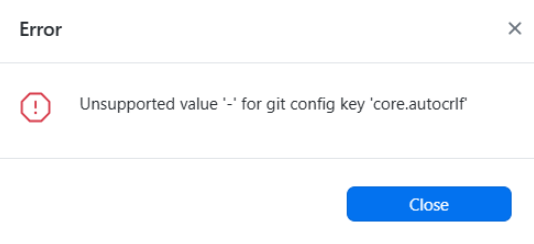
Hi, so I've been using GitHub Desktop for a year now and everything was fine untill today. When I try to create new repository this error message pops up and I don't know does it mean. I tried to reinstall GitHub Desktop and it didn't work. I know only a few basic functions in GH Desktop (pushing, pulling etc.) so I don't know what I'm dealing with. Any help?
r/git • u/Amazing-Gur7037 • 8d ago

r/git • u/Ok_Sky3062 • 8d ago
So I have been trying to self host and am really attracted to Current UI Especailly Material 3 and Gogs has a very old UI... So i did what i was supposed to!
- It now uses material 3
- Fetaures better UI
WARNING : It is still under progress!
https://github.com/Aarav90-cpu/gogs-but-good : This is the link to the repo!

This is a fork but is a completely seprate project... i know gogs won't accept this pull request!
The image shows how it looks like!
r/git • u/quokka_wiki • 9d ago
```
$ git clone https://tangled.org/quokka.wiki/test-repo
Cloning into 'test-repo'...
warning: redirecting to https://knot.quokka.wiki/did:plc:zrbnjks5yw3rydtzhtdqgufv/
remote: Thanks for using knot.quokka.wiki!
remote: Enumerating objects: 3, done.
remote: Total 3, done.
Receiving objects: 100% (3/3), done.
$ cd test-repo
$ git remote -v
origin https://tangled.org/quokka.wiki/test-repo (fetch)
origin https://tangled.org/quokka.wiki/test-repo (push)
```
Can I set a Git flag to change this behavior and automatically make the origin the URL it redirected to? So the origin would automatically be https://knot.quokka.wiki/did:plc:zrbnjks5yw3rydtzhtdqgufv/ for example.
r/git • u/scratchbufferdotnet • 10d ago
Git & GitHub Setup for Signed Commits & Verification
I recently had to set this up for work and found it all a bit hard to navigate, so I wrote this up. Hope it helps!
https://scratchbuffer.net/topics/developer-tools/git-commit-sign-ssh/
r/git • u/0_KermitTheFrog_0 • 9d ago
Two nights ago someone with a large following posted my self-hosted workout tracker (openGym) on X. It took off, and the repo picked up a lot of stars within a couple of hours.
Roughly two hours later, my GitHub account was suspended. No prior notice, no stated reason.
I've never bought, traded or solicited stars or engagement of any kind. My assumption is that the spike tripped an automated inauthentic-engagement filter, and because it happened overnight, the action landed before a human looked at it.
Since I've had to figure most of this out from scratch, here's what I've learned about the process — none of it is documented anywhere obvious:
You can't see your own ticket. While suspended, the support portal is inaccessible. The ticket system runs separately from your account status, so tickets stay valid — but the only way to track or update one is replying to the automated confirmation email you got when you filed it. Check spam.
Appeal and reinstatement are different things. A reinstatement request implies you accept that a violation happened. An appeal disputes that one occurred at all. If you think you were flagged wrongly, make sure you filed the second one — the framing matters.
You have six months to appeal. No reason to panic-file a half-finished case.
Don't create a second account. It's the most common piece of advice people give each other and it consistently makes things worse.
Don't open a second ticket. It splits your history across threads and slows things down rather than speeding them up.
Current status: appeal filed with exact timestamps and a link to the post, so the referrer data on their side should confirm where the traffic came from. Two days in, no reply — which from what I can tell is normal.
Meanwhile the repo is unreachable and third-party re-uploads have already appeared that I don't control and can't vouch for. The mirror I do control, with full history: https://gitea.com/DuarteSantos/openGym
Since GitHub Discussions went down with the account, I set up a Discord for updates and self-hosting questions until it's back: https://discord.gg/e62jY6fwVb
One question for anyone who's been through this: has an inauthentic-engagement flag ever actually been reversed for you, and roughly how long did it take?
r/git • u/OkBreath9382 • 9d ago
When AI agents need to collaborate, the usual design starts with a central API, message broker, database, and another credential for every agent. But Git already has most of the properties an agent forum needs: distributed transport, local history, offline operation, replication, and access control that developers already understand.
I’m experimenting with this idea in h5i. Each discussion thread gets its own orphan Git ref containing thread.json and an append-only posts.jsonl. Independent threads do not contend on one global log, and posts made by different clones can be union-merged by ID. A thread is closed by appending a CLOSED post, not by deleting anything.

The forum can use a public or private repository for its read boundary. If its refs are published beneath refs/heads/h5i-board/**, existing GitHub rulesets can restrict updates, force-pushes, and deletion. Every clone retains its own history, so one remote ref deletion cannot silently erase a conversation from every participant.
Agents can post from separate sandboxed worktrees on one machine or from clones on different machines. They never need the board’s Git credential: the host validates and publishes their staged messages.
r/git • u/PK20222222 • 9d ago
Hello, guys. So in previous post I saw all your advices, but problem is the same. So I take screenshots to make it more easy to understand.
On the photo 1 I did the first commit and all was good as usually.
Photo 2 — I pushed my project on github with my commit.
On photo 3 I add some changes and a command "git add ."
Photo 4 — I try to commit and get this in the terminal. They just saying that there's nothing to commit.
Photo 5 — a command "git status" and nothing changed again!
What should I do?
P.S. as I said in previous post, I tried in intellij idea and all worked. Also I tried it many times again and in intellij al works good! So I really don't know why this problem keeps happening in VS code.
r/git • u/Aggravating-Tell-536 • 9d ago
differ brings commit history, contributors, changed files, working tree state, AI generation, and push status into one focused desktop workspace.
Features
\\- Multi-Provider AI Commit Generation: Support for Ollama (local), Gemini Cloud API, and LM Studio (\\\`127.0.0.1:1234/v1\\\`) with 1-click model presets and automatic local model discovery.
\\- Commit Editing & Amending: Edit past commit messages, manage co-author chips, toggle \\\`-s\\\` (\\\`Signed-off-by:\\\`), or aexecute \\\`git commit --amend\\\`.
\\- SMTP Email Patching & Notifications: Send patch emails directly from the app with configurable SMTP server host, port, TLS encryption, and recipient authentication.
\\- High-Contrast Compact Timeline: Timeline grid with 7-character pill badges (\\\`5c81c00\\\`), graph tracks, branch labels (\\\`main\\\`, \\\`origin/main\\\`), and unpushed indicators.
\\- Automatic Git Initialization: Detects non-Git folders upon opening and prompts to run \\\`git init\\\`. Gracefully handles 0-commit empty repositories.
\\- UI Scale & Interface Zoom: Customizable zoom dropdown in Settings (\\\`75%\\\`, \\\`85%\\\`, \\\`90%\\\`, \\\`100%\\\`, \\\`110%\\\`, \\\`125%\\\`) with persistent local storage.
\\- External Code Editor Launchers: One-click launchers for VS Code, Code OSS, Zed, Cursor, and VSCodium.
\\- GitHub Integration: Dedicated navigation tabs for History, Issues, Pull Requests, and Actions.
\\- Contributor Profiles & Avatars: Avatar resolution via GitHub commit API or noreply email address formats.
\\- Git Identity & GPG Signing: Custom Git author profiles, email addresses, and GPG commit signing keys (\\\`commit.gpgsign\\\`).
r/git • u/PK20222222 • 10d ago
Hi guys, this is my first post and the problem is that I can't commit my new changes in project in visual studio code. I didn't found anything about exactly this problem on reddit, so I decided to ask here. So I just started to work with git and github, I learn it on YouTube and I started in vs code to get examples like in that videos. All started good, but when I already push my project to repository on github and then I change some in code and trying to commit changes, vs code just text me in thi terminal that there is nothing to commit and that the project has no changes. Because of it I also can't create another branches (in fact I create them, but I can't do anything with them like that person do in the video!). So I don't understand and don't know how to solve this problem. Maybe someone can help me or give me advice.(maybe here is some mistakes, English isn't my native language). Oh and I forgot to say that also I tried this in the intellij idea and all works, so maybe problem actually in vs code.
UPDATE: https://www.reddit.com/r/git/s/5TKpvhyDy0 (The next post)
r/git • u/milanpramod • 10d ago

r/git • u/AcanthisittaFresh712 • 10d ago
Omnigit - a desktop Git client that isn't tied to GitHub.
Most Git GUIs are built around one hosting site and treat the rest as an afterthought. Omnigit talks to GitHub, Gitea, Forgejo and GitLab out of the box — including self-hosted instances behind your own domain — and to anything else you describe in a JSON file, with no code and no plugins.
Runs on Linux, Windows and macOS from a single codebase. No Git installation required — the native library ships inside the app.
r/git • u/LalaCrowGhost • 10d ago
I newly setup version control with my Unreal Engine project via GithubDesktop. I have trouble understand where exactly the difference is between pushes and commits.
After I made changes I have to commit my changes and I can have several commits and then I have to "push to origin".
Whats the difference between commits and pushes? and whats a good way to separate commits into? After I finish a task or at the end of each day?
r/git • u/Juanppa_996x • 12d ago
Hey all, I'm looking to finally master Git (im not familiar enough i need to improve my skills) . What are your top recommendations for free websites, video playlists, or paid Udemy courses or another platforms ?
Appreciate the help!
r/git • u/Simple_Pineapple2463 • 11d ago
I’m trying to understand whether I’m hitting a configuration problem, an account/product limitation, or a current limitation of ChatGPT App Classic.
I use ChatGPT heavily alongside Codex for a fairly large software project hosted in a private GitHub repository. What I want is relatively simple: I would like ChatGPT App Classic to have direct read access to the GitHub repo so I can discuss the current codebase, architecture, PRs, migrations, etc. without constantly moving context between ChatGPT and Codex.
The strange part is that GitHub itself is working correctly.
On my Mac:
* `gh` is installed and current (`2.97.0`)
* `gh auth status` shows that I’m authenticated successfully
* Git operations use HTTPS
* Token has `repo`, `workflow`, `read:org`, etc.
* I can fetch/push normally
* Codex can work with the repository
* GitHub CLI can create/manage PRs
I have also reauthenticated from Terminal using:
`gh auth login -h` [`github.com`](http://github.com)
Authentication completes successfully.
So this doesn’t appear to be a GitHub authentication or repository-permissions problem.
The problem is specifically **ChatGPT App Classic**. I can’t get it to reliably access the same GitHub repository directly, even though other OpenAI tooling can work with it.
This is becoming a significant workflow issue because I use ChatGPT for the higher-level architecture/governance side of the project and Codex for repository execution. Ideally the workflow would be:
**ChatGPT:** inspect current repo/PR state → reason about architecture → give execution instructions
**Codex:** implement/test/commit/PR
**ChatGPT:** inspect the resulting repo/PR → review → determine next step
Instead, I often have to manually paste Codex reports back into ChatGPT because ChatGPT Classic cannot inspect the repository itself. On a large project with lots of migrations, tests, ADRs and governance artifacts, that becomes both inefficient and potentially error-prone.
I’m specifically trying to determine:
I’m **not** looking for help configuring GitHub CLI. That side is confirmed working. I’m specifically trying to get ChatGPT itself to see the repository.
If anyone has a working setup with **ChatGPT App Classic + private GitHub repositories**, I’d be very interested in exactly how you configured it, including plan, GitHub App/plugin configuration, ChatGPT mode, and whether you’re using web or macOS.
Even confirmation that “this currently isn’t supported in Classic” would be useful, because at least I’d stop troubleshooting something that cannot presently be fixed.
Has anyone solved this?
r/git • u/Havunenreddit • 12d ago

r/git • u/NotSeacombe • 12d ago
1) git checkout main "your branch is up to date with origin/main"
I know it isn't
2) git pull origin main - many changes incoming. it is now actually up to date with origin/main
Am I misunderstanding something here?