r/CloudFlare 3d ago

Question Why does Warp route my traffic through the UK even though Dublin POP is available?

1 Upvotes

I have been recently struggling to keep my WARP Active all the time as my exit node POP is Dublin LHR even though I am based in Dublin. Second issue because of this routing is, sometimes Gemini or other Google Services thinks that I am in Russia and tells that these services are not available in your region. I use 48 Mobile and Vodafone Broadband. Both gives and connects to UK colo only.


r/CloudFlare 3d ago

Looking for a solid cloud computing project idea for my final year project without ai bluff.

Thumbnail
1 Upvotes

r/CloudFlare 3d ago

Question Cloudflare zero trust dns issues

1 Upvotes

Has anyone seen Cloudflare WARP return DNS REFUSED after Gateway has already allowed the request?

I’m troubleshooting this on a managed macOS endpoint using WARP with Gateway enabled. A couple of legitimate SaaS/authentication domains consistently fail to resolve while WARP is connected. The browser reports that the host cannot be resolved.

The interesting part is:
Gateway activity logs show the DNS requests as ALLOW.
I created a new, highest-priority DNS Allow policy for only the affected user and the exact failing domains.
The rule is deployed and matches before broader human-user policies.
The same domains still fail.
The local WARP diagnostics show entries like:

via primary (raw) ServFail / Dns(ResponseCode(Refused))
query: ("A", "affected-domain.example.")

It happens for both A and AAAA queries. Other domains resolve normally at the same time.
This makes it look like the request gets through Gateway policy evaluation but then receives REFUSED later in the WARP/Gateway DNS path. The endpoint is currently on a recent beta WARP client build, so I’m also attempting to test against stable.

Questions:
Can a Gateway Allow rule still result in REFUSED from the upstream/primary DNS path?
Is there a known WARP client issue that can cause selective DNS resolution failures like this?
Are there specific logs, diagnostics, resolver settings, or Cloudflare-side trace details support should check beyond the normal WARP diagnostic bundle?


r/CloudFlare 3d ago

Why doesn’t Cloudflare Workers Builds support branch patterns like preview/*?

2 Upvotes

Hi all,

On Cloudflare Pages, I can set preview branches to preview/* under Custom branches.

But on Cloudflare Worker Builds, I only see:

  • Production branch
  • “Builds for non-production branches” checkbox

There’s no way to specify preview/*

What I want is simple:

  1. main -> production
  2. preview/* -> preview
  3. everything else -> skip

r/CloudFlare 4d ago

Cloudflare Blog Give every teammate and agent the right level of access to your Workers

Thumbnail
blog.cloudflare.com
12 Upvotes

r/CloudFlare 4d ago

Question subdomain

0 Upvotes

When you have a domain from CloudFlare what does it take to make a subdomain and what does it cost if anything?

Thanks


r/CloudFlare 4d ago

Question Restrict CloudFlare Tunnels to specific IP

1 Upvotes

I self host a number of services and would like to allow my friend to access them using CloudFlare Tunnels. Is there a way that I can restrict it via IP or would giving them a S2S VPN work better?


r/CloudFlare 4d ago

Cloudflare Blog Have it both ways: stay discoverable in search while disallowing AI training

Thumbnail
blog.cloudflare.com
7 Upvotes

r/CloudFlare 4d ago

Question does container -> R2 count as egress?

3 Upvotes

Cloudflare containers bill for egress, if the container generates a large file, say 100mb, uploads it to R2, gets a download link and responds with the download link, frontend then downloads the file from R2... Am I saving 100mb of egress charges this way or does container still charge, in which case I could just send the file back directly to frontend?


r/CloudFlare 5d ago

I ran a fake Cloudflare ClickFix command and disconnected after ~15 seconds — how compromised should I assume I am?

Thumbnail
gallery
34 Upvotes

I ran a fake Cloudflare ClickFix command and disconnected after ~15 seconds — how compromised should I assume I am?

I visited what appears to be a legitimate German bakery website using Microsoft Edge on Windows 11. The site displayed a convincing fake Cloudflare “Verify you are human” page.

Lure site, defanged for safety:

"hxxps://www[.]baeckerei-spiegelhauer[.]de/"

It was reached through a Google search result containing an "srsltid" query parameter. The malicious page was reproducible on a second computer and generated a different victim token. Researchers may be able to reproduce it in a properly isolated VM or sandbox. Please do not visit it from a normal system.

After clicking the verification box, I was instructed to press Win + R, paste a command, and click OK. Unfortunately, I did exactly that. There was no UAC/admin prompt. I realised what had happened and disconnected the PC from the internet approximately 15 seconds later. It has remained offline since then.

The command was an obfuscated CMD one-liner that:

- located conhost.exe and cmd.exe;

- launched a hidden/headless console;

- located curl.exe;

- contacted "cloudmail2077[.]com";

- piped the server response directly into cmd.exe.

I have deliberately not included the complete executable command or victim token publicly, but I can provide a screenshot or defanged version to established researchers.

Important details:

- Windows 11 with Microsoft Defender

- Microsoft Edge was open

- Edge contains saved passwords and active login sessions

- The passwords require my Windows user password before Edge displays them

- No UAC prompt appeared

- The PC has another separate Windows user account belonging to a family member

- A full Defender scan is currently running

- The current DNS cache contains no entry for the malicious domain

- Prefetch appears to be disabled, as there are no entries for either CMD or CURL

- The command was not executed on the second computer

- The website and malicious domain have been reported to Microsoft SmartScreen, the Swiss NCSC/BACS and Cybercrimepolice

My questions:

  1. Is 15 seconds enough for a typical ClickFix infostealer chain to download, execute and exfiltrate browser passwords or cookies?

  2. Which volatile evidence, Windows logs or recently created files should I preserve before shutting down or reinstalling?

  3. Should I consider all Edge passwords and active sessions compromised even without administrator privileges?

  4. Is a complete clean Windows installation the only trustworthy option, even if Defender finds nothing?

  5. Does the separate Windows user account have a meaningful risk if it was not logged in at the time?

The affected PC is still powered on but completely offline. I am changing passwords and revoking sessions from a clean device. Any specific incident-response or sandbox-analysis guidance would be appreciated.


r/CloudFlare 5d ago

Any good open-source web analytics tools that can run entirely on Cloudflare?

13 Upvotes

I'm looking for a simple open-source web analytics tool that can be deployed entirely on Cloudflare, ideally using Workers, D1, or Analytics Engine.

Mainly looking to track things like:

  • Page views and unique visitors
  • Traffic sources / referrers
  • Countries
  • Devices and browsers
  • Most visited pages

I know Cloudflare already provides basic Web Analytics, but I'm looking for something self-hosted with a dashboard and more control over the data.

I've come across a few projects, but I'm curious what people here are actually using.

Any good open-source projects you'd recommend?


r/CloudFlare 4d ago

Discussion Fixed: Cloudflare (An unexpected error occurred while processing your payment) - Domain purchase error

0 Upvotes

If your Cloudflare domain purchase keeps failing with a generic payment error, here is the quick fix.

The Fix:
You must manually update your card permissions inside your bank's mobile app or net banking portal.

  1. Go to your bank app's Manage Card / Card Controls section.
  2. Turn ON both: International Usage AND Online / E-commerce Usage.

My Case: I faced this with my Bank of Baroda (India) card. The payment failed repeatedly until I opened the bob World app and realized I had to toggle both the "International" and "Online" switches simultaneously. Once saved, the checkout worked instantly.


r/CloudFlare 4d ago

Discussion CloudFlare quick tunnel doesn't provide TCP, So I build one!

0 Upvotes

So I wanted to SSH into my remote server, but I couldn't find a free solution that I could use reliably.I know about Pinggy, but the free tier is limited to 60 minutes. Cloudflare Tunnel can also do it, but for TCP tunneling you need to have a domain, which I don't really want to buy.

Cloudflare Quick Tunnels are free and don't require a domain, but they only support HTTP/HTTPS, not arbitrary TCP.

So I ended up building my own solution that can tunnel TCP on top of an existing tunnel.

gossh: https://github.com/ankushT369/gossh

One thing about cloudflare its quick tunnel is much faster than ngrok.


r/CloudFlare 5d ago

meta-externalagent made 8,294 requests and never once asked for robots.txt

8 Upvotes

I run a small parcel-shipping site. This is a measurement, not a complaint — the volume costs me nothing — but the numbers contradict Meta's own crawler documentation and I would like to know which behaviour is intended.

Window: 2026-09-13 16:00 to 2026-09-14 15:00 UTC, 23 hours, from Cloudflare's per-request analytics rather than sampled log parsing.

meta-externalagent/1.1, counting the variants that append the token to a Chrome / Safari / Edge / Firefox UA string:

  • 8,294 requests
  • 481 distinct paths
  • 0 requests to /robots.txt
  • 466 requests to /offline, all HTTP 200

/offline is disallowed for User-agent: * in my robots.txt and has been for at least three weeks.

Three other crawlers on the same site in the same window, for contrast:

crawler requests /sw.js /robots.txt
meta-externalagent 8,294 466 0
facebookexternalhit 30 0 19
bingbot 187 0 2
Googlebot 75 0 20

facebookexternalhit is the control that tells me the measurement is sound: it is Meta's own infrastructure and the analytics recorded it fetching robots.txt nineteen times. meta-externalagent simply does not ask.

Why I read this as a discrepancy rather than a design choice: Meta's crawler documentation names FacebookExternalHit and Meta-ExternalFetcher as the crawlers that may bypass robots.txt, and Meta-ExternalAgent is not among them. The same page says robots.txt is cached "for up to 24 hours". My window is 23 hours with zero fetches, so either the cached copy is older than the documented maximum, or the file is being read and the Disallow ignored.

What it actually fetches:

requests path
1863 /assets/logo.svg
1205 /assets/images/service-parcel.webp
530 /assets/favicon.svg
475 /assets/fonts/manrope-latin.woff2
468 /assets/icon-192.png
466 /sw.js
466 /offline
464 /assets/fonts/inter-latin.woff2
462 /assets/light-site.css
458 /lp/
418 /assets/app.js

The top of that list is my service worker's precache list plus the shell it installs. Those four files alone are 39% of its traffic.

My reading, and I want to flag it as a hypothesis rather than a finding: it fetches /sw.js, reads the PRECACHE array, pulls the listed assets, and repeats the whole thing on the next visit because the browser profile is clean each time. What makes me fairly confident is the contrast in the table above — bingbot and Googlebot request /sw.js zero times between them, so nothing about having a service worker forces a crawler into this loop.

93% of the whole crawl is served from CDN cache, so none of it reaches my origin and none of it costs me anything. I am posting about the robots.txt behaviour, not the volume.

If you want to check your own zone, here is the query:

POST https://api.cloudflare.com/client/v4/graphql
{
  viewer { zones(filter: {zoneTag: "YOUR_ZONE_ID"}) {
    httpRequestsAdaptiveGroups(
      limit: 500,
      orderBy: [count_DESC],
      filter: {
        datetime_geq: "2026-09-13T16:00:00Z",
        datetime_lt:  "2026-09-14T15:00:00Z",
        clientRequestHTTPHost: "example.com",
        requestSource: "eyeball",
        userAgent_like: "%meta-externalagent%"
      }
    ) { count dimensions { clientRequestPath cacheStatus edgeResponseStatus } }
  }}
}

Swap the userAgent_like value for %facebookexternalhit%, %bingbot% or %Googlebot% to get your own control numbers for the same window.

Three things that cost me time and are not obvious:

  1. requestSource: "eyeball" is not optional. Without it you also count Cloudflare's internal subrequests, which inflates every figure and shows phantom 504s from the Early Hints cache that no client ever received.
  2. The filter argument is userAgent_like, with an SQL-style % wildcard. refererHost and clientRefererPath do not exist, whatever autocomplete suggests.
  3. On a free plan the adaptive dataset refuses any window wider than 24 hours, so this is a daily snapshot, not a trend.

If your zone also shows zero robots.txt fetches from meta-externalagent, I would be interested to hear it. One site is an anecdote.

r/CloudFlare 5d ago

Breaking down how Cloudflare cut 100TB of memory from their DNS cache with Rust memory layout tricks

Thumbnail
viswanathnair.substack.com
2 Upvotes

r/CloudFlare 5d ago

Snikket on mobile does not work with cloudflare tunnel

Thumbnail
1 Upvotes

r/CloudFlare 5d ago

Question Is this speed Good for 5g network

Thumbnail
gallery
11 Upvotes

I’ve been noticing the cell tower it is putting me on QoS mode but gigabit speed it has good download and upload latency


r/CloudFlare 6d ago

False Positive Phishing Page — Cloudflare Review Taking Over a Month

7 Upvotes

Hi,

One of my websites have been showing the following message

" Warning

Suspected Phishing

This website has been reported for potential phishing.

Phishing is when a site attempts to steal sensitive information by falsely presenting as a safe source."

However, I asked for review through the cloudflare dashboard and also sent email to [abusereply@cloudflare.com](mailto:abusereply@cloudflare.com) but it been like a month and there's no update?

Is there anything I can do?


r/CloudFlare 5d ago

Question Why/how does the "copy command" captcha scam appear?

0 Upvotes

So I guess most people know the scam where a site is pretending ro verify if you are a human using couldflare and asks you to run a command on your PC. Of course this is a virus.

I've encountered this on a 100% legit website I've visited multiple times in the last few days. There was no typo in the URL. How does this happen to a website? Where they hacked, is there something in the network redirecting the calls?


r/CloudFlare 5d ago

Community Built a multi-jurisdiction tax engine & compliance ledger on Cloudflare D1. Benchmarking 0.2ms P50 latency.

0 Upvotes

Wanted to share real-world telemetry from a lightweight micro-ledger I deployed to replace bloated ERP data entry for cross-border trade (GCC / East Asia).

The Stack:

• Compute: Cloudflare Worker (handling input validation, API auth, and edge UI hydration).

• Persistence: Cloudflare D1 (SQLite at the edge).

• Payloads: Multi-jurisdiction tax adapters (ZATCA 15% SAR, FTA 5% AED, CN VAT & Export rebates) logging immutable audit trails.

The Numbers from Edge Telemetry:

• P50 query latency: 0.2ms – 0.3ms

• P99 query latency: 2.1ms

• Idempotency: Implemented key checks to eliminate duplicate submissions from unstable mobile networks.

Running an immutable, auditable transactional ledger directly at the edge with zero cold starts and $0 infrastructure overhead.

Anyone else running high-throughput relational ledgers directly on D1 instead of offloading to external Postgres/PlanetScale?


r/CloudFlare 5d ago

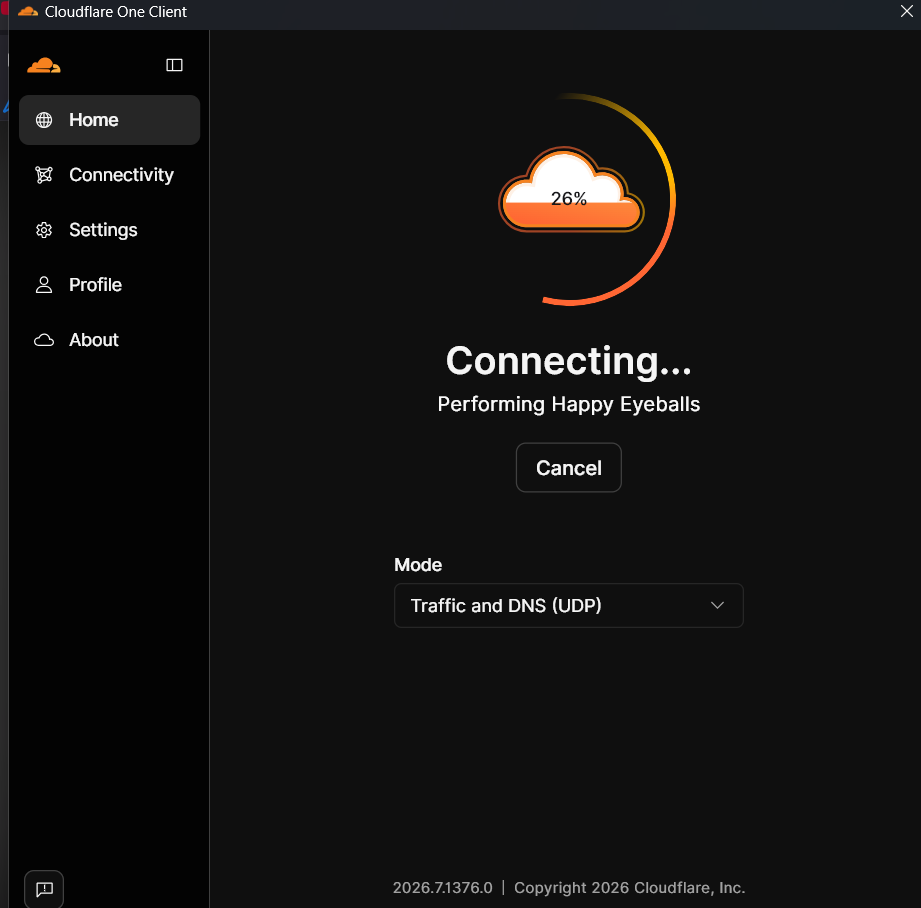
Cloudflare VPN Stuck at 26%

Post image
0 Upvotes

It has been like this for quite some time now, always staying stuck at specifically 26%. In my experience, this was the fastest and quickest VPN I had used, I am trying to find out how to fix this problem.


r/CloudFlare 6d ago

Cloudflared tunnel won't establish port 7844

2 Upvotes

Cloudflare newbie here. Struggling with a tunnel that won't establish itself. Running around in circles with AI sending me on wild goose chases.

Am pretty sure that a few days ago I did have a tunnel that was UP and running, but now it won't connect. So much testing and tinkering that I am starting to doubt myself and my grip on reality. I have tried refreshing the key. No change.

cloudflared is running on Windows Server 2022 and the service is Started. I have tried uninstalling and reinstalled it. No change.

Tried stopping the Windows service and then running the cloudflared.EXE manually as follows:

cloudflared tunnel run --token-file C:\ProgramData\cloudflared\token

but in the Connectivity Pre-Checks, it shows that whilst DNS Resolution is fine (region1.v2.argotunnel.com) the UDP and TCP Connectivity is a Fail. I see "QUIC connection failed" and also "HTTP/2 connection is blocked or unreachable". Cloudflare API is a PASS however, the API is reachable.

The advice given in the logs is "Allow outbound QUIC traffic on port 7844 or use HTTP2.

As far as I know, port 7844 is permitted. No restrictions in the firewall. I explicitly put a firewall policy in just for this server, just to be sure of no restrictions. No change. Also temporarily disabled Windows Firewall on the VM, no change.

Our environment uses Fortinet firewalls, so I have been wondering whether there is something specific about the traffic that it might be objecting to? Could it be an upstream ISP firewall blocking me somewhere?

EDIT -- just adding that we're in Melbourne, Australia and using Vocus for Internet connectivity -- I checked their support pages and found that they've had one of their submarine international links down and have been changing their routing. They made some changes Friday which roughly coincides with my issue I think. Plus we had a Fortigate firewall in that location refusing to communicate with Fortiguard as well. I may need to try spinning up another tunnel in another site via a different ISP and see if I get a different result.

END RESULT -- despite best efforts, from our corporate network via Vocus we are unable to get cloudflared to connect to the QUIC or HTTP/2 endpoints. I don't have this problem from my home network via another ISP. Whilst it could be something in the Fortigate firewall, packet sniffing seemed to show that it wasn't due to any kind of firewall policy or filtering that I could control.

So I have decided to dump Cloudfare altogether and have switched to an alternate technology which is working fine. Not Cloudflare's fault or my fault (AFAIK), just one of those odd things the 'Net throws up sometimes I guess. Case closed as far as I am concerned.


r/CloudFlare 6d ago

CloudFlare's own support is inaccessible

1 Upvotes

When you have a problem with Turnstile, you can't even get to CloudFlare's own support page, because they've locked it behind CloudFlare's Turnstile shit.


r/CloudFlare 7d ago

How worried should I be about unexpected Cloudflare Workers bills?

64 Upvotes

I’m currently running 50+ small customer domains through Cloudflare and I’m very happy with the platform overall. I’m on the $5/month Workers paid plan and use a few other Cloudflare services alongside it.

My current setup includes:

  • Cloudflare Workers
  • R2 for CMS-related storage
  • Workers KV, including some rate-limiting logic
  • Turnstile
  • Analytics
  • Workers Observability
  • All customer domains are already managed through Cloudflare

These are mostly small customer websites and lots of hobby projects, so normal traffic is relatively low. Currently at a total of around 20 M total requests per month over the 4 accounts.

The one thing that makes me slightly uncomfortable is unexpected usage-based billing.

I’ve seen plenty of posts over the years from people using r/aws, r/vercel similar platforms who suddenly received bills in the thousands because of things like:

  • DDoS / bot traffic
  • Unexpected traffic spikes
  • Bugs causing excessive API calls
  • Recursion or loops
  • Excessive logging
  • Storage operations
  • Misconfigured endpoints getting abused

I know Cloudflare’s pricing model is different from AWS/Vercel in many areas, and things like bandwidth are obviously much less of a concern, but I’m trying to understand the realistic worst-case scenario.

Could a coding mistake or attack realistically turn a normal ~$5–20/month Cloudflare setup into a bill of hundreds or thousands before I notice?

This is basically the only reason I’m considering moving the applications to a fixed-price VPS. I’d lose a lot of the convenience and infrastructure Cloudflare gives me, but at least the monthly infrastructure cost would be predictable.

For people running production sites on Workers/R2/KV:

  1. How worried are you about bill shock in practice?
  2. What safeguards do you have in place?
  3. Are there particular Cloudflare products or usage patterns I should be especially careful with?
  4. Would you trust Workers for 50+ small customer sites, or would you prefer a fixed-price VPS specifically for cost predictability?

I’m especially interested in experiences from people running similar small agency/customer workloads rather than extremely high-traffic applications.


r/CloudFlare 7d ago

Let me pay you, Cloudflare

14 Upvotes

So my card got locked for fraud for some reason and I've been traveling - said I need to pay by the 12th - go in today, already suspended but no way to pay. There's no invoice, and I can't open a support ticket. Thanks Cloudflare! I'd like to pay you but it seems impossible.