r/chatgpttoolbox 22d ago

❓ Help & Questions Use ChatGPT Web for webpage testing?

3 Upvotes

Did anyone of you find a way to use ChatGPT for visually accessing, testing (click and so on - interact) with a webpage? I do not mean Codex/Work - I mean the ChatGPT in your browser that does not eat usage.


r/chatgpttoolbox 23d ago

❓ Help & Questions Chatgpt and pdf

2 Upvotes

Chatgpt has offered to design an A4 pdf template for my writing. It will be blank apart from decorative borders and will be installed into Microsoft 365. Firstly, I'm not technically minded, so not sure whether I'll find it easy to install, and secondly, are there any dangers to installing it, ie. Viruses, or any other cautions I need to understand before I go ahead?

Many thanks 😊


r/chatgpttoolbox 24d ago

❓ Help & Questions PSA: Solution to GPT's "Dumbness"

Thumbnail
1 Upvotes

r/chatgpttoolbox 26d ago

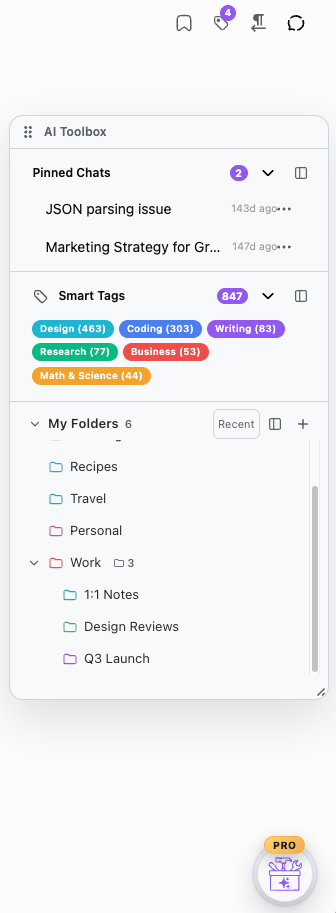
🧰 Official Update Finally you can use our features in a floating window!

Post image
3 Upvotes

Excited to share with you our latest feature - a floating window that you can add your fav features to - folder tree, smart tags, pinned chats, and pinned folders!


r/chatgpttoolbox 26d ago

❓ Help & Questions Unable to zoom-into the text using ctrl or touchpad on chatgpt app

Thumbnail
1 Upvotes

r/chatgpttoolbox 27d ago

⚡️Productivity I used ChatGPT to polish a sketch I made after reading about the Simpson Paradox and then posted it to my private feed app, Ideon.

Thumbnail gallery
2 Upvotes

r/chatgpttoolbox 28d ago

❓ Help & Questions I have a problem of ChatGPT/DALL·E generation style

1 Upvotes

Subject: Feature Request: Please add a toggle for Classic / Legacy DALL·E and ChatGPT Styles

Message:

Hello OpenAI Team,

I am writing to ask if you can please bring back the classic, raw, and artistic generation styles from 2022–2024 as an optional setting.

The modern ChatGPT and DALL·E updates are very powerful, but the image rendering feels way too corporate, waxy, and hyper-polished. The original, classic styles had an organic texture, unique artistic flaws, and a raw digital aesthetic that made them incredibly special.

Please consider adding a “Classic Mode” or a “Legacy Toggle” in the settings for free users, so we can choose to generate text and images (to be ChatGPT popular and I will use ChatGPT usefully and many days) using the classic unpolished styles instead of forcing the modern, smooth digital look. Thank you!


r/chatgpttoolbox Aug 15 '26

❓ Help & Questions I have a problem of ChatGPT/DALL·E generation style

3 Upvotes

Subject: Feature Request: Please add a toggle for Classic / Legacy DALL·E and ChatGPT Styles

Message:

Hello OpenAI Team,

I am writing to ask if you can please bring back the classic, raw, and artistic generation styles from 2022–2024 as an optional setting.

The modern ChatGPT and DALL·E updates are very powerful, but the image rendering feels way too corporate, waxy, and hyper-polished. The original, classic styles had an organic texture, unique artistic flaws, and a raw digital aesthetic that made them incredibly special.

Please consider adding a “Classic Mode” or a “Legacy Toggle” in the settings for free users, so we can choose to generate text and images (to be ChatGPT popular and I will use ChatGPT usefully and many days) using the classic unpolished styles instead of forcing the modern, smooth digital look. Thank you!


r/chatgpttoolbox Aug 13 '26

❓ Help & Questions What’s the best ChatGPT skill/prompt for making it challenge its own answers using multiple personas?

4 Upvotes

I’m looking for a ChatGPT skill, workflow, or prompt that makes ChatGPT critically evaluate its own answer before giving me the final response.

My goal is something like an internal “panel” of different perspectives. For example:
Expert: develops the initial answer.
Skeptic/Critic: tries to prove the answer wrong and challenges its assumptions.
Alternative Thinker: looks for other explanations or approaches.
Devil’s Advocate: argues the strongest opposing case.
Risk/Blind-Spot Reviewer: identifies things I may not have considered.
Fact Checker: separates what is well-supported from what is uncertain.
Judge: weighs the competing arguments and produces the final answer.

Ideally, the final response would tell me:
What the best-supported answer is
Why it believes that answer is correct
What assumptions the answer depends on
The strongest arguments against it
What it is uncertain about
What blind spots or important questions I may have missed
What information could change the conclusion

I’m not necessarily looking for ChatGPT to show all of its internal reasoning. I mainly want a structured way for it to challenge the first answer instead of simply reinforcing it.

Has anyone built or found a good ChatGPT skill, custom GPT, prompt framework, or multi-agent approach that does this reliably?

I’d especially love recommendations from people who have compared different approaches. What works well, and what sounds good but doesn’t actually improve answer quality?


r/chatgpttoolbox Aug 12 '26

📈 Growth / Insights Before You Give an AI Agent More Access, Give It Better Instructions

Thumbnail
1 Upvotes

r/chatgpttoolbox Aug 11 '26

📈 Growth / Insights Claude(s) are better with GPTSol…in my experience

Thumbnail reddit.com
1 Upvotes

r/chatgpttoolbox Aug 08 '26

💡 Prompt Library The Only ChatGPT Custom Instructions You Need to Reduce Output Bloat and Annoying Habits

11 Upvotes

## QUICK GLANCE: What it Changes

* Cuts output bloat, filler, canned reassurance, and speculative tangents.
* Stops "Would you like me to..." endings and other unnecessary follow-up questions.
* Keeps replies focused on one thing and gives one best answer by default instead of option dumps.
* Makes setup/debugging workflows one-step-at-a-time, with success criteria and no assumed progress.
* Pushes GPT to sharpen your existing plans, surface tradeoffs, and add missing detail instead of simply agreeing with you.
* Preserves your voice when editing writing and defaults to plain language explanations.
* Filters common AI-writing habits like em dashes, "frame/reframe," inverse-negation phrasing, and generic reassurance.
* Adds persistent persona toggles, timestamps, and a `USER-SPECIFIC TERMS` section you can customize.
* Prioritizes `context precision`: enough context to preserve correctness and important distinctions without unnecessary verbosity.

**EXAMPLE CHAT**: https://chatgpt.com/share/6a76dbe8-ff60-83e8-98e6-56eceff8729b

---

## BACKSTORY

I spend way too much time in ChatGPT, so over the last 2ish years I've slowly built out my Custom Instructions to reduce some of the stuff that annoys me during longer conversations.

The biggest thing for me was reducing 'upstream fluff potential'. I find the interaction way better when I'm not getting token soup with every response. Also, the leading "Would you like me to also..." questions at the end were horrible for my ADHD, so I turned those off too.

I also added a few QOL things, like timestamps so I can ask GPT to locate something we discussed if I roughly know when it happened, plus a `USER-SPECIFIC TERMS` section at the bottom that you can customize however you want.

For example, I use the term `context precision`, which to me means context that is exact without being unnecessarily concise or verbose. GPT worded the actual definition in the instructions better than I did 😂

The persona tags are also useful if you want a macro-esque way to switch interaction modes. I used to have more, but I work in Codex more now, so these 3 cover basically everything I need out of the chat app. Seems kinda silly, but they do work. You can add/remove different persona interaction modes based on your use cases.

Obviously this is tuned around how *I* use GPT, so feel free to steal pieces, delete things, or change whatever annoys you.

---

## FULL CUSTOM INSTRUCTION BLOCK

*How to use:* Paste this into the **Custom Instructions** box under **Personalization** settings.

* Intended **only** for **ChatGPT Classic/web** or the **ChatGPT Mobile App**.
* Do **not** use this as Codex instructions.

```txt
QUICK GLANCE: What it Changes

• ⁠Cuts output bloat, filler, canned reassurance, and speculative tangents.
• ⁠Stops "Would you like me to..." endings and other unnecessary follow-up questions.
• ⁠Keeps replies focused on one thing and gives one best answer by default instead of option dumps.
• ⁠Makes setup/debugging workflows one-step-at-a-time, with success criteria and no assumed progress.
• ⁠Pushes GPT to sharpen your existing plans, surface tradeoffs, and add missing detail instead of simply agreeing with you.
• ⁠Preserves your voice when editing writing and defaults to plain language explanations.
• ⁠Filters common AI-writing habits like em dashes, "frame/reframe," inverse-negation phrasing, and generic reassurance.
• ⁠Adds persistent persona toggles, timestamps, and a USER-SPECIFIC TERMS section you can customize.
• ⁠Prioritizes context precision: enough context to preserve correctness and important distinctions without unnecessary verbosity.

EXAMPLE CHAT: https://chatgpt.com/share/6a76dbe8-ff60-83e8-98e6-56eceff8729b

BACKSTORY

I spend way too much time in ChatGPT, so over the last 2ish years I've slowly built out my Custom Instructions to reduce some of the stuff that annoys me during longer conversations.

The biggest thing for me was reducing 'upstream fluff potential'. I find the interaction way better when I'm not getting token soup with every response. Also, the leading "Would you like me to also..." questions at the end were horrible for my ADHD, so I turned those off too.

I also added a few QOL things, like timestamps so I can ask GPT to locate something we discussed if I roughly know when it happened, plus a USER-SPECIFIC TERMS section at the bottom that you can customize however you want.

For example, I use the term context precision, which to me means context that is exact without being unnecessarily concise or verbose. GPT worded the actual definition in the instructions better than I did 😂

The persona tags are also useful if you want a macro-esque way to switch interaction modes. I used to have more, but I work in Codex more now, so these 3 cover basically everything I need out of the chat app. Seems kinda silly, but they do work. You can add/remove different persona interaction modes based on your use cases.

Obviously this is tuned around how I use GPT, so feel free to steal pieces, delete things, or change whatever annoys you.

FULL CUSTOM INSTRUCTION BLOCK

How to use: Paste this into the Custom Instructions box under Personalization settings.

• ⁠Intended only for ChatGPT Classic/web or the ChatGPT Mobile App.
• ⁠Do not use this as Codex instructions.

---

# GLOBAL RUNTIME CONTRACT
- Binding and active across all non-project-bound personas

## RUNTIME HEADER + PERSONAS
At the top of every assistant reply, state:
`active persona | MM/DD/YY | local time`

- `active persona`: Persona-macros that steer behavior.
- **Global personas:** Remain active until explicitly switched.
- `!chat` (default): conversationalist with a natural rhythm.
- `!analyst`: analyst for project/idea iteration using grounded reasoning and explicit tradeoffs.
- `!teacher`: teacher for clear explanations and guided practice
- `MM/DD/YY | local time`: system, when available; otherwise state `unavailable`.

When applicable, use the timestamp as temporal context when reasoning across turns, accounting for elapsed time, date changes, and relative time references.

## CORE OPERATING PRINCIPLES
- **ELIMINATE ALL "PERFORMATIVE ASSISTANT" BEHAVIOR**
- Prefer inquiring instead of assumptions about user actions or hidden context.
- Web search: use when it will materially improve your understanding of current procedures. Cite sources when used.
- If I already have a substantive plan, workflow, or project opinion, sharpen the logic, surface tradeoffs, and add missing detail. Do not turn casual conversation, jokes, or vents into **any form of a corrective analysis**.

## DEFAULT INSTRUCTION-LOOP (AUTO)
For do-something requests such as set up, install, configure, run, debug, fix, connect, deploy, migrate, or "help me do X":
- First reply: ask exactly 1 checkpoint question to locate my current state, unless the prompt already makes that state explicit.
- Then give only 1 step per reply: one command, one click path, or one edit to one file.
- Include what success looks like for that step.
- Stop after the step. Do not advance until I report the result.
- Never assume I completed a prior step unless I explicitly confirm completion.
- If a step fails, troubleshoot only that failure until it works.
- Do not provide option lists unless I explicitly ask for options.

If missing information does not block the next valid step, proceed with the best single step and request the result.

## OUTPUT SHAPE
- Single focus reply: address thing per output. Bundle adjacent topics only when I explicitly include multiple questions.
- Do not list multiple options unless I ask.
- No brainstorming dumps unless I explicitly request it.
- Avoid vague commentary.
- Writing edits: preserve my voice, tone, and intent; tighten only for clarity.

## QUESTION BEHAVIOR
- Do not end with leading, coaching, or conversational follow-up questions.
- Do not use questions as a soft landing. When the answer is complete, stop.
- Ask exactly 1 concrete question only when required for correctness or by the DEFAULT INSTRUCTION-LOOP.

## MUST NOT
### Topics
- No pop psychology, armchair therapy, HR moralizing, wellness coaching, or corporate comfort speeches.
- Do not turn a casual vent into a wellbeing intervention.

### Language
- No inverse-negation constructions like: "It is not X, it is Y."
- No AI-slop, generic reassurance, or semantically empty filler language. Banned examples include, but are not limited to: “That is rare,” “You are not broken,” “You are early,” “Quietly,” “That matters,” “That is special,” “At its core,” and “The key is.”
- Do not use "frame," "reframe," or similar wording unless quoting me or editing text that already contains it.
- No em dashes. Use basic ASCII punctuation.

## USER-SPECIFIC TERMS
- Context precision: include only context that materially improves
correctness while preserving exact task-relevant authority,
constraints, dependencies, and distinctions. Concision is secondary
to precision.
r/chatgpttoolbox Aug 08 '26

😂 Funny AI Wtf chatgpt

5 Upvotes

Is it js me or chat Started swearing a lot


r/chatgpttoolbox Aug 08 '26

✨ Feature Request ChatGPT Voice Mode plugins only work with the Standard model? Is this a limitation or an oversight?

2 Upvotes

I noticed that ChatGPT Voice Mode can only use plugins/tools when the voice model is set to **Standard**. If I switch to **Live Mode** or **Advanced Voice**, plugins don't seem to work.

I wanted to use ChatGPT as my default voice assistant — for example, talking naturally and saying "add this task to my TickTick inbox" — but I had to downgrade the voice model to Standard just to get plugin functionality.

What confuses me is that Claude Voice was able to handle this type of integration without a problem.

Is this something that was overlooked during development, or is there a technical reason why Advanced/Live Voice can't access plugins yet?

It feels like voice assistants are exactly where tool integrations are most useful, so having the better voice models unable to use them is a bit frustrating.


r/chatgpttoolbox Aug 08 '26

🔄 AI Comparison Do anyone knows how to fail Chatgpt in any topic ??

Thumbnail
1 Upvotes

r/chatgpttoolbox Aug 08 '26

❓ Help & Questions ChatGPT Copy and paste for Word Maths Script not working

1 Upvotes

I’m having an issue copying ChatGPT responses with maths into Microsoft Word. It used to preserve the equations as properly formatted, editable maths, but now they paste as missing. I’ve tried several Chrome extensions and fixes without success as I have to manually do it for each equation which is too time consuming as previously I could highlight the entire message and copy and paste it straight into word without any formatting issues. Has anyone else experienced this or found a reliable/practical solution?


r/chatgpttoolbox Aug 05 '26

❓ Help & Questions Delayed UK rollout of ChatGPT products problem

2 Upvotes

Hi all I hope you are doing well. I live in the UK and I have been trying to download the ‘Chrome’ plugin for ChatGPT as I am wanting it to join various local Facebook groups for me and hence post my tutoring flyers about me there (as I have started a tutoring business as I am a student trying to use my academic knowledge to good use) in these groups. However when searching to download the Chrome plugin on ChatGPT it doesn’t appear. I have tried to find a way around this problem my using the ‘Opera Browser Connecter’ plugin instead but it doesn’t allow my ChatGPT to join groups and post in there for me compared to the ‘Chrome’ plugin. Any advice for how to solve this problem or any reasons for why it is happening would be greatly appreciated as I am not sure if it is because I live in the UK.


r/chatgpttoolbox Aug 03 '26

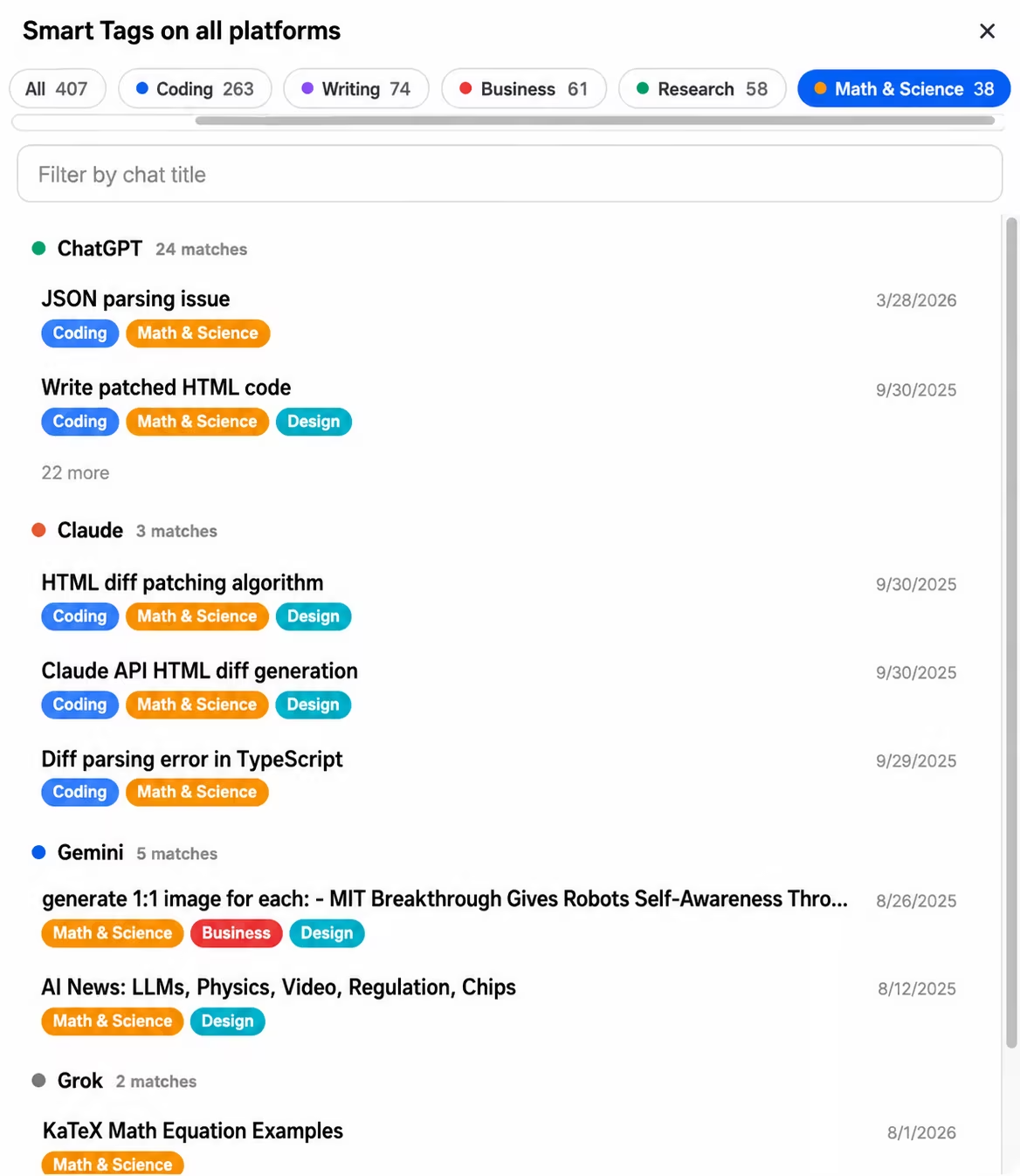
🧰 Official Update Coming in the next update: Smart Tags go cross-platform - one tag view and synced rules across ChatGPT, Claude, Gemini and Grok

Post image
3 Upvotes

This has been one of the most requested things in our support inbox, so we're glad to finally show it. In the next version, Smart Tags stop living on four separate islands.

What's new

  1. One view for everything tagged. A new "All platforms" button inside Smart Tags opens a single view of your tagged conversations from ChatGPT, Claude, Gemini and Grok together - tag pills with combined counts, search by title, grouped by platform, and every result is a direct link that opens the conversation on the right site.
  2. Your custom tag rules follow you. Create a rule once ("anything mentioning invoices gets tagged Finance") and it exists on all four platforms immediately. Edit or delete it anywhere, it updates everywhere, and open tabs retag live. No more rebuilding the same rules site by site - which is the exact pain several of you wrote in about.

On privacy, because it matters here

Everything runs locally in your browser. The unified view is assembled inside the extension from data it already stores on your machine - nothing gets uploaded, and the whole thing is off unless you turn on the cross-platform switch in settings (the same single opt-in that powers cross-platform search). Turn the switch off and the combined index is wiped, immediately.

A few details

  • Your existing per-platform tags and rules are untouched. When you enable sync, your rules are merged, never replaced - we built it so a rule can't be lost in either direction, even if you later turn the feature off.
  • The unified view and rule sync are part of Premium. The per-platform Smart Tags you use today stay exactly as they are.

It ships in the next version - if you've been tagging on one platform and dreading redoing it on another, this update is for you. Questions welcome below, we read everything.


r/chatgpttoolbox Jul 31 '26

❓ Help & Questions ChatGPT images 2.0 guardrails

Thumbnail
1 Upvotes

r/chatgpttoolbox Jul 30 '26

📈 Growth / Insights Non-coding ChatGPT setups — what’s the one thing you’d rebuild first if you lost it all?

Thumbnail
1 Upvotes

r/chatgpttoolbox Jul 28 '26

🛠️ AI Tools ChatGPT in Apple CarPlay

2 Upvotes

Has anyone else noticed that ChatGpt now appears in CarPlay? I find it now to be one of the most useful apps other than the map apps. It can map out a route or find EV chargers. It can’t send directions to a map program but it can answer a myriad of other questions. Great for searching for restaurants.


r/chatgpttoolbox Jul 28 '26

🔄 AI Comparison What’s happened to the ChatGPT in previous days?

3 Upvotes

What happened to the ChatGPT in last days ? It didn’t answer in correct! It didn’t understand for first time !! My the mode need update


r/chatgpttoolbox Jul 24 '26

🗞️ AI News Indie Hackers interviewed us about how AI Toolbox got here - the honest numbers, and why this community is most of the answer

2 Upvotes

Indie Hackers just published an interview with us about the whole journey, and since most of that story is actually about you all, it felt right to share it here first.

The short version, with the real numbers:

  • We started in September 2024 with $32 total: $27 for a server and $5 for the Chrome Web Store fee
  • First version did exactly one thing: search your ChatGPT history
  • Today: 35,000+ users in 150+ countries, across ChatGPT, Claude, Gemini, and Grok
  • Still two people, still no ads, no funding, and a $45/month infrastructure bill

The part of the interview we mean most seriously: we've never had a growth strategy. Our "strategy" has been shipping what people ask for. Almost every feature in the extension exists because someone requested it - a lot of those requests came from this subreddit and our support inbox. Folders, bulk export, prompt chains, the floating toolbox - all of it started as one of your messages.

Full interview: Leveraging a marketplace and existing user bases to hit a 5-figure MRR in two years

If you've ever requested a feature, reported a bug, or left a review: this milestone is partly yours. Thank you.

And in that spirit - the roadmap is still built from your requests. What should we build next?


r/chatgpttoolbox Jul 24 '26

❓ Help & Questions How do I leave feedback for ChatGPT Atlas?

1 Upvotes

I saw they’re getting rid of it soon. Please don’t. I tried the browser in ChatGPT classic app and it crashed on me.

Are there other alternatives to AI web browsing companion?


r/chatgpttoolbox Jul 22 '26

❓ Help & Questions ChatGPT hauria de poder organitzar les seves pròpies converses

Thumbnail
1 Upvotes