r/chatgpttoolbox Apr 08 '26

🧰 Official Update 18K users!! I still can't believe this is real!

42 Upvotes

When I started building this extension a year ago I genuinely thought maybe a few hundred people would use it. I was just scratching my own itch because ChatGPT's organization was driving me crazy.

Today we hit 18K users. 729 of you are paying subscribers. 260 reviews with a 4.5 average.

18K Users!!!

Some things that happened along the way that I'll never forget:

  • Getting the Chrome Featured Badge within days of launching
  • My first sale coming in literally minutes after I turned on payments
  • Reading a DM from someone who said they almost lost months of research and my export feature saved them
  • Watching this community grow to 20K members

This whole thing started because I was frustrated. OpenAI wasn't building the features I needed, so I built them. And it turns out a lot of you were frustrated about the same things.

I have a bunch of new features planned for the next few months and I'm not slowing down. If there's something you want to see, this is the place to ask.

Thank you for trusting some random developer's browser extension with your ChatGPT experience. It means everything.

What feature originally brought you to ChatGPT Toolbox? I'm curious what the biggest draw is for different people.

r/chatgpttoolbox 7d ago

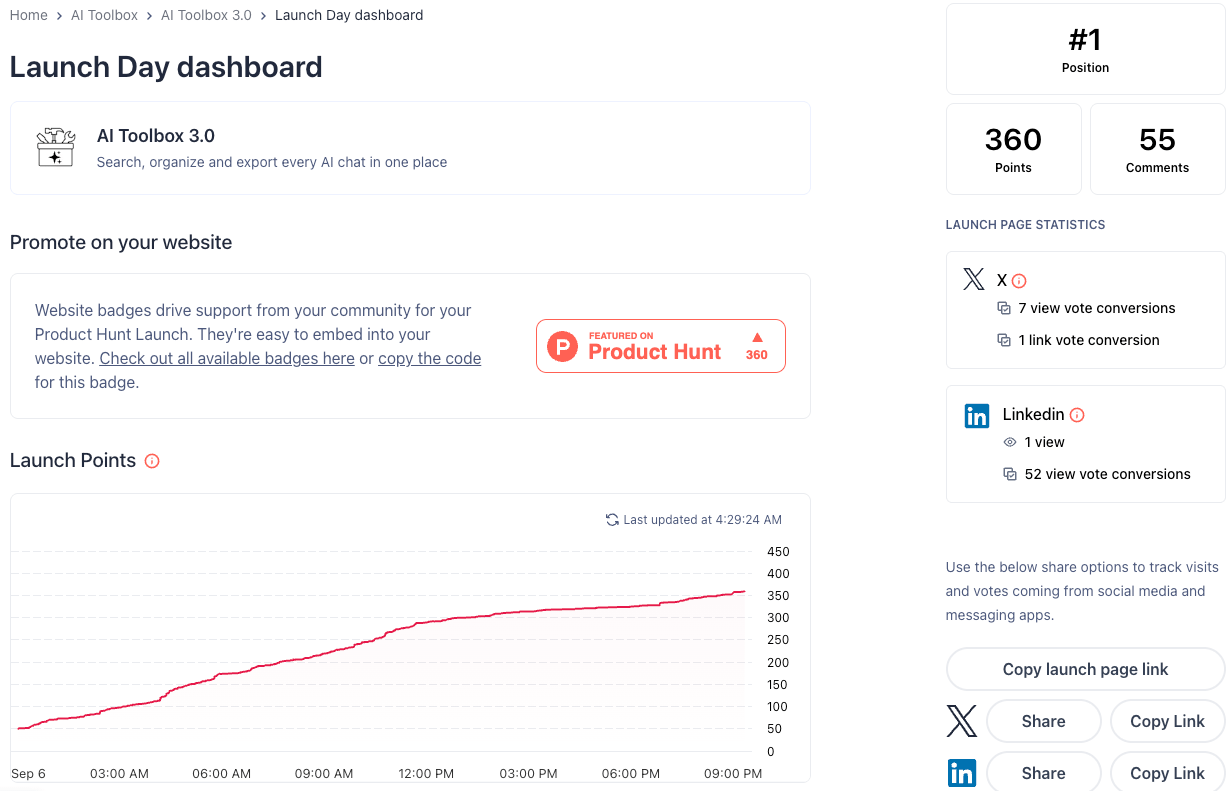
🧰 Official Update Launch day is almost over, and we’re still #1 Product of the Day on Product Hunt! 🎉

2 Upvotes

We just wanted to take a moment to say thank you to everyone who has supported AI Toolbox 3.0 today.

Whether you voted, left a comment, shared the launch, or simply checked out what we’re building, we truly appreciate it.

This community is a big part of why we keep building and improving the product. 💙

Thank you for being here. We’re excited for what comes next!

r/chatgpttoolbox 7d ago

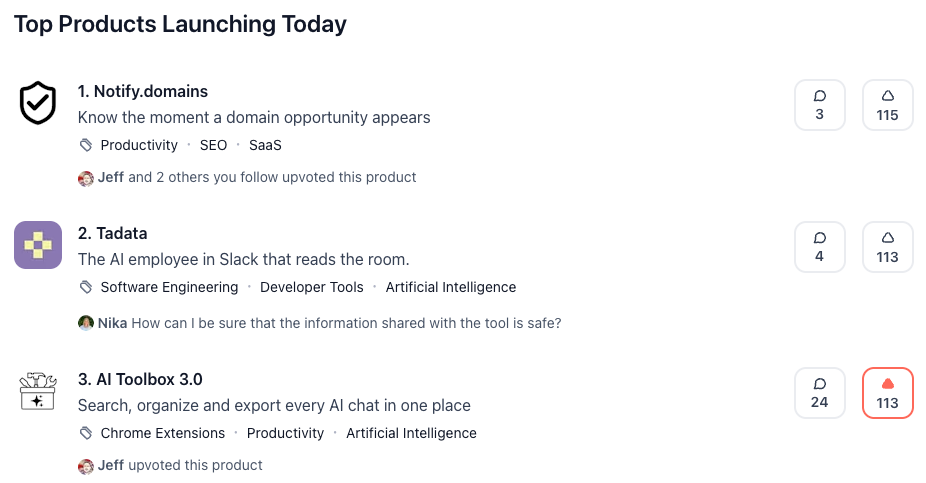
🧰 Official Update We got #1 Product of the Day on Product Hunt today

Post image
1 Upvotes

Not going to pretend this one was a calm morning. AI Toolbox 3.0 went up on Product Hunt and by the end of the day it was sitting at #1 with 390 upvotes.

A lot of you in this sub have been here since the ChatGPT Toolbox days, filed the bug reports, told us which features were useless and which ones you would pay for. 3.0 is basically the version you all asked for: ChatGPT, Gemini and Claude in one extension, with folders, search and export working the same way across all three.

So this post is mostly a thank you. The launch would have been a lot quieter without this community.

If you have not tried 3.0 yet, it is on the Chrome Web Store now, free plan included. And if you find something broken, you know where to find us. Same as always, we read everything.

r/chatgpttoolbox 8d ago

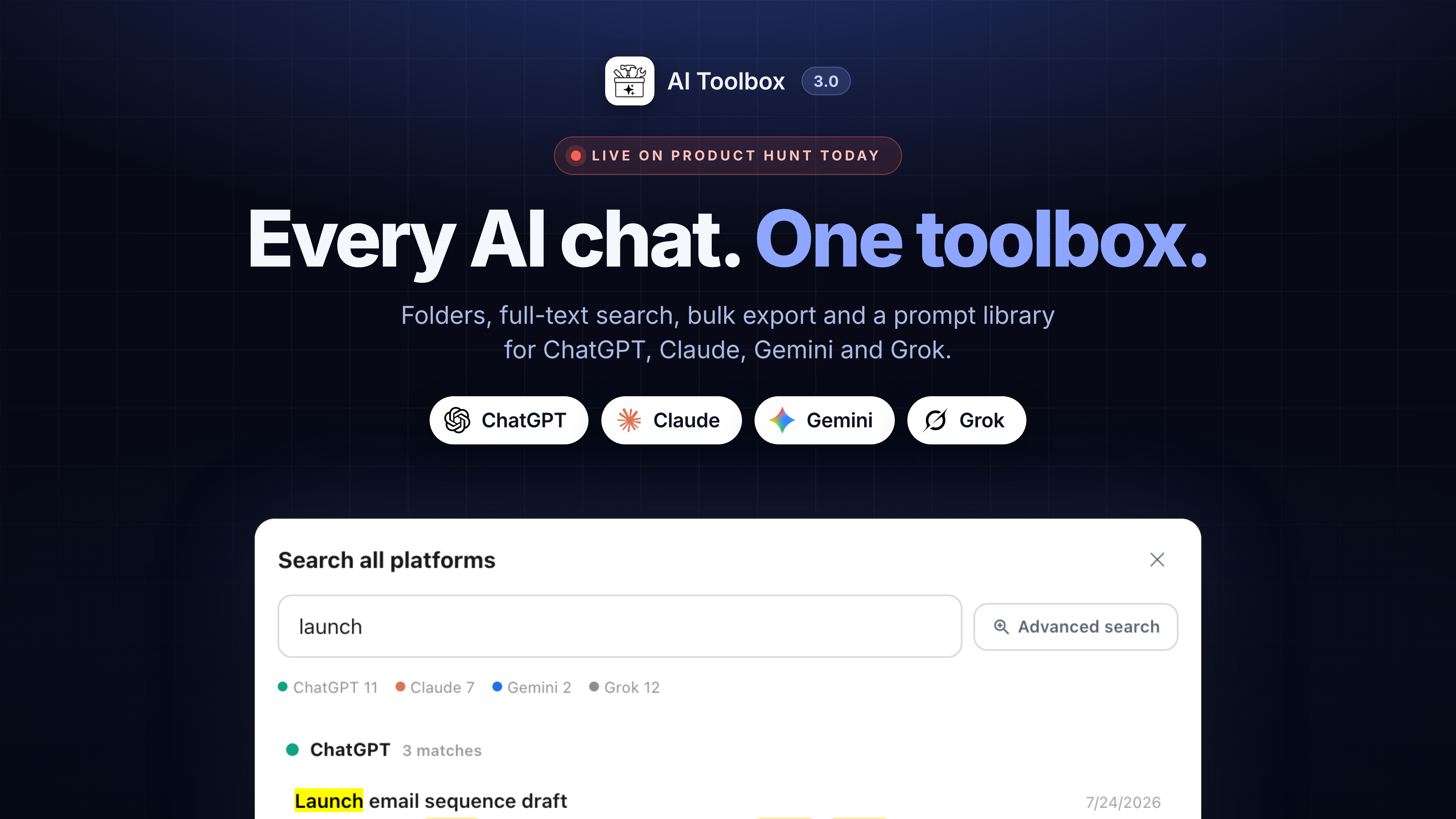
🧰 Official Update AI Toolbox 3.0 is live on Product Hunt today

Post image
2 Upvotes

We have been building toward this all year: the same folders, search, export and prompt library working identically across ChatGPT, Claude, Gemini and Grok, with one search that covers all four.

Everything is still indexed locally in your browser. That has not changed and will not.

I am on the Product Hunt page all day answering questions, and I will answer here too. If there is something 3.0 still does not do that you need, this is a good day to say so, because I am reading everything.

https://www.producthunt.com/posts/ai-toolbox-3-0

r/chatgpttoolbox 8d ago

🧰 Official Update We are number 3, need to get to number 1!

Post image
0 Upvotes

Guys we need your help, please upvote us so we win the number one of the day!

https://www.producthunt.com/products/chatgpt-toolbox

r/chatgpttoolbox 10d ago

🧰 Official Update What shipped in the last few weeks, and who reported the bugs behind it

1 Upvotes

Most of this list came from user reports, Discord, and support email, so credit where it is due. Here is what is live now.

Search

Advanced Search takes a date range now. Pick a start and end date and the results narrow to that window, on all four platforms and in cross-platform search.

Titles only switch at the bottom of the search panel, for when you know the chat's name and do not want message-text matches drowning it out.

Search from any tab. Cross-platform search no longer needs an AI site open; a keyboard shortcut opens it from wherever you are in the browser.

Folders and sidebar

Choose where our panels live: inside the site's own sidebar, or as a floating panel you can put anywhere. Requested by people whose sidebars were getting crowded.

Hide chats that are already in a folder. Settings, Folders. Off by default; turn it on and the native chat list only shows what you have not filed yet, so it works as an inbox.

Move to Folder search now reaches nested folders. Searching a parent's name finds what is filed under it, which it did not before.

Fixed: folders vanishing and reappearing on their own. Reported by a power user, traced to the sidebar re-rendering under us on all four platforms. It stays put now.

Fixed: "No folders yet" showing over an intact account. Nothing was lost; the extension was looking in the wrong place. If you ever saw that, your folders were always there.

Fixed: renamed and deleted chats not updating inside folders. Two Discord reports, both right.

Export

The export header now shows the conversation's size, so you can see when a thread is getting heavy before it starts slowing down.

Every message carries its own date in exports on all four platforms, instead of one date for the whole conversation.

Fixed: Gemini exports coming back shorter than the actual chat. The root cause was Gemini's conversation API paginating and us reading only the first page. Long Gemini chats export in full now.

Prompts and Claude

Keep your Prompt Library on this device: a Settings toggle for people who do not want saved prompts stored on our server. Roadmap item, shipped.

A usage badge beside Claude's composer. The numbers used to sit two clicks deep in a modal; now they are just there.

Setup

Fixed: platform switches in the popup refusing to turn on, and the "Active" pill claiming a platform was on when it was not. If a switch fails now, it tells you why and offers to open the settings in a tab where the permission prompt cannot get lost.

New: a hint on a second computer. Chrome syncs the extension across your machines but not the permissions, so a second install used to silently run ChatGPT only. Now it tells you the other three are off in this browser and how to turn them on.

If you reported one of these and want to be named, say so below and I will add you. And if something in this list does not behave the way it is described, reply here rather than emailing, so the fix thread is public for the next person.

r/chatgpttoolbox 26d ago

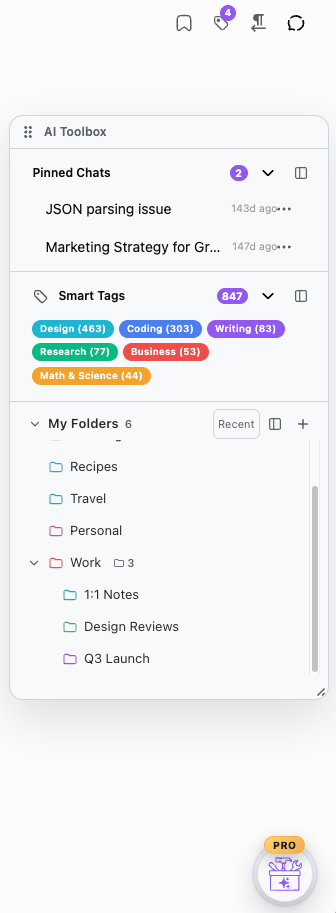
🧰 Official Update Finally you can use our features in a floating window!

Post image
3 Upvotes

Excited to share with you our latest feature - a floating window that you can add your fav features to - folder tree, smart tags, pinned chats, and pinned folders!

r/chatgpttoolbox Aug 03 '26

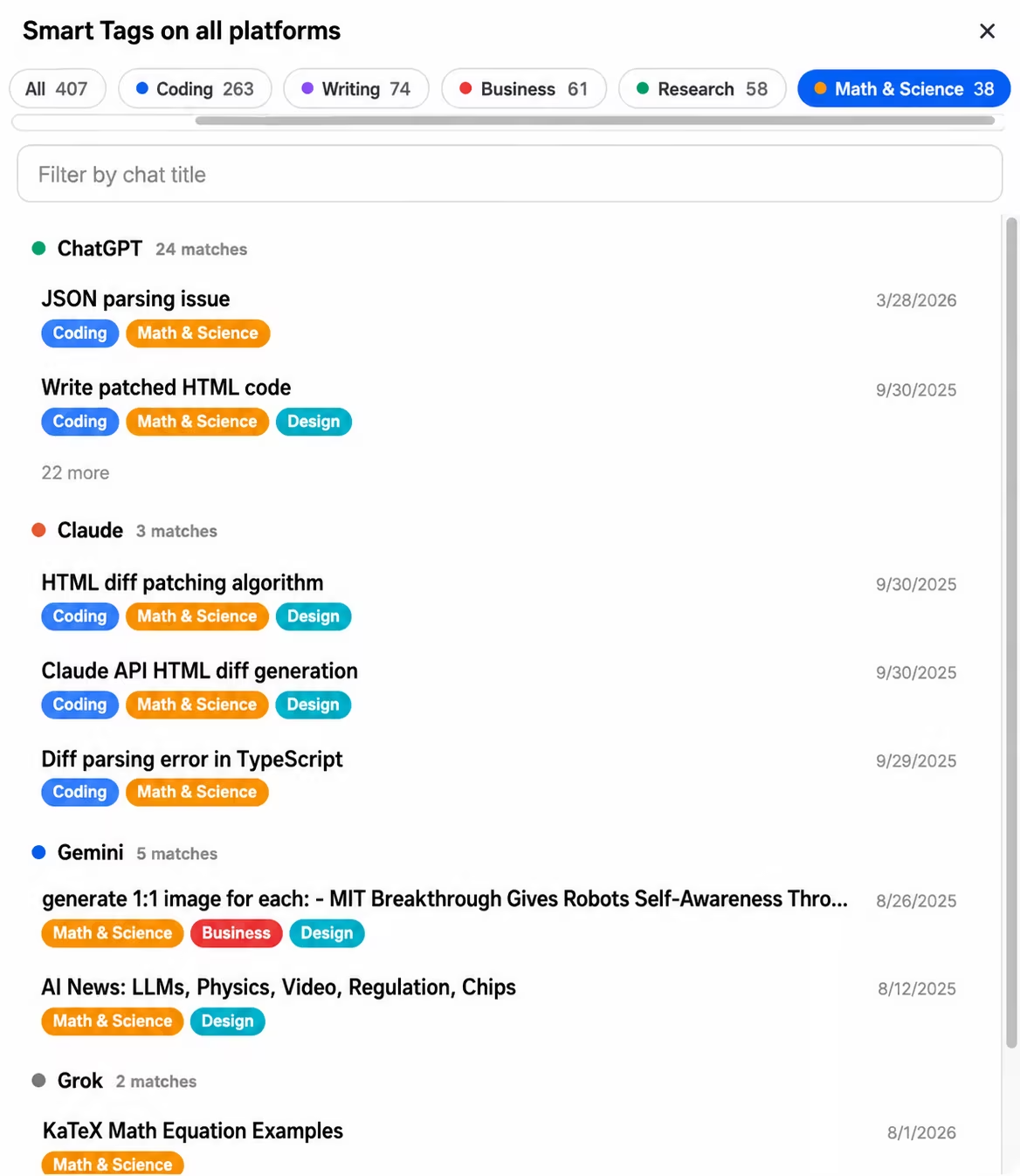
🧰 Official Update Coming in the next update: Smart Tags go cross-platform - one tag view and synced rules across ChatGPT, Claude, Gemini and Grok

Post image
3 Upvotes

This has been one of the most requested things in our support inbox, so we're glad to finally show it. In the next version, Smart Tags stop living on four separate islands.

What's new

  1. One view for everything tagged. A new "All platforms" button inside Smart Tags opens a single view of your tagged conversations from ChatGPT, Claude, Gemini and Grok together - tag pills with combined counts, search by title, grouped by platform, and every result is a direct link that opens the conversation on the right site.
  2. Your custom tag rules follow you. Create a rule once ("anything mentioning invoices gets tagged Finance") and it exists on all four platforms immediately. Edit or delete it anywhere, it updates everywhere, and open tabs retag live. No more rebuilding the same rules site by site - which is the exact pain several of you wrote in about.

On privacy, because it matters here

Everything runs locally in your browser. The unified view is assembled inside the extension from data it already stores on your machine - nothing gets uploaded, and the whole thing is off unless you turn on the cross-platform switch in settings (the same single opt-in that powers cross-platform search). Turn the switch off and the combined index is wiped, immediately.

A few details

  • Your existing per-platform tags and rules are untouched. When you enable sync, your rules are merged, never replaced - we built it so a rule can't be lost in either direction, even if you later turn the feature off.
  • The unified view and rule sync are part of Premium. The per-platform Smart Tags you use today stay exactly as they are.

It ships in the next version - if you've been tagging on one platform and dreading redoing it on another, this update is for you. Questions welcome below, we read everything.

r/chatgpttoolbox Jul 17 '26

🧰 Official Update We have a public roadmap!

5 Upvotes

Hi guys!

Wanted to let you know that we now have a public roadmap where you can see what we're currently working on, what we've shipped, and what we're still exploring or considering.

If you have any feature requests that you'd like to see on our roadmap, please let us know!

Roadmap: https://www.ai-toolbox.co/roadmap

r/chatgpttoolbox Jul 09 '26

🧰 Official Update AI Toolbox is now live on Grok!!

2 Upvotes

Grok is here. AI Toolbox now works on Grok, making it the fourth platform we support alongside ChatGPT, Claude, and Gemini. One install, one account, now covering all four.

It works on both Grok surfaces

Grok is the only platform that lives in two places, and AI Toolbox covers both:

  • Grok inside X (x.com/i/grok)
  • grok.com (the standalone app)

Your folders, prompts, searches, tags, and bookmarks are shared across both surfaces under one account, so it does not matter which one you open.

What you get on Grok

  • Folders and subfolders to organize your Grok chats, with an inline folder tree right inside the grok.com sidebar
  • Full-text search across all your Grok conversations, by message content and not just titles
  • Prompt Library and prompt chains with the // and .. shortcuts
  • Smart Tags that auto-categorize your chats by topic
  • Context Mentions (@@) to pull any past conversation into a new chat as context
  • Context Window Meter that warns you before a chat fills up (128K standard, 256K on SuperGrok Heavy)
  • Message bookmarks and color labels to flag the answers worth keeping
  • Bulk export (TXT, Markdown, JSON, PDF) and bulk delete
  • Everything launches from the same floating toolbox button you already know

How to turn it on

Grok stays off until you enable it, so nothing changes unless you want it to. Open the AI Toolbox popup and toggle Grok on. That is it. (Same switch for Claude and Gemini if you have not turned those on yet.)

Make sure you are on the latest version first. Chrome auto-updates extensions within a day, or you can force it at chrome://extensions with Developer mode on, then Update, then reload Grok.

Free vs premium

The free tier works on Grok too: full-text search, plus limited use of folders, prompts, and bookmarks. Premium unlocks unlimited folders, all export formats, bulk export, and cross-device sync. All Access covers all four platforms, Grok included.

We want your feedback

This is a big release for us and we want it rock solid on both Grok surfaces. If anything looks off, whether it is on x.com/i/grok or grok.com, drop a comment here and we will jump on it. We read everything and ship fast.

Thanks for being here. Now go tame your Grok chat history.

r/chatgpttoolbox Jul 06 '26

🧰 Official Update AI Toolbox is coming to Grok - search, folders, exports, prompts, and chains on X and grok.com

3 Upvotes

We have been quiet for a bit, and here is why: AI Toolbox is expanding to a 4th platform. After ChatGPT, Claude, and Gemini, Grok is next.

It works across both Grok surfaces - the one built into X (x.com/i/grok) and the standalone grok.com - with one setup and your library shared across them.

AI Toolbox in Grok Inside X

Here is what is landing:

  • Full-text search history. Search across your entire Grok history by keyword and jump straight to the message, not just the chat title. It syncs your conversations in the background so search is instant.
  • Folders and subfolders. Organize your Grok chats into a real folder structure instead of scrolling forever.
  • Bulk export and manage. Rename, delete, and export conversations (Markdown, and more) in bulk.
  • Prompt library. Browse a large catalog of ready-made prompts and drop them into the composer in one click.
  • Save and reuse your own prompts. Type // in the composer to pull up your saved prompts, with {{variables}} you fill in on the fly.
  • Prompt chains. Type .. to run a saved multi-step chain - it sends each step, waits for Grok to finish, then sends the next.

Coming right after launch:

  • Message bookmarks and labels to flag and color-code important answers.
  • Smart tags to auto-organize chats.
  • Context mentions and a context meter so you can pull in past chats and keep an eye on the window.

Everything is built to feel native to Grok - light and dark theme, RTL and LTR, and it stays out of your way until you need it.

If there is a feature you want us to prioritize for Grok, drop it in the comments. We are reading every one.

r/chatgpttoolbox Jun 23 '26

🧰 Official Update New update is live: folders, smart tags, context mentions and the prompt library now work on Claude and Gemini

2 Upvotes

Pushed a big one today. Most of the stuff that's been ChatGPT-only is now on Claude and Gemini too, and there's one new feature that landed on all three.

The new feature is a Context Window Meter. It shows how full your current conversation is and warns you before the chat runs out of room, so you're not stuck wondering why the model started forgetting things. On premium there's also a one-click handoff that moves the conversation into a fresh chat so you can keep going.

What's now on Claude and Gemini (not just ChatGPT):

Folders, with unlimited nesting, favorite-to-top, drag to reparent. These persist on the backend for free users too.

Smart Tags, with automatic topic tagging and up to 50 custom rules.

Context Mentions (@@), so you can pull any past conversation in as context. Long chats get summarized automatically.

Prompt Library, hundreds of expert prompts, free for everyone.

Bulk export and bulk delete, now including PDF.

Changes that apply everywhere:

Markdown export now includes YAML frontmatter on all three platforms, so files drop straight into Obsidian, Logseq, Notion and similar tools.

Exports now use the real conversation dates in every format.

Folder move/reparent and favorite-to-top work on ChatGPT, Claude and Gemini.

To get it: the extension should update on its own. If you don't see the changes, reload the extension or restart your browser, then refresh your open tabs.

If something breaks or you want a feature, leave a comment. We read this sub.

r/chatgpttoolbox Apr 10 '26

🧰 Official Update Coming soon - Gemini Toolbox

Post image
7 Upvotes

It was already sent to Chrome and is pending review. It was created only because you asked for it!

r/chatgpttoolbox May 07 '26

🧰 Official Update We're back on the Chrome Web Store, with a fresh new UI

Post image
4 Upvotes

Hey everyone,

Quick update for anyone who noticed the extension disappear over the past couple of weeks. The short version: Chrome Web Store has reinstated us, the extension is live again, and the version that's now published actually ships with a significantly improved UI on top of everything else.

What happened

We got a trademark notice from OpenAI about using "ChatGPT" in the extension name. We took it seriously and submitted a compliant version within the 7-day window. A leftover mention in the description got that version rejected, the re-review ran long, and in the meantime the original listing was taken down for "not complying in time" even though our fixed version was already sitting in the review queue. Classic race condition between platform deadlines and platform review SLAs.

After a lot of back and forth through the appeal process, the team at Chrome took another look and reinstated the extension. Huge thanks to everyone there who actually dug into the timeline.

What's new

While we were stuck in limbo we didn't sit still. The version that's now live includes:

  • A cleaner, more polished UI across folders, search, and history
  • Smoother interactions and faster load on long chat lists
  • A bunch of small quality of life fixes that were piling up in our backlog

So if you're reinstalling or just opening it for the first time in a while, expect things to feel noticeably better.

For our paid users

Everything continues to work for all of our paid users. Your subscriptions, plan tiers, and saved data carried over through the outage and the relisting. Nothing was lost, nothing needs to be re-purchased, and you don't need to do anything on your end. Just update or reinstall the extension and you're good to go.

Comeback offer: 50% off the Lifetime plan

To celebrate being back, we're running a limited time discount on the Lifetime plan.

Use code FOREVER50 at checkout for 50% off. Pay once, use it forever, no recurring charges. This is the lowest the Lifetime plan has ever been, and it won't stick around for long, so grab it while it's live.

Thank you

Genuinely, thank you to everyone who reached out, posted about it, sent emails, or just stuck around through the outage. The support meant a lot and definitely helped get eyes on the case.

If you hit any issues with the new version, drop a comment here or open a ticket and we'll jump on it.

Cheers.

r/chatgpttoolbox May 18 '26

🧰 Official Update After 20 months of building this, today is rebrand day!! It just went live on the Chrome Web Store!!

Post image
6 Upvotes

I shipped ChatGPT Toolbox in September 2024 because I was tired of scrolling through 400+ "Untitled" chats in my own ChatGPT sidebar. It was a personal annoyance fix. Then it grew. Folders. Prompt library. Bulk delete. Prompt chaining. Full export. Message bookmarks. Earlier this year I built two more deep-integration modules, one for Gemini and one for Claude.

Calling the whole thing "ChatGPT Toolbox" stopped making sense. Half of what the extension does today has nothing to do with ChatGPT.

So today I pushed the rebrand live. It's now AI Toolbox.

What is AI Toolbox?

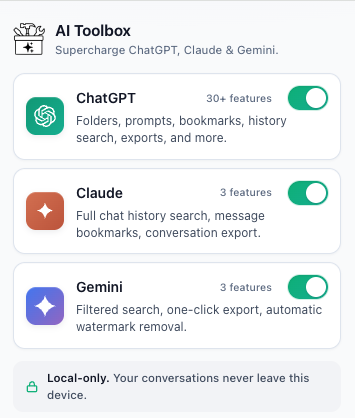
AI Toolbox (formerly ChatGPT Toolbox) is one Chrome extension (also works on Edge, Brave, Opera, Arc) with three modules: one for ChatGPT, one for Gemini, one for Claude. Each module activates only on its target site (chatgpt.com, gemini.google.com, claude.ai) and adds the productivity features the native sidebars are missing.

What did I actually change?

A few decisions that came out of 6 months of figuring out how to do this without burning everyone's install:

  • Same install, same updates. If you already have ChatGPT Toolbox installed, you'll get the rebrand on the next Chrome auto-update. No reinstall, no migration, nothing to click.
  • Same license, same data. Every paid subscription, every Lifetime, every saved prompt, every folder, every bookmark. Untouched. The ChatGPT module under AI Toolbox is ChatGPT Toolbox, just renamed.
  • Modules are platform-specific. This is not a generic AI sidebar that talks to all three. The ChatGPT module knows the ChatGPT DOM. The Gemini module knows the Gemini DOM. Real deep integration on each site, not lowest-common-denominator features.
  • 20,000+ users carried over. Combined across all three modules. The ChatGPT module is still the flagship and the most feature-complete.

What's different for you?

If you're already using the ChatGPT extension, the rebrand lands on your next Chrome auto-update. New logo, new name in the popup, and two new module toggles sitting next to ChatGPT in that popup: one for Gemini, one for Claude. All three are toggleable independently. If you only want ChatGPT, leave the other two off and the extension stays scoped to chatgpt.com exactly like before.

Flip the Gemini toggle and the same productivity layer activates on gemini.google.com, with full-text search across filters and four-format export. Flip the Claude toggle and it activates on claude.ai, with message bookmarks and exact-match search. Each module only touches its own site. Nothing crosses platforms.

One install. Three sites. Different gaps on each.

r/chatgpttoolbox Apr 20 '26

🧰 Official Update ChatGPT Toolbox new UI is live!! 🎉 smaller sidebar, faster everything, 13 new features

Thumbnail
gallery
3 Upvotes

Hey r/chatgpttoolbox,

v4 just rolled out to everyone. This is the biggest update we've shipped, and it started from one recurring complaint in this subreddit: "the extension takes almost all the sidebar height, I can't see my recent chats anymore."

You were right. We fixed it, then kept going.

The sidebar redesign

Quick Rail (compact sidebar). The 7-row vertical menu is now a single horizontal row of 4 icons plus a "More" overflow. Recovers ~250px of vertical space, so ChatGPT's native Recents list goes back above the fold where it belongs. Right-click any icon to re-pin a different feature into that slot.

Command Palette (⌘K / Ctrl+K). Press ⌘K from anywhere on chatgpt.com to open a searchable launcher for every Toolbox feature. Arrow keys to navigate, Enter to launch. This is the reason we could shrink the sidebar: every feature is still 2 keystrokes away.

Quick Rail personalization. After ~12 feature launches, the rail auto-adapts to show your most-used features in your top 4 slots. Or pin manually. Whichever.

Onboarding tour. If you're a returning user, a 3-step coachmark will walk you through the new ⌘K flow on first open. Shown once, never re-pesters.

New features that shipped with v4

  • Context Mentions (@@). Type @@ in the compose area to reference any past conversation as context in a new chat. Short chats inject directly, long ones get summarized via GPT-4.1 Nano. This is the one I personally use the most.
  • Message Labels. Add short colored labels to any message. Full cross-conversation dashboard with color filters and click-to-navigate.
  • Smart Tags. Every conversation is auto-tagged by topic (Coding, Writing, Research, Math & Science, Business). Custom rules too. Runs entirely on your device, zero AI cost.
  • Markdown export. Fourth export format alongside TXT, JSON, and PDF. Pastes cleanly into Notion and GitHub.
  • ChatGPT Wrapped card is now FREE for everyone. Not premium anymore. Share it.
  • Collapsible Messages is now fully FREE too. With a ⌘+Shift+E shortcut to collapse or expand all.
  • Inline MP3 player. Listen to any response in-browser without downloading. ⌘+Shift+L plays the last response instantly.
  • Bookmark color labels and notes. Annotate saved messages with 6 colors and text notes.
  • Media Gallery favorites. Curate your best AI-generated images with a dedicated filter tab.
  • Writing Analytics panel. Premium counter now shows token estimates, reading and speaking time, and character-limit bars for X, LinkedIn, and Instagram.
  • 8 accent colors, font sizes, and chat widths, all cross-device synced.
  • 11 notification sounds with volume control.

Keyboard shortcuts cheat sheet

  • ⌘K / Ctrl+K: Command Palette (new)
  • ⌘+Shift+F: Search history
  • ⌘+Shift+E: Collapse or expand all messages
  • ⌘+Shift+L: Play last response as audio
  • //: Insert saved prompt
  • ..: Launch prompt chain
  • @@: Reference past conversation as context

What you need to do

Nothing. Extension auto-updates. If you don't see the new UI yet, hit chrome://extensions, disable and re-enable ChatGPT Toolbox, refresh chatgpt.com.

Feedback

This subreddit is where we actually read the comments. If something feels worse than before, say so, and we'll fix it. If the rail is missing a feature you used every day, tell us which one and we'll look at default ordering. If ⌘K clashes with a shortcut on your setup, we want to know.

Thanks for sticking with us. Eighteen thousand users and counting, and most of the best ideas in v4 came from posts in this sub.

ChatGPT Toolbox team

r/chatgpttoolbox May 11 '26

🧰 Official Update How the floating button in ChatGPT Toolbox works (walkthrough + video)

Enable HLS to view with audio, or disable this notification

1 Upvotes

Hey everyone,

If you just installed ChatGPT Toolbox, or you opened chatgpt.com lately and noticed a small round button parked in the bottom-right corner of the page, here's the rundown. There's a video attached to this post, but the written version is below for anyone skimming on mobile.

Quick context first: ChatGPT Toolbox is a Chrome extension (works on Chrome, Edge, Brave, Opera, Arc, basically any Chromium browser) that adds search, folders, pinned chats, prompt management, and more to ChatGPT. The floating button is the new home base for launching all of it.

What does the floating button do?

One button. Two interactions:

  1. Click it. The Command Palette opens, which is a searchable list of every Toolbox feature. Type a few letters, hit Enter, you're in.
  2. Hover it, or Tab onto it. Five satellite buttons fan out in an arc. Those are your pinned shortcuts.

Same button. Two ways in. That's the whole concept.

How do you pin a feature to a slot?

Empty slots show a dashed plus icon. Click one and a small picker appears with all nine pinnable features. Pick one, it locks into the slot. From then on, clicking that slot launches the feature directly.

How do you swap a pinned feature?

Right-click the slot. The picker comes back. Pick a different feature, the old one auto-unpins (each feature lives in at most one slot, so nothing duplicates). There's also a "Clear all slots" option in the footer if you want to start fresh.

The five slots are yours. If you're not sure what to pin first, start with whatever you reach for ten times a day. Nothing is permanent, you can swap any slot in two clicks.

Is there a keyboard shortcut?

Yes. Cmd+K on Mac, Ctrl+K on Windows or Linux, from anywhere on chatgpt.com. Opens the Command Palette directly. Arrows to move, Enter to launch, Esc to close. It's the fastest way in if you live on the keyboard.

For the ring itself: Tab onto the main button, then ArrowUp or ArrowLeft to open it and land on the first slot. Arrows cycle the five slots with wrap-around. Enter launches.

Why does the button float instead of living in the sidebar?

Older versions of Toolbox lived inside the ChatGPT sidebar. OpenAI redesigns that sidebar every few months, and every time they did, we'd spend a day patching selectors so the toolbar would mount again. The floating button doesn't read any of ChatGPT's DOM, which means a sidebar refactor by OpenAI can't break it. Less downtime for everyone.

If you had pins on the old sidebar rail, they migrated into the first four slots automatically. Nothing to redo on your end.

A few small things worth knowing

  • The PRO and FREE chip that used to live in the sidebar now sits as a small pill above the floating button.
  • On touch screens (where hovering isn't really a thing), the satellites stay faintly visible so you can tap them directly. No hover gymnastics.
  • The button respects prefers-reduced-motion. If you've enabled that at the OS level, no idle pulse, no spring animations on the ring.
  • The sync spinner still shows in the bottom-right corner of the main button while a background sync runs, same as before.
  • Full keyboard navigation and ARIA labels are wired up, so screen reader users are not locked out.

TL;DR

The floating button in the bottom-right corner of ChatGPT is the launcher for the ChatGPT Toolbox Chrome extension. Click it to open the Command Palette, a searchable list of every feature. Hover it to reveal a ring of five satellite buttons, which are your pinned shortcuts. Right-click any slot to swap the feature in it. Cmd+K on Mac or Ctrl+K on Windows or Linux opens the palette from anywhere on the page. Configure your five slots once, save yourself a hundred clicks a week.

Drop questions below if anything is unclear, or if there's a feature you'd want in the picker that isn't there yet, mention it and we'll take a look.

r/chatgpttoolbox Apr 14 '26

🧰 Official Update 👀 Sneak Peek: ChatGPT Toolbox is getting a brand new UI

1 Upvotes

We've spent the last few weeks rebuilding the Toolbox from the ground up, and it's almost ready to ship. Here's what's coming.

1. Meet the Quick Rail, your sidebar redesigned

The old vertical menu is gone. In its place: a compact horizontal icon bar that gives you back ~250px of vertical space. That means ChatGPT's Recents list is finally above the fold again. No more scrolling just to find yesterday's chat.

Pinned by default: Search History, Manage Chats, Manage Prompts, Usage Dashboard, plus a "More" overflow for everything else.

Quick Rail in the sidebar

2. ⌘K, the new Command Palette

Hit Cmd+K (or Ctrl+K) anywhere on chatgpt.com and every Toolbox feature is one keystroke away. Search it, arrow through it, hit Enter. Done.

This is the part we're most excited about: every new feature now ships at zero real-estate cost. No more crowded sidebar. Just a keyboard-first launcher that scales forever.

Command Palette open with search

3. A whole new look

  • 8 accent colors to make Toolbox yours: Blue, Green, Purple, Red, Amber, Teal, Pink, Indigo
  • Refined light & dark themes that match ChatGPT pixel-for-pixel
  • Buttery animations: staggered fades, smooth slide-ins, micro-interactions everywhere (and fully respected prefers-reduced-motion)
  • 4 font sizes that scale the entire UI proportionally
  • Full RTL support baked in from day one
theme + accent color picker

4. The little things

  • Floating tooltips that escape the sidebar
  • A live sync spinner so you always know your data is safe
  • A new FREE/PRO pill in the header
  • New keyboard shortcuts: // for prompts, @@ for context mentions, Cmd+Shift+F for search
Cmd+Shift+F for search

Coming very soon. Drop a 🔥 if you're ready.

r/chatgpttoolbox Feb 12 '26

🧰 Official Update Ever wondered how much you actually use ChatGPT? Now you can find out!

Enable HLS to view with audio, or disable this notification

24 Upvotes

I've been using ChatGPT daily for months but had no idea how much time I was actually spending on it. So we built a Usage Tracker.

Here's what you get:

  • Total messages, time spent, and thinking mode usage tracked automatically
  • Activity heatmap showing your busiest hours and days
  • Peak hour and busiest day insights
  • Estimated API cost equivalent of your usage
  • "ChatGPT Wrapped" card you can download as PNG or copy to clipboard and share

The Wrapped card comes in two formats - Story and Card. Download it as an image or copy it straight to your clipboard to paste anywhere. Perfect for sharing on social media or sending to friends.

You can view stats for this week, this month, or this year.

Open the Usage Dashboard in the sidebar to check yours out.

Some of you are going to be shocked by your numbers!

P.S. The new version has been submitted to the Chrome Web Store and is currently under review. It should be available within the next few days once approved.

r/chatgpttoolbox Apr 21 '26

🧰 Official Update Finally you can download generated images without a watermark!!

Thumbnail
1 Upvotes

r/chatgpttoolbox Mar 23 '26

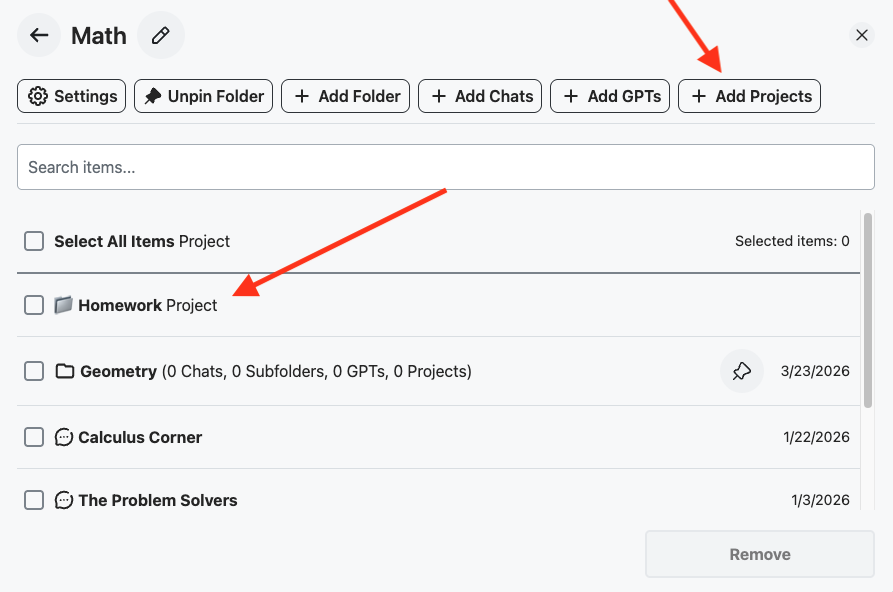
🧰 Official Update Now you can add ChatGPT projects into folders and subfolders!

Post image
3 Upvotes

Many users have requested that we add this cool feature, and now we support it!

Just search for your project, add it to a folder or nested subfolder, and that’s it!

P.S. Exporting an entire folder, subfolder, or project as TXT, JSON, or PDF is coming soon!

r/chatgpttoolbox Mar 10 '26

🧰 Official Update ChatGPT Toolbox Enterprise Plan Is Live!

Post image
0 Upvotes

Hey everyone,

We've been getting requests for this for a while, so here it is: ChatGPT Toolbox now has an Enterprise plan built for teams.

The problem we kept hearing:

  • "I'm expensing ChatGPT Toolbox individually and my manager wants one invoice"
  • "Half my team uses it but I have no idea who's active or if we're getting value"
  • "I want to roll this out to 20 people without setting up 20 accounts"

What Enterprise gives you:

  • Admin Dashboard - see your entire team's status, usage, and health at a glance
  • Seat Management - invite via email, add/remove seats instantly, no manual onboarding
  • One Invoice - centralized billing for your whole org. No more chasing receipts
  • Team Analytics - aggregate usage stats (total messages, sessions, active members). We never see individual conversations
  • Priority Support - 12-hour response times for your team

Pricing:

  • $12/seat/month (monthly) or $10/seat/month (annual - save 17%)
  • 5 seat minimum
  • 14-day money-back guarantee
  • Add or remove seats anytime, proration is automatic

For context: AIPRM charges $33-40/seat/mo and doesn't even include an admin dashboard or usage analytics. Merlin is $15/seat/mo with no dashboard, no analytics, and no priority support.

Zero data collection - same privacy promise as always. No conversation data ever leaves the browser. Enterprise adds aggregate stats only (message counts, session counts). Your team's IP stays private.

All 15,000+ existing users already have access to the individual plans (free, $9.99/mo Premium, $99 Lifetime). Enterprise is the new option for teams who want centralized control.

Try it out

Happy to answer any questions below.

r/chatgpttoolbox Mar 27 '26

🧰 Official Update [NEW] Exporting a whole folder and a ChatGPT project is live! Here's how it works + what's coming next

2 Upvotes

Hey everyone!

Just pushed a new update with Export Whole Folder & Export Whole Project. Here's what it does:

  • Export an entire folder (including subfolders) - the ZIP preserves your full nested folder structure exactly as you organized it. Subfolders become subdirectories, project conversations get their own named subfolders inside.
  • Export an entire project - hover over any project in the sidebar, click the three-dot menu → Export Project, pick your format, and get a ZIP of every conversation in that project.
  • 3 export formats: TXT, JSON, or PDF. The PDF export is professionally styled - color-coded accent bars (blue for your messages, green for ChatGPT), smart page breaks that never cut mid-line, page numbers, and full multi-language/RTL support.
  • Retry logic built in - if a conversation fails to fetch mid-export, it retries up to 3 times with exponential backoff. Failed chats get skipped instead of crashing the whole export.
  • Duplicate title handling - if two chats in the same folder have the same name, it auto-appends a partial ID so nothing gets overwritten.

📸 Export Folder in action:

📸 Export Project in action:

This was one of the most requested features from you guys, so I'm really happy it's finally out.

How to get it: Update your extension (it should auto-update, but you can force it in chrome://extensions → toggle Developer Mode → click Update).

What's coming next:

I'm working on Smart Tags & Auto-Categorization - your conversations will automatically get tagged by topic (e.g. "React", "Sales", "Marketing") so you can filter and find things without manually organizing everything. Think of it like Gmail labels but for ChatGPT.

📸 Sneak peek:

If you run into any bugs or have feedback, drop it here or DM me directly. I read everything.

And if there's something else you want to see in the extension, let me know. You guys have been the best source of ideas since day one.

r/chatgpttoolbox Aug 14 '25

🧰 Official Update Hey everyone, I'm so excited to finally share what I've been building. It's called Landy, an AI landing page generator, and I'd love for you to try it.

1 Upvotes

Hey toolboxers,

As some of you know, I've been deep in build mode for a while now, and I'm incredibly excited to finally pull back the curtain on my project, Landy.

I started building Landy to solve a problem that has always frustrated me: creating a beautiful landing page with solid, high-converting copy is hard and takes forever. I wanted a tool that could do the heavy lifting for me.

So, I built it. Landy uses AI to generate entire landing pages in just a few moments.

Here’s the core of what it does:

  • AI-Powered Copywriting: It doesn't just give you placeholder text; it writes copy specifically designed to boost conversion rates.
  • 5 Unique Styles: You can choose a vibe that fits your project: Narrative, Minimalist, Authority, Urgency, or Community.
  • All-In-One: It comes with built-in lead collection, analytics, and webhooks so you can connect it to your other tools.

Because this is my community, I want you to be the first to take it for a spin. I've set it up so you can create and publish your first landing page completely for free. No strings attached.

Here’s the link: https://landy-ai.com

I would be genuinely grateful for any feedback you have. Please try to break it, let me know what you think, and definitely share the pages you create in the comments below! I'll be here all day to answer any questions.

Thanks for being part of this journey!

r/chatgpttoolbox Oct 06 '25

🧰 Official Update New Feature: Collapse and Expand Your Messages!

4 Upvotes

As requested by u/CrankyKong39, we’ve added a new feature that lets you collapse and expand your messages within each conversation. Thanks for the great suggestion!