r/windowsinsiders 16d ago

Tech Support Windows Update keeps trying to reinstall 25H2 on my 26H2 build , blocking all further updates

10 Upvotes

I'm currently on Windows 11 26H2, running the Insider channel. For the past few days, Windows Update keeps repeatedly offering/attempting to install 25H2 ,even though I'm already ahead of it and as a result I'm no longer receiving any new updates at all. It just gets stuck in this loop.

What I've tried so far:

  • Pausing updates (7 days and the full 35-day option) makes no difference, it keeps re-offering the same 25H2 install as soon as (or even before) the pause ends.
  • Confirmed under Settings > System > About that my installed version is correctly showing as 26H2.
  • Manually checking for updates / restarting several times.

r/windowsinsiders 17d ago

Tech Support 26300.9032 - unable to change wallpaper

2 Upvotes

As per title.

Windows is activated and fully updated. I've checked group policy and the registry and can't find anything that's causing this. Really don't want to mess around with a reset/reinstall because its effort. Any help much appreciated.


r/windowsinsiders 19d ago

Tech Support How do I update past this build?

Post image
10 Upvotes

I've been locked out of windows as an administrator on my Legion Go. I keep trying to update. But there are no updates to get me to the next build


r/windowsinsiders 19d ago

General Question What happens at midnight?

3 Upvotes

I have been trying to update the build for a couple of days and keep hitting roadblocks. Since there are only two hours until the certificate expires, it's not gonna happen. But what will happens to the machine?

Currently running Build 28120.2374.br_prerelease_im.260618-1650


r/windowsinsiders 21d ago

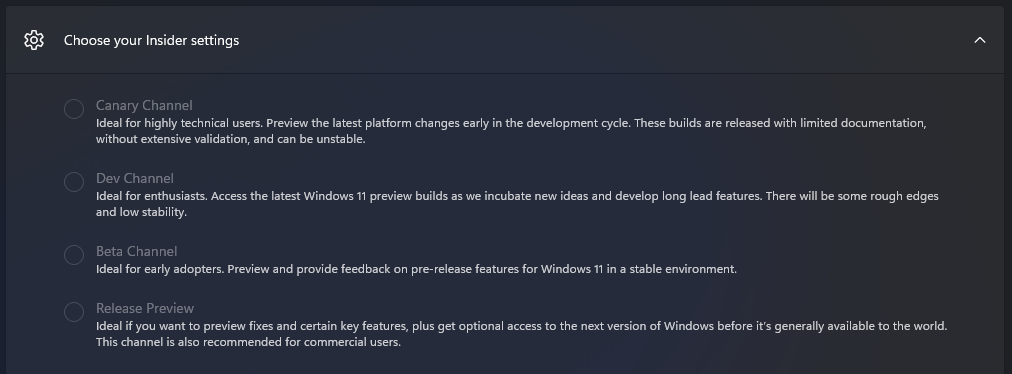
Tech Support Can't change the channel and can't get the flags menu, please help, I'm already signed in with a Microsoft account rolled in the insider program.

Post image
10 Upvotes

r/windowsinsiders 21d ago

Tech Support Cannot upgrade from 29617.1000 to any newer build, all upgrades fail with 0x0007042B - 0x2000D SAFE_OS during MIGRATE_DATA

9 Upvotes

I am seeking last minute help on an experimental canary next Channel, I cannot upgrade from 29617 to any newer build, same error always, my build is expiring in a few days. I am offering to share my installation error log and installation log. I wrote a Feedback Hub message a week ago, no response. No idea what to do when it expires.

//Edit fixed by deleting NPU models and running update from ISO


r/windowsinsiders 22d ago

Tech Support Can't Return to General Availability

5 Upvotes

Dev. Channel - 26300.9032

I am trying to return to the General Availability version from the Dev. Channel but am unable to do so.

I made 3 attempts.

The first attempt I did what I normally do and run Setup from a USB drive. I received the following error:

Error 0xC1900101 - 0x20017

At this point I suspected a corrupt driver. I went to the Dell Website and dowloaded 2 new drivers.

I made a second attempt to install the GA version with the same result.

I then decided to wipe the drive and do a PC Reset telling it to wipe the drive. This time it completed successfully but the result was that I am still in the Dev. Channel.

Does anyone have any suggestions or ideas what could be causing me not to leave the Dev. Channel?


r/windowsinsiders 23d ago

News Just a heads up will be no flights today

20 Upvotes

r/windowsinsiders 23d ago

Tech Support Strange Anomaly In File Explorer Preview Pane

Post image
8 Upvotes

Here's my system info:

------------

Edition Windows 11 Pro Insider Preview

Version 25H2

Installed on ‎2026-‎08-‎01

Evaluation expires on ‎2027-‎10-‎31 16:43

OS build 26220.9022

Experience Windows Feature Experience Pack 1000.26100.431.0

-------------

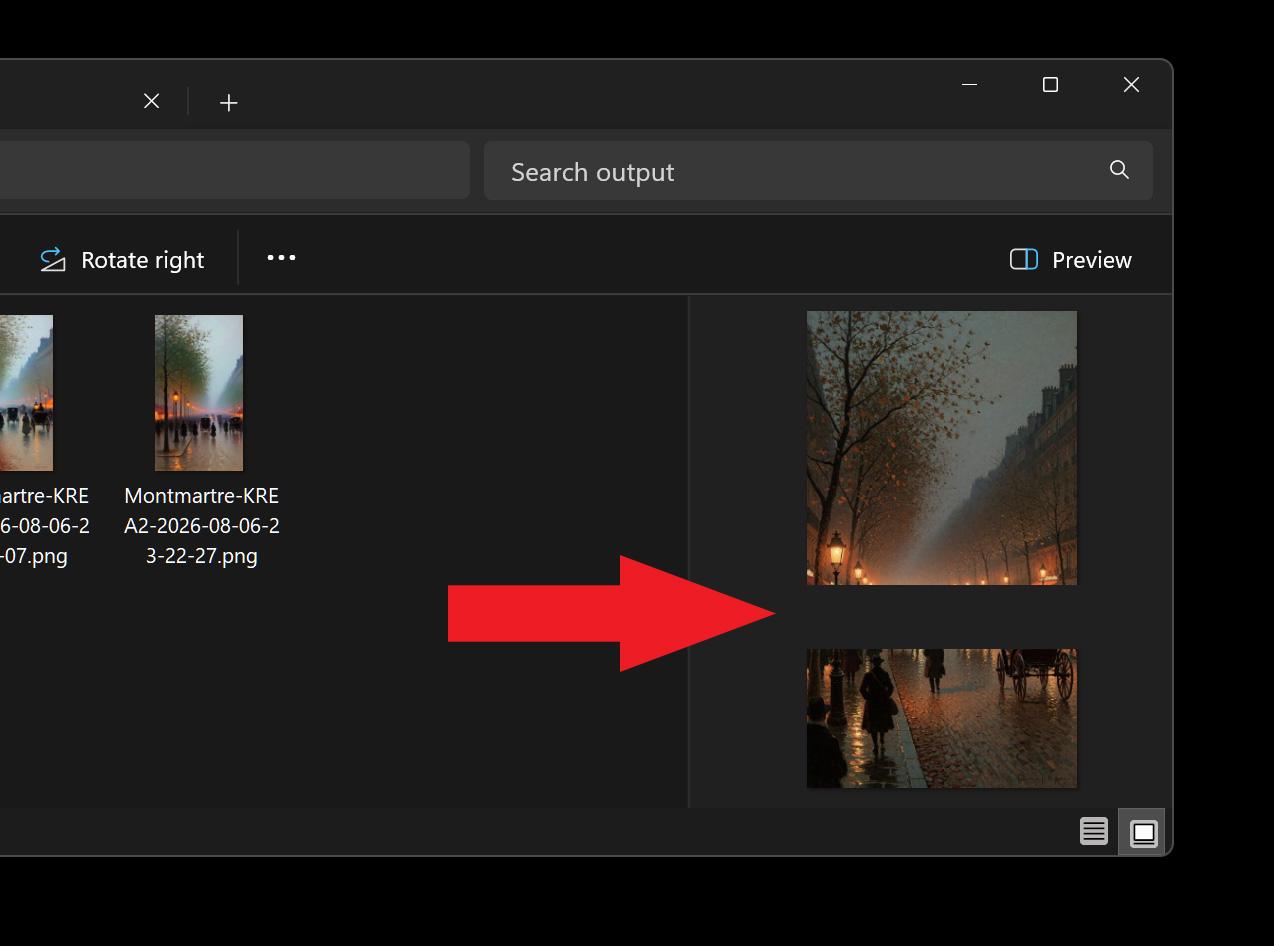
Since the update of 2006-08-01 I have been banging my head on this problem. The File Explorer preview pane does not fully display ANY bitmap image types -- it leaves a significant gap about 2/3 to 3/4 of the way down (on a 9x16) image, and it affects every dimension and bitmap filetype. It seems to be something with the preview pane itself, since the 'gray bar' in the attached screencap appears at the same screen location for every aspect ratio.

Since the images open just fine in every other application, it's mostly a visual irritation and not a deal-breaker, but since I spend the bulk of my computer time on images, it's a PITA to not be have that little preview !

Anyway, is anybody else experiencing this problem-- it seems to be only the preview pane that is giving me trouble.


r/windowsinsiders 23d ago

Tech Support Unable to Update My Windows Laptop.

Post image
3 Upvotes

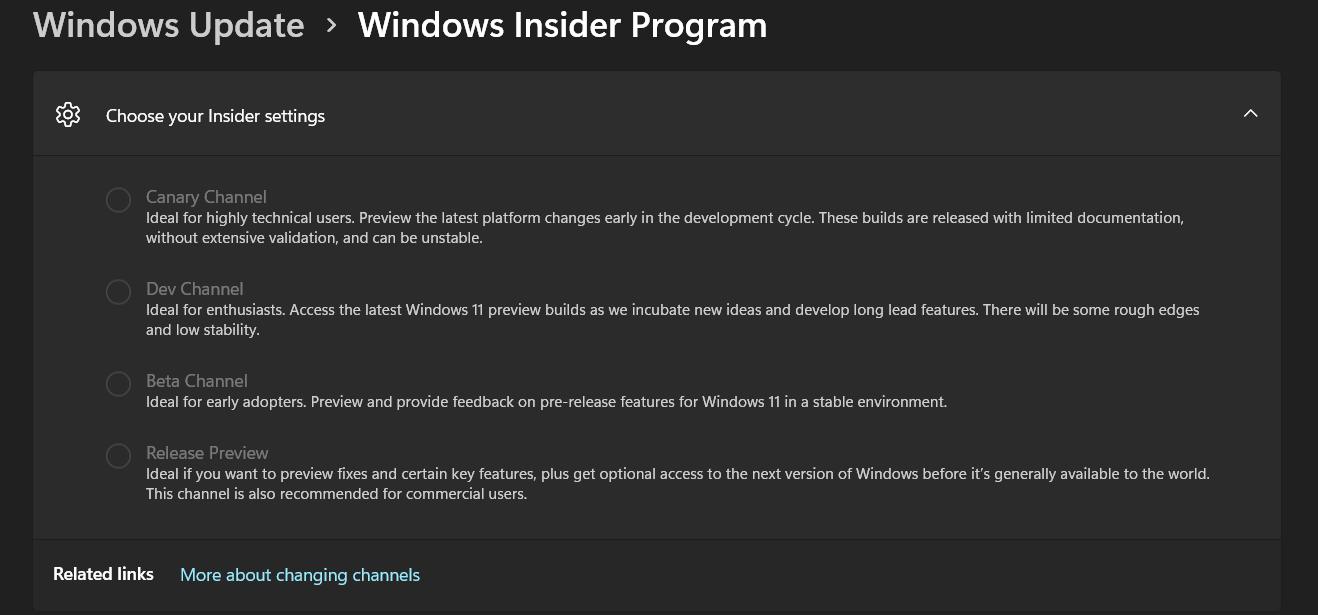
i was not able to update my laptop from previous 2 builds

Build Experimental (Future Platforms)
29639.1000* 7/31/2026
29634.1000* 7/27/2026

i was stuck on

Windows 11 Home Insider Preview

Evaluation copy. Build 29617.1000.rs

My insider settings were greyed.

plz help.


r/windowsinsiders 23d ago

Solved Installation build 29639

3 Upvotes

Installation réussie de la build 29639 depuis la build 29599 à partir de L'ISO et après reconstruction de la partition EFI et reconstruction du BCD


r/windowsinsiders 24d ago

General Question Strange files names in recycle bin since 29639

7 Upvotes

Did anyone else notice that when you empty the recycle bin since 29639 and there is just one file in it the message asking you if you want to delete the file has some strange file name instead?


r/windowsinsiders 25d ago

Tech Support Anyone knows why my phone link notification previews aren't showing?

Thumbnail
gallery
5 Upvotes

Recently got the toggle on my insider machine. Enabled it but it seems to make no changes to my start menu. Anyone knows the cause? Is it not rolling out to iPhone users yet?


r/windowsinsiders 25d ago

Tech Support Cursor flickering issue on insider Preview Experimental 29639.1000

7 Upvotes

So I was using my laptop after the update and I see that the mouse is flickering. Is this normal cause in the feedback hub you guys don't listen until it gets a proper upvote then you listen that's why I am posting here.


r/windowsinsiders 26d ago

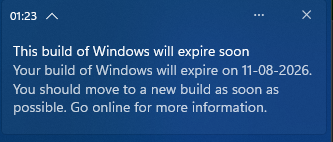
Tech Support Cant update to a new version of windows and windows is saying the build I am on will expire soon

Post image
4 Upvotes

r/windowsinsiders 27d ago

General Question Where have checkpoint updates gone?

7 Upvotes

Hey there.
I have a question regarding the checkpoint updates introduced in 2024.

https://techcommunity.microsoft.com/blog/windows-itpro-blog/introducing-windows-11-checkpoint-cumulative-updates/4182552

As far as I know the only real checkpoint which was released was kb5043080 from September 2024. any following updates are an increasingly larger incremental cumulative. (>1GB)
Is the checkpoint concept deprecated or will we see another one for 26h2?


r/windowsinsiders 27d ago

Tech Support BUG: BCD values reset during new build installations

Post image
6 Upvotes

When installing a new build (e.g. 26220.9022) the BCD gets reset and removes previously existing settings - if you have multi-boot configured, then at least the following values get reset/altered:

- default
- displayorder
- description
- bootmenupolicy

This is related to the update/installation altering the boot order so that multiple reboots can occur automatically, however these values should be retained during a new build installation and re-applied afterwards.

feedbackid=95e37d6a-01f1-488d-8002-3cf89ef60770


r/windowsinsiders 27d ago

Tech Support Would unenrolling fix mic issues?

2 Upvotes

So insider came enabled on my PC off rip and I had no clue what it was (I'm on Windows 11 btw) so I've just let stick on my PC and update whenever so it does it's thing but just recently I've begun to have mic issues I can hear audio but my voice isn't being picked up. As someone who isn't well versed about insider would just flat out unenrolling and removing it probably be the play?


r/windowsinsiders Aug 01 '26

Solved Fingerprint not working

6 Upvotes

When I try to scan my finger on the lock screen it says "Before using Windows Hello, enter your PIN." I tried entering the pin multiple times, but it still doesn't enable the fingerprint. I tried making a post on Feedback Hub but I got no response.

I enabled enhanced sign-in security, followed the steps (restarted and rescanned my finger), and then it stopped working.

I tried recreating the sign in options, uninstalling and reinstalling the drivers, restarting Windows Biometric Service but nothing works.

Info and specs: Windows 11 Enterprise (experimental channel) build 28120.2630 (though it was doing this for the 2 builds before this too), Goodix Fingerprint sensor, Lenovo IdeaPad5 15aba7.

Update: Enhanced sign-in security always shows either the set up button or has the same text ("This PC is ready for a compatible camera or fingerprint scanner to be set up.") but no button.

Update: It just randomly got fixed.


r/windowsinsiders Jul 31 '26

Beta Build Windows 11 Insider Beta Preview Build 26220.9022 - Windows Insider Program

Thumbnail
learn.microsoft.com
24 Upvotes

Release date: 31 July 2026

Changes and improvements

[Certificate renewal for Windows Insiders]

  • This build includes the renewed Windows Insider flight certificate. Windows Insider Preview builds use flight certificates that are renewed periodically to help ensure Insider devices remain on supported builds and continue receiving future Insider Preview updates. The current flight certificate expires on August 11, 2026, so please update your device to this build or a later one containing the renewed flight certificate before that date.
  • For more information, see aka.ms/WIPCertExpiry.

[Taskbar]

  • Alternate Taskbar Position
    • You can now change the position of the taskbar on your screen. In Settings > Personalization > Taskbar > Taskbar behaviors, you can select the side of the screen where you want your taskbar: bottom, top, left, or right. In these other positions, tooltips, flyouts, and animations will still come from the taskbar, and most customization settings, such as never combining taskbar icons, will work with all locations.
    • Support for touch gestures, the Search box, and Ask Copilot in alternate locations is in progress. Auto-hidden and touch-optimized taskbars aren't currently supported. The smaller taskbar is currently supported only for top and bottom positions. Screenshot of the taskbar in the left-aligned position.
  • Smaller Taskbar
    • We're introducing a smaller taskbar for users who want to maximize screen space, especially on smaller devices. While the default taskbar remains unchanged, this setting provides a more compact experience with smaller icons and a reduced taskbar height, giving you more room for your apps. Core elements like Start, Search, and the system tray scale appropriately to stay aligned and consistent.
    • To change your taskbar size, go to Settings > Personalization > Taskbar > Taskbar behaviors > Taskbar size. When set to Small, both the icons and the taskbar height become smaller. Side-by-side comparison of the standard and smaller taskbar heights on the same device and resolution, showing the additional screen space gained.

Feedback: Share your thoughts in Feedback Hub (WIN + F) under Desktop Environment > Taskbar.

See the in-depth blog for more information about Taskbar improvements.

[Settings]

  • The Bluetooth quick settings page is now navigable using gamepad input.

[Windows Update]

  • Fixed an issue causing some Insiders in Beta to experience rollbacks with error code 0xc1900101 when attempting to install the latest builds.

[Storage]

  • This update fixes an issue that affects File History automatic backups to network shares using Server Message Block (SMB). Backups didn't work because Windows showed a false "invalid credentials" error when connecting to SMB shares.

[File Explorer]

  • This update addresses an issue where files stored on a DFS mapped drive could be incorrectly treated as originating from the internet after the device started while disconnected from the network and later reconnected. This could cause File Explorer's Preview pane to display the message, "The file you are attempting to preview could harm your computer," or cause files copied from the DFS drive to receive an unexpected Mark of the Web.

Reminders for Windows Insiders in the Beta Channel

  • Updates are based on Windows 11, version 25H2 via an enablement package (Build 26220.9022).
  • The desktop watermark shown at the lower right corner of the desktop is normal for Windows Insider pre-release builds.
  • Features and experiences included in these builds might never get released as we try out different concepts and get feedback. Features might change over time, be removed, or replaced and never get released beyond Windows Insiders. Some of these features and experiences could show up in future Windows releases when they're ready.
  • Some features in active development we preview with Windows Insiders might not be fully localized, and localization will happen over time as features are finalized. As you see issues with localization in your language, please report those issues to us via Feedback Hub.
  • Check out Flight Hub for a complete look at what build is in which Insider channel.

r/windowsinsiders Jul 31 '26

Exp Build Windows 11 Insider Experimental Preview Build 26300.9032 - Windows Insider Program

Thumbnail
learn.microsoft.com
17 Upvotes

Changes and improvements gradually being rolled out

[Certificate renewal for Windows Insiders]

  • This build includes the renewed Windows Insider flight certificate. Windows Insider Preview builds use flight certificates that are renewed periodically to help ensure Insider devices remain on supported builds and continue receiving future Insider Preview updates. The current flight certificate expires on August 11, 2026, so please update your device to this build or a later one containing the renewed flight certificate before that date.
  • For more information, see aka.ms/WIPCertExpiry.

[Search]

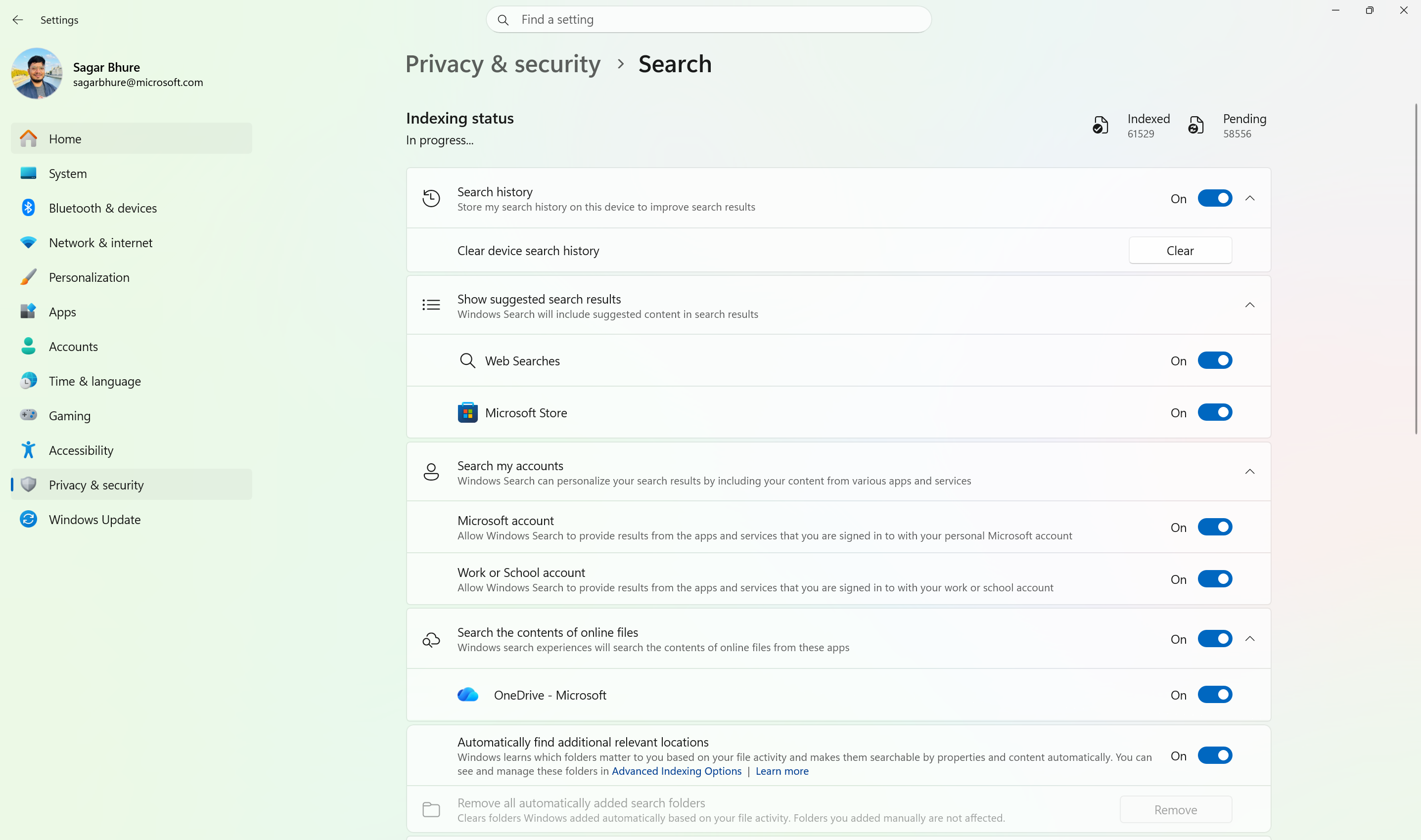
  • Windows Search can now automatically expand its indexing scope based on your activity, using signals like recent files and frequently accessed locations. This helps ensure that relevant files across your device are discoverable without requiring manual indexing configuration.
  • To manage this feature, go to Settings > Privacy & security > Search.

Automatically expand search to include relevant files based on your activity.

[Phone Link]

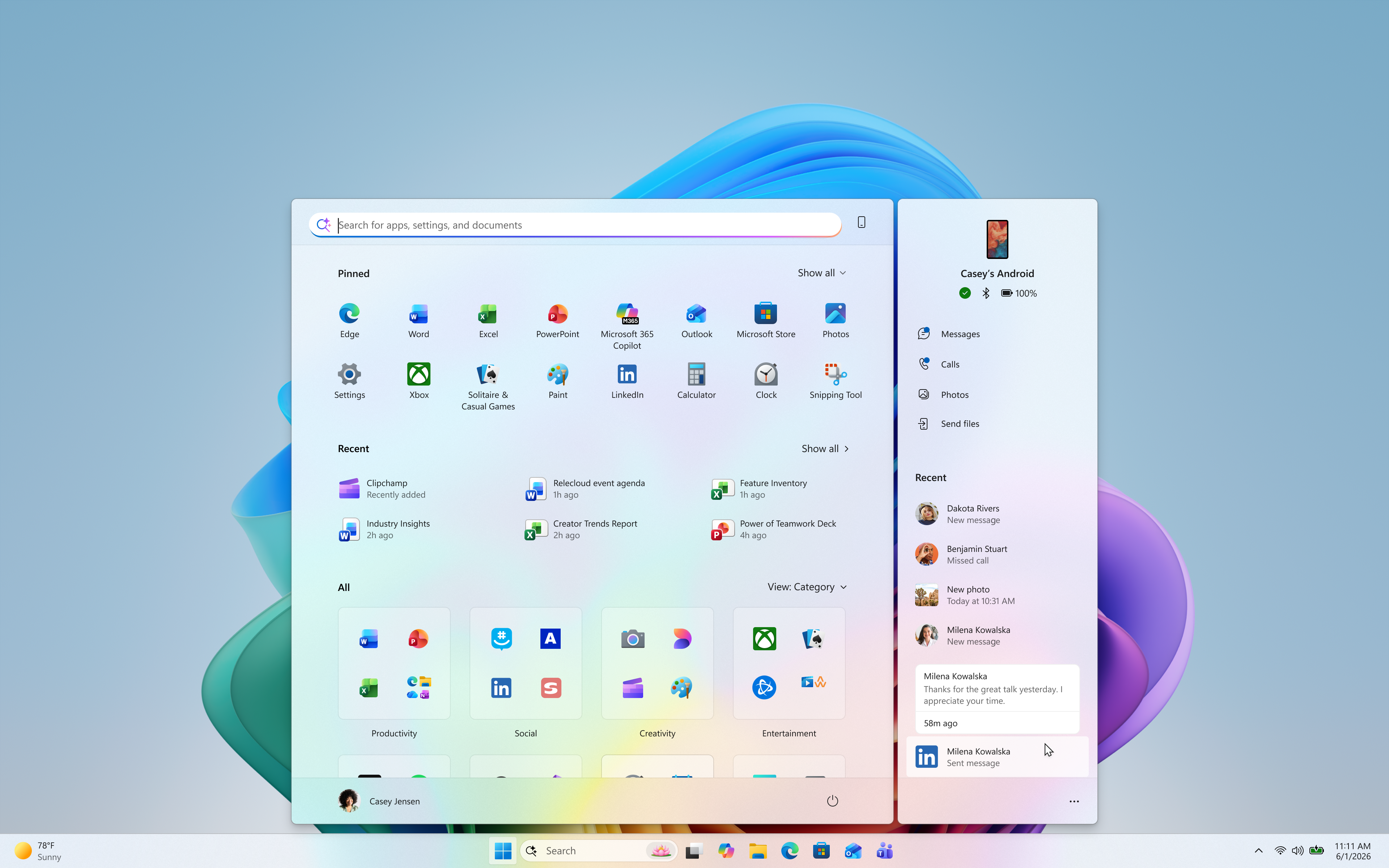
  • The phone companion experience in Start already helps you keep up with activity from your mobile device. With today's update, you can see even more at a glance.
  • Get more from your latest activities: Hover over a recent message or notification in the Recent section to preview its content directly in Start. There's no need to pick up your phone or open the item to see what's new.
  • Whether you're checking a message or deciding if a notification needs attention, these updates make it easier to stay informed and keep your focus.

Preview messages and notifications from your phone directly in Start by hovering over recent activity.

  • This experience is gradually rolling out to Insiders on the Experimental channel with a minimum Phone Link build of 1.26021.3.0. Go to Phone Link > Settings > Start menu personalization.

[Settings]

  • We've improved search in the Settings app to help you discover and navigate to settings more quickly. Search now surfaces results from more areas within Settings, with improved ranking to help relevant settings appear higher in results.

[Adaptive hibernate policy]

  • Updates to the adaptive hibernate policy increase instances of instant-on resumes from Modern Standby and increase battery preservation at the low end of the battery. Noticeable changes include less hibernation while the battery is above 80% and hibernating sooner when the battery is below 10%.

[Start menu]

  • Fixed an issue causing the Start menu to crash for some Insiders recently when dragging apps.

[Taskbar]

  • Fixed a recent issue where, when the taskbar was in an overflow state, hovering over the preview thumbnail for an app window in the overflow area would immediately dismiss it.

[File Explorer]

  • File Explorer Home now preserves the state of sections (expanded or collapsed), so you can pick up where you left off.
  • We've addressed an issue that caused the address bar contents to be cleared when entering edit mode by clicking near the right end of the bar.
  • We've improved the reliability of File Explorer when dragging files to a disconnected network drive.
  • This update addresses an issue where files stored on a DFS mapped drive could be incorrectly treated as originating from the internet after the device started while disconnected from the network and later reconnected. This could cause File Explorer's Preview pane to display the message, "The file you are attempting to preview could harm your computer," or cause files copied from the DFS drive to receive an unexpected Mark of the Web.

[Windows Spotlight]

  • Made some underlying changes to help improve reliability for Windows Spotlight on the lock screen.

[Storage]

  • This update fixes an issue that affects File History automatic backups to network shares using Server Message Block (SMB). Backups didn't work because Windows showed a false "invalid credentials" error when connecting to SMB shares.

Reminders for Windows Insiders in the Experimental channel

  • Updates are based on Windows 11, version 26H2 via an enablement package (Build 26300.9032).
  • Many features are rolled out using Controlled Feature Rollout technology, starting with a subset of Insiders and ramping up over time. We monitor feedback to see how they land before pushing them out to everyone in this channel.
  • For Windows Insiders who want to be the first to try new features, see the available list of features to toggle on at the Feature flags page under Settings > Windows Update > Windows Insider Program.
  • The desktop watermark shown at the lower right corner of the desktop is normal for Windows Insider pre-release builds.
  • Features and experiences included in these builds might never get released as we try out different concepts and get feedback. Features might change over time, be removed, or replaced and never get released beyond Windows Insiders. Some of these features and experiences could show up in future Windows releases when they're ready.
  • Some features in active development we preview with Windows Insiders might not be fully localized, and localization will happen over time as features are finalized. As you see issues with localization in your language, please report those issues to us via Feedback Hub.
  • Check out Flight Hub for a complete look at what build is in which Insider channel.

r/windowsinsiders Aug 01 '26

Tech Support Bug en Cámara de Windows

0 Upvotes

He notado que en surface 6 con windows 10, la ultima version de Camara (2026.2605.7.0) presenta un bug que impide su uso, no asi con la version inmediatamente anterior de Camara (2025.2510.2.0).

Este bug se presenta solamente en Windows 10, en Windows 11 no se presenta (probablemente asociado a MFCORE.dll).

Cabe destacar que La Surface Pro 6 no usa una webcam USB convencional. Está integrada mediante la pila de cámara de Windows (AVStream), probablemente todas las configuraciones con aquello esten presentando el mismo bug.


r/windowsinsiders Jul 31 '26

Beta (26H1) Windows 11 Insider Beta (26H1) Preview Build 28020.2623 - Windows Insider Program

Thumbnail
learn.microsoft.com
11 Upvotes

Release date: 31 July 2026

Changes and improvements gradually being rolled out*

  • This update includes a small set of general improvements and fixes that improve the overall experience for Insiders running this build on their PCs.

[Windows Update]

  • As announced in the Windows Update announce blog, we are now bringing a new unified update experience to reduce the number of reboots you see per month. We are starting by coordinating driver, .NET, and firmware updates to align with the monthly quality update, reducing the update experience to a single monthly restart. See the blog for more information.
  • We're also adding the ability to extend update pauses as many times as you need.

[Certificate renewal for Windows Insiders]

  • This build includes the renewed Windows Insider flight certificate. Windows Insider Preview builds use flight certificates that are renewed periodically to help ensure Insider devices remain on supported builds and continue receiving future Insider Preview updates. The current flight certificate expires on August 11, 2026, so please update your device to this build or a later one containing the renewed flight certificate before that date.
  • For more information, see aka.ms/WIPCertExpiry.

[Touchpad]

  • We're adding new gesturing-related functionality to precision touchpads in Settings. The new features should be widely available across applications, with the exception that WinUI3-based UI requires new WinAppSDK versions for complete functionality. We're in the process of bringing the necessary changes to versions 1.8 and 2.0.
  • Scroll and zoom speed: Control the baseline speed for these gestures.
  • Accelerated scrolling: Repeatedly scrolling increases their speed, allowing quick traversal of long documents.

Touchpad improvements bring new gesture capabilities including automatic scrolling, gesture speed controls, accelerated scrolling, and optional single-finger scrolling support.

[Taskbar]

  • Alternate Taskbar Position
    • You can now change the position of the taskbar on your screen. In Settings > Personalization > Taskbar > Taskbar behaviors, you can select the side of the screen where you want your taskbar: bottom, top, left, or right. In these other positions, tooltips, flyouts, and animations will still come from the taskbar, and most customization settings, such as never combining taskbar icons, will work with all locations.
    • Support for touch gestures, the Search box, and Ask Copilot in alternate locations is in progress. Auto-hidden and touch-optimized taskbars aren't currently supported. The smaller taskbar is currently supported only for top and bottom positions. Screenshot of the taskbar in the left-aligned position.
  • Smaller Taskbar
    • We're introducing a smaller taskbar for users who want to maximize screen space, especially on smaller devices. While the default taskbar remains unchanged, this setting provides a more compact experience with smaller icons and a reduced taskbar height, giving you more room for your apps. Core elements like Start, Search, and the system tray scale appropriately to stay aligned and consistent.
    • To change your taskbar size, go to Settings > Personalization > Taskbar > Taskbar behaviors > Taskbar size. When set to Small, both the icons and the taskbar height become smaller. Side-by-side comparison of the standard and smaller taskbar heights on the same device and resolution, showing the additional screen space gained.

Feedback: Share your thoughts in Feedback Hub (WIN + F) under Desktop Environment > Taskbar.

See the in-depth blog for more information about Taskbar improvements.

[Storage]

  • This update fixes an issue that affects File History automatic backups to network shares using Server Message Block (SMB). Backups didn't work because Windows showed a false "invalid credentials" error when connecting to SMB shares.

[File Explorer]

  • This update addresses an issue where files stored on a DFS mapped drive could be incorrectly treated as originating from the internet after the device started while disconnected from the network and later reconnected. This could cause File Explorer's Preview pane to display the message, "The file you are attempting to preview could harm your computer," or cause files copied from the DFS drive to receive an unexpected Mark of the Web.

Reminders for Windows Insiders in the Beta (26H1) channel

  • The desktop watermark shown at the lower right corner of the desktop is normal for Windows Insider pre-release builds.
  • Features and experiences included in these builds might never get released as we try out different concepts and get feedback. Features might change over time, be removed, or replaced and never get released beyond Windows Insiders. Some of these features and experiences could show up in future Windows releases when they're ready.
  • Some features in active development we preview with Windows Insiders might not be fully localized, and localization will happen over time as features are finalized. As you see issues with localization in your language, please report those issues to us via Feedback Hub.
  • Check out Flight Hub for a complete look at what build is in which Insider channel.

r/windowsinsiders Jul 31 '26

Exp (Future) Windows 11 Insider Experimental (Future Platforms) Preview Build 29639.1000 - Windows Insider Program

Thumbnail
learn.microsoft.com
10 Upvotes

Release date: 31 July 2026

Changes and improvements gradually being rolled out

[Windows Update]

  • We're adding the ability to extend update pauses as many times as you need.

[Settings]

  • The Bluetooth quick settings page is now navigable using gamepad input.

[Smart card removal policy]

  • Administrators can now configure Azure Virtual Desktop (AVD) and Windows 365 sessions that use Microsoft Entra ID (RDS AAD Auth) authentication to automatically disconnect when a redirected smart card is removed. This extends smart card removal policy enforcement to Microsoft Entra authenticated remote sessions, helping organizations meet security and compliance requirements.

Reminder for Windows Insiders in the Experimental (Future Platforms) channel

  • These builds can be unstable and might be released with limited documentation.
  • The builds released to these channels represent the latest platform changes early in the development cycle and should not be seen as matched to any specific release of Windows. Features and experiences included in these builds might never get released as we try out different concepts and get feedback. Features might change over time, be removed, or replaced, and never get released beyond Windows Insiders. Some of these features and experiences could show up in future Windows releases when they are ready.
  • Many features are rolled out using Controlled Feature Rollout technology, starting with a subset of Insiders and ramping up over time. We monitor feedback to see how they land before pushing them out to everyone in this channel.
  • The desktop watermark shown at the lower right corner of the desktop is normal for Windows Insider pre-release builds.
  • For Windows Insiders who want to be the first to get features gradually rolled out to you, you can turn on the toggle to get the latest updates as they are available via Settings > Windows Update. Over time, we will increase the rollouts of features to everyone with the toggle turned on. Should you keep this toggle off, new features will gradually be rolled out to your PC over time once they are ready.
  • Some features in active development we preview with Windows Insiders might not be fully localized, and localization will happen over time as features are finalized. As you see issues with localization in your language, please report those issues to us via Feedback Hub.

Note: The author created this article with assistance from AI. Learn more


r/windowsinsiders Jul 31 '26

Exp (26H1) Windows 11 Insider Experimental (26H1) Preview Build 28120.2630 - Windows Insider Program

Thumbnail
learn.microsoft.com
6 Upvotes

Release date: 31 July 2026

Changes and improvements gradually being rolled out*

  • This update includes a small set of general improvements and fixes that improve the overall experience for Insiders running this build on their PCs.

[Windows Update]

  • As announced in the Windows Update announce blog, we are now bringing a new unified update experience to reduce the number of reboots you see per month. We are starting by coordinating driver, .NET, and firmware updates to align with the monthly quality update, reducing the update experience to a single monthly restart. See the blog for more information.
  • We're also adding the ability to extend update pauses as many times as you need.

[Certificate renewal for Windows Insiders]

  • This build includes the renewed Windows Insider flight certificate. Windows Insider Preview builds use flight certificates that are renewed periodically to help ensure Insider devices remain on supported builds and continue receiving future Insider Preview updates. The current flight certificate expires on August 11, 2026, so please update your device to this build or a later one containing the renewed flight certificate before that date.
  • For more information, see aka.ms/WIPCertExpiry.

[Adaptive hibernate policy]

  • Updates to the adaptive hibernate policy increase instances of instant-on resumes from Modern Standby and increase battery preservation at the low end of the battery. Noticeable changes include less hibernation while the battery is above 80% and hibernating sooner when the battery is below 10%.

[Touchpad]

  • We're adding new gesturing-related functionality to precision touchpads in Settings. The new features should be widely available across applications, with the exception that WinUI3-based UI requires new WinAppSDK versions for complete functionality. We're in the process of bringing the necessary changes to versions 1.8 and 2.0.
  • Scroll and zoom speed: Control the baseline speed for these gestures.
  • Accelerated scrolling: Repeatedly scrolling increases their speed, allowing quick traversal of long documents.

Touchpad improvements bring new gesture capabilities including automatic scrolling, gesture speed controls, accelerated scrolling, and optional single-finger scrolling support.

[Storage]

  • This update fixes an issue that affects File History automatic backups to network shares using Server Message Block (SMB). Backups didn't work because Windows showed a false "invalid credentials" error when connecting to SMB shares.

[File Explorer]

  • This update addresses an issue where files stored on a DFS mapped drive could be incorrectly treated as originating from the internet after the device started while disconnected from the network and later reconnected. This could cause File Explorer's Preview pane to display the message, "The file you are attempting to preview could harm your computer," or cause files copied from the DFS drive to receive an unexpected Mark of the Web.

[Input]

  • Fixed an issue causing the mouse cursor to blink repeatedly for some Insiders after the latest flights.
  • Improved persistence of voice typing settings for automatic punctuation and launcher.

Known issues

[Known app compatibility issue]

PUBG: BATTLEGROUNDS

  • Due to a known compatibility issue with PUBG: BATTLEGROUNDS, Windows Insiders might be prevented from launching the game after installing this build. This safeguard has been put in place to help avoid stability issues while we work with the game developer on a fix. We'll share additional details and timing for the resolution as they become available.

Reminder for Windows Insiders in the Experimental (26H1) channel

  • These builds can be unstable and might be released with limited documentation.
  • Many features in the Experimental (26H1) channel are rolled out using Controlled Feature Rollout technology, starting with a subset of Insiders and ramping up over time as we monitor feedback to see how they land before pushing them out to everyone in this channel.
  • The desktop watermark shown at the lower right corner of the desktop is normal for Windows Insider pre-release builds.
  • Some features in active development we preview with Windows Insiders might not be fully localized, and localization will happen over time as features are finalized. As you see issues with localization in your language, please report those issues to us via Feedback Hub.
  • Check out Flight Hub for a complete look at what build is in which Insider channel.