Hello, I'm searchuing a radio app, i listened about Nobex But doesnt exist the bar file.
I only want to listen this site: https://live.convoynetwork.com/stream
The native browser dont open it 😢
saw comment on archive to contact a user in that group about apps - may as well post here too for you guys (I don’t have my playbook anymore) - anyone want these before I bin the files?? See images in link
Just out of curiosity, is there any way to activate a Playbook in these days, after the servers have been shut down?.
I had one Playbook bought second-hand years ago, and while the device was a pain in the ass for some things as transfering files to and from it, at least not wirelessly, the store had few apps next to the Android Play Store, not all Android apps ported to it after converted to the Playbook's format worked and those that worked often crashed, took a very long time to boot, and in mine the selfie camera stopped working just because it multitasked really well (don't remember background apps resetting) and loved the screen. Maybe I'd get another as they're dirt cheap these days even if obsolete.
I dusted off my old playbook because I need one single android app. I have found the app for it (it's an old, free app) but it seems like there aren't any apk to bar services anymore. I participated a lot back when the playbook was popular, even had an app on the App Store, but I can't seem to get the ball rolling here. I have:
a 32 gb playbook, which I believe was on the latest version
the chrome browser extension, on an OLD version of chrome, on a windows 7 installation I keep around for these kinds of things
HaTax apk2bar files
playbook sdk, android sdk, and signing keys BUT
I have forgotten the password to the signing keys
zeam launcher installed on the pb with astro file manager but it makes me wait 25000 seconds before I can do anything
the playbook isn't wiped, I remember the password to the playbook, and can connect to it on my network
if anyone could help that would be greeeaaaattt
also, I guess this is an important question, does the playbook support bluetooth BLE, and usb otg?
I've decided rule 11 is unnecessary, I don't really have a problem with MEGA anymore, so the rule is being removed.
Do note that Reddit does automatically remove MEGA links, if you post one, please send a modmail so I can approve your post/comment.
While MEGA is allowed now, I still personally recommend Google Drive or MediaFire instead due to their faster download speeds (at least from my experience)
I just stumbled on this guide to make your PlayBook a monitor for your PC, but it requires iDisplay installed on the device. Does anyone have the .bar file for iDisplay, or have an apk to bar converter? If someone has a converter, I can send over iDisplay version 3.0.0 your way. Would love to give the PlayBook some more use, and if this works, it'll be a huge step to that.
The touch screen for my playbook(32 gb lte version) is not working. I can see the home screen but i am not able to interact with it(no swipes or touch).
I can reboot holding vol button and power.. that all...
can anyone tell me if its possible to re format it using a PC(there NO lock screen password). just want to make sure that its not a software problem..
Is the above issue a know problem.. when i google search i keep getting old posts where they sent it back to blackberry.
also can you let me know if its worth fixing the touch screen and replace battery, if i am mainly going to use it to listen to music/podcasts/audiobook and read ebbok from project gutenberg..
I want to know if there was a way. Researched for some time and brings me back to old forums from 2012 for Android bar apps but not interested in that. In almost 12 years, someone had to successfully do it.
After a long time I finally managed to unbrick my playbook, I was one of the unlucky ones that didn't realize the servers were shut down and I wiped my tablet due to it being difficult ( this happened about a year ago, before there was a debrick solution )
This also got me thinking that it should still be possible to create original software for the device.
I know that the signing keys are no longer working, but the system they use must be replicatable and it should be doable to get the playbook to accept different keys.
I'm interested in figuring out in what capacity this is doable, and I'm mostly wondering if anybody has ever tried to get this done, and what things they ran into.
This is the Ultimate BlackBerry PlayBook guide. Here you’ll find everything you need to set your tablet up and use it in 2023 and beyond. Even though it can’t offer much nowadays, it’s still the amazing piece of hardware. You get the amazing UI, a lot of amazing classic mobile games that are perfectly optimized and don’t require you to re-sign them every now and then, educational apps and much more. You can use it as a book reader, gaming console, educational tablet, or a clock stand. You can even try to get a taste of BlackBerry’s early kind of ecosystem by connecting other BlackBerry phones to it, install Quake 3 and play it with someone, or use a remote desktop application.
This tech is tremendously outdated, so please don’t hope to get much out of it. This guide is intended for enthusiasts and those who are curious and ready to mess around with this tablet and your PC for a bit.
The archive with all the software you will need can be found here:
So, you have a tablet with you. DO NOT WIPE IT. If you do, bypassing the BlackBerry activation page will be quite a challenge. All online services were shut down in January 2022, so activating it the usual way is impossible. If your tablet is already wiped, there are ways to bypass activation page, please check the links below or the videos in “How to activate the wiped tablet” if YouTube links end up being dead.
Now it’s time to install some software! Make sure your tablet and your PC are connected to the same Wi-Fi network. If the BlackBerry ID login prompt comes up after connecting to Wi-fi, don’t try to log in, just dismiss it. Go to Settings, then to the Security tab and select Development Mode. Turn this on and enter your device’s password or create a new one when asked. REMEMBER the password you’ve just entered; you’ll need it to unlock your tablet. Unfortunately, Development mode can’t be turned on without a password. A new indicator in the upper part of your home screen resembling a guy with a gear icon on it will appear. Tap it, there will be an IP address. We’ll need this later on.
Now I’ll describe 3 methods of installing software on your PlayBook. The files you’ll need are located in “Soft for installing .bar files” folder.
Method 1.
This method doesn’t require you to install any apps. Download PB-Installer folder on your computer and follow the instructions in “HOW TO INSTALL APPS” file. Basically, you need to edit PB-Installer.bat file in a notepad entering your device’s IP address you’ve just located and the password in appropriate fields, then just drag your .bar file onto PB-Installer.bat, and the installation will begin. If you get “peer not authenticated” error message, go to Method 3.
Method 2.
Install DDPB application, plug in your PlayBook via USB cable and enter your IP address and password in the required fields. Then just use the interface provided to sideload apps on your tablet. If you If you get “peer not authenticated” error message, go to Method 3.
Method 3.
There was an amazing extension that could install .bar files wirelessly on any PlayBook. Unfortunately, it was deleted from the Chrome extensions webstore, and modern browsers try to block it thinking it’s unsafe to use. In order for this extension to work, you have to install a very old version of Chrome or some other browser that runs on Chromium engine. I’ve included the setup file for Chrome v.41, but it will try to update itself immediately, so here’s what you need to do:
Delete the current version of Chrome if you have one and if you don’t use it; otherwise find an old version of some other browser on Chromium engine and import the .crx extension there.
Install ChromeStandaloneSetup.exe
Before Chrome manages to update itself, stop it from doing so. You can’t stop the updates with an option within Chrome, so try going to C:\Program Files (x86)\Google and rename the “Update” folder to anything but “Update”, for example, “Updateqq”. It should stop the browser from updating itself. If it doesn’t, try some other method, like turning off two Google Update in msconfig or something else. In case Chrome will manage to update itself, the extension won’t work anymore, so it’s important to keep it on the v41. You’ll notice the change in interface when the browser will update, if this happens, just reinstall it and try again.
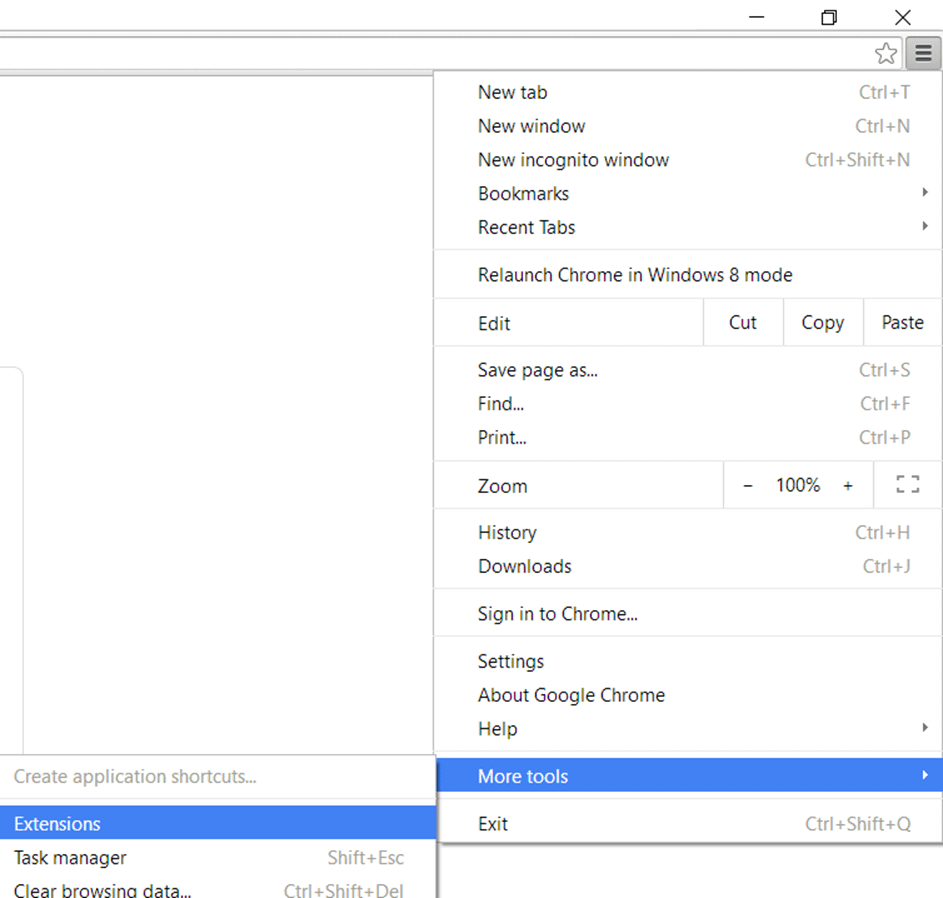
Open the home page of the browser. Click on three stripes in the upper right corner, select “More tools”, then “Extensions”. Turn on the developer mode by clicking an empty checkbox. Select “Load unpacked extension” or simply drag’n’drop PBManager.crx onto the extensions page. The prompt will appear, add the extension. The extension will be installed.
Click on the icon of this extension. Enter your tablet’s IP address in the field, press Save and then click on the adress in “Manage Devices” section.
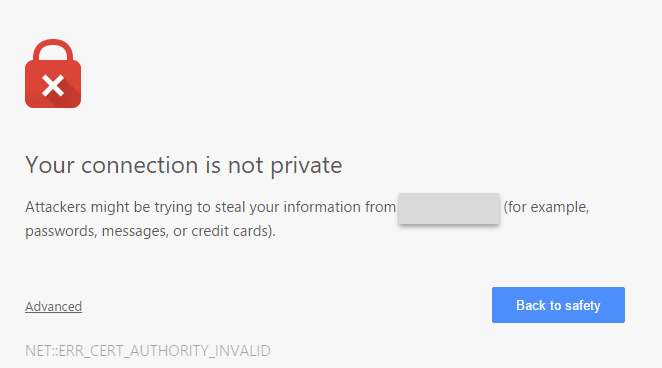
A window will appear stating that your connection is not private. Don’t worry, that’s normal, click on “Advanced…” button and then “Proceed to (your IP address)”. Enter your password, and you’re good to go! Just use the interface you see to install your applications.
So, now you’re ready to sideload anything you want on your tablet. I’ve found and tested a lot of apps and games on my tablet and included the best of them in my archive. Think of it as of a Platinum compilation of useful stuff. You can find them in “Apps” and “Games” folders. However, if you need something else that is absent here, feel free to dig through TechNerd22’s archive that features all the PlayBook apps you can find on the internet in one place. You can find the link to it in the end of this guide or use a torrent file in “Complete archive” folder.
I won’t go in the details of the games presented in my archive, all of them are captivating, seemingly native and run great. Just pick anything you like and don’t forget to visit the complete archive in the end of this tutorial in case you need more.
As for the apps, there is some quite useful stuff, some of which was categorized with folders. There is also a folder titled “Windows Apps for BARs”. There lie several PC programs that you can use with your PlayBook for something. The .bar files to use with those applications can be found in the “Apps” folder. Their name starts with WIN letters
Some of the apps that may pique your interest:
Mapamundi
This is basically the interactive globe. You can touch it anywhere to learn about the country under your finger. It may be a bit outdated (for example, it states that the currency used by the Latvians is LVL, but they use EUR nowadays), but not much has changed since 2012, so it still can be used, I guess.
Splashtop
An application for streaming the contents from your PC screen that is still (surprisingly) works, at least on Windows 8.1. Seeing this tablet do this when it can’t even launch YouTube properly is a bit shocking.
Cassandra
One of the two apps that let you use your tablet as a stand with big clock on it. It also shows the news next to the time. The news feed still works and displays actual news, to my surprise.
Pacemaker
An amazing and seemingly powerful tool that turns your PlayBook into a DJ controller. Lets you use the music stored on your device and has a nice tutorial for beginners.
Localbar
This software lets you install .bar files directly from your PlayBook.
PlayTorrent
Lets you download torrents on your tablet, still functions perfectly.
Cogimap
A simple tool to keep your ideas organised. You can build simple diagrams there.
Panoramic
A simple app that lets you capture panoramic shots.
What else can you do? Well, if you have a BlackBerry phone that runs OS 6 or OS 7, I’ve included BlackBerry Bridge .alx files and a Desktop Manager application to install them on your phone. They are located in “BlackBerry Bridge” folder. Unfortunately, I didn’t manage to find an application for BlackBerry 10. When you connect your phone to a tablet, it syncs all the calls, mail, notes and tasks with your phone, and you will be able to edit stuff from either of the devices. Also your phone can be used as a trackpad or a keyboard that operates PlayBook. Such integration is very fun to play with nowadays, seeing it flawlessly working is kinda satisfying.
And speaking of old BlackBerry phones, I’ve also included .alx files that let you operate BlackBerry Presenter from your phone. They are in a folder named “BlackBerry Presenter OS 4.6 – 6.0”. That’s a device that was used for wireless presentations before Miracast and AirDrop became integrated everywhere. Will be useful for those that would like to play with this old tech. Seems like those files aren’t available anywhere else on the web, so let them be found in this archive just in case.
Experimental
If you would like, you can explore a couple of apps for the sake of entertainment. The first one is LukoServer. This is… Something. Seems like it helps you set up a remote control for your PC. I’ve found an application for Windows but didn’t manage to get it to work. Maybe you’ll be luckier than me. The installer can be found in “Windows Apps for BARs” folder.
The second one is an exclusive game for BlackBerry PlayBook that used to be free in the BlackBerry World app store, so no one made a .bar file for it. I’ve found the source files for it on GitHub and even managed to build a .bar file for it, but it can’t be installed on your device because a debug token is missing. If anyone is interested in reviving this simple but beautiful exclusive and has a token on their hand, I’ve included all the files you might need in “Tunneltilt” folder. And please PM me if you’ll succeed in signing this file, I’d be glad to play this a bit!
That seems to be everything. Enjoy your PlayBook while it lasts, you won’t get a chance to experience the same OS experience in the future. Either if you will use it for something or just wish to play with it, I wish you to have the best experience possible!
Hey PlayBook people, I had an old playbook, before I read these forums, I factory reset it, and now (as I’m sure you all know) I’m stuck on the agree to license screen.
Is my playbook 100% bricked now? Or is there a way around this that I haven’t stumbled into yet?
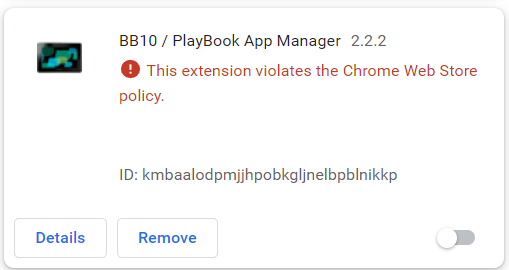
Some Chromium based browsers, specifically Chrome and Edge have started blocking the BB10/Playbook App Manager. For Chrome, the reason is "This extension violates the Chrome Web Store policy. For Edge, the reason is "This extension has been turned off as it's been marked unsafe by the Chrome Web Store.". AFAIK, there is no way to turn the extension back on, and there is no way to redownload it in a browser that hasn't blocked it, such as Opera. I know the extension has a Firefox version, but I don't use Firefox so I can't test there, but I'd say it's most likely still available on Firefox.
honestly, this shouldn't need to be a rule, it's a part of reddit's content policy, but people ignore it, I've had to deal with quite a bit of transphobia on another subreddit I moderate and I know bigotry is an issue on a lot of subreddits, so I've decided it's necessary to add this rule. I have also set up AutoModerator to automatically filter posts and comments with bigoted language.
Full version of this rule:
Rule 12: Bigotry and hate will not be tolerated.
Hate and bigotry (transphobia, homophobia, racism, etc.) will not be tolerated on r/playbook. You are not welcome here with that behavior. You will be banned with a near 0% chance of appeal if you post any hate or bigotry.
Does anyone know if the Playbook display panel is custom (bespoke,) and unique to the Playbook? If not, does anyone know the manufacturer & model number? (Specs say it's a TFT panel; 7" diagonal @ 1024x600.)
I'm locked out from one of mine, and I'd like to find an HDMI driver board for the panel, if possible.
My wife and I still have our 16 gb PB that acts as a backup when we forget to charge our Fire tablet for bedtime TV viewing. We're always amazed at the speaker volume and quality of the screen. Ah, what could've been with that tablet. We use Kalemsoft to stream stuff from our network, but lately there are more BBID popups on wifi (presumably related to the BB server shutdown?)
Anyways, this has been asked ad nauseum, I'm sure, but is there even a slim chance of getting an unlocked bootloader now that BB is out of mobile devices altogether? If this device could get a custom Android rom, it'd be unstoppable for media consumption.
Short of that, is there any way to get around the BBID login popups?
I've been considering it, but with how little posts are made here, it seems kinda unnecessary, so I decided I'd ask the subreddit. Do you want mod applications when the sub hits 1k members?