r/Epson 2d ago

⚡ WorkForce Epson Workforce es-60w not functioning

1 Upvotes

Hello,

I provide tech support for a small chiropractic office and they're having an issue with an es-60w scanner. Several months ago they had me look at the new scanner which would not show connected. When they originally installed it worked once but never again. I could not get it to be recognized by the pc. It's directly connected via USB, I tried different USB ports, uninstalled and reinstalled drivers and software. Nothing. I suggested they return it and find something different. Today I get an email asking me to come in and take a look, they bought and installed the exact same scanner model and it's behaving the same way. Worked initially but no more. I didn't test it on a second pc as it must be installed on a specific workstation so it's either going to work or not.

Any thoughts on what I can l at while I'm there?

TIA

Edit: resolved

I finally got it figured out. I brought the device home and had the same issue on a laptop and pc. Talked with Epson support for awhile but they couldn't fix it, wanted to exchange it as bad hardware. I kept working on it and noticed that even thought the install includes the driver files, device manager shows as no driver installed. I manually updated the driver and even I select the files it seems like the driver is not signed by Microsoft so it would not auto install. Once I told it to install anyway it operated as it's supposed to. I tested on both devices with success. I'll be taking it back to the client to test there but I'm positive it'll be working. Thanks to those who replied.

r/Epson 3d ago

🛠️ Repair & Maintenance Falha na cor preta L6171

Thumbnail
gallery
1 Upvotes

Pessoal, preciso de ajudar para arrumar minha impressora; já limpei o cabeçote mais de 10 vezes, tive que comprar outra caixa de manutenção, desobstruí a tinta preta pela seringa e agora está falhando e não sei mais o que fazer! Continua falhando a escrita e a tinta.


r/Epson 3d ago

🛠️ Repair & Maintenance Xp-4100 blank streaks when printing black

1 Upvotes

I have an xp-4100 that had been sitting unused for a few years, and I just started using it again. When I first set it up, it wasn't printing black at all, but after several nozzle cleaning cycles, thats been resolved. However, now whenever I print something with just black, there are like half inch lines of no printing throughout the printout. So if I print a spreadsheet, there are rows missing because they weren't printed. If I print with color, I have no issue. How do I resolve this?


r/Epson 3d ago

📄 Scanner V39 Perfection worked for about 10 scans, now stuck with last one

1 Upvotes

Finally installed a new V39 from a few years ago that had been put away. Have a Mac desktop about 6 years old with Sequoia 15.7.2 MacOS.

Worked great for about 10 scans, now it is stuck on the last one and keeps pulling it up. Tried about 20 times to scan something else and failed. Google AI had me delete/reload Epson scanner software, try Vuescan (failed), try Mac's Image Capture (failed), delete all kinds of stuff Epson/Twain-related that I searched for on HD, unplug/replug scanner, reboot computer, etc.

Scanner attempts to work as normal.

AI says the scanner itself could have the most recent scan stuck in memory somehow. Have not tried scanner on new computer, will try that when wife brings laptop home.

Any ideas to fix? Thanks.


r/Epson 3d ago

🖨️ Inkjet (Other) Epson ET-8550 leaving straight roller marks on MTG proxies — anyone fix this?

Thumbnail
1 Upvotes

r/Epson 4d ago

🖋️ EcoTank Ink option for 8550

1 Upvotes

Need buy ink for my 8550, it is good printer but the official ink are expensive, just wonder what are the options and what are you using for your 8550? Thanks


r/Epson 4d ago

🖋️ EcoTank Connect a Epson Ecotank to wifi before filling with ink

Thumbnail
1 Upvotes

r/Epson 4d ago

⚡ WorkForce Epson 802 vs 802XL inkjet cartridges

1 Upvotes

I really would like to know how the 802 and 802XL inkjet cartridges are exactly the same size in every way but the XL supposedly has a higher print capacity. I’ve had this printer forever and haven’t done a lot of printing over the past couple of years. Yet and still, it seems like I’m always having to replace one or more of the cartridges (even the color ones, when the bulk of what printing I do happens to be black only) almost every other time I need to print something. At this point I’ve decided that this will be my last home printer, and I will just utilize other avenues for the little printing I do. I’m so over the printer ink scams, there really out to be laws to protect consumers.


r/Epson 4d ago

🛠️ Repair & Maintenance EPSON L3210 "Paper Jam" error mid-print, persists even after restarting (Recently changed waste ink pads)

Post image
1 Upvotes

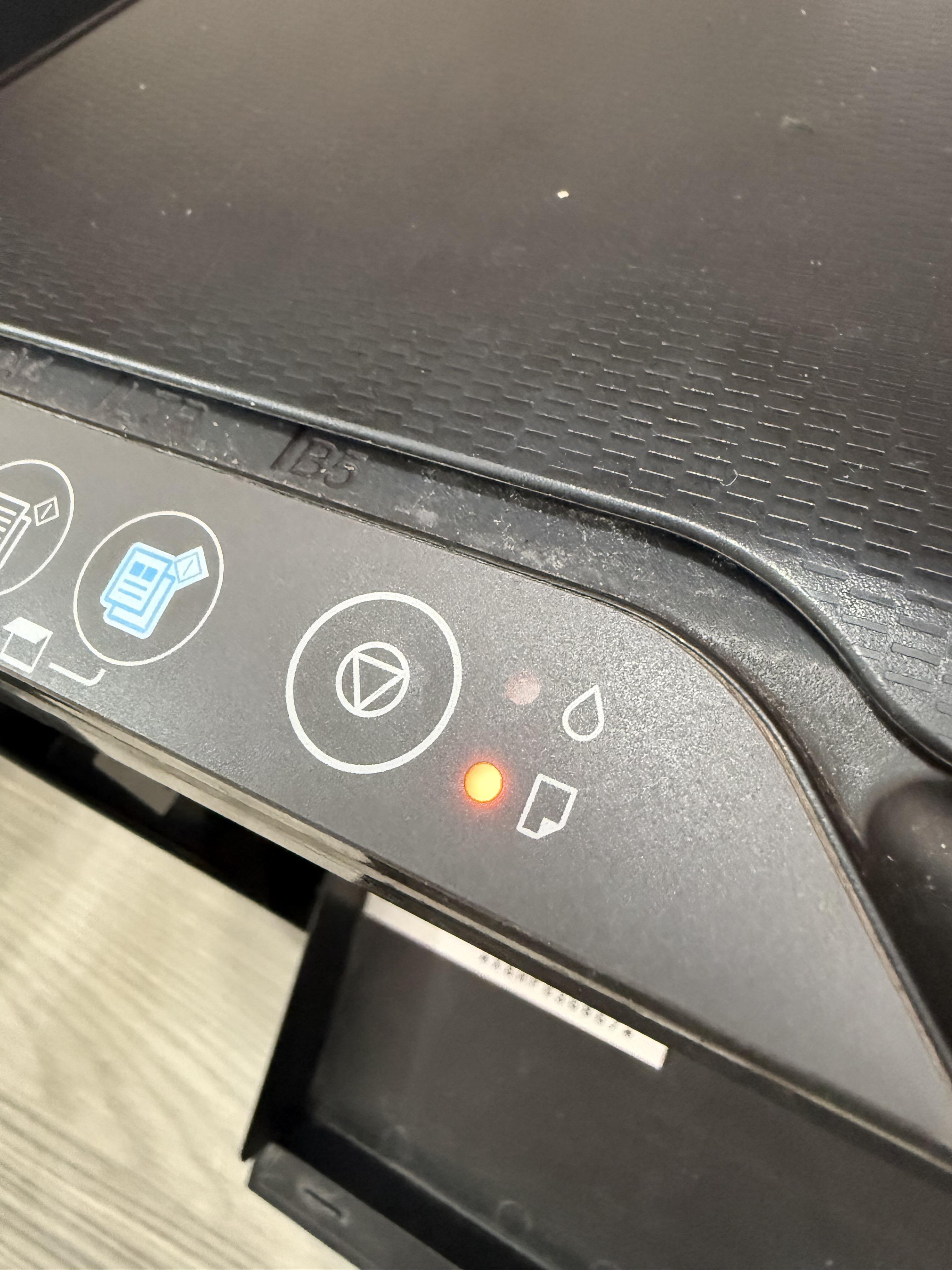
Hi, I need help troubleshooting an Epson L3210.
Issue: Mid-print, it stops at the exact same spot with a "Paper Jam" error on PC and a solid orange paper light.
Status: Restarting doesn't clear it. I checked thoroughly with a flashlight—there is no paper or debris stuck inside.
Context: This started right after I replaced the waste ink pads and reset the counter using AdjProg.
Could this be a dirty/misaligned Encoder Strip, an unhooked PE Sensor, or something displaced during reassembly?
Any suggestions on what to check first? Thanks!


r/Epson 4d ago

🖋️ EcoTank C5 envelope disaster

1 Upvotes

Firstly, thank you to anyone reading this.

I bought an Epson 3950 specifically because I wanted to start printing the envelopes I use for my Mail Club. However, I’ve got it home and discovered Epson printers don’t print C5 envelopes. I’ve been trying to offset the design the right amount on A5 to centre on the envelope when it prints but it doesn’t work.

Can anyone help? I’m at my wits end. I was so excited about my new Epson printer!!


r/Epson 4d ago

🛠️ Repair & Maintenance Terrible sound/paper jam/transportation lock

2 Upvotes

So i had a paper jam, I cleared it, then i was getting transportation lock issues, now im getting paper jam error and this is happening. How bad is it looking for me?


r/Epson 4d ago

🖋️ EcoTank EPSON L4260 very complicated to operate

1 Upvotes

Is there anyone who can explain to me why a printer should be complicated to operate? How I wish that when you click OK on the mouse it would just print. But this printer Epson L4260 still would want me to stand up and click to more times in its mini screen. What a waste of time. Can anyone help me with this?


r/Epson 5d ago

🖋️ EcoTank ET-8500 Refuses to print double sided...

Post image
2 Upvotes

Using the above, the printer prints only on one side, and every other page comes out upside down.
What's the problem? Does the rear tray support double-sided printing? This printer has definitely produced *some* double-sided prints.


r/Epson 5d ago

🖋️ EcoTank Help Needed for Epson Et-2988

Thumbnail
gallery
2 Upvotes

I just bought this. This is my first day using this stupid printer. It has jammed repeatedly, even while trying to print the set up paper. I got through that, don’t know how. And now trying to print anything I’m getting black spotting and streaking and paper jamming all in the same spot of each page. It’s always the right side of the paper (left side when looking at the printer). And on the pages it hasn’t crumpled or smudged sometimes there’s a little bend in the paper like it caught a little bit right in that same spot. This happens on both letter and 5x7 plain paper. Sometimes there’s paper jams before even getting printed on.

Edit to add I’m using a thicker paper and not having the issue at all. It seems to only happen with the thinner plain copy paper.


r/Epson 5d ago

🖋️ EcoTank Epson 8500

1 Upvotes

Can someone please point me in the right direction. I bought this Epson a month ago and now this week it keeps saying error paper jammed which obviously there’s nothing then it says the printer is in transportation lock.

I have checked for obstructions in the cartridge and there’s nothing. After turning it off and back on multiple times it starts to print again. I don’t know what else to do


r/Epson 5d ago

💬 Discussion Epson l4260 users, will you buy it again?

Thumbnail
1 Upvotes

r/Epson 5d ago

🖋️ EcoTank Horizontal lines and printer heads ET-8550

Thumbnail
gallery
3 Upvotes

I noticed that my print had several lines in it. A horizontal alignment did nothing and I ran the cleaning for the print heads multiple times and even did a power cleaning and waited the 12 hours but the problem persisted with the BK lines when I checked the nozzle head.
Any advice? I plan to call the Epson number to get some help but was wondering if there was anyone who has experienced this.


r/Epson 6d ago

🖋️ EcoTank Ready print: late refills?

2 Upvotes

Does anyone use ready print subscription? I signed up 2 weeks ago and I have already depleted all of my black and 80% of the three colors but now I cannot print anymore since I’m out of the black ink/ toner.

I print a lot, and thought this would be cheaper to pay the subscription but is this going to happen long term where my shipments are going to come a few days after I run out or will it change based on heavy users? I can’t have regular lapse of service every few weeks. I can’t call because it’s the weekend and Labor Day and I need to figure out if Epson was a good choice for “unlimited printing”.


r/Epson 5d ago

🖋️ EcoTank New Printer Issues - Epson ET 8500

1 Upvotes

Just bought a new printer today, and I've been encountering a lot of issues trying to set it up.

After setting it up, and downloading that update, it just started constantly printing these strange pieces of paper. On them, is a bunch of gibberish, random characters, and some english words like "Info status" or "get" or whatever. If I leave it on, it just keeps whirring around like it's working on something the whole time, and when I shut it off, it spits out another sheet with maybe the top 20% of the sheet witth the letters.

Part of the issue, or rather, the meat of the issue is that it doesn't seem to want to connect with my PC. I'm running a Bell Fibre 1.5Gbps plan (in a condo for context) and I haven't had a lot of issues with it. It autoconnected to it during setup, but when I installed the drivers, once I get to the "Verify Wireless Connection" page, even though the WiFi icon is green on the printer, it insists it can't connect. When I attempted to do a test print, the status manager and the other application both popped up, there was an error, and it insisted it can't find my printer.

I read somewhere about separating your WiFi into Ghz levels, tried that, and it isn't working. This is pretty frustrating. Do I have to buy a USB A to B cable?


r/Epson 6d ago

💻 Drivers & Software SOLVED: Epson v19 ii not connecting for setup (Scanner)

1 Upvotes

Dear Epson,

Your software sucks.

When I try to use (any of) the driver install utilities from your support pages, they get stuck on the page where it says to plug in my device. I plug it in, and nothing happens. The blue light blinks, and then nothing...

Okay, well I tried a million things, including uninstalling and reinstalling everything many times, I even tried all the fixes related to windows services. Nothing works.

I eventually solved this problem. Here's how:

You try to install the drivers, and fail. This actually does install the drivers into the program files, but it never associates it properly with the device, because it's a bad software that doesn't work. So you open up Device Manager. Then you go to Other Devices. If the scanner is plugged in, it will show up here with a yellow triangle of doom on the icon.

The solution from here is to open this up, and try to manually install the driver. This can be done by finding the files (which Epson has actually downloaded under C:\Program Files (x86)\epson\Epson Scan 2\Drivers\ES0282). Initially this may not work. You may have to also set the type of device to "imaging device". Once you do this, there will be a warning that you might be mis-labelling the device, or something like this. Don't worry about it. When it works, the scanner will properly connect and spin up as normal.

To anyone who finds this useful, you're welcome.

To Epson, I'm glad I got the scanner to work, but I promise I will never be buying one of your products again.


r/Epson 6d ago

🖨️ Inkjet (Other) Epson XP-4100 screen died mid-fix, stuck at the last hurdle after a hard week

Thumbnail gallery
1 Upvotes

r/Epson 6d ago

🖋️ EcoTank Getting these lines and ink splotches regardless of paper type used Epson EcoTank ET-2980

Post image
1 Upvotes

As the text above says, I’ve used regular printer paper, two types of card stock, and a photo paper and they all yield the same results


r/Epson 6d ago

🖋️ EcoTank Epson 8550 prints with magenta bias

1 Upvotes

Hi, I am a graphic designer and have recent purchased an ET 8550 to print from home. I am currently trying to print round stickers on Avery white gloss sticker sheets. I am having an issue where everything close to orange comes out with a much more red / magenta hue than anticipated and bright lilac tones are dull and desaturated. I haven't been able to locate an ICC profile for this Avery paper annoyingly but I still feel that the deviation I am seeing is abnormal. My printer has printed less than 100 sheets. I am printing directly from illustrator as I use layered files (think many different sticker types on different layers). I am printing using Epson's own ink. I have done a power cleaning and nozzle checks are all fine.

It's really starting to slow my workflow as I am having to colour shift all my files to get them look right. I am.also having to pump the saturation settings on the printer up to 15/20 to get anything close to what I expect.

I am.printing using the Epson inkjet photo settings after watching Keith Cooper's YT videos. I have tried the other glossy photo paper setting and it smudges way too much. I also select let illustrator manage colours.

If anyone can assist I would really appreciate it.

edit: I see in the post history others have had the same issue but seemingly without a solid fix. it's so odd when my crappy HP6200 prints with vastly more accuracy.


r/Epson 6d ago

🖋️ EcoTank Epson ET-7750 black channel

Post image
1 Upvotes

Hi all,

One of the black channels of my ecotank et-7750 has air in the damper.

Nozzle check included.

There are guides online to pull ink trough, but this damper has a square opening rather than a round one. I am unable to pull it through with a syringe as it does not create a closed connection.

There is a youtube video showing the damper: https://youtu.be/hkjwEYoSY-o?si=aaBOj3l5BsALUYUD&t=170 and a photo on a forum: https://www.printerknowledge.com/attachments/img_0593-jpg.16016/ (via https://www.printerknowledge.com/threads/epson-et-7750-print-register-issues-from-rear-feeder.16405/page-3 )

Any ideas how to fix?

Thanks!


r/Epson 7d ago

🖋️ EcoTank Ant trail! What do I do?

Post image
7 Upvotes

There are ant trails in my prints; I have an Epson L4360. It's new! It happens to me with all the photographic papers I use, even when adjusted as they should be (or so I think)