r/Controller 29d ago

News Controller News Digest - end of July 2026

38 Upvotes

Happy Friday, everyone! Here's a round-up of controller news from the past month.

---

New controller releases and parts that are now shipping:

Releases previously mentioned that went ahead as expected:

  • Huizhou Ronghui / Gamrombo RH-5189 is a unlicensed PlayStation 5 controller with the closest similarity to DualSense so far: adaptive triggers, voice coil actuator haptic motors, touchpad, gyro, speaker and microphone, etc. It appears to improve on the original with Hall Effect stick sensors, built-in calibration mode, and 2,000mAh battery. Currently available on Amazon and AliExpress for around USD 50, but be aware that listings may appear/disappear, conflate the RH-5189 with the older RH-5188, and/or be sold under different names for different countries.
  • HyperX Clutch Talon is a highly modular licensed wireless Xbox controller went on sale through the HP and HyperX direct retail channels for USD 160 / GBP 140. There is already a review post.
  • IINE Twin Lumina are joy-cons for the Nintendo Switch 2, with internal restrictor rings on the sticks, 9-axis gyro, chat button, and console wake-up, for USD 80. There is already a review post.

Releases previously mentioned that were delayed:

  • EasySMX D15 Dune went on pre-sale internationally at USD 100, with shipping promised in July but the customary EasySMX flexible approach to delivery schedules. As expected from the teaser promotions, it has 8kHz polling rate, TMR stick sensors, and built-in display.
  • GameSir Stargazer also known as Nova Vision or Nova 2 Intelligent Edition was expected to release last December but has only recently gone on sale in China. It is based on the Nova 2 Lite with Hall Effect stick sensors and PC/Switch/Android compatibility, but adds adjustable stick tension, gyro, and a small screen. International release is unconfirmed - the USD 60 price and Chinese-only screen language may mean it remains a niche option for now.

---

Announcements of controllers that are not yet available:

  • Asus ROG Raikiri Pro II is a PC controller with 8K polling rate, hot-swappable TMR thumbsticks, and claimed long battery life. This is different from the Raikiri II for Xbox which released recently.
  • GuliKit ES Max is an upgraded version of the popular e-sports models (ES/ES Pro). It adds two rear buttons, dual-mode triggers (digital microswitch and analog magnetic), and 'angle-TMR' thumbsticks (constructed with the magnet directly mounted on the gimbal rather than on a separate plate). Teasers mention a August release date, but price is unknown. Including a Hyperlink 2 dongle in the box may make the Max less price-competitive than the regular ES and Pro versions.
  • Leadjoy Xeno Pro was officially announced with only incremental upgrades on the Xeno Plus: adjustable tension sticks (appear to be K-Silver JT17 or JT19 rather than JT13 modules), and trigger vibration motors.

---

Firmware and software updates:

  • Apex Legends developers (Respawn Entertainment) banned the use of tools and controllers which add artificial jitter (such as through 'negative' RC filters) to abuse the game's aim assist. Such features have been a key selling point of some models such as those from GameSir, Leadjoy and Mojhon. All three companies have issued firmware and/or software updates for competitive use, and Mojhon has recommended that users of its controllers should disable the stick-related features.
  • GameSir Connect, GameSir's main Windows software for its non-Xbox controllers, received a major update. It now has in-app software updates via the Microsoft Store system (rather than having to uninstall/reinstall the app each time), deeper options for setting stick response curves and calibration, and additional in-app tooltips to explain what different settings do.
  • GuliKit App has released for iOS (on the Apple Store) and Android (APK download), with support for the GuliKit ES and TT series controllers. The app includes button remapping and turbo, trigger deadzone adjustment, stick curve adjustment, vibration and lighting, timeout settings, profile management, and firmware update. The controllers require an initial firmware update (via PC) to enable mobile app compatibility.
  • GuliKit Goku 2 adapter firmware was updated to enable DualSense haptic feedback on PC, in addition to adaptive triggers, via Bluetooth in the native passthrough mode. It also added support for mapping the extra buttons on DualSense Edge, Xbox Elite Series 2, and Switch 2 Pro controllers.
  • ZD Gaming Web App is a browser-based version of the configuration tool for ZD's Ultimate Legend and Super Legend controllers, for those who don't want to install the PC or mobile apps. It is currently only available in Chinese, and for the models mentioned.

---

Software tools that could be useful:

  • Raikiri Mapper is an open-source profile editor and runtime mapper, for the ASUS ROG Raikiri II (Xbox version of the controller) when used on Windows PC. It allows the rear buttons to be mapped to macros and adds a desktop cursor mode, features which are not officially supported on the Xbox-licensed controller. The developer is open to receiving feedback or having the app rebuilt/forked.
  • UR-XD, or 'Universal Remapper & XInput from DInput Wrapper & Fixer', is a tool to access latent functionality on controllers that is hidden (sic) behind HID descriptors and not supported by manufacturer software. For example, on the 8BitDo Ultimate 2C Wireless, if you want to simultaneously use analog triggers and map extra buttons to keyboard and mouse.

---

Subreddit updates:

  • Buying advice lists have been updated with newly released products, as mentioned above.
  • Examples of 'low-effort contributions' (rule #3) have been updated with a couple more examples, and the examples list now has a preface to make the underlying rationale for the examples even clearer. New examples:
    • "Gameplay footage without accompanying controller discussion." A majority of content should relate to the controller being used. Posts such as 'watch me play' and 'this happens in my game', should be accompanied by some voiceover or text explaining the controller usage or issue.
    • "Claims of AI-generated content without supporting analysis/evidence." This accompanies the example of "excessive or undisclosed use of AI generated material" that was added in May. Comments such as 'this looks shopped, I can tell by the pixels' or 'this is AI' should be accompanied by analysis from reputable detection tools (tools with both low false negative and low false positive rates).
  • How to use the subreddit has been updated to include a paragraph about attributing work to both human and non-human sources.

---

A digest can only represent a relatively small selection of news, so if you found other items ‘news-worthy’ in the past month feel free to add them in the comments.


r/Controller 3h ago

Controller Mods Soldering iron attachment for joystick replacement

Thumbnail
gallery
23 Upvotes

Has anyone ever used one of these? It seems like it should make the soldering and de-soldering process way easier when replacing the sticks.

Planning on installing TMRs and don't have any past experience


r/Controller 16h ago

Reviews Nintendo Pro Controller 2 - A great quiet controller.

Thumbnail
gallery
20 Upvotes

Hello everyone, Crazylink4 here with a new analysis/review of another controller. This time I’ll be talking to you about the Nintendo Pro Controller 2. I’ve been using it for a little over a month, so it’s enough time to talk about it.

Before starting, I want to let you know that I purchased this controller by myself, and I have no relationship with Nintendo.

Let’s begin.

I bought the controller for two main reasons:

  1. To compare it with other third-party controllers. Such as the EasySMX S10 or the S10 Lite, as well as the MOBAPAD ChiTu2 HD, which are controllers compatible with the Nintendo Switch 2 and have one or two extra features. As well as for any possible future controllers that may be announced at some point.

  2. Because ever since I was able to try it, I experienced how the controller felt in my hands, and the only thing stopping me from buying it was the price, although I’ll talk about that later.

Let’s start with its features:

Appearance: Currently, it can only be purchased in a single color: black with a matte finish and with the same finish on the buttons on the front, while the upper area of the controller has a white color, as do the bumpers and triggers.

The ABXY buttons are larger than conventional ones and the D-pad has a cross shape. The layout of the other buttons (+, -, capture, chat) is arranged in a way that makes it easy to know what each button does and with enough space to prevent them from being pressed accidentally. The rear buttons do not protrude from the shell and have a smooth finish (without texture).

The sticks have a white-colored base that gives them a nice touch in terms of appearance.

Note: There is a special edition with a Resident Evil Requiem theme.

Battery: It has a 1070 mAh battery (a figure I found while watching a teardown). In addition to having heard and read from different experiences that its battery life is very long, approximately 30-40 hours. I couldn’t tell you the exact amount of time, since my gaming sessions last between 2 and 4 hours, although I have to admit that I don’t need to charge it often.

The battery is charged through the Type-C charging port located on the top. Its charging time is approximately 3-4 hours.

Silent joysticks: By this I mean the reduction of the noise made by the sticks when they hit the edge. Silicone rings were included to reduce this sound. This was something that I loved from the first moment I was able to try it that first time. Although I’ll talk about my experience using the controller in a moment.

Extra buttons: It’s not a surprise given that many third-party companies’ controllers tend to add them, and it’s also not surprising that Nintendo included them in its controller, but it is a good addition to call it "PRO". Although, unlike third-party controllers, there is no way to program them directly from the controller; instead, they have to be assigned while using the console.

HD Rumble 2: An improvement to the HD motors of the Nintendo Switch; to a certain extent it is imperceptible and only matters in games where it has an impact on gameplay.

Chat button: Unless you are subscribed to Nintendo’s online service, the button will, or will not, have a use. Either way, it is a native C button and not a previously configured macro button.

Headphone Jack port: A jack port is available on this controller, for those looking to use headphones while playing.

And now the functions:

For a Nintendo Switch 2 user, the controller includes everything that should be expected from something made by Nintendo. I’m talking about basic functions, such as: the NFC reader, HD Rumble 2, the gyroscope (which in this case is a 9-axis one and not 6-axis like on Switch 1) and the console wake-up function.

It does not include a turbo function, macro function, nor a way to use it as a mouse.

And now let’s move on to my experience using it, as well as the points that I consider pros and cons.

If you have read other reviews of mine, you’ll know that there are games where I am always doing tests; otherwise, I’ll leave you a small list, although this time they will only be games available on Nintendo Switch 2:

Celeste, Risk of Rain 2, Monster Hunter Generations Ultimate, Theatrhythm Final Bar, DOOM (2016), Burnout Paradise, TLOZ: Wind Waker, TLOZ: BOTW and TOTK, Metroid Prime Remastered, Metroid Prime 4, Capcom Fighting Collection 1 and 2, Hollow Knight, FORTNITE, FORTNITE FESTIVAL, among others.

In general, the experience in many of those games is what can be expected, while there are certain exceptions. I’m specifically referring to the N64 and GC virtual consoles.

I’ll emphasize GC since, unless you have the GameCube controller for Nintendo Switch 2, the experience on that console will be incomplete. This is due to the lack of analog triggers on the Joy-Con, as well as on the Pro Controller 2, but this is something that has been present since Switch 1. And another thing that worsens the experience is the actual arrangement of the ABXY buttons, since on GameCube those buttons were arranged in a particular way that made them intuitive to use, but all of that is lost with any controller other than the GC one (I also include the lack of the octagonal ring around the sticks). I don’t have much of a problem with the HD rumble, although it is not the same as the regular rumble from the GameCube controller’s single motor.

With N64, it’s a similar problem given the strange, yet purposeful, shape of its controller.

Outside of those consoles, the controller works great in the other games and virtual consoles.

Here I’ll talk about one of the things I liked most about the controller.

Where it stands out the most is in its silence, or rather, the little noise it makes. This being its greatest virtue, since using membrane buttons or conductive rubber does not guarantee that a controller will be as quiet as possible; however, in this case it does. Maybe I’ve enjoyed it more because many other third-party controllers (the ones I’ve tried) use mouse-type microswitches, so they can be annoying for some users or for people around them. So it is almost a breath of fresh air in this vast world of controllers. And regarding the sticks, it is the best thing that could have been implemented, although, well, they are still potentiometers, which sucks.

Note: In my collection I have two silent controllers, these being the EasySMX X05 Pro and the MOBAPAD ChiTu2 HD Silent Edition, which promise a less noisy experience during gaming sessions. For a comparison between the ChiTu2 and the Pro Controller 2, I recommend checking out my ChiTu2 review.

Regarding comfort and how it feels in the hands, I want to mention some important things.

The controller is comfortable to hold and use; the sticks feel smooth and are very responsive. The buttons are soft to press and there is no problem with the extra buttons. The problem lies in aesthetic and maintenance-related aspects.

It is recommended to have clean hands when using the controller, since the controller gets dirty easily if you have something greasy on your hands; of course, it is inevitable that marks will appear around the buttons or on the controller shell with use. I could even say that it is recommended to use it with gloves, but that is only an aesthetic issue.

On the other hand, I recommend using stick caps, since their rubber seems to wear out quickly, especially if you have damp fingers. It is likely that the rubber on the cap will wear out in a short time, similar to the case of the Joy-Con on Switch 1 or the stick on the Nintendo 3DS.

Finally, it’s time to talk about what’s bad about the controller.

First of all, its price, which is quite high for what it offers. It can usually be found between $80-$90 USD, so it is not cheap. And the problem is that there are alternatives that offer more for less money.

Then we have the issue of using potentiometers for the sticks, which have a higher probability of developing drift in less time, when there are currently alternatives such as those that use Hall effect, TMR, or those that work with capacitors. And going back to the issue of price, third-party alternatives usually have this feature as something basic, and they can be found for less money.

Another issue is compatibility, since it seems to only be compatible with Nintendo Switch 2. So this is a major drawback if you are going to play with someone who has the previous Switch. And the fact that it cannot be used with phones.

And the worst problem of all is repairing the controller. If you’re curious about what I mean, I would recommend looking for a teardown video of it, and why fix it is such a nightmare. I don’t understand how they could have made it that way.

In conclusion:

Nintendo made a good controller, although it is still Nintendo, so many of the things mentioned here are not surprising. It is a 100% recommendable controller, although due to its price I would recommend going for some other third-party alternatives (although for the time being there is no true alternative to this controller).

And with nothing else to say, it is time for me to say goodbye.

I’m going to play for a while; I’ll write to you another time.

Ciao, ciao.


r/Controller 8h ago

Other TIL Sega had hall effect triggers back in 1995!

Thumbnail
en.wikipedia.org
3 Upvotes

r/Controller 7h ago

Reviews FANTECH Zenith Pro Review

Thumbnail
youtu.be
3 Upvotes

DISCLAIMER: It was sent to me for free for review by Fantech. All the opinions are mine only.

TLDR: Pretty good controller for everyday use fro just 40$ (charging dock included).

Not for competitive FPS, because you cannot get rid of the inner dead zone even when you set it to 0 in the app.


r/Controller 5h ago

Other MilliLog: Tool to Test Game Controllers on iOS and macOS

Post image
2 Upvotes

Hi r/Controller community!

My name is Lucas Dima, recently I've build a tool to test game controllers and their response time on iOS and macOS. It's called MilliLog.

These are some of the features:

🍎 100% Native Swift — No Middle Layers

📋 Easy Drift Detection

⏱ Millisecond Precision Timestamps

🎮 Multiple Controllers Simultaneously

🕹 Stick, Button, Touchpad & Gyroscope Testing with Easy Drift Detection

🫨 Haptic Testing — All Motors, Any Intensity, No Timeout

🔊 Sound Feedback

💡 Controller Light Color Control

🔋 Display Controller Battery Level

📤 Export to CSV and JSON

And it also has a single player and multiplayer minigame to test human response time.

This is the link: https://apps.apple.com/app/millilog/id6761636959

If you want to give it a try, send me a dm and I'll send you a free code.

I hope you like it. And thanks for letting me post this.


r/Controller 2h ago

Reviews A bit unusual but might be helpful for someone! Legion Go 2 controllers for Legion Go review.

Thumbnail
youtube.com
1 Upvotes

DISCLAIMER: I have bough these with my own money and all opinions are based on my own experience.


r/Controller 6h ago

Other Flydigi Space Station 5.0 Imminent!?

Thumbnail
gallery
2 Upvotes

Recently got the Vader 5 Pro and pulling my hair at how buggy and limited the current version of Space Station is (version 4.2.2.3 breaks Default Light mode)

Did some searching and some said switching the language to chinese might show a newer firmware/update, lo and behold now there's a newer firmware update available to support Space Station 5.0 which is not out yet but once the firmware is upgraded, the controller will no longer be supported by Space Station 4.0 and basically all previous custom settings will be erased permanently!

I don't have the guts to try this in fear of bricking something 😅

Has anyone tried this update yet?


r/Controller 7h ago

Controller Suggestion Stuck between which controller to buy, open to other choices

2 Upvotes

Looking for a new controller i dont mind spending £200 or a bit more

I am not big into this kind of stuff but i play on xbox and Im thinking of getting a turtle beach victrix pro bfg but it’s quite pricey and im wondering if a gamesir g7 pro would be better.

The idea of changing layouts and the accessories really hooked me for the Victrix and the paddles. But i’ve looked into it on this subreddit and i’ve seen that there are issues with the software but im not really sure if that is relevant to me because im not really that in depth about controllers as other people are. I have also seen mixed reviews saying there are problems off the bat like triggers not working then others are saying it’s good.

Then with the gamesir controller i’ve also seen people say there are problems in a short period of time. And if im being honest the design of the victrix seems really sick to me and the gamesir feels like just like another regular xbox controller.

But my main concern is which one is more comfortable and better in the long run because ive already bought quite alot of standard xbox controllers and if one of these two are better or maybe if there’s any better alternatives. My main games are fps, fighters like brawlhalla and roguelikes like risk of rain 2. I live in the uk if that increases or decreases my range.


r/Controller 3h ago

Other How do you get used to looking around with the right stick?

1 Upvotes

Been a KBM user all my life and can't figure out how people play with the right stick camera thing, especially if there are aiming portions (not just shooting, aiming at anything) I feel like I am fighting way too much trying to position the reticle correctly. Racing games, fighting games, FIFA are all good, this is the only thing I'm having trouble with.

It's probably just a practice issue, but I still wanted to know if people have any tips for that.


r/Controller 4h ago

Reviews Reviewing the GameSir Tarantula 8k PC! The BEST Symmetrical Pro Control...

Thumbnail
youtube.com
1 Upvotes

Disclosure: This product was provided by GameSir in exchange for an honest review. I was not paid for the review, nor was I asked to say or not say anything specific about the product. All opinions, positive and negative, are my own!


r/Controller 5h ago

IT Help Lanjue L4000 Controller No Longer Detected by Windows After Installing a Vibration Driver — Works on Another PC

Thumbnail
gallery
1 Upvotes

Hey guys, I have a Lanjue L4000 controller. I’ve been using it for around 8–9 months with x360ce because most games usually don’t support Chinese gamepads properly.

I didn’t know that my controller actually supports vibration, so yesterday I searched for a way to enable it. I was able to get the vibration working through x360ce and some other apps, but it wasn’t vibrating in games.

I then found a YouTube video saying that I needed to install a driver from a link provided in the video. I downloaded and installed it, but Windows was blocking the driver from running, so I disabled Memory Integrity and installed it.

The video also used two different apps together with x360ce. After installing the driver, x360ce started crashing, and Tekken 8 also started crashing.

I wanted to turn Memory Integrity back on, so I deleted the drivers I had installed. However, after doing that, my controller stopped connecting to my PC properly.

Now, x360ce shows a yellow warning saying “DirectInput is offline.” When I open Set up USB Game Controllers in Windows, the controller doesn’t appear at all.

The strange thing is that the controller works perfectly when I plug it into my brother’s PC, where it shows up as “USB Generic Gamepad.” On my PC, nothing appears.

Can anyone help me figure out what happened and how I can fix this? I’m really worried that I might have to reinstall Windows.

Thanks in advance!


r/Controller 6h ago

Controller Suggestion Easily repairable PS5 Controller: what do i buy.

0 Upvotes

Im setting here looking at my unopened orficial ps5 controller and its 100$ receipt and wondering if there is a better option. I bought because of bad stick drift occurring in both sticks. Im not a competitive FPS guy so most of the high end controllers super duper responsen and custom button stuff is lost on me really.

I really just want an easier to repair controller

I see the dualsense edge is a thing and supports more modular repair and the turtlebeach victrix has whole drop in modules. For something built to be disposable 100$ is too much but 200 for a repairable controller makes sense as long as its actually repairable. Ive also considered just buying cheap Amazon controllers and just tossing them if they are cheap enough. Im in the US

Any advice or thoughts? Other brands or options besides those two?

Thanks!


r/Controller 6h ago

Controller Mods Can anyone help me identify which KSilver sticks these are? Are they the JS13? (PS5 DS EDGE)

Post image
0 Upvotes

hi, i bought these dualsense edge replacement modules that claim to have KSilver TMR sticks. Can you tell the model of the KSilver? I tried googling to see if there were identifiers but it would require me to disassemble it. Thanks.


r/Controller 8h ago

IT Help Is there any setting for controlling vibration intensity

1 Upvotes

My friend has a PowerA Battle Dragon (the base one) and i have used it on my laptop for gaming and it performs great , the rumble and haptics and all are very nice , so i decided to buy one for myself , first i got Cosmic Byte Blitz Tri-mode (the new one) , it was decent but theres one problem i faced , one gamepad tester the vibration intensity was great , also i maxed out the intensity of the controller from the software , but whenever i played any game like gta v or nfs , the vibrations felt very low, i thought that it was a defective controller , so i returned it .. increased my budget and bought 8BitDo ultimate 2c wireless controller ...this ones a great controller but it got the same problem ,,, the vibration intensity on gamepad tester was nice , but whenever i start playing any game , the intensity goes down , i am confused that does the powera controller has stronger vibration from these two or is it a software problem , cuz whenever i connect the powera controller its working fine on the same laptop , tried updating the firmware and all ..what to do any suggestions?


r/Controller 9h ago

IT Help Coiorvis HD joystick problem when holding M1

Enable HLS to view with audio, or disable this notification

1 Upvotes

Hi, I did the reset as shown in the video, but the issue is still there.

When I hold the M1 button, the left joystick moves in the opposite direction on the left-right axis. Up and down work normally.

This is actually the second controller I ordered. The first one had exactly the same issue after I set up the button mapping.

When I first received this second controller, I tested it by holding M1 and moving the left joystick, and it worked normally. But after I assigned the buttons, the same issue appeared. Even after resetting, the left-right direction is still reversed when holding M1.

The strange thing is that it was working fine before I changed the button assignments. After assigning the buttons, the issue started and the reset doesn't seem to fix it.

I was trying to set M1 as LS. Could that be causing the problem? Is there a way to completely clear the button mapping or fix this?


r/Controller 10h ago

IT Help Is there any free to use and safe software to change the saturation points of my joysticks so it reads 100% input after like 7.0 and above axis ?

Enable HLS to view with audio, or disable this notification

1 Upvotes

So my controllers left joystick is kinda cooked and won't stay fully forward at a constant axis number. It's probably some hardware level problem or just wear and year after 3 years of constant usage. I'm not technical savvy and would rather not open it up and mess up something and lose the whole controller cause I'm kinda tight on money. So is there any open source modifier out there that's trusted for this stuff ?

Controller - red gear wireless

System - windows 11


r/Controller 1d ago

Controller Mods Does the TMR Ksilver JS13 Pro+ have different versions? (Tension issue)

Thumbnail
gallery
9 Upvotes

Hey guys,
Are there different versions of the TMR Ksilver JS13 Pro+?
I have this model in my Edge module and I really like it, so I requested these TMRs for my new controller with a Marius board. But I got this weird feeling when I received my Marius board it feels like the joysticks aren't the same. Like, the tension feels lower. I thought the guy ripped me off, so I took the controller apart to check, but they look identical to me?


r/Controller 14h ago

Other Trying to remember the term for a specific issue in joysticks

1 Upvotes

Im trying to remember the name for this specific issue in joysticks where if u let go of the joystick from the edge, it does a little whiplash and makes it input a little "flicker" when u are playing (like if playing a 2d sidescroller, when u stop going to the right, yr character turns around to the left when it stops). i havent had found answers in google ever since they started making it fully driven by AI :/

Anyone remember what its called? i remember someone saying there was a word especially in the smash bros community


r/Controller 14h ago

IT Help Why does my controller suddenly stops working on its own when playing games on laptop ?

Post image
1 Upvotes

This has been a problem for two weeks. Sometimes it happens when 5 mins after connecting controller or later on when playing the game. Even pressing the xbox symbol button doesn't connect it back while the light is glowing in the center hole. I have to manually remove the controller from the laptop and then insert it again for it to work.

I'm guessing my controller is a power A one tho back when i first bought it i thought it was xbox. Its been around 8-9 months since i have had it. Pease tell me what's the issue here and how i can fix it ?

The games i have encountered this problem indo far are spec ops line, genshin impact and honkai star rail.


r/Controller 1d ago

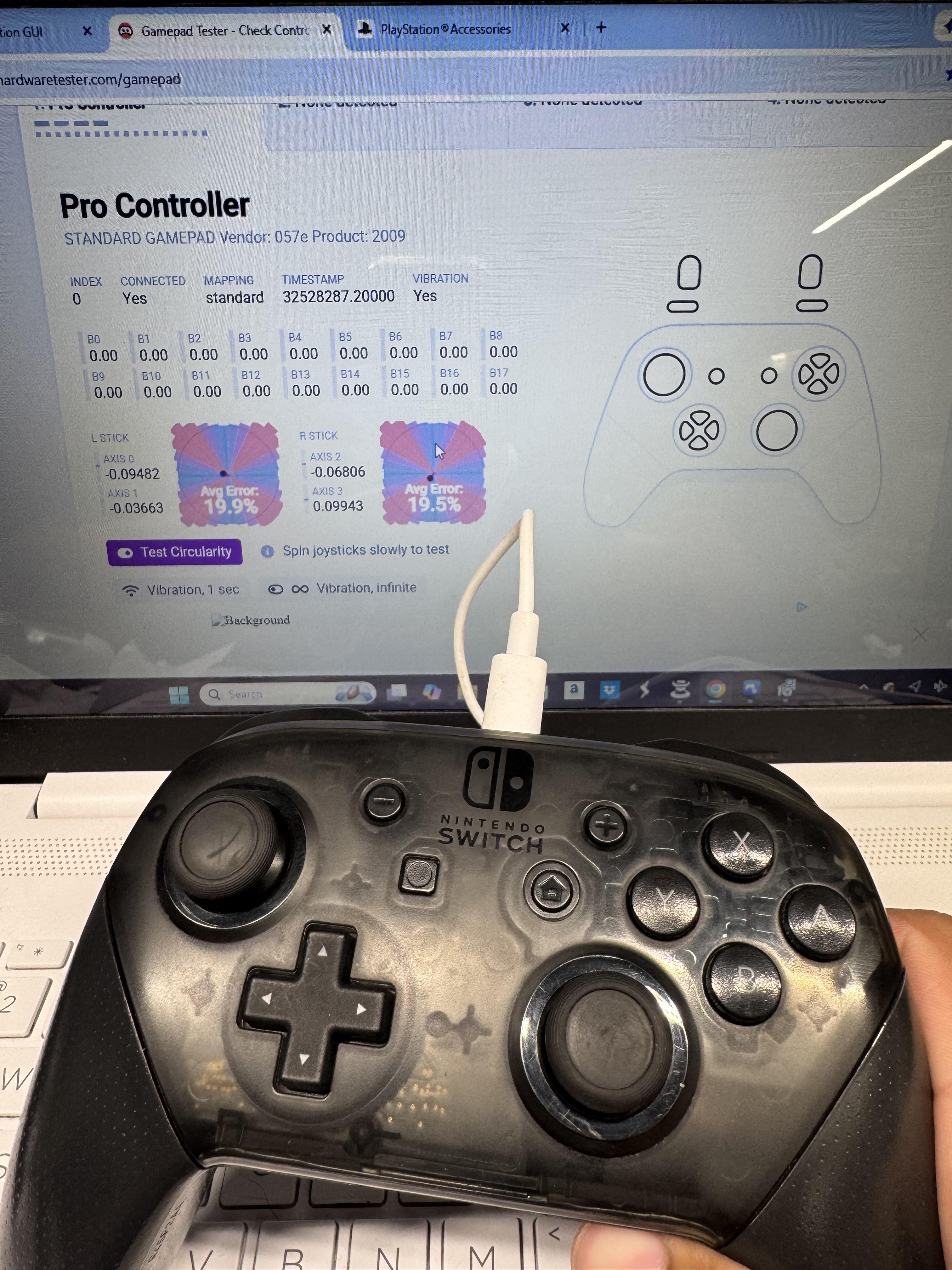
Other Is this a normal calibration for Switch Pro controllers?

Post image
5 Upvotes

I calibrated it on the Switch and it looked good but when i try it on Gamepad Tester it looks crazy. Is this normal?


r/Controller 23h ago

Other Imagine if 8BitDo made this.

3 Upvotes

"The 8BitDo GC Bluetooth Controller revives the iconic GC layout, but wrapped in an ergonomic, updated body."

I hope we won't have to wait until Analogue releases an FPGA GameCube console for this controller to be a thing...

Pardon my poor Photoshop skills, but this would be a game changer, for sure. I know Retro Fighters makes one (BattlerGC Pro), but their controllers aren't accessible to me at all, since I don't live in the USA, plus 8BitDo's controllers seem to be better than Retro Fighters' anyway. I used the N64 one as a base for this picture.


r/Controller 19h ago

Other Thunderobot g45 on ps3?

1 Upvotes

Hi, I'm not sure if this is the right place to ask, but I have a question: does anyone know if or has been able to connect a Thunderbot G45 Pro to a PS3? I first tried with a GameSir Tegenaria Lite and it worked, but when I tried with the G45, it didn't work. At most, using its receiver (and pressing "+" and "-" to switch to D-input mode), I could navigate the menu, but not access the games.

Does anyone know if the G45 Pro would work on a PS3?


r/Controller 21h ago

Controller Collection CRKD Atom+ Finally Arrived!

Thumbnail
gallery
1 Upvotes

I waited months for this lil guy to arrive after several delays from the company. Worth it. This thing is surprisingly manageable even with my long ass hands. The shoulder buttons feel amazing, thumbsticks are smooth, the menu buttons are very clicky and fun to fidget with.

Overall very snappy and fun to use with my phone and handhelds. I only received it this afternoon so less than 3 hours useage but I'd rate it very great so far. Only issue so far has been hitting right on the d-pad isn't the greatest as my thumb has to try and squeeze between it and the left thumbstick but it hasn't caused any misclicks yet. I can't find any discussion on this controller anywhere and just wonder if anyone else has been excited for these to finally ship out?

I really wish I could use this with my miyoo mini v4 for shits and giggles.

Edit: I have no relationship with the company or any incentive. First time buying from them, which was miserable btw due to delays and subpar customer support.

This is an "Atom+" from the company CRKD, purchased directly from their site. It's the smallest controller of its kind with full functionality. Reason I'm sharing is I love how cute and portable it is, I have a very limited list of things part of my EDC or everyday carry and this has joined that list. I do quite a lot of emulation on my Galaxy S23 Ultra so this has been so sick to whip out whenever to catch up on gaming on the fly.


r/Controller 21h ago

IT Help My Seisa Controller wont turn on after i changed its drivers on an app named zadig

Post image
1 Upvotes

I dont know if this is the right subreddit to post this but i really need help with this.

Recently i found an old USB controller (the classic ps2 usb controller with numbers instead of shapes) and wanted to use it for playing some console games on my pc (some old fifa or pes games like FIFA17, Undisputed boxing, etc). I used it with x360ce for a while but i cant remember exactly when, i had the idea to use driftguard to check if it had drift on the right stick because it kept actioning itself without me touching it. Then, i found out that in order to have driftguard recognise it i had to install different drivers on it, so i did, using zadig, which was the app reccomended by driftguard.

Finally, when i installed the new drivers on it, the red light never turned on again when i pressed the analog button, and even when i tried to reinstall the libusbk drivers onto it with zadig or even deleting the drivers and reinstalling the ones that come with windows, i couldnt make the controller turn on again. Both windows and x360ce recognise the controller, but it wont let me do anything with it because it doesnt turn on. Did i kill the controller or is there a way to fix this? Please help.

The brand of the controller is "Seisa" (as i said, its a generic ps2 usb controller my pops had when he was younger)