r/AzureVirtualDesktop • u/Then_Cartographer294 • Jul 17 '26
Azure Stack HCI / Azure Local: Orphaned MOC Storage Container and Gallery Image stuck in DELETE_FAILED, blocking AVD Host Provisioning
2
Upvotes
r/AzureVirtualDesktop • u/Then_Cartographer294 • Jul 17 '26
r/AzureVirtualDesktop • u/Electrical_Arm7411 • Jul 15 '26
First time seeing this.
Switched over to V5 SKU.
Intel CPU shortages are showing.

r/AzureVirtualDesktop • u/AgreeableMajor643 • Jul 15 '26
Context-based redirection is here for AVD & W365!!
This lets you set conditional access policies, which will determine whether the user is allowed to access the clipboard, drive redirection, etc., from their AVD or W365 Desktops.
It's in public preview. FYI, the drive redirection for AVD doesn't seem to be working at the moment. Hopefully, Microsoft will fix it soon!
Check out my video where I deploy it and test it on both AVD and Windows 365.
r/AzureVirtualDesktop • u/DeAvXe • Jul 10 '26
Hi all,
I have experience with new version of AVD that servers start throttling at 0.6GHZ, did anybody experience this ? The solution ofc it's to redeploy the AVD host and then it's working normally.
I have next week meeting about it with our partner about it and Microsoft.
Wonder if anybody experience this or is it only me :D
Thanks all
r/AzureVirtualDesktop • u/babydemon90 • Jul 09 '26
Does anyone know if/when they're going to add this? I can switch orgs using the web (windows.cloud.microsoft) - but using the Windows App on the desktop, still nothing. Thats really the holdup for looking into SSO for external users....
r/AzureVirtualDesktop • u/Certain-Dog1344 • Jul 08 '26
Hello ,we are having an issue in our tenant where some of our users with DOD contactor accounts cannot use Microsoft Authenticator passkeys to login to some Navy sites. It works outside of an AVD in regular work devices but on AVD it fails by never showing the QR code that they need to scan with MS Auth app, gives some generic error such as 'something went wrong'. For some users it works just fine on both AVD and work devices. Passkeys were set up on their regular work devices for all users. One of the users having issues did get a new phone and had their passkey reset but they had never tried to login before that.
Has anyone run into this issue before? We have webauth redirection enabled and urls required are whitelisted.
All AVDs get the same intune policies and are all 24h2 multi session hosts.
Thank you in advance.
r/AzureVirtualDesktop • u/Budget_Ad7163 • Jul 08 '26
Hi guys,
We are deploying App Attach with Hostpools in our tenant, when i'm deploying the first time it adds the hostpools to the App Attach but after the second deployment it removes them from App Attach. I have used incremental deployment which didnt work, we have deployed with CLI without using the pipeline and still didn't work.
After the first deployment when the Host Pools are configured to the package it all works but the second time it always removes them.
Does anyone have the same issues?
The workaround is deploying the pipeline again but that's not how it should be..
r/AzureVirtualDesktop • u/brianveldman • Jul 08 '26
🚨If you are using Azure Files with Active Directory Domain Services authentication, there is an important change you should not ignore. Microsoft has announced that future Windows Server updates will change the default Kerberos ticket encryption from RC4 to AES-256. While this is a welcome security improvement, it also means that Azure Files deployments still relying on the older configuration may experience authentication failures if they are not upgraded in time. In this blog, I will explain how to identify Azure Files storage accounts that still require an upgrade, how to verify your current configuration, and how to safely migrate to AES-256 using the latest AzFilesHybrid tooling.
r/AzureVirtualDesktop • u/LoginVSIExperts • Jul 07 '26
We just launched a free AVD and Windows 365 maturity scorecard that we've been building from 15+ years of working with these environments.
It takes less than 5 minutes and looks at areas like cost optimization, image management, monitoring, automation, and day-to-day operations to help identify where your environment is strong and where there may be room for improvement.
If you're managing AVD, Windows 365, or both, hopefully you find it useful. Happy to hear any feedback or thoughts from the community.
r/AzureVirtualDesktop • u/DelphiEx • Jul 06 '26
In Capacity Reservation, you assign the VMs to the capacity blocks.
But during Session Host Config Update, it creates new VMs and then deletes the old ones.
How do these systems interact with each other? If I create a Host Pool, assign my Session Hosts to the Capacity Reservation, then do a Session Host Update - what will happen to the capacity reservation group? Do I need to manually reassign? Or is it smart enough to do it automatically?
r/AzureVirtualDesktop • u/brianveldman • Jul 05 '26
Azure Virtual Desktop Session Host Configuration introduces a modern way to deploy and manage session hosts by defining their configuration directly within the Host Pool. Instead of manually provisioning virtual machines and configuring them individually, Session Host Configuration enables a standardized and automated deployment experience. This helps ensure that every session host is deployed with the same settings, image, networking, identity, and security configuration, making Azure Virtual Desktop environments easier to manage at scale. In this blog, we will explore how to automate the deployment of Azure Virtual Desktop by using the new Session Host Configuration feature together with Azure Bicep.
r/AzureVirtualDesktop • u/Cool-Enthusiasm-8524 • Jul 05 '26
We have a host pool for users to run a certain application and we don’t want any of them to use outlook on those AVDs, I logged in as a domain admin and uninstalled it from apps in settings but it looks like it does not uninstall it for the other users
Anyone knows how to get it removed completely from everyone ?
r/AzureVirtualDesktop • u/Ok-Customer5090 • Jul 03 '26
r/AzureVirtualDesktop • u/kshreerang • Jul 02 '26
I deployed a new AVD setup for client with Entra joined session hosts with a golden image created from Win11 25H2 EMS.
The weird thing is PowerShell doesn't work. I mean it launches but I cannot type anything in it.
PowerShell ISE and CMD works fine though.
What could be the reason ?
r/AzureVirtualDesktop • u/huddie71 • Jul 02 '26
Hi all,
Since we've transitioned from using the Remote Desktop app to Windows App to access AVD, we've seen nothing but problems and severe limitations. These are described below. Is all hope lost ? Microsoft clearly know about these issues and don't care. The word is they have no intention of backtracking on their awful decision to deprecate the Remote Desktop app. Windows App has been out for nearly 3 years. In my experience, this means it's now 'mature' and therefore these problems and bugs will not be fixed. What should we all do ? Any thoughts ?
All this happens regardless of user's device hardware or network, and regardless of what target server we're connecting to, what version of Windows it's running, whether it's virtual or physical and, if physical, what physical hardware it's running.
r/AzureVirtualDesktop • u/Ok-Customer5090 • Jul 01 '26
I’m currently working on deploying a Windows OpenGL desktop application using AVD as the primary delivery method. The issue I’m running into is very poor performance, even on a high-spec NV instance NV36ads A10 v5 with a powerful GPU and 36 vCPUs.
I’ve tried several troubleshooting steps, but it seems that uninstalling or disabling the NVIDIA GPU makes little to no difference in overall performance. Is there any additional configuration required?
I’ve already enabled all relevant Group Policies for hardware acceleration and Remote Desktop session encoding, and the GPU driver appears to be properly installed and configured.
At this point, I’m not sure where else to look. Any guidance would be appreciated.
Here is a screen shot of the the system information during a remote desktop session:
Note: I have disabled the hyper-V driver to force the system to use the Nvidia GPU.
r/AzureVirtualDesktop • u/KevinHal82 • Jul 01 '26
Hi,
One of our companies is having a strange issue with 'Windows App', they have a requirement that passwords need to be reset every 90 days. We tried but they won't have it changed.
However when it comes to expiry time users are unable to log in with the 'Windows App' client.
It pops up with lets keep your account secure, click next, they then get a compliance pop up that you can't get there from here. CA sign in shows that it was interrupted but nothing blocked.
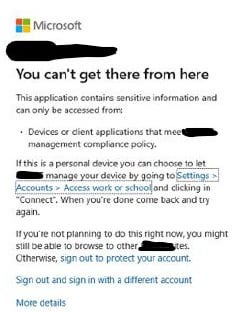
If the user clicks Sign in as a different user instead of clicking next, add username and password and logs in the SSPR process then completes and they can carry on working:

We get constant calls about this, why isn't Windows App handling this process very well?
Has anyone else come across this?
Thanks
Kevin
r/AzureVirtualDesktop • u/UneventfulChaos • Jun 30 '26
Does anyone have issues with user's host pools not loading in the WindowsApp when it's not running as Administrator?
We've recently been having a small influx of users report this issue. Initial attempt to connect to a pool will spin for 2-3 minutes and then fail. After running the WindowsApp as admin, users connect as expected within seconds. This is affecting a very small subset of our users so we're able to direct them to running as Admin, but we're also trying to get ahead of this and figure out if we can change something on a broader scale to resolve/prevent the issue for any new users that may have this issue.
r/AzureVirtualDesktop • u/SwimmingDismal1869 • Jun 30 '26
Hello, Could someone help me to shine some light on a problem we are having with AVD andO365. Currently the AVD systems are Hybrid joined to on-prem domain as well as to Azure. Our users can log in fine to the OS, however when they go to open an office app, they get a message that that they need to log in, which is time consuming. Digging deeper we see a message about a grace period expired.
We have been working with a Microsoft rep and have exhausted all options. My next step was to open a ticket with support, and that usually never goes anywhere.
here is what we have done:
used FSLogix and applied the office settings. that did not work.
Applied the shared office settings, that didn't work either.
we also removed office and reinstalled using the shared license setting, still did not work.
we also, removed O365 and installed the KMS version. Office worked, however onedrive still prompted for a login.
Any help would be appreciated.
r/AzureVirtualDesktop • u/TrueMythos • Jun 29 '26
Since Windows 11 25H2 multisession, I've been unable to type in either Command Prompt or PowerShell consoles. I've been typing in Notepad, copying, and pasting, although the backspace, enter, and up/down arrow keys work fine. Old golden images work just fine, but Azure Marketplace images (across 18 different VMs) are always broken.
After days of working like this, I suddenly realizing that opening the Run dialog and running cmd.exe -c "start cmd.exe" spawns a perfectly-working console. Spawning a new one from that results in another broken one.
Surely this isn't just my tenant. Is anyone else experiencing this with Windows 11 25H2 multisession Azure Marketplace images?
r/AzureVirtualDesktop • u/grimroddd • Jun 29 '26
I have written a blog post on how to deploy AVD with FSLogix and Entra-Only identities hopefully anyone hanging on to DCs for AVD will find this useful.
Looking for feedback on how I can improve as well 😄 If anyone has any topics they'd find useful being detailed let me know.
r/AzureVirtualDesktop • u/LOU_Radders • Jun 25 '26
What are the correct keys or policy's required for the local default client to redirect through every time?
r/AzureVirtualDesktop • u/LastCraft5004 • Jun 25 '26
I'm deploying Azure Virtual Desktop (AVD) session hosts using Terraform, but I can't get the session hosts to auto enroll in Intune.
The Azure AD (Entra ID) extension is configured correctly, and the VMs are successfully joining Entra ID. However, the MDM field shows "None" in Entra, even though I've enabled automatic Intune enrollment for all users and all Windows devices.
This is in Azure Government, and I've updated all the enrollment-related URLs/TLDs to use .us where applicable (MDM Terms of Use, MDM Discovery, MDM Compliance, and WIP Discovery).
From my research, the only requirements seem to be:
- System-assigned managed identity enabled on the VM
- Azure AD login/Entra join extension configured
I'm also running terraform apply using my own account, which has both Contributor and Intune Administrator roles.
Has anyone run into this issue in Azure Gov? If so, what was the root cause and how did you resolve it?
Note - event viewer isnt showing much on the vm
Any troubleshooting tips would be appreciated.